

Show Parameters
BMM_Archive · July 15, 2026

Original Source
- Original title: Show Parameters
- Original author: DreamX
- Original date: May 22, 2016
- Source thread: https://forums.rpgmakerweb.com/threads/show-parameters.62222/
- Source forum path: Game Development Engines > RPG Maker Javascript Plugins > JS Plugins In Development
Summary
{ "lightbox_close": "Close", "lightbox_next": "Next", "lightbox_previous": "Previous",
Archived First Post
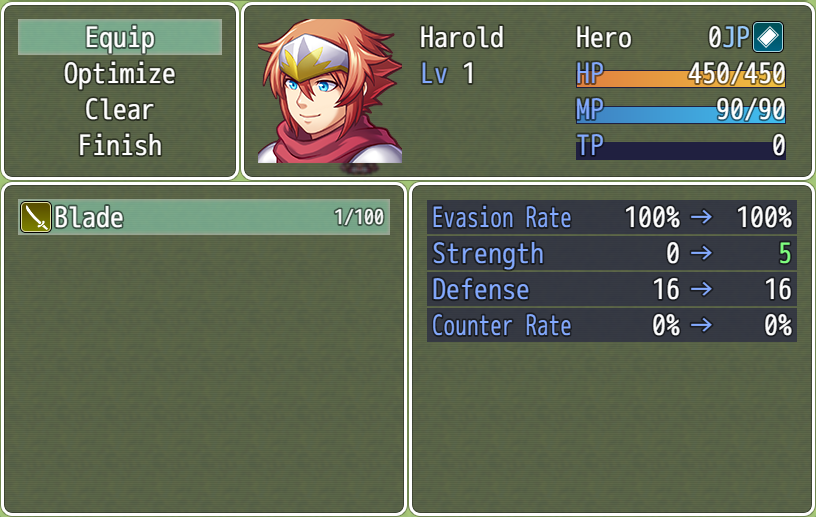
Current Features
Define the parameters shown on the Yanfly's menu plugins. You can use custom parameters from Quasi Param Plus, too.
Future Updates
1. Be able to define the parameters shown individually for each equipment (optional).
2. Be able to show only parameters that are effected by the equipment (optional)
5. Integrate with the default status menu
Script
 * ============================================================================
 * How To Use
 * ============================================================================
 * When defining parameters, you can either use the parameter number or
 * parameter abbreviation. Use lowercase. If you are using Quasi Params Plus,
 * you can use the abbreviations from that plugin as well.
 *
 * 0 - mhp
 * 1 - mmp
 * 2 - atk
 * 3 - def
 * 4 - mat
 * 5 - mdf
 * 6 - agi
 * 7 - luk
 *
 * For Parameter "General Parameters", use lo or hi after each parameter to
 * designate whether is displayed with a long box or a short one.
 * ============================================================================
 * Terms Of Use
 * ============================================================================
 * Free to use and modify for commercial and noncommercial games, with credit.
 * Credit Quasi for their parameter plugin.
 * ============================================================================
 * Credits
 * ============================================================================
 * DreamX
 * Thanks to Yanfly for their plugins.
Downloads / Referenced Files
RPG Maker Web attachments are mirrored locally when available. Other external links remain hosted by their original creator or third-party service.
- Local mirror: 22955-c24933430f7be351871b3c5c013ba627.png
SHA-256:cff81c8fa8dccb5e059ae8b198c7ee9f5686da97ffd5b35dd66a18b9950dce40
Original attachment URL: https://forums.rpgmakerweb.com/attachments/show-param-equip-core-png.38552/
License / Terms Note
* Terms Of Use * ============================================================================ * Free to use and modify for commercial and noncommercial games, with credit. * Credit Quasi for their parameter plugin.
Referenced Images / Attachments
Creator Claims / Removal
If you are the original creator and want this listing reassigned, edited, or removed, join BMMPlay and contact the moderators with proof that matches the original RPG Maker Web profile, linked GitHub, itch.io page, or another public creator identity.
Replies (0)
No replies yet.
Topic Summary
Loading summary...