

Terrain Tags
BMM_Archive · July 15, 2026

BMM_Archive
Preserved forum archive. This topic stores the original first post and locally mirrored RPG Maker Web attachments when available. It is posted by the BMMPlay archive account, not by the original creator.
Original Source
- Original title: Terrain Tags
- Original author: Shaz
- Original date: November 30, 2015
- Source thread: https://forums.rpgmakerweb.com/threads/terrain-tags.51922/
- Source forum path: Game Development Engines > RPG Maker Javascript Plugins > JS Plugins In Development
Summary
Download from pastebin Or if you have an older version of MV that doesn't have the ShaderTilemap class, Download old version from pastebin I would like to add to this plugin - it works, but it's pretty bare.
Archived First Post
Download from pastebin
Or if you have an older version of MV that doesn't have the ShaderTilemap class,
Download old version from pastebin
I would like to add to this plugin - it works, but it's pretty bare.
Currently it allows you to do the following:
Ignore a tile when checking passage settings
Ground cover and ground decoration tiles mostly have a O passage setting so you can walk over them.
If you draw a cliff and you use one of these tiles against the right/left/top edges, it causes the passability of the cliff to be ignored, and you can walk across the cliff edge.
This flag lets the ground cover/decoration tile be ignored when checking passability, so the settings of the tile below - the cliff, in this case - are applied.
Set a tile to act like a counter
Sometimes you want a tile that is not a counter to act like a counter (eg - talk to an NPC on the other side of a fence or small [1-tile-wide] stream).
Using the real counter flag on some tiles causes them to be drawn differently (tables extend several pixels below the grid tile - try setting a counter flag on a fence tile and drawing with it - yuck!).
This flag lets the tile ACT like a counter but not LOOK like a counter.
Offset tiles vertically
Hate how you have to have your pictures lined up along the bottom of the wall or the top of the wall, unless you want to assault the tileset and make it overlap 2 tiles?
Using the Offset Terrain tag lets you specify tiles that can be drawn X pixels higher than the grid, allowing you to adjust things vertically without having to modify the tileset itself.
Note - the passage setting still applies to the tile in the editor, so you may need to adjust passage settings in the tileset if you don't want a great big gap. Also, negative numbers don't work - you can only display a tile higher than its editor position, not lower.
See how it works:
Draw tiles below shadow
When you draw something with an auto-shadow (or add a shadow yourself using that tool), B-E tiles placed at the same location are drawn on top of the shadow. Sometimes this is okay (trees), but sometimes you want the shadow to cover them as well (like a pile of wood or a small shrub at the side of a house).
Using the Under Shadow terrain tag lets you specify B-E tiles that should be drawn under the shadow.
Just be careful using it - if you have a shadow as well as 2 B-E tiles on the same location, any with this terrain tag MUST be drawn first, or it won't work.
Please let me know if you have any other suggestions. I am considering:
- terrain tag that causes you to slide until you hit something
- terrain tag that lets you walk over/under a bridge
Or if you have an older version of MV that doesn't have the ShaderTilemap class,
Download old version from pastebin
I would like to add to this plugin - it works, but it's pretty bare.
Currently it allows you to do the following:
Ignore a tile when checking passage settings
Ground cover and ground decoration tiles mostly have a O passage setting so you can walk over them.
If you draw a cliff and you use one of these tiles against the right/left/top edges, it causes the passability of the cliff to be ignored, and you can walk across the cliff edge.
This flag lets the ground cover/decoration tile be ignored when checking passability, so the settings of the tile below - the cliff, in this case - are applied.
Set a tile to act like a counter
Sometimes you want a tile that is not a counter to act like a counter (eg - talk to an NPC on the other side of a fence or small [1-tile-wide] stream).
Using the real counter flag on some tiles causes them to be drawn differently (tables extend several pixels below the grid tile - try setting a counter flag on a fence tile and drawing with it - yuck!).
This flag lets the tile ACT like a counter but not LOOK like a counter.
Offset tiles vertically
Hate how you have to have your pictures lined up along the bottom of the wall or the top of the wall, unless you want to assault the tileset and make it overlap 2 tiles?
Using the Offset Terrain tag lets you specify tiles that can be drawn X pixels higher than the grid, allowing you to adjust things vertically without having to modify the tileset itself.
Note - the passage setting still applies to the tile in the editor, so you may need to adjust passage settings in the tileset if you don't want a great big gap. Also, negative numbers don't work - you can only display a tile higher than its editor position, not lower.
See how it works:
Spoiler
The tiles on the left have no terrain tags. The tiles on the right have terrain tags 3 and 5. In the editor, they all appear vertically aligned.
The plugin parameters are set to move tiles with terrain tag 3 up by 16 pixels, and tiles with terrain tag 5 up by 32 pixels.
How much nicer do the tiles on the right look when playing the game?! Remember - no changes have been made to the tileset, so you're not taking up 2 tiles for a 1-tile image.
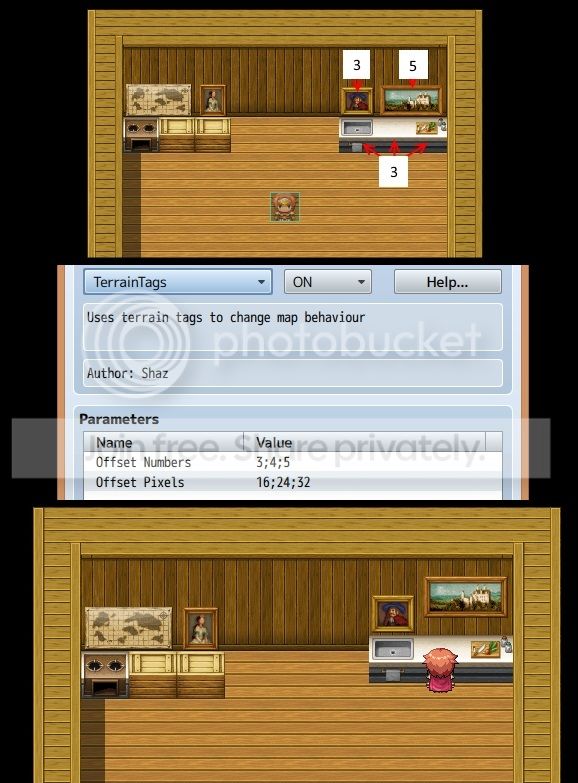
The tiles on the left have no terrain tags. The tiles on the right have terrain tags 3 and 5. In the editor, they all appear vertically aligned.
The plugin parameters are set to move tiles with terrain tag 3 up by 16 pixels, and tiles with terrain tag 5 up by 32 pixels.
How much nicer do the tiles on the right look when playing the game?! Remember - no changes have been made to the tileset, so you're not taking up 2 tiles for a 1-tile image.
Draw tiles below shadow
When you draw something with an auto-shadow (or add a shadow yourself using that tool), B-E tiles placed at the same location are drawn on top of the shadow. Sometimes this is okay (trees), but sometimes you want the shadow to cover them as well (like a pile of wood or a small shrub at the side of a house).
Using the Under Shadow terrain tag lets you specify B-E tiles that should be drawn under the shadow.
Just be careful using it - if you have a shadow as well as 2 B-E tiles on the same location, any with this terrain tag MUST be drawn first, or it won't work.
Please let me know if you have any other suggestions. I am considering:
- terrain tag that causes you to slide until you hit something
- terrain tag that lets you walk over/under a bridge
Downloads / Referenced Files
RPG Maker Web attachments are mirrored locally when available. Other external links remain hosted by their original creator or third-party service.
- Download: Download from pastebin
- Download: Download old version from pastebin
Referenced Images / Attachments
Creator Claims / Removal
If you are the original creator and want this listing reassigned, edited, or removed, join BMMPlay and contact the moderators with proof that matches the original RPG Maker Web profile, linked GitHub, itch.io page, or another public creator identity.
Replies (0)
No replies yet.
0
replies
13
views
Topic Summary
Loading summary...