

MVSmart Map Buttons (Customizable Map Scene interface)
BMM_Archive · July 15, 2026

BMM_Archive
Preserved forum archive. This topic stores the original first post and locally mirrored RPG Maker Web attachments when available. It is posted by the BMMPlay archive account, not by the original creator.
Original Source
- Original title: Smart Map Buttons (Customizable Map Scene interface)
- Original author: bluebooth
- Original date: February 16, 2016
- Source thread: https://forums.rpgmakerweb.com/threads/smart-map-buttons-customizable-map-scene-interface.56986/
- Source forum path: Game Development Engines > RPG Maker Javascript Plugins > JS Plugin Releases (RMMV)
Summary
Map Controls 1.10 Author: Michael Morris @Blue Booth Studios Introduction
Archived First Post
Map Controls 1.10
Author: Michael Morris @Blue Booth Studios
Introduction
Let's face it. You've got your really cool mini-game ideas, and you can't wait to put them together. The last thing you want to bother with is making all the buttons and input methods work correctly. To be used with map interface elements or mini-games, this creates a series of sprite buttons on screen that will respond to keyboard, mouse, and touch. Very flexible, can be used to create any mini-game of your choosing. First created to replace static arrow pictures for BBS_WorldMap.js.
Features
- Full (tested) multi-touch support! WARNING: This required me to redo most of TouchInput core, which may introduce some incompatibilities.
- Swipe (up/down/left/right) gesture support.
- Fully customizable map controls (ie. Zelda) / minigame controls.
- Up to eight controls on screen - four DPad buttons and four action buttons (ok, cancel, menu, other). Any combination of these eight controls can be used.
- Simple script call can be made to check whether a button has been pressed in standard conditionals: ie. "If SceneManager._scene.isPressed('ok');"
- Simple script call can be made to check whether a button is enabled via standard conditionals: ie. "If SceneManager._scene.isButtonEnabled('ok');"
- New isPressed() will check for keyboard, gamepad, mouse, AND touch input on a given button, which means that map controls now only need to check one function to determine input.
- Each button can be set to a specific x, y, or set to center around the player (particularly for DPad buttons). Buttons will automatically follow player if centered.
- Opacity fade-in/out buttons when dialogue boxes are open. Faded out buttons are automatically disabled.
- Button sprite sheet with support for separate graphics for hot, cold, and disabled frames.
- Plugin Command can be used to completely block all default touch input processing.
- Plugin Commands to show/hide active GUI elements, and to disable all GUI elements through one call.
- Buttons will only display once completely loaded and ready (no more flickers of bad positions / hidden buttons etc.).
- Multiple buttons can appear down at the same time.
- Buttons can be enabled/disabled/faded through plugin command.
Screenshots
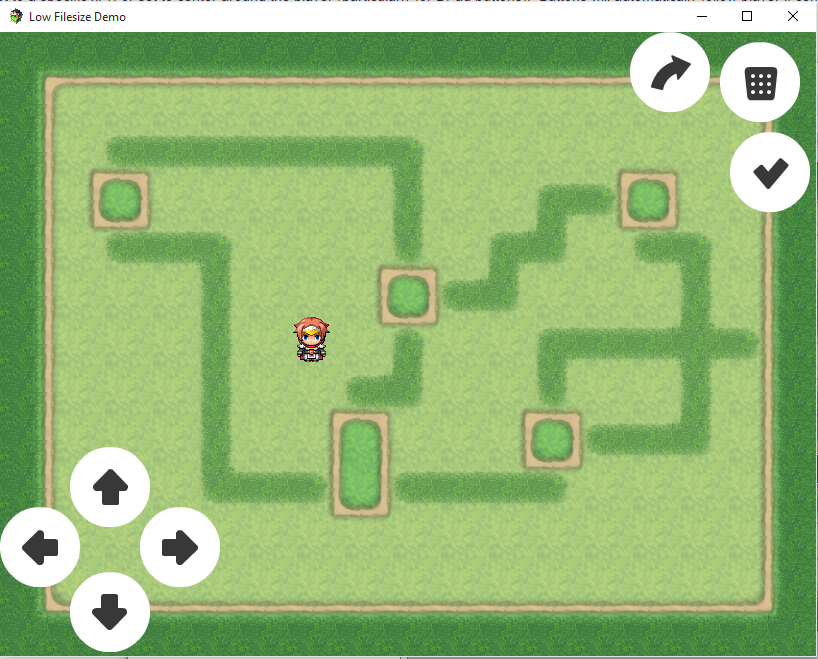

How to Use
- Copy script into your game js/plugins directory.
- Import this script into your project and set all parameters.
- Set up events to use with the plugin. See demo provided.
Demo
Attached to this post.
Script
//=============================================================================
// Bluebooth Plugins - Map Controls
// BBS_MapControls.js
//=============================================================================
//=============================================================================
/*:
* @title Map Controls Plugin
* @author Michael Morris (https://www.patreon.com/bluebooth)
* @date Feb 13, 2016
* @filename BBS_MapControls.js
* If you enjoy my work, consider supporting me on Patreon!
*
* https://www.patreon.com/bluebooth
*
* @plugindesc v1.10 Creates and displays key/mouse/touch responsive input buttons
* on the map screen. Original design was merged with elements of Masked's MBS MobileDirPad,
* and then new enhancements / reworkings were added on top of that. Swipe support.
* REQUIRES: BBS_MultiTouch.js. This script must be below BBS_MultiTouch.js in Plugin Manager.
* Special Thanks to Tsukihime for all the help.
* Special Thanks to Masked for MBS MobileDirPad on which the Map Buttons are based.
* Special Thanks to 'Ramza' Michael Sweeney and Lakaroth for helping so much with testing.
*
* ============================================================================
* Terms of Use
* ============================================================================
* - Free for use in non-commercial projects with credits
* - Contact me for commercial use
*
* ============================================================================
* Parameters
* ============================================================================
* @param -----Core-----
* @param DPad Buttonset Image
* @desc Relative filepath for display imageset for the DPad buttons.
* @default ./img/system/DPadButtonSet.png
*
* @param Action Buttonset Image
* @desc Relative filepath for display image for the action (non DPad) buttons.
* @default ./img/system/ActionButtonSet.png
*
* @param Opacity
* @desc How opaque to make all displayed controls. 0 - transparent, 255 - opaque.
* @default 255
*
* @param Fade Duration
* @desc How long, in frames (each frame 1/60th of a second), it should take to fade in or out a control.
* @default 10
*
* @param Disable Map Controls Option
* @desc Name of command to show in options menu to enable/disable map controls.
* @default Disable Map Controls
*
* @param Block Map Touch Input
* @desc If true, MapControls is "greedy" and will block all default mouse and touch input processing while custom buttons are visible.
* @default true
*
* @param Debug Mode
* @desc Enable to activate console variable logging. Use for debugging odd behaviour.
* true to enable console variable logging.
* @default false
*
* @param -----Button Positioning-----
* @param DPad Spacer
* @desc Gap in pixels between player and the DPad pictures.
* @default 10
*
* @param DPad Up Position
* @desc The DPad Up Button image position on screen (in format x; y). Use -1, -1 to center on player.
* @default -1; -1
*
* @param DPad Down Position
* @desc The DPad Down Button image position on screen (in format x; y). Use -1, -1 to center on player.
* @default -1; -1
*
* @param DPad Left Position
* @desc The DPad Left Button image position on screen (in format x; y). Use -1, -1 to center on player.
* @default -1; -1
*
* @param DPad Right Position
* @desc The DPad Right Button image position on screen (in format x; y). Use -1, -1 to center on player.
* @default -1; -1
*
* @param Action Button Position
* @desc The Action Button image position on screen (in format x; y). Use -1, -1 to center on player.
* @default -1; -1
*
* @param Cancel Button Position
* @desc The Cancel Button image position on screen (in format x; y). Use -1, -1 to center on player.
* @default -1; -1
*
* @param Menu Button Position
* @desc The Menu Button image position on screen (in format x; y). Use -1, -1 to center on player.
* @default -1; -1
*
* @param Shift Button Position
* @desc The Other Button image position on screen (in format x; y). Use -1, -1 to center on player.
* @default -1; -1
*
* @help
* ============================================================================
* Description
* ============================================================================
*
* To be used with mini-games, this creates a series of sprite buttons on screen that will respond to
* keyboard, mouse, and touch. Very flexible, can be used to create any mini-game of your choosing.
* First created to replace static arrow pictures for BBS_WorldMap.js.
*
* ============================================================================
* Plugin Commands
* ============================================================================
*
* Use the following plugin commands to manipulate custom controls.
*
* Plugin Commands:
*
* MapControls init # Initialize Map Controls, none are enabled or visible by default.
* MapControls overrideDefaultTouch override # If true, blocks all default touch processing. Use to prevent players from moving at undesirable times, etc.
* MapControls clearGui # Sets all Map Controls to disabled and invisible. Useful for changing up visible controls.
* MapControls blockMapTouchInput isBlocked # If true, GUI is "greedy" and will block all map mouse and touch input while GUI is visible.
* MapControls setButtonState btn visible enabled # Sets a specific button btn visibility to isVisible.
* MapControls setNewButtonPos btn x y # Sets a specific button btn to new x and y.
*
* ============================================================================
* Script Commands
* ============================================================================
* Script Commands:
*
* SceneManager._scene.isPressed(btn); # Used to check if a specific button is pressed. Use in conditionals.
* SceneManager._scene.isButtonEnabled(btn); # Used to check if a specific button is enabled. Use in conditionals.
*
* ============================================================================
* Change Log
* ============================================================================
* 1.10 - Fixed override check - Map Controls only ignore default input functions when at least one button is visible.
* This is to prevent input freezing during dialogue boxes, etc.
* 1.09 - Multi-touch seperated into own script to facilitate further growth.
* - Removed isolated / redundent variables.
* - Made options menu support for MapControls.
* - Added more safety checks for this._buttons while adding options menu support.
* - Fixed mouse support with new Multi-touch.
* 1.08 - Gesture history tracking added.
* 1.07 - Had to redo all major TouchInput core functions in order to fully support mult-touch and gestures.
* - integrated with https://github.com/jairajs89/Touchy.js
* - Multiple controls now appear down at same time.
* - Added in functions for swipe support (up, down, left, right).
* - Setup to allow for gesture support.
* - Successful integration of swipe support.
* - Added gesture parameters.
* 1.06 - Multi-touch support successfully added!
* - Added debug functionality to display last pressed buttons for testing.
* - Dialogue show/hide and disabling of entire UI now works properly.
* - First touch doesn't register bug fixed.
* - Touch interface more responsive (especially when displaying hot frame for multiple buttons).
* - Invisible buttons now automatically don't respond to input.
* - All Scene_Map functions now convert input to lower-case, to make script access more friendly.
* - Cleaned up block default touch handling to use only one check.
* 1.05 - Fixed issue with fadein/fadeout not activating. Used this instead of scene.
* - Fixed forgotten hardcode that prevented proper gui customization.
* - Fixed a number of other small bugs.
* 1.04 - Fixed flash of all controls when map scene first loaded. Looked cheap.
* - First few arrow X, Y calculations are wrong... fixed. Buttons now only show where they should.
* - Fixed handling fade interaction with Map Controls.
* 1.03 - Fixed input buttons responding inconsistently to touch/mouse input.
* - Removed all redundent tolowercase string manipulation.
* - Removed this._touching, does not handle mouseover.
* - Fixed logic error in handling showGui.
* 1.02 - Added in fade and button frame support. Includes hot/cold/disabled support. Fade support fixed.
* 1.01 - Plugin finished. Logic separated out from world map, added touch and mouse support to arrows.
*
*/
//=============================================================================
//=============================================================================
var Imported = Imported || {} ;
var BBS = BBS || {};
Imported.MapControls = 1;
BBS.MapControls = BBS.MapControls || {};
(function() {
//=============================================================================
// Parameter Variables
//=============================================================================
var parameters = PluginManager.parameters('BBS_MapControls');
var pDPadImg = String(parameters['DPad Up Image'] || './img/system/DPadButtonSet.png');
var pDActionBtnImg = String(parameters['Action Buttonset Image'] || './img/system/ActionButtonSet.png');
var pOpacity = Number(parameters['Opacity'] || '255');
var pFadeDuration = Number(parameters['Fade Duration'] || '15');
var pDisableMapControlsCmd = String(parameters['Disable Map Controls Option'] || 'Disable Map Controls');
var pBlockMapTouch = eval(String(parameters['Block Map Touch Input'] || 'true'));
var pDebugging = eval(String(parameters['Debug Mode'] || 'false'));
var pSpacerSize = Number(parameters['DPad Spacer'] || '10');
var pDPadUpPos = String(parameters['DPad Up Position'] || '-1; -1');
var pDPadDownPos = String(parameters['DPad Down Position'] || '-1; -1');
var pDPadLeftPos = String(parameters['DPad Left Position'] || '-1; -1');
var pDPadRightPos = String(parameters['DPad Right Position'] || '-1; -1');
var pAButtonPos = String(parameters['Action Button Position'] || '-1; -1');
var pBButtonPos = String(parameters['Cancel Button Position'] || '-1; -1');
var pXButtonPos = String(parameters['Menu Button Position'] || '-1; -1');
var pYButtonPos = String(parameters['Shift Button Position'] || '-1; -1');
//=============================================================================
// Game_Interpreter
//=============================================================================
var BBS_MC_Game_Interpreter_pluginCommand = Game_Interpreter.prototype.pluginCommand;
Game_Interpreter.prototype.pluginCommand = function(command, args) {
if (command === 'MapControls')
{
switch (args[0]) {
case 'init':
SceneManager._scene.initMapControls();
break;
case 'clearGui':
SceneManager._scene.clearGui();
break;
case 'overrideDefaultTouch':
SceneManager._scene.blockDefaultTouchResponse(eval(String(args[1])));
break;
case 'setButtonState':
SceneManager._scene.setButtonState(String(args[1]).toLowerCase(), eval(String(args[2])), eval(String(args[3])) );
break;
case 'setNewButtonPos':
SceneManager._scene.setNewPos(String(args[1]).toLowerCase(), Number(args[2]), Number(args[3]) );
break;
};
}
else {
BBS_MC_Game_Interpreter_pluginCommand.call(this, command, args);
}
};
//=============================================================================
// ConfigManager
//=============================================================================
ConfigManager.disableMapControls = false;
var BBS_MC_ConfigManager_makeData = ConfigManager.makeData;
ConfigManager.makeData = function() {
var config = BBS_MC_ConfigManager_makeData.call(this);
config.disableMapControls = this.disableMapControls;
return config;
};
var BBS_MC_ConfigManager_applyData = ConfigManager.applyData;
ConfigManager.applyData = function(config) {
BBS_MC_ConfigManager_applyData.call(this, config);
this.disableMapControls = this.readConfigDisableMapControls(config, 'disableMapControls');
};
ConfigManager.readConfigDisableMapControls = function(config, name) {
var value = config[name];
if (value !== undefined) {
return value;
} else {
return false;
}
};
//=============================================================================
// Window_Options
//=============================================================================
var BBS_DisableMapControls_Window_Options_addGeneralOptions = Window_Options.prototype.addGeneralOptions;
Window_Options.prototype.addGeneralOptions = function() {
BBS_DisableMapControls_Window_Options_addGeneralOptions.call(this);
this.addCommand(pDisableMapControlsCmd, 'disableMapControls');
};
//=============================================================================
// Sprite_MapButton
//=============================================================================
function Sprite_MapButton() {
this.initialize.apply(this, arguments);
this.anchor.x = 0.5;
this.anchor.y = 0.5;
this._fadeDuration = 0;
this._fadeSpeed = 0;
this.z = 5;
};
Sprite_MapButton.prototype = Object.create(Sprite_Base.prototype);
Sprite_MapButton.prototype.constructor = Sprite_MapButton;
Sprite_MapButton.prototype.initialize = function(btn, bitmapName, originStr, xRectOffset, xOffset, yOffset) {
Sprite_Base.prototype.initialize.call(this);
this._btn = btn;
this.visible = false;
this._centerOnPlayer = false;
var tmpStr = originStr.split(';');
this.x = Number(tmpStr[0]);
this.y = Number(tmpStr[1]);
this._rectXOffset = xRectOffset;
this.bitmap = ImageManager.loadNormalBitmap(bitmapName, 0);
// Account for player-centered controls.
if (this.x < 0 && this.y < 0) {
this._centerOnPlayer = true;
this._xOffset = xOffset;
this._yOffset = yOffset;
}
};
// Cuts out unnecessary load checks.
Sprite_MapButton.prototype._onBitmapLoad = function() {
this.setFrames();
this.updateMovement();
};
Sprite_MapButton.prototype.setFrames = function() {
// Reject attempt to fit Frame if bitmap not finished loading.
if (!this.bitmap.width) return;
rectWidth = Math.floor(this.bitmap.width / 4);
rectHeight = Math.floor(this.bitmap.height / 3);
this._hotFrame = new Rectangle(this._rectXOffset * rectWidth, rectHeight * 0, rectWidth, rectHeight);
this._coldFrame = new Rectangle(this._rectXOffset * rectWidth, rectHeight * 1, rectWidth, rectHeight);
this._disabledFrame = new Rectangle(this._rectXOffset * rectWidth, rectHeight * 2, rectWidth, rectHeight);
};
Sprite_MapButton.prototype.update = function() {
this.updateMovement();
if (!this.visible) return;
Sprite_Base.prototype.update.call(this);
this.updateFrame();
};
Sprite_MapButton.prototype.updateMovement = function() {
if (this._fadeDuration > 0) {
this.opacity += this._fadeSpeed;
this._fadeDuration--;
// Only truly hide when fade complete.
if (this.opacity <= 0) {
Sprite_Base.prototype.hide.call(this);
}
return;
}
if (this._centerOnPlayer) {
if (!this.width) return;
this.x = $gamePlayer.screenX() + (this._xOffset * this.width);
this.y = $gamePlayer.screenY() + (this._yOffset * this.height);
//if (pDebugging) {
// console.log(this._btn);
// console.log(this.x);
// console.log(this.y);
//}
}
};
Sprite_MapButton.prototype.updateFrame = function() {
var frame;
if (!this.enabled) {
frame = this._disabledFrame;
}
else
{
frame = this._coldFrame;
if (this.isPressed() ) {
frame = this._hotFrame;
}
}
if (frame) {
this.setFrame(frame.x, frame.y, frame.width, frame.height);
}
};
// Uses new touch input functions.
Sprite_MapButton.prototype.isTouched = function() {
var rect = new PIXI.Rectangle(this.x - this.width * this.anchor.x, this.y - this.height * this.anchor.y, this.width, this.height);
if (TouchInput.isClicked(rect)) return true;
if (TouchInput.fingers === null) return false;
return TouchInput.isTouchingArea(rect);
};
Sprite_MapButton.prototype.isPressed = function() {
if (!this.visible || !this.enabled) return false;
var pressed = Input.isPressed(this._btn) || this.isTouched();
if (pressed) {
TouchInput.addLastButton(this._btn);
}
return pressed;
};
Sprite_MapButton.prototype.hide = function() {
this._fadeDuration = pFadeDuration;
this._fadeSpeed = -1 * (pOpacity / pFadeDuration);
};
Sprite_MapButton.prototype.show = function() {
// Show begins immediately with opacity 0.
Sprite_Base.prototype.show.call(this);
this._fadeDuration = pFadeDuration;
this._fadeSpeed = 1 * (pOpacity / pFadeDuration);
};
Sprite_MapButton.prototype.toggleVisibility = function(isVisible) {
if (isVisible) {
this.show();
return;
}
this.hide();
};
//=============================================================================
// Scene_Map
//=============================================================================
Scene_Map.prototype.initMapControls = function() {
this._blockDefaultTouch = pBlockMapTouch;
this._buttonsVisible = false;
this.createControls();
};
Scene_Map.prototype.createControls = function() {
if (ConfigManager.disableMapControls) return;
this._buttons = [];
this._buttons['up'] = new Sprite_MapButton('up', pDPadImg, pDPadUpPos, 0, 0, -1.5);
this._buttons['down'] = new Sprite_MapButton('down', pDPadImg, pDPadDownPos, 1, 0, 0.5);
this._buttons['left'] = new Sprite_MapButton('left', pDPadImg, pDPadLeftPos, 2, -1, -0.5);
this._buttons['right'] = new Sprite_MapButton('right', pDPadImg, pDPadRightPos, 3, 1, -0.5);
this._buttons['ok'] = new Sprite_MapButton('ok', pDActionBtnImg, pAButtonPos, 0, 0, 0);
this._buttons['cancel'] = new Sprite_MapButton('cancel', pDActionBtnImg, pBButtonPos, 1, 0, 0);
this._buttons['menu'] = new Sprite_MapButton('menu', pDActionBtnImg, pXButtonPos, 2, 0, 0);
this._buttons['shift'] = new Sprite_MapButton('shift', pDActionBtnImg, pYButtonPos, 3, 0, 0);
this.addChild(this._buttons['up']);
this.addChild(this._buttons['down']);
this.addChild(this._buttons['left']);
this.addChild(this._buttons['right']);
this.addChild(this._buttons['ok']);
this.addChild(this._buttons['cancel']);
this.addChild(this._buttons['menu']);
this.addChild(this._buttons['shift']);
};
// Hide/Disable GUI during dialogue messages.
var BBS_IA_Scene_Map_createMessageWindows = Scene_Map.prototype.createMessageWindow;
Scene_Map.prototype.createMessageWindow = function() {
BBS_IA_Scene_Map_createMessageWindows.call(this);
var scene = this;
var oldStartMessage = this._messageWindow.startMessage;
this._messageWindow.startMessage = function() {
oldStartMessage.apply(this, arguments);
scene._hideGui();
};
var oldTerminateMessage = this._messageWindow.terminateMessage;
Window_Message.prototype.terminateMessage = function() {
oldTerminateMessage.apply(this, arguments);
TouchInput._clearHistory();
scene._showGui();
};
};
Scene_Map.prototype.blockDefaultTouchResponse = function(block) {
this._blockDefaultTouch = block;
};
// While GUI visible, override default touch functionality.
var BBS_IA_Scene_Map_processMapTouch = Scene_Map.prototype.processMapTouch;
Scene_Map.prototype.processMapTouch = function() {
// Only block map controls (including message controls) while our GUI is defined...
if (this._buttons !== undefined) {
// ...and active.
if (this._anyButtonsVisible() === true) {
//console.log("Buttons are visible");
if (this._blockDefaultTouch) return;
}
}
BBS_IA_Scene_Map_processMapTouch.call(this, arguments);
};
Scene_Map.prototype.isPressed = function(btn) {
if (this._buttons === undefined) return;
var btnSafe = btn.toLowerCase();
var pressed = this._buttons[btnSafe].isPressed() || TouchInput._history.wasPressed(btnSafe);
if (pressed) {
if (pDebugging) console.log(btnSafe);
TouchInput._history.removeBtn(btnSafe);
}
return pressed;
};
Scene_Map.prototype.setButtonState = function(btn, isVisible, isEnabled) {
if (this._buttons === undefined) return;
var btnSafe = btn.toLowerCase();
this._buttons[btnSafe].enabled = isEnabled;
this._buttons[btnSafe].toggleVisibility(isVisible);
};
// Suspected method of boolean on Show/HideGUI does NOT work.
Scene_Map.prototype._anyButtonsVisible = function() {
if (this._buttons['up'].visible) { return true; }
if (this._buttons['down'].visible) { return true; }
if (this._buttons['left'].visible) { return true; }
if (this._buttons['right'].visible) { return true; }
if (this._buttons['ok'].visible) { return true; }
if (this._buttons['cancel'].visible) { return true; }
if (this._buttons['menu'].visible) { return true; }
if (this._buttons['shift'].visible) { return true; }
return false;
}
Scene_Map.prototype._showButton = function(btn) {
if (this._buttons === undefined) return;
var btnSafe = btn.toLowerCase();
if (this._buttons[btnSafe]._hiding) {
this._buttons[btnSafe].enabled = true;
this._buttons[btnSafe].show();
}
};
Scene_Map.prototype._hideButton = function(btn) {
if (this._buttons === undefined) return;
var btnSafe = btn.toLowerCase();
if (this._buttons[btnSafe].visible) {
this._buttons[btnSafe].hide();
}
};
Scene_Map.prototype.isButtonEnabled = function(btn) {
if (this._buttons === undefined) return;
var btnSafe = btn.toLowerCase();
return this._buttons[btnSafe].enabled;
};
Scene_Map.prototype.setNewPos = function(btn, x, y) {
if (this._buttons === undefined) return;
var btnSafe = btn.toLowerCase();
this._buttons[btnSafe].x = x;
this._buttons[btnSafe].y = y;
};
Scene_Map.prototype._showGui = function() {
if (this._buttons === undefined) return;
// Ugly, but faster than a for ... in ...
this._showButton('up');
this._showButton('down');
this._showButton('left');
this._showButton('right');
this._showButton('ok');
this._showButton('cancel');
this._showButton('menu');
this._showButton('shift');
};
Scene_Map.prototype._hideGui = function() {
if (this._buttons === undefined) return;
// Ugly, but faster than a for ... in ...
this._hideButton('up');
this._hideButton('down');
this._hideButton('left');
this._hideButton('right');
this._hideButton('ok');
this._hideButton('cancel');
this._hideButton('menu');
this._hideButton('shift');
};
Scene_Map.prototype.clearGui = function() {
this._hideGui();
};
})(BBS.MapControls);
//=============================================================================
// End of File
//=============================================================================
// Bluebooth Plugins - Map Controls
// BBS_MapControls.js
//=============================================================================
//=============================================================================
/*:
* @title Map Controls Plugin
* @author Michael Morris (https://www.patreon.com/bluebooth)
* @date Feb 13, 2016
* @filename BBS_MapControls.js
* If you enjoy my work, consider supporting me on Patreon!
*
* https://www.patreon.com/bluebooth
*
* @plugindesc v1.10 Creates and displays key/mouse/touch responsive input buttons
* on the map screen. Original design was merged with elements of Masked's MBS MobileDirPad,
* and then new enhancements / reworkings were added on top of that. Swipe support.
* REQUIRES: BBS_MultiTouch.js. This script must be below BBS_MultiTouch.js in Plugin Manager.
* Special Thanks to Tsukihime for all the help.
* Special Thanks to Masked for MBS MobileDirPad on which the Map Buttons are based.
* Special Thanks to 'Ramza' Michael Sweeney and Lakaroth for helping so much with testing.
*
* ============================================================================
* Terms of Use
* ============================================================================
* - Free for use in non-commercial projects with credits
* - Contact me for commercial use
*
* ============================================================================
* Parameters
* ============================================================================
* @param -----Core-----
* @param DPad Buttonset Image
* @desc Relative filepath for display imageset for the DPad buttons.
* @default ./img/system/DPadButtonSet.png
*
* @param Action Buttonset Image
* @desc Relative filepath for display image for the action (non DPad) buttons.
* @default ./img/system/ActionButtonSet.png
*
* @param Opacity
* @desc How opaque to make all displayed controls. 0 - transparent, 255 - opaque.
* @default 255
*
* @param Fade Duration
* @desc How long, in frames (each frame 1/60th of a second), it should take to fade in or out a control.
* @default 10
*
* @param Disable Map Controls Option
* @desc Name of command to show in options menu to enable/disable map controls.
* @default Disable Map Controls
*
* @param Block Map Touch Input
* @desc If true, MapControls is "greedy" and will block all default mouse and touch input processing while custom buttons are visible.
* @default true
*
* @param Debug Mode
* @desc Enable to activate console variable logging. Use for debugging odd behaviour.
* true to enable console variable logging.
* @default false
*
* @param -----Button Positioning-----
* @param DPad Spacer
* @desc Gap in pixels between player and the DPad pictures.
* @default 10
*
* @param DPad Up Position
* @desc The DPad Up Button image position on screen (in format x; y). Use -1, -1 to center on player.
* @default -1; -1
*
* @param DPad Down Position
* @desc The DPad Down Button image position on screen (in format x; y). Use -1, -1 to center on player.
* @default -1; -1
*
* @param DPad Left Position
* @desc The DPad Left Button image position on screen (in format x; y). Use -1, -1 to center on player.
* @default -1; -1
*
* @param DPad Right Position
* @desc The DPad Right Button image position on screen (in format x; y). Use -1, -1 to center on player.
* @default -1; -1
*
* @param Action Button Position
* @desc The Action Button image position on screen (in format x; y). Use -1, -1 to center on player.
* @default -1; -1
*
* @param Cancel Button Position
* @desc The Cancel Button image position on screen (in format x; y). Use -1, -1 to center on player.
* @default -1; -1
*
* @param Menu Button Position
* @desc The Menu Button image position on screen (in format x; y). Use -1, -1 to center on player.
* @default -1; -1
*
* @param Shift Button Position
* @desc The Other Button image position on screen (in format x; y). Use -1, -1 to center on player.
* @default -1; -1
*
* @help
* ============================================================================
* Description
* ============================================================================
*
* To be used with mini-games, this creates a series of sprite buttons on screen that will respond to
* keyboard, mouse, and touch. Very flexible, can be used to create any mini-game of your choosing.
* First created to replace static arrow pictures for BBS_WorldMap.js.
*
* ============================================================================
* Plugin Commands
* ============================================================================
*
* Use the following plugin commands to manipulate custom controls.
*
* Plugin Commands:
*
* MapControls init # Initialize Map Controls, none are enabled or visible by default.
* MapControls overrideDefaultTouch override # If true, blocks all default touch processing. Use to prevent players from moving at undesirable times, etc.
* MapControls clearGui # Sets all Map Controls to disabled and invisible. Useful for changing up visible controls.
* MapControls blockMapTouchInput isBlocked # If true, GUI is "greedy" and will block all map mouse and touch input while GUI is visible.
* MapControls setButtonState btn visible enabled # Sets a specific button btn visibility to isVisible.
* MapControls setNewButtonPos btn x y # Sets a specific button btn to new x and y.
*
* ============================================================================
* Script Commands
* ============================================================================
* Script Commands:
*
* SceneManager._scene.isPressed(btn); # Used to check if a specific button is pressed. Use in conditionals.
* SceneManager._scene.isButtonEnabled(btn); # Used to check if a specific button is enabled. Use in conditionals.
*
* ============================================================================
* Change Log
* ============================================================================
* 1.10 - Fixed override check - Map Controls only ignore default input functions when at least one button is visible.
* This is to prevent input freezing during dialogue boxes, etc.
* 1.09 - Multi-touch seperated into own script to facilitate further growth.
* - Removed isolated / redundent variables.
* - Made options menu support for MapControls.
* - Added more safety checks for this._buttons while adding options menu support.
* - Fixed mouse support with new Multi-touch.
* 1.08 - Gesture history tracking added.
* 1.07 - Had to redo all major TouchInput core functions in order to fully support mult-touch and gestures.
* - integrated with https://github.com/jairajs89/Touchy.js
* - Multiple controls now appear down at same time.
* - Added in functions for swipe support (up, down, left, right).
* - Setup to allow for gesture support.
* - Successful integration of swipe support.
* - Added gesture parameters.
* 1.06 - Multi-touch support successfully added!
* - Added debug functionality to display last pressed buttons for testing.
* - Dialogue show/hide and disabling of entire UI now works properly.
* - First touch doesn't register bug fixed.
* - Touch interface more responsive (especially when displaying hot frame for multiple buttons).
* - Invisible buttons now automatically don't respond to input.
* - All Scene_Map functions now convert input to lower-case, to make script access more friendly.
* - Cleaned up block default touch handling to use only one check.
* 1.05 - Fixed issue with fadein/fadeout not activating. Used this instead of scene.
* - Fixed forgotten hardcode that prevented proper gui customization.
* - Fixed a number of other small bugs.
* 1.04 - Fixed flash of all controls when map scene first loaded. Looked cheap.
* - First few arrow X, Y calculations are wrong... fixed. Buttons now only show where they should.
* - Fixed handling fade interaction with Map Controls.
* 1.03 - Fixed input buttons responding inconsistently to touch/mouse input.
* - Removed all redundent tolowercase string manipulation.
* - Removed this._touching, does not handle mouseover.
* - Fixed logic error in handling showGui.
* 1.02 - Added in fade and button frame support. Includes hot/cold/disabled support. Fade support fixed.
* 1.01 - Plugin finished. Logic separated out from world map, added touch and mouse support to arrows.
*
*/
//=============================================================================
//=============================================================================
var Imported = Imported || {} ;
var BBS = BBS || {};
Imported.MapControls = 1;
BBS.MapControls = BBS.MapControls || {};
(function() {
//=============================================================================
// Parameter Variables
//=============================================================================
var parameters = PluginManager.parameters('BBS_MapControls');
var pDPadImg = String(parameters['DPad Up Image'] || './img/system/DPadButtonSet.png');
var pDActionBtnImg = String(parameters['Action Buttonset Image'] || './img/system/ActionButtonSet.png');
var pOpacity = Number(parameters['Opacity'] || '255');
var pFadeDuration = Number(parameters['Fade Duration'] || '15');
var pDisableMapControlsCmd = String(parameters['Disable Map Controls Option'] || 'Disable Map Controls');
var pBlockMapTouch = eval(String(parameters['Block Map Touch Input'] || 'true'));
var pDebugging = eval(String(parameters['Debug Mode'] || 'false'));
var pSpacerSize = Number(parameters['DPad Spacer'] || '10');
var pDPadUpPos = String(parameters['DPad Up Position'] || '-1; -1');
var pDPadDownPos = String(parameters['DPad Down Position'] || '-1; -1');
var pDPadLeftPos = String(parameters['DPad Left Position'] || '-1; -1');
var pDPadRightPos = String(parameters['DPad Right Position'] || '-1; -1');
var pAButtonPos = String(parameters['Action Button Position'] || '-1; -1');
var pBButtonPos = String(parameters['Cancel Button Position'] || '-1; -1');
var pXButtonPos = String(parameters['Menu Button Position'] || '-1; -1');
var pYButtonPos = String(parameters['Shift Button Position'] || '-1; -1');
//=============================================================================
// Game_Interpreter
//=============================================================================
var BBS_MC_Game_Interpreter_pluginCommand = Game_Interpreter.prototype.pluginCommand;
Game_Interpreter.prototype.pluginCommand = function(command, args) {
if (command === 'MapControls')
{
switch (args[0]) {
case 'init':
SceneManager._scene.initMapControls();
break;
case 'clearGui':
SceneManager._scene.clearGui();
break;
case 'overrideDefaultTouch':
SceneManager._scene.blockDefaultTouchResponse(eval(String(args[1])));
break;
case 'setButtonState':
SceneManager._scene.setButtonState(String(args[1]).toLowerCase(), eval(String(args[2])), eval(String(args[3])) );
break;
case 'setNewButtonPos':
SceneManager._scene.setNewPos(String(args[1]).toLowerCase(), Number(args[2]), Number(args[3]) );
break;
};
}
else {
BBS_MC_Game_Interpreter_pluginCommand.call(this, command, args);
}
};
//=============================================================================
// ConfigManager
//=============================================================================
ConfigManager.disableMapControls = false;
var BBS_MC_ConfigManager_makeData = ConfigManager.makeData;
ConfigManager.makeData = function() {
var config = BBS_MC_ConfigManager_makeData.call(this);
config.disableMapControls = this.disableMapControls;
return config;
};
var BBS_MC_ConfigManager_applyData = ConfigManager.applyData;
ConfigManager.applyData = function(config) {
BBS_MC_ConfigManager_applyData.call(this, config);
this.disableMapControls = this.readConfigDisableMapControls(config, 'disableMapControls');
};
ConfigManager.readConfigDisableMapControls = function(config, name) {
var value = config[name];
if (value !== undefined) {
return value;
} else {
return false;
}
};
//=============================================================================
// Window_Options
//=============================================================================
var BBS_DisableMapControls_Window_Options_addGeneralOptions = Window_Options.prototype.addGeneralOptions;
Window_Options.prototype.addGeneralOptions = function() {
BBS_DisableMapControls_Window_Options_addGeneralOptions.call(this);
this.addCommand(pDisableMapControlsCmd, 'disableMapControls');
};
//=============================================================================
// Sprite_MapButton
//=============================================================================
function Sprite_MapButton() {
this.initialize.apply(this, arguments);
this.anchor.x = 0.5;
this.anchor.y = 0.5;
this._fadeDuration = 0;
this._fadeSpeed = 0;
this.z = 5;
};
Sprite_MapButton.prototype = Object.create(Sprite_Base.prototype);
Sprite_MapButton.prototype.constructor = Sprite_MapButton;
Sprite_MapButton.prototype.initialize = function(btn, bitmapName, originStr, xRectOffset, xOffset, yOffset) {
Sprite_Base.prototype.initialize.call(this);
this._btn = btn;
this.visible = false;
this._centerOnPlayer = false;
var tmpStr = originStr.split(';');
this.x = Number(tmpStr[0]);
this.y = Number(tmpStr[1]);
this._rectXOffset = xRectOffset;
this.bitmap = ImageManager.loadNormalBitmap(bitmapName, 0);
// Account for player-centered controls.
if (this.x < 0 && this.y < 0) {
this._centerOnPlayer = true;
this._xOffset = xOffset;
this._yOffset = yOffset;
}
};
// Cuts out unnecessary load checks.
Sprite_MapButton.prototype._onBitmapLoad = function() {
this.setFrames();
this.updateMovement();
};
Sprite_MapButton.prototype.setFrames = function() {
// Reject attempt to fit Frame if bitmap not finished loading.
if (!this.bitmap.width) return;
rectWidth = Math.floor(this.bitmap.width / 4);
rectHeight = Math.floor(this.bitmap.height / 3);
this._hotFrame = new Rectangle(this._rectXOffset * rectWidth, rectHeight * 0, rectWidth, rectHeight);
this._coldFrame = new Rectangle(this._rectXOffset * rectWidth, rectHeight * 1, rectWidth, rectHeight);
this._disabledFrame = new Rectangle(this._rectXOffset * rectWidth, rectHeight * 2, rectWidth, rectHeight);
};
Sprite_MapButton.prototype.update = function() {
this.updateMovement();
if (!this.visible) return;
Sprite_Base.prototype.update.call(this);
this.updateFrame();
};
Sprite_MapButton.prototype.updateMovement = function() {
if (this._fadeDuration > 0) {
this.opacity += this._fadeSpeed;
this._fadeDuration--;
// Only truly hide when fade complete.
if (this.opacity <= 0) {
Sprite_Base.prototype.hide.call(this);
}
return;
}
if (this._centerOnPlayer) {
if (!this.width) return;
this.x = $gamePlayer.screenX() + (this._xOffset * this.width);
this.y = $gamePlayer.screenY() + (this._yOffset * this.height);
//if (pDebugging) {
// console.log(this._btn);
// console.log(this.x);
// console.log(this.y);
//}
}
};
Sprite_MapButton.prototype.updateFrame = function() {
var frame;
if (!this.enabled) {
frame = this._disabledFrame;
}
else
{
frame = this._coldFrame;
if (this.isPressed() ) {
frame = this._hotFrame;
}
}
if (frame) {
this.setFrame(frame.x, frame.y, frame.width, frame.height);
}
};
// Uses new touch input functions.
Sprite_MapButton.prototype.isTouched = function() {
var rect = new PIXI.Rectangle(this.x - this.width * this.anchor.x, this.y - this.height * this.anchor.y, this.width, this.height);
if (TouchInput.isClicked(rect)) return true;
if (TouchInput.fingers === null) return false;
return TouchInput.isTouchingArea(rect);
};
Sprite_MapButton.prototype.isPressed = function() {
if (!this.visible || !this.enabled) return false;
var pressed = Input.isPressed(this._btn) || this.isTouched();
if (pressed) {
TouchInput.addLastButton(this._btn);
}
return pressed;
};
Sprite_MapButton.prototype.hide = function() {
this._fadeDuration = pFadeDuration;
this._fadeSpeed = -1 * (pOpacity / pFadeDuration);
};
Sprite_MapButton.prototype.show = function() {
// Show begins immediately with opacity 0.
Sprite_Base.prototype.show.call(this);
this._fadeDuration = pFadeDuration;
this._fadeSpeed = 1 * (pOpacity / pFadeDuration);
};
Sprite_MapButton.prototype.toggleVisibility = function(isVisible) {
if (isVisible) {
this.show();
return;
}
this.hide();
};
//=============================================================================
// Scene_Map
//=============================================================================
Scene_Map.prototype.initMapControls = function() {
this._blockDefaultTouch = pBlockMapTouch;
this._buttonsVisible = false;
this.createControls();
};
Scene_Map.prototype.createControls = function() {
if (ConfigManager.disableMapControls) return;
this._buttons = [];
this._buttons['up'] = new Sprite_MapButton('up', pDPadImg, pDPadUpPos, 0, 0, -1.5);
this._buttons['down'] = new Sprite_MapButton('down', pDPadImg, pDPadDownPos, 1, 0, 0.5);
this._buttons['left'] = new Sprite_MapButton('left', pDPadImg, pDPadLeftPos, 2, -1, -0.5);
this._buttons['right'] = new Sprite_MapButton('right', pDPadImg, pDPadRightPos, 3, 1, -0.5);
this._buttons['ok'] = new Sprite_MapButton('ok', pDActionBtnImg, pAButtonPos, 0, 0, 0);
this._buttons['cancel'] = new Sprite_MapButton('cancel', pDActionBtnImg, pBButtonPos, 1, 0, 0);
this._buttons['menu'] = new Sprite_MapButton('menu', pDActionBtnImg, pXButtonPos, 2, 0, 0);
this._buttons['shift'] = new Sprite_MapButton('shift', pDActionBtnImg, pYButtonPos, 3, 0, 0);
this.addChild(this._buttons['up']);
this.addChild(this._buttons['down']);
this.addChild(this._buttons['left']);
this.addChild(this._buttons['right']);
this.addChild(this._buttons['ok']);
this.addChild(this._buttons['cancel']);
this.addChild(this._buttons['menu']);
this.addChild(this._buttons['shift']);
};
// Hide/Disable GUI during dialogue messages.
var BBS_IA_Scene_Map_createMessageWindows = Scene_Map.prototype.createMessageWindow;
Scene_Map.prototype.createMessageWindow = function() {
BBS_IA_Scene_Map_createMessageWindows.call(this);
var scene = this;
var oldStartMessage = this._messageWindow.startMessage;
this._messageWindow.startMessage = function() {
oldStartMessage.apply(this, arguments);
scene._hideGui();
};
var oldTerminateMessage = this._messageWindow.terminateMessage;
Window_Message.prototype.terminateMessage = function() {
oldTerminateMessage.apply(this, arguments);
TouchInput._clearHistory();
scene._showGui();
};
};
Scene_Map.prototype.blockDefaultTouchResponse = function(block) {
this._blockDefaultTouch = block;
};
// While GUI visible, override default touch functionality.
var BBS_IA_Scene_Map_processMapTouch = Scene_Map.prototype.processMapTouch;
Scene_Map.prototype.processMapTouch = function() {
// Only block map controls (including message controls) while our GUI is defined...
if (this._buttons !== undefined) {
// ...and active.
if (this._anyButtonsVisible() === true) {
//console.log("Buttons are visible");
if (this._blockDefaultTouch) return;
}
}
BBS_IA_Scene_Map_processMapTouch.call(this, arguments);
};
Scene_Map.prototype.isPressed = function(btn) {
if (this._buttons === undefined) return;
var btnSafe = btn.toLowerCase();
var pressed = this._buttons[btnSafe].isPressed() || TouchInput._history.wasPressed(btnSafe);
if (pressed) {
if (pDebugging) console.log(btnSafe);
TouchInput._history.removeBtn(btnSafe);
}
return pressed;
};
Scene_Map.prototype.setButtonState = function(btn, isVisible, isEnabled) {
if (this._buttons === undefined) return;
var btnSafe = btn.toLowerCase();
this._buttons[btnSafe].enabled = isEnabled;
this._buttons[btnSafe].toggleVisibility(isVisible);
};
// Suspected method of boolean on Show/HideGUI does NOT work.
Scene_Map.prototype._anyButtonsVisible = function() {
if (this._buttons['up'].visible) { return true; }
if (this._buttons['down'].visible) { return true; }
if (this._buttons['left'].visible) { return true; }
if (this._buttons['right'].visible) { return true; }
if (this._buttons['ok'].visible) { return true; }
if (this._buttons['cancel'].visible) { return true; }
if (this._buttons['menu'].visible) { return true; }
if (this._buttons['shift'].visible) { return true; }
return false;
}
Scene_Map.prototype._showButton = function(btn) {
if (this._buttons === undefined) return;
var btnSafe = btn.toLowerCase();
if (this._buttons[btnSafe]._hiding) {
this._buttons[btnSafe].enabled = true;
this._buttons[btnSafe].show();
}
};
Scene_Map.prototype._hideButton = function(btn) {
if (this._buttons === undefined) return;
var btnSafe = btn.toLowerCase();
if (this._buttons[btnSafe].visible) {
this._buttons[btnSafe].hide();
}
};
Scene_Map.prototype.isButtonEnabled = function(btn) {
if (this._buttons === undefined) return;
var btnSafe = btn.toLowerCase();
return this._buttons[btnSafe].enabled;
};
Scene_Map.prototype.setNewPos = function(btn, x, y) {
if (this._buttons === undefined) return;
var btnSafe = btn.toLowerCase();
this._buttons[btnSafe].x = x;
this._buttons[btnSafe].y = y;
};
Scene_Map.prototype._showGui = function() {
if (this._buttons === undefined) return;
// Ugly, but faster than a for ... in ...
this._showButton('up');
this._showButton('down');
this._showButton('left');
this._showButton('right');
this._showButton('ok');
this._showButton('cancel');
this._showButton('menu');
this._showButton('shift');
};
Scene_Map.prototype._hideGui = function() {
if (this._buttons === undefined) return;
// Ugly, but faster than a for ... in ...
this._hideButton('up');
this._hideButton('down');
this._hideButton('left');
this._hideButton('right');
this._hideButton('ok');
this._hideButton('cancel');
this._hideButton('menu');
this._hideButton('shift');
};
Scene_Map.prototype.clearGui = function() {
this._hideGui();
};
})(BBS.MapControls);
//=============================================================================
// End of File
//=============================================================================
Known Bugs / TODO
- If feature requested, extend plugin to work with all scenes.
- If feature requested, extend plugin to work with more gestures (one gesture per version).
- Make your suggestions or report bugs here!
History
v1.10
- Fixed override check - Map Controls only ignore default input functions when at least one button is visible. This is to prevent input freezing during dialogue boxes, etc.
v1.09
- Multi-touch seperated into own script to facilitate further growth.
- Removed isolated / redundent variables.
- Made options menu support for MapControls.
- Added more safety checks for this._buttons while adding options menu support.
- Fixed mouse support with new Multi-touch.
v1.08
- Gesture history tracking added.
v1.07
- Had to redo all major TouchInput core functions in order to fully support mult-touch and gestures.
- integrated with https://github.com/jairajs89/Touchy.js
- Multiple controls now appear down at same time.
- Added in functions for swipe support (up, down, left, right).
- Setup to allow for gesture support.
- Successful integration of swipe support.
- Added gesture parameters.
v1.06
- Multi-touch support successfully added!
- Added debug functionality to display last pressed buttons for testing.
- Dialogue show/hide and disabling of entire UI now works properly.
- First touch doesn't register bug fixed.
- Touch interface more responsive (especially when displaying hot frame for multiple buttons).
- Invisible buttons now automatically don't respond to input.
- All Scene_Map functions now convert input to lower-case, to make script access more friendly.
- Cleaned up block default touch handling to use only one check.
v1.05
- Fixed issue with fadein/fadeout not activating. Used this instead of scene.
- Fixed forgotten hardcode that prevented proper gui customization.
- Fixed a number of other small bugs.
v1.04
- Fixed flash of all controls when map scene first loaded. Looked cheap.
- First few arrow X, Y calculations are wrong... fixed. Buttons now only show where they should.
- Fixed handling fade interaction with Map Controls.
v1.03
- Fixed input buttons responding inconsistently to touch/mouse input.
- Removed all redundent tolowercase string manipulation.
- Removed this._touching, does not handle mouseover.
- Fixed logic error in handling showGui.
v1.02
- Added in fade and button frame support. Includes hot/cold/disabled support. Fade support fixed.
v1.01
- Plugin finished. Logic separated out from world map, added touch and mouse support to arrows.
- Fixed override check - Map Controls only ignore default input functions when at least one button is visible. This is to prevent input freezing during dialogue boxes, etc.
v1.09
- Multi-touch seperated into own script to facilitate further growth.
- Removed isolated / redundent variables.
- Made options menu support for MapControls.
- Added more safety checks for this._buttons while adding options menu support.
- Fixed mouse support with new Multi-touch.
v1.08
- Gesture history tracking added.
v1.07
- Had to redo all major TouchInput core functions in order to fully support mult-touch and gestures.
- integrated with https://github.com/jairajs89/Touchy.js
- Multiple controls now appear down at same time.
- Added in functions for swipe support (up, down, left, right).
- Setup to allow for gesture support.
- Successful integration of swipe support.
- Added gesture parameters.
v1.06
- Multi-touch support successfully added!
- Added debug functionality to display last pressed buttons for testing.
- Dialogue show/hide and disabling of entire UI now works properly.
- First touch doesn't register bug fixed.
- Touch interface more responsive (especially when displaying hot frame for multiple buttons).
- Invisible buttons now automatically don't respond to input.
- All Scene_Map functions now convert input to lower-case, to make script access more friendly.
- Cleaned up block default touch handling to use only one check.
v1.05
- Fixed issue with fadein/fadeout not activating. Used this instead of scene.
- Fixed forgotten hardcode that prevented proper gui customization.
- Fixed a number of other small bugs.
v1.04
- Fixed flash of all controls when map scene first loaded. Looked cheap.
- First few arrow X, Y calculations are wrong... fixed. Buttons now only show where they should.
- Fixed handling fade interaction with Map Controls.
v1.03
- Fixed input buttons responding inconsistently to touch/mouse input.
- Removed all redundent tolowercase string manipulation.
- Removed this._touching, does not handle mouseover.
- Fixed logic error in handling showGui.
v1.02
- Added in fade and button frame support. Includes hot/cold/disabled support. Fade support fixed.
v1.01
- Plugin finished. Logic separated out from world map, added touch and mouse support to arrows.
Suggestions, bug reports, and feature requests are welcomed!
Requirements
Compatibility Issues
None known. Compatible with Klaus Map Overlays, Terrax Lighting System, and most (if not all) of Yanfly's plugins.
FAQ
Q: The demo won't open, how to open it?
A: Download Winrar and try again.
Credit and Thanks
- Micheal Morris @Blue Booth Studios
- Credit to Tsukihime for continuing to be so helpful!
- Kenney for the open-source art assets used for button images.
- Masked - MBS - Mobile DirPad & Action Button, which serves as basis for some of the button functionality.
- Jairajs89 - Touchy.js, which serves as basis for some multi-touch functionality.
- Ramza, Lakaroth and friends for all their help testing multi-touch.
Author's Notes
Free for non-commercial usage as long as credit is given, contact me for commercial use.
Credit needed to use the DPad buttonset provided in the demo.
View attachment BBS_MapControls.js
View attachment MC Demo.zip
Features Mentioned
- Full (tested) multi-touch support! WARNING: This required me to redo most of TouchInput core, which may introduce some incompatibilities.
- Swipe (up/down/left/right) gesture support.
- Fully customizable map controls (ie. Zelda) / minigame controls.
- Up to eight controls on screen - four DPad buttons and four action buttons (ok, cancel, menu, other). Any combination of these eight controls can be used.
- Simple script call can be made to check whether a button has been pressed in standard conditionals: ie. "If SceneManager._scene.isPressed('ok');"
- Simple script call can be made to check whether a button is enabled via standard conditionals: ie. "If SceneManager._scene.isButtonEnabled('ok');"
- New isPressed() will check for keyboard, gamepad, mouse, AND touch input on a given button, which means that map controls now only need to check one function to determine input.
- Each button can be set to a specific x, y, or set to center around the player (particularly for DPad buttons). Buttons will automatically follow player if centered.
- Opacity fade-in/out buttons when dialogue boxes are open. Faded out buttons are automatically disabled.
- Button sprite sheet with support for separate graphics for hot, cold, and disabled frames.
- Plugin Command can be used to completely block all default touch input processing.
- Plugin Commands to show/hide active GUI elements, and to disable all GUI elements through one call.
- Buttons will only display once completely loaded and ready (no more flickers of bad positions / hidden buttons etc.).
- Multiple buttons can appear down at the same time.
- Buttons can be enabled/disabled/faded through plugin command.
Downloads / Referenced Files
RPG Maker Web attachments are mirrored locally when available. Other external links remain hosted by their original creator or third-party service.
- Local mirror: 18639-8751fd19d0b3b83baa4c82ab197e47b0.png
SHA-256:b744092a6ae12d85aea045146b2765543616770c868fe18aa962716fbe6a4544
Original attachment URL: https://forums.rpgmakerweb.com/attachments/mapcontrolspluginscreena-png.32181/ - Source: https://github.com/jairajs89/Touchy.js
- Local mirror: BBS_MapControls.js
SHA-256:b96e5b241e983dcd0055273884fedd97f1b78f1749cd6f1edeaf4116b8868963
Original attachment URL: https://forums.rpgmakerweb.com/attachments/bbs_mapcontrols-js.41949/ - Local mirror: MC-Demo.zip
SHA-256:7c55dcf8e1d93a104203f03f9d0201ac4ca67acd7bd3a9d2db9a25fc7f771c3a
Original attachment URL: https://forums.rpgmakerweb.com/attachments/mc-demo-zip.41950/
License / Terms Note
* Terms of Use * ============================================================================ * - Free for use in non-commercial projects with credits * - Contact me for commercial use
Referenced Images / Attachments
Creator Claims / Removal
If you are the original creator and want this listing reassigned, edited, or removed, join BMMPlay and contact the moderators with proof that matches the original RPG Maker Web profile, linked GitHub, itch.io page, or another public creator identity.
Replies (0)
No replies yet.
0
replies
14
views
Topic Summary
Loading summary...