Preserved forum archive. This topic stores the original first post and locally mirrored RPG Maker Web attachments when available. It is posted by the BMMPlay archive account, not by the original creator.
Original Source
- Original title: Plugin Analyzer: get information on plugin usage
- Original author: ldd
- Original date: August 23, 2017
- Source thread: https://forums.rpgmakerweb.com/threads/plugin-analyzer-get-information-on-plugin-usage.83095/
- Source forum path: Game Development Engines > RPG Maker Javascript Plugins > JS Plugins In Development
Summary
Code: https://raw.githubusercontent.com/ldd/plugin-analyzer/master/plugin-analyzer.js Github: https://github.com/ldd/plugin-analyzer Plugin Analyzer ===================
Archived First Post
Code: https://raw.githubusercontent.com/ldd/plugin-analyzer/master/plugin-analyzer.js
Github: https://github.com/ldd/plugin-analyzer
Plugin Analyzer
===================
Uses ES6 Proxies to take a peek at the code used by the plugins.
At the moment, this plugin DOES NOT support the NW.js runtime included with RPG Maker MV 1.5.
In other words, **you must export to web to use this plugin**
Usage
-------------
1) Copy this plugin to your project's folder directory
2) Place this plugin at the top of your plugins. (DO NOT PLACE ANYTHING BEFORE IT)
3) If possible, disable all your plugins
4) Export to web, open using a browser that supports ES6 Proxies
5) Start your game
> tip: If your game crashes, you can edit `game.js` in your output folder and comment out everything after `PluginLoader(...)`
API
-------------
`PluginAnalyzer.printLoggers()`
>output all the logged information to console
`PluginAnalyzer.printByPlugin(), printLoggers`
> output formatted logged information
Usecase
--------------
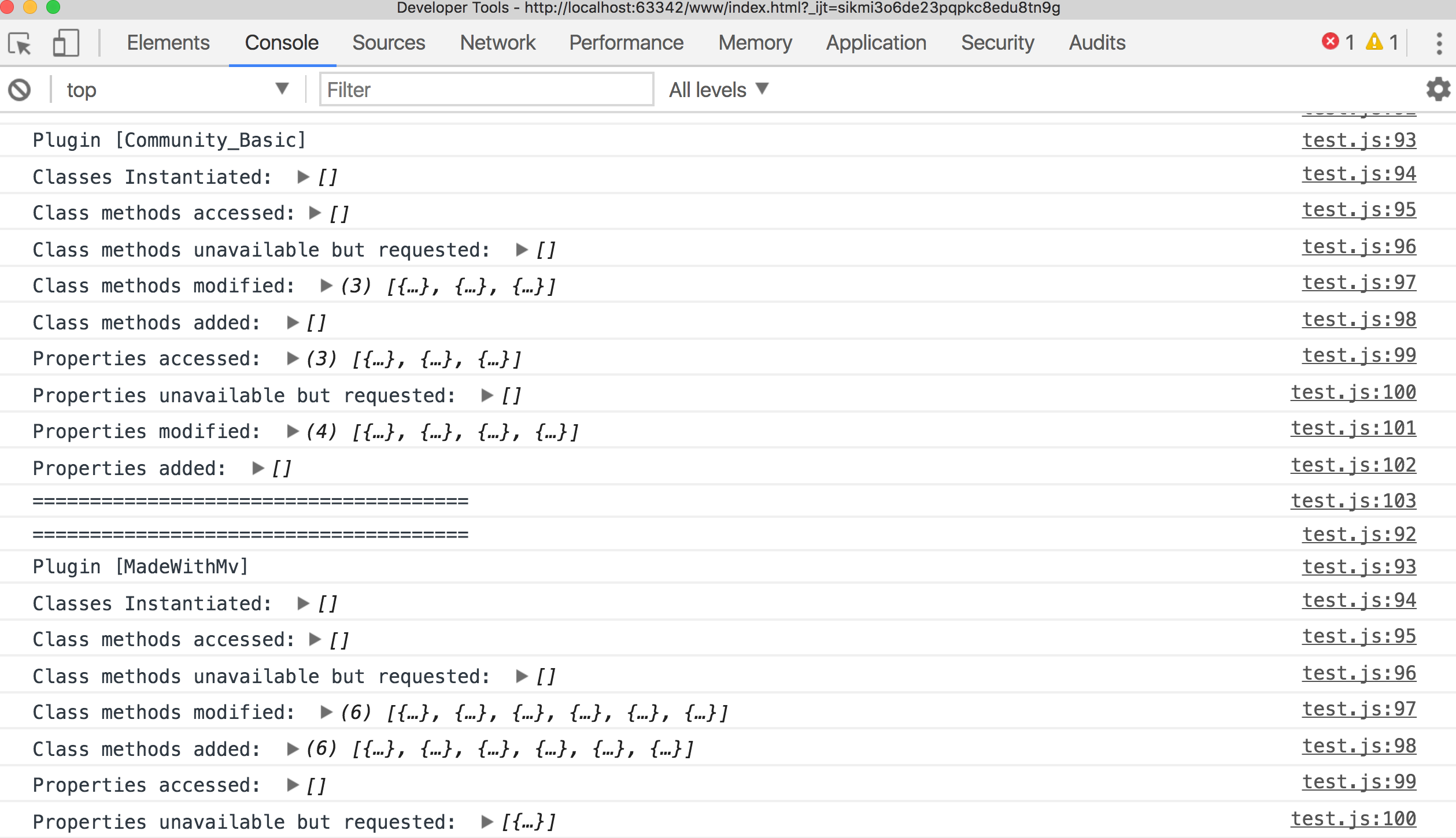
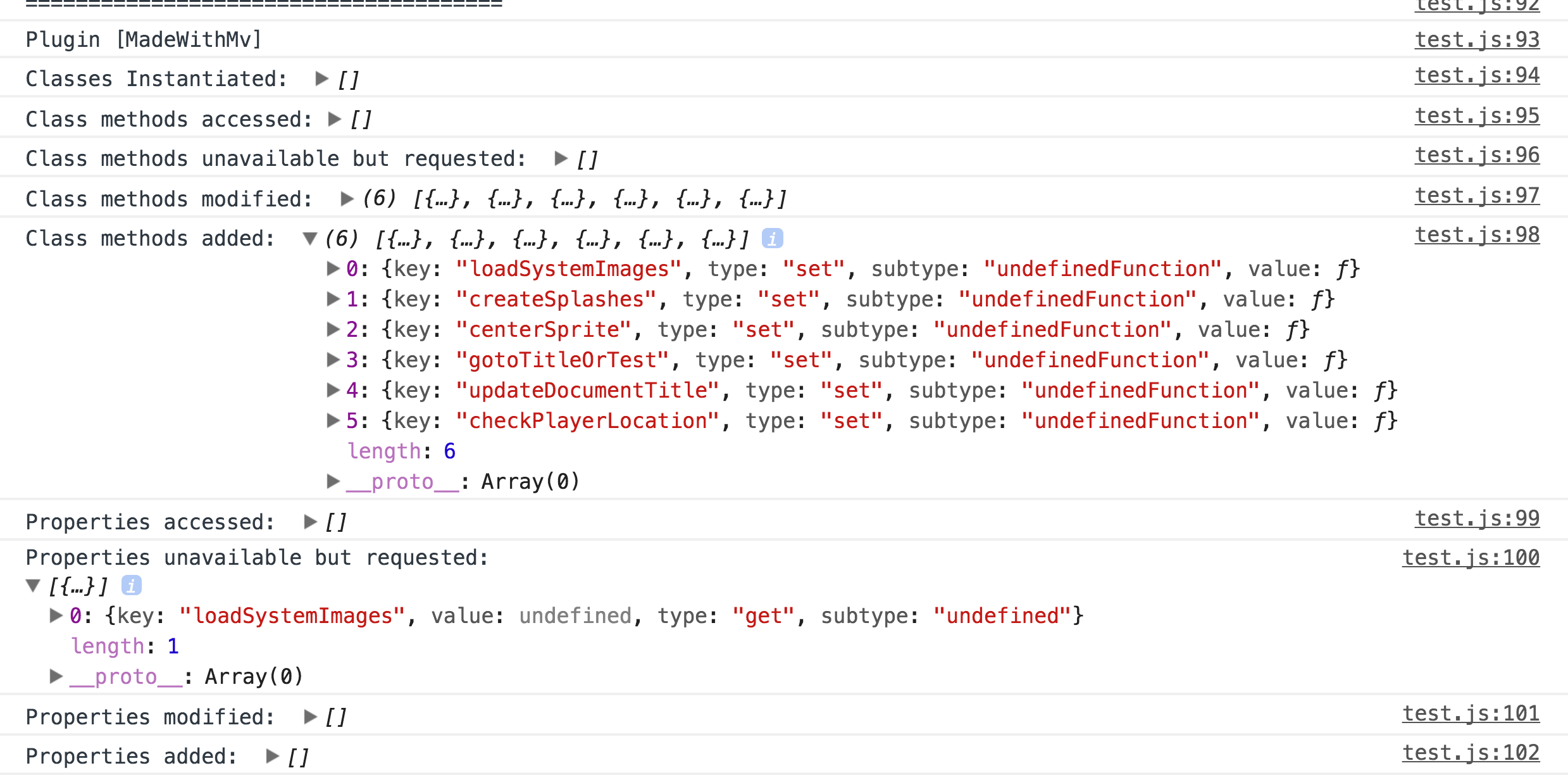
Take a look at the following output
In that image, we can clearly see that `LoadSystemImages` was perhaps used incorrectly.
If we take a look at the source, we see that `Scene_Boot.loadSystemImages` is defined in `rpg_scenes`.
The plugin `MadeWithMv` attempts to access `Scene_boot.prototype.loadSystemImages` instead.
It is possible that the developer intended for this usage, but that seems unlikely:
*all* other managers set properties in their prototypes.
Changelog
-------------
v.0.1 initial release

Github: https://github.com/ldd/plugin-analyzer
Plugin Analyzer
===================
Uses ES6 Proxies to take a peek at the code used by the plugins.
At the moment, this plugin DOES NOT support the NW.js runtime included with RPG Maker MV 1.5.
In other words, **you must export to web to use this plugin**
Usage
-------------
1) Copy this plugin to your project's folder directory
2) Place this plugin at the top of your plugins. (DO NOT PLACE ANYTHING BEFORE IT)
3) If possible, disable all your plugins
4) Export to web, open using a browser that supports ES6 Proxies
5) Start your game
> tip: If your game crashes, you can edit `game.js` in your output folder and comment out everything after `PluginLoader(...)`
API
-------------
`PluginAnalyzer.printLoggers()`
>output all the logged information to console
`PluginAnalyzer.printByPlugin(), printLoggers`
> output formatted logged information
Usecase
--------------
Take a look at the following output
In that image, we can clearly see that `LoadSystemImages` was perhaps used incorrectly.
If we take a look at the source, we see that `Scene_Boot.loadSystemImages` is defined in `rpg_scenes`.
The plugin `MadeWithMv` attempts to access `Scene_boot.prototype.loadSystemImages` instead.
It is possible that the developer intended for this usage, but that seems unlikely:
*all* other managers set properties in their prototypes.
Changelog
-------------
v.0.1 initial release

Downloads / Referenced Files
Log in to download
Log in, then follow the RPG Maker Developers Group to see these download links.
Log in to downloadReferenced Images / Attachments
Creator Claims / Removal
If you are the original creator and want this listing reassigned, edited, or removed, join BMMPlay and contact the moderators with proof that matches the original RPG Maker Web profile, linked GitHub, itch.io page, or another public creator identity.
Replies (0)
No replies yet.
0
replies
1
view
Topic Summary
Loading summary...