




Preserved forum archive. This topic stores the original first post and locally mirrored RPG Maker Web attachments when available. It is posted by the BMMPlay archive account, not by the original creator.
Original Source
- Original title: Eli Custom Parameters - Add new parameters to actors and enemies!
- Original author: Eliaquim
- Original date: May 5, 2021
- Source thread: https://forums.rpgmakerweb.com/threads/eli-custom-parameters-add-new-parameters-to-actors-and-enemies.136232/
- Source forum path: Game Development Engines > RPG Maker Javascript Plugins > JS Plugin Releases (RMMZ)
Summary
{ "lightbox_close": "Close", "lightbox_next": "Next", "lightbox_previous": "Previous",
Archived First Post
Author: Hakuen Studio
Introduction
If you ever felt that you need more than 8 parameters, that the default parameters are not enough, that is your chance!
This plugin lets you add as many new parameters as you want!
*It's compatible with Eli_ClassCurves.js
Features
● Add new custom parameters to actors and enemies!
● Manipulate these parameters with note tags and script calls!
● Add buffs, debuffs, and grow effect to these parameters!
How to use
♦ PLUGIN PARAMETERS ♦
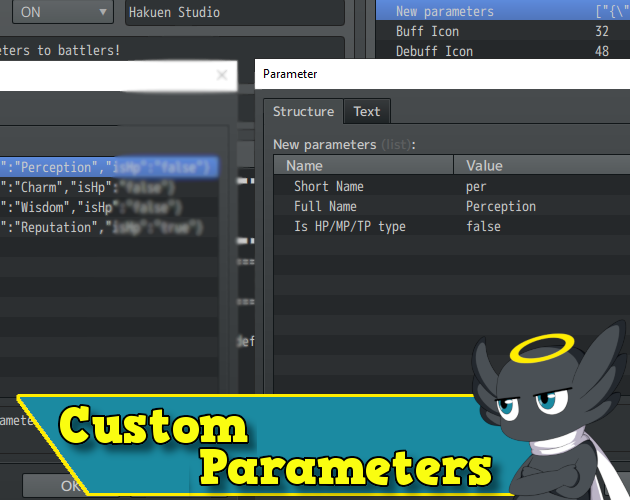
Go to the plugin parameter "New parameters" and add as many parameters as you want.
ShortName → This will be the one that you will use to reference script calls and note tags.
FullName → This will be the full name of the parameters. That can appear on battle log etc.
HP/MP/TP type → That will decide if the parameter will work like HP/MP/TP.
After that, you can choose the buff and Debuff icon range for these parameters.
They work exactly like the default ones. They will get an icon in the icon sheet and will follow a range.
With the exception that the range must follow how many custom parameters you have added.
The default works like that:
You have 8 default parameters: hp, mp, atk... etc.
The buff icons for these parameters go from the icon index 32 to 48.
This means the index 32 will be the Hp Buff level 1,
33 Hp buff level 2. And so on.
The same for Debuff, which takes the icon index 48 to 62.
48 Hp Debuff level 1
49 Hp Debuff level 2.
So you have to follow the same logic for the Buff and Debuff icon for these new parameters.
♦ NOTE TAGS ♦
You can use the following note tags on the item and skill note fields to add effects to the new parameters:
<AddCBuff: paramId/shortName:turns >
<RemoveCBuff: paramId/shortName >
<AddCDebuff: paramId/shortName:turns >
<RemoveCDebuff: paramId/shortName >
<GrowCaramId/shortName:value >
If you want to add more than one parameter, separate each one with a comma ",".
To add new parameter changes for the equipment and class, you can use the following note tag on the weapon, armor, or class note fields:
<CParamsaramId/shortName:value, paramId/shortName:value>
You can either use the paramId or the shortName of the new parameters.
The id will start at 0. This means that the new parameter id 0 will be the first one you have created.
Example:
<CParams: crm:23, 1:37> → Will add 23 to the crm parameter, and 37 for the new parameter id 1.
Optionally, you can also use the plugin parameter templates for that:
<CParams: TemplateName>
For both ways, if you don't set a specific parameter, it will be equal to 0.
***ATTENTION! All notes are case sensitive!***
♦ SCRIPT CALLS ♦
You can use them with actors or enemies:
$gameActors.actor(ID).[script call] => For actors.
$gameParty.members()[index].[script call] => For Party Members.
$gameTroop.members()[index].[script call] => For Enemies.
.cparamBase(paramId)
.cparamPlus(paramId)
.cparam(paramId)
.addCParam(paramId, value)
Example:
$gameParty.members()[0].cparam(0) → Will return the value of the first Custom Parameter.
You can also reference them using the object name directly, which is the short name:
$gameParty.members()[0].crm → Will return the crm(charm) value
For those parameters that work like HP/MP/TP, you will reference the current value of them with the script calls above.
But to get the max value, you can use the prefix "max" before the shortname:
$gameParty.members()[0].maxlp → Will return the max lp value
To change parameter value, like changing the hp and not the mhp, you can
use the following:
$gameParty.members()[0]._rep += value
$gameParty.members()[0].refreshCustomParameter(paramId/shortName)
NOTE¹: The recover all event command will also recover the custom parameters that are HP-like.
NOTE²: If you are using MZ, you can use the plugin commands.
Go to the plugin parameter "New parameters" and add as many parameters as you want.
ShortName → This will be the one that you will use to reference script calls and note tags.
FullName → This will be the full name of the parameters. That can appear on battle log etc.
HP/MP/TP type → That will decide if the parameter will work like HP/MP/TP.
After that, you can choose the buff and Debuff icon range for these parameters.
They work exactly like the default ones. They will get an icon in the icon sheet and will follow a range.
With the exception that the range must follow how many custom parameters you have added.
The default works like that:
You have 8 default parameters: hp, mp, atk... etc.
The buff icons for these parameters go from the icon index 32 to 48.
This means the index 32 will be the Hp Buff level 1,
33 Hp buff level 2. And so on.
The same for Debuff, which takes the icon index 48 to 62.
48 Hp Debuff level 1
49 Hp Debuff level 2.
So you have to follow the same logic for the Buff and Debuff icon for these new parameters.
♦ NOTE TAGS ♦
You can use the following note tags on the item and skill note fields to add effects to the new parameters:
<AddCBuff: paramId/shortName:turns >
<RemoveCBuff: paramId/shortName >
<AddCDebuff: paramId/shortName:turns >
<RemoveCDebuff: paramId/shortName >
<GrowCaramId/shortName:value >
If you want to add more than one parameter, separate each one with a comma ",".
To add new parameter changes for the equipment and class, you can use the following note tag on the weapon, armor, or class note fields:
<CParamsaramId/shortName:value, paramId/shortName:value>
You can either use the paramId or the shortName of the new parameters.
The id will start at 0. This means that the new parameter id 0 will be the first one you have created.
Example:
<CParams: crm:23, 1:37> → Will add 23 to the crm parameter, and 37 for the new parameter id 1.
Optionally, you can also use the plugin parameter templates for that:
<CParams: TemplateName>
For both ways, if you don't set a specific parameter, it will be equal to 0.
***ATTENTION! All notes are case sensitive!***
♦ SCRIPT CALLS ♦
You can use them with actors or enemies:
$gameActors.actor(ID).[script call] => For actors.
$gameParty.members()[index].[script call] => For Party Members.
$gameTroop.members()[index].[script call] => For Enemies.
.cparamBase(paramId)
.cparamPlus(paramId)
.cparam(paramId)
.addCParam(paramId, value)
Example:
$gameParty.members()[0].cparam(0) → Will return the value of the first Custom Parameter.
You can also reference them using the object name directly, which is the short name:
$gameParty.members()[0].crm → Will return the crm(charm) value
For those parameters that work like HP/MP/TP, you will reference the current value of them with the script calls above.
But to get the max value, you can use the prefix "max" before the shortname:
$gameParty.members()[0].maxlp → Will return the max lp value
To change parameter value, like changing the hp and not the mhp, you can
use the following:
$gameParty.members()[0]._rep += value
$gameParty.members()[0].refreshCustomParameter(paramId/shortName)
NOTE¹: The recover all event command will also recover the custom parameters that are HP-like.
NOTE²: If you are using MZ, you can use the plugin commands.
Screenshots
Terms of Use
Update Log
Hakuen Studio Custom Parameters for RPG Maker MZ by Hakuen Studio
Add new custom parameters to battlers (Actor and Enemy)!
hakuenstudio.itch.io
Features Mentioned
Downloads / Referenced Files
Log in to download
Log in, then follow the RPG Maker Developers Group to see these download links.
Log in to downloadLicense / Terms Note
Terms of Use Update Log Hakuen Studio Custom Parameters for RPG Maker MZ by Hakuen Studio Add new custom parameters to battlers (Actor and Enemy)!
Referenced Images / Attachments
Creator Claims / Removal
If you are the original creator and want this listing reassigned, edited, or removed, join BMMPlay and contact the moderators with proof that matches the original RPG Maker Web profile, linked GitHub, itch.io page, or another public creator identity.
Replies (0)
No replies yet.
0
replies
1
view
Topic Summary
Loading summary...
