

MVPIXI SpriteSheets Animations Core V1.0 [TexturePacker]
BMM_Archive · July 15, 2026

BMM_Archive
Preserved forum archive. This topic stores the original first post and locally mirrored RPG Maker Web attachments when available. It is posted by the BMMPlay archive account, not by the original creator.
Original Source
- Original title: PIXI SpriteSheets Animations Core V1.0 [TexturePacker]
- Original author: Jonforum
- Original date: August 23, 2017
- Source thread: https://forums.rpgmakerweb.com/threads/pixi-spritesheets-animations-core-v1-0-texturepacker.83083/
- Source forum path: Game Development Engines > RPG Maker Javascript Plugins > JS Plugin Releases (RMMV)
Summary
{ "lightbox_close": "Close", "lightbox_next": "Next", "lightbox_previous": "Previous",
Archived First Post

<span style="color: #ff0080">RMMV PIXI SpriteSheetsAnimations TexturePacker CORE
credit (jonForum,dimisterjon)
<span style="color: #b3b300">SpecialThanks: to codeandweb for free pro life licenses
under M.I.T licence
<span style="color: #b30000">Required:
* pixi.js v4.5.6 or upper
*TexturePacker or texturePackerPro(*<span style="color: #ff8000">recommended)
*a Sequencing PNG maker
*a JS reader and editor
TUTORIAL:1
<span style="color: #b35900">sorry for quality was my first time with Adobe Premiere, and not allow me to encode with my cuda gpu !!.
Presentation
The SpriteSheetsAnimations plugin for rmmv is a small engine that lets you easily use and integrate your animation sheets with texturePacker.
It supports the free module and the pro module(shareware) of the texturePacker software to easily integrate the animation sheets into your project as an object usable in different contexts.
The plugin is composed of 3 distinctive modules that allow to efficiently manage the different functionality related to the core rmmv.
It supports the free module and the pro module(shareware) of the texturePacker software to easily integrate the animation sheets into your project as an object usable in different contexts.
The plugin is composed of 3 distinctive modules that allow to efficiently manage the different functionality related to the core rmmv.
Download and update the latest version of pixi.js and replace in rmmv libs.
https://github.com/pixijs/pixi.js/releases
add the rmmvPixiSpriteAnimeCore.js plugin to your pluginManager.
follow the guide and the module you are interested or the script call list.
https://github.com/pixijs/pixi.js/releases
add the rmmvPixiSpriteAnimeCore.js plugin to your pluginManager.
follow the guide and the module you are interested or the script call list.
For the moment, the plugin allows the following functionality.
- * Settings available in the pluginManager
- * Activation / deactivation of a animation module
- * Replace the hero and follower with an animated object
- * Replace Events with Object animate and full support in the eventEditor.
- * Addition of several motions in an animate Object
- * Adds predefined or custom motionContext to make your animation live
- * Preloading and caching at game start to optimize performance.
- * Creating and managing infinite layer to easily manage the z-index like UNITY do.
- * Context of direction that supports the directions if needed.
- * easy search event animated with the new rmmv event name search in sofware
note: all ID are use for picture Actor, Events
SCRIPTCALL LISTS
legend: <span style="color: #00b300">green:finish <span style="color: #ffff00">yellow:available partially <span style="color: #ff0000">red:todo
__________________________________________________________________________________________
<span style="color: #b30059">pixiSSA
allow to global access to the plugin, also for initialise and create animated obj game.
its allow following method list.
createAniPicture (id,aniObj,layer) ■
create an new animated object and assign it to a unique id animationControler_Pictures
id (number): the unique ID you want assign to this new animatedOBJ
aniOBJ "String": the name reference of your _aniObj setup in pixiSSA,
layer (number)optional": the layer to add, by default its alway layer 0
return: animationControler_Pictures ID
id (number): the unique ID you want assign to this new animatedOBJ
aniOBJ "String": the name reference of your _aniObj setup in pixiSSA,
layer (number)optional": the layer to add, by default its alway layer 0
return: animationControler_Pictures ID
PHP:
pixiSSA.createAniPicture(0,'cloud',10); //create the aniOBJ cloud, asign to id 0, and id assign to layer 10allow change ID to a target layer available. newLayer can be a boolean with true to restore the layer at his default.
id (number): the target ID you want apply a change layer
newLayer (number)||(boolean)": the target layer number to add this new ID
return: animationControler_Pictures ID
id (number): the target ID you want apply a change layer
newLayer (number)||(boolean)": the target layer number to add this new ID
return: animationControler_Pictures ID
PHP:
pixiSSA.changeLayers(0 ,9); //transfer id 0, to layer 9, a lower layer
var myVar = pixiSSA.changeLayers(0 ,14); // also store animationControler in a scoped var
myVar.changeLayers(0 ,true); // restore to default initial layer.allow to execute a heavy performance test, with some console log result and fps result, for verify you motion obj performance in you project.Will force duplicate numbers aniOBJ in a layer with random ID
layer (number)": the target layer where the test will assign animatedObj
aniOBJ "String": the name reference of your _aniObj setup in pixiSSA,
limit (number)": the target layer where the test will assign animatedObj
return: null
layer (number)": the target layer where the test will assign animatedObj
aniOBJ "String": the name reference of your _aniObj setup in pixiSSA,
limit (number)": the target layer where the test will assign animatedObj
return: null
PHP:
pixiSSA.testPerformances(10,'cloud',500); //creates *500,renderings and plays cloud aniObj in the layer 10destroy the seleted aniOBJ from memory and cache. (destroy texture and the obj)
aniOBJ "String": the name reference of your _aniObj setup in pixiSSA,
return: new aniOBJs lists in pixiSSA._aniObj
aniOBJ "String": the name reference of your _aniObj setup in pixiSSA,
return: new aniOBJs lists in pixiSSA._aniObj
PHP:
pixiSSA.destroyCaches('cloud'); //perma destroy the cloud obj in pixiSSA._aniObj and all texturesget a specifique animated obj by ID, from picture module, will return the animationControler
id (number): the id of the target animated obj you need
return: animationControler_Pictures ID
id (number): the id of the target animated obj you need
return: animationControler_Pictures ID
PHP:
var myVar = pixiSSA.getAnimationControler_Pictures(0); //store animationControler ID in a varget a specifique animated obj append to a events by ID, from events module, will return the animationControler
id (number): the id of the target animated obj you need
return: animationControler_Pictures ID
id (number): the id of the target animated obj you need
return: animationControler_Pictures ID
PHP:
var myVar = pixiSSA.getAnimationControler_Events(24); //get the animationControler from events 24
myVar.start('mymotion');// start a motion from this controllerget a specifique animated obj by ID from actor, from player module, will return the animationControler
id (number): the id of the target animated obj you need
return: animationControler_Pictures ID
id (number): the id of the target animated obj you need
return: animationControler_Pictures ID
PHP:
var myVar = pixiSSA.getAnimationControler_Actors(1); //store animationControler of the actor 1start default motions and rendering, this method take the default motions and start play to frame 0.
list [array]optional: You can target specific aniControlers id list, with id's in array
events (boolean)optional: You can also start all the aniControlers events module with events set to true.
players (boolean)optional: You can also start all the aniControlers players module with players set to true.
return: list of start animationControler
list [array]optional: You can target specific aniControlers id list, with id's in array
events (boolean)optional: You can also start all the aniControlers events module with events set to true.
players (boolean)optional: You can also start all the aniControlers players module with players set to true.
return: list of start animationControler
PHP:
var startLists = pixiSSA.startAll(); //start rendering and play all aniControler with motions you created
var startLists = pixiSSA.startAll(false,true,true); //start all module rendering with all aniControler have motions.resume play animation, will resume from the frame paused.
list [array]optional: You can target specific aniControlers id list, with id's in array
events (boolean)optional: You can also resume all the aniControlers events module with events set to true.
players (boolean)optional: You can also resume all the aniControlers players module with players set to true.
return: list of play animationControler
list [array]optional: You can target specific aniControlers id list, with id's in array
events (boolean)optional: You can also resume all the aniControlers events module with events set to true.
players (boolean)optional: You can also resume all the aniControlers players module with players set to true.
return: list of play animationControler
PHP:
var playLists = pixiSSA.playAll([2,57,105,1000]); //resume all motions from the last frame paused.
var playLists = pixiSSA.playAll(false,true,true); //resume all animation of all modulestop all motion and rendering, can take a list, and also can stop the module events and players. This method return you the list stopped
list [array]optional: You can target specific aniControlers id list, with id's in array
events (boolean)optional: You can also stop all the aniControlers events module with events set to true.
players (boolean)optional: You can also stop all the aniControlers players module with players set to true.
return: list of stopped animationControler
list [array]optional: You can target specific aniControlers id list, with id's in array
events (boolean)optional: You can also stop all the aniControlers events module with events set to true.
players (boolean)optional: You can also stop all the aniControlers players module with players set to true.
return: list of stopped animationControler
PHP:
var stopLists = pixiSSA.stopAll([2,57,105,1000]); //stop all motions and the rendering in those animationControler id.
var stopLists = pixiSSA.stopAll(false,true,true); //stop all rendering of all modulepause only all motions, will keep rendering controler and motions. will also return you a array list.
list [array]optional: You can target specific aniControlers id list, with id's in array
events (boolean)optional: You can also pause all the aniControlers events module with events set to true.
players (boolean)optional: You can also pause all the aniControlers players module with players set to true.
return: list of paused animationControler
list [array]optional: You can target specific aniControlers id list, with id's in array
events (boolean)optional: You can also pause all the aniControlers events module with events set to true.
players (boolean)optional: You can also pause all the aniControlers players module with players set to true.
return: list of paused animationControler
PHP:
var stopLists = pixiSSA.pauseAll( [2,57,105,1000] ); //pause all motions in those animationControler id, keep the renderingtarget animationControl you want to bind to the maps, also support all layer, if you not set x,y, the method will calcul and transfere the current screen position to bindMap
id (number): the id of the target animated obj to bind
newX (boolean)optional: new reel map X coor to bind, leave empty to bind by screen x
newY (boolean)optional: new reel map Y coor to bind, leave empty to bind by screen y
return: animationControler_Pictures ID
id (number): the id of the target animated obj to bind
newX (boolean)optional: new reel map X coor to bind, leave empty to bind by screen x
newY (boolean)optional: new reel map Y coor to bind, leave empty to bind by screen y
return: animationControler_Pictures ID
PHP:
var myVar = pixiSSA.bindMaps(6); //bind the animationControler 6 to the map from screen position
var myVar = pixiSSA.bindMaps(6,1240,600); //bind the animationControler 6 to the reel map coor 1240x,600ydebug all animationControlers rendered in game with all motions, you apply debug only on specific id array list.
Its allow check current frame, width, collider, position cropped frame from texturePacker, and more...
list [array]optional: the id's in a array of targets animationControler id
return: null
Its allow check current frame, width, collider, position cropped frame from texturePacker, and more...
list [array]optional: the id's in a array of targets animationControler id
return: null
PHP:
pixiSSA.debug([2,1]); //apply a debug rendering mode to motions in animationControler 2 and 1__________________________________________________________________________________________
animationControler_Pictures
the animationControler_Pictures module allows the integral management of all animated Object created and assigned to a specific id and layer. multiple way to acces it:
PHP:
pixiSSA._animationControler._pictures._animationPicturesIndex[id] //direct acces
var myVar = pixiSSA.getAnimationControler_Pictures(id) // acces by return, also can store in a scope variable
var myVar = createAniPicture (id,aniObj,layer) // acces by create, also can store in a scope variablesetControlerProps (Props) ●
assign PIXI PROPRETY to a animationControler, animationControler are a pixi Container parenting all motion childs.
Props {obj}: apply setup property passed as obj to animationControler parenting motions obj
return: this animationControler_Pictures
Props {obj}: apply setup property passed as obj to animationControler parenting motions obj
return: this animationControler_Pictures
PHP:
var newProps = {x:50, y:100, scale[1,-1], alpha:0.5, pivot:[0.1,0.8], buttonMode:true, ...};
pixiSSA.createAniPicture(0,'cloud',10).setControlerProps(newProps)
pixiSSA.getAnimationControler_Pictures(0).setControlerProps(newProps)
pixiSSA.getAnimationControler_Pictures(66).setControlerProps( {x:50, y:100} )start and rendering the default motion in this animationControler, this will clear all other motion rendered. You can set the motion if you no what use the default, and set the frame (by default is 0)
motionName "String"optional: the name reference of your motion listed in this animationControler
frame (number)optional: force to start at a specific frame allowed
return: this animationControler_Pictures
motionName "String"optional: the name reference of your motion listed in this animationControler
frame (number)optional: force to start at a specific frame allowed
return: this animationControler_Pictures
PHP:
pixiSSA.createAniPicture(0,'cloud',10).start(); // ex: create animationControler with cloudOBJ, and will start the default motion in the list
pixiSSA.getAnimationControler_Pictures(0).start("cloud_shake2", 5) // get the target animationControler, and start the motion cloud_shake2 at frame 5
stop all motions and rendered in this animationControler, its stop frameUpdate and rendering. You can keep property of the animationControler if you need, else the property will reset ex: x, pivot, alpha, scale.....
keepProps (boolean)optional: pass true if you whant force to keep property of animationControler
return: this animationControler_Pictures
keepProps (boolean)optional: pass true if you whant force to keep property of animationControler
return: this animationControler_Pictures
PHP:
pixiSSA.getAnimationControler_Pictures(7).stop() //stop all motions update and rendering in scene (no more calculation)
pixiSSA.getAnimationControler_Pictures(7).stop(true) //stop all motions update and rendering, but force keep the property in controlerResume the motion was stopped in this animationControler, its resume to the frame stopped.
return: this animationControler_Pictures
return: this animationControler_Pictures
PHP:
pixiSSA.getAnimationControler_Pictures(7).play() //resume update animation from last framepause the current motion rendered in this animationControler, will keep frame
return: this animationControler_Pictures
return: this animationControler_Pictures
PHP:
pixiSSA.getAnimationControler_Pictures(7).pause() //pause current motion and freeze frame and update (allow resume)bind this animationControler_Pictures to the current maps,(unBindScreen) the bind autoCalcul the current screen position , but you can force bind to new x,y maps position.
x (number)optional: the new maps x coor to bind this AnimationControler and all motions children
y (number)optional: the new maps y coor to bind this AnimationControler and all motions children
return: animationControler_Pictures ID
x (number)optional: the new maps x coor to bind this AnimationControler and all motions children
y (number)optional: the new maps y coor to bind this AnimationControler and all motions children
return: animationControler_Pictures ID
PHP:
pixiSSA.getAnimationControler_Pictures(0).bindToMaps(); //autoBind by current screen position
pixiSSA.createAniPicture(0,'cloud',10).bindToMaps(1200,50).play("cloud_idle3"); // create, bindToNew x,y and play renderingalso use for (unBindMap), will turn false bindToMaps , and also allow to add factor are using for special screen move factor. ex: if screen move by 1Xpixel, and this animationControler have a screen factorX:20%, the picture will move only by 0.8Xpixel.
This allow special picture screen motion move effect to simulate a reel depth and camera depth factor.
factorX (number)optional: set a factor valur for X, allow negative valur, ideal valur between 5 to 95 (%)
factorY (number)optional: set a factor valur for Y, allow negative valur, ideal valur between 5 to 95 (%)
return: animationControler_Pictures ID
This allow special picture screen motion move effect to simulate a reel depth and camera depth factor.
factorX (number)optional: set a factor valur for X, allow negative valur, ideal valur between 5 to 95 (%)
factorY (number)optional: set a factor valur for Y, allow negative valur, ideal valur between 5 to 95 (%)
return: animationControler_Pictures ID
PHP:
pixiSSA.getAnimationControler_Pictures(0).bindToScreen(); // unBindMap
pixiSSA.getAnimationControler_Pictures(0).bindToScreen(95,10); // unBindMap and apply factor pixel screen position (1pixel are now X:0.05 Y:0.90set a collide zone to the current animationControler (player and can pass the zone), set a custom square if need or take the current motions width rendered.
zone [array]optional: allow to make a custom square zone by the pivot, or will take the current motions frame zone rendered.
return: animationControler_Pictures ID
zone [array]optional: allow to make a custom square zone by the pivot, or will take the current motions frame zone rendered.
return: animationControler_Pictures ID
PHP:
pixiSSA.createAniPicture(8,'bigTree1',3).bindToMaps(120,200).setCollide([-5,5,20,-5]).play("idle1"); //create aniObj bigTree1, id 8, to layer 3, bind it to map at X120,Y200, giveColision zone to trink, play and rendering
pixiSSA.getAnimationControler_Pictures(8).setCollide(); // heroes can move if its x,y are inside the collision zone make by the current motions renderedtransform the motionBone as a getter of the motionSpine proprety. (x,y,sx,sy,alpha,..)
If realChild set true, add a motion inside a other motion, the motionSpine, will becaume parent of the motionBone.
Will also remove the motionBone from the animationControler children, will only rendering if motion parent are rendering.
motionSpine "String": the name reference of the motion will be the parent or setter.
motionBone "String": the name reference of the motion will become children , or getter.
position [array]: pass a array [x,y] for position of Bone in the parent from the pivot.
realChild (boolean)optional: allow real children mode, addChild the motionBone in motionSpine.
return: animationControler_Pictures ID
If realChild set true, add a motion inside a other motion, the motionSpine, will becaume parent of the motionBone.
Will also remove the motionBone from the animationControler children, will only rendering if motion parent are rendering.
motionSpine "String": the name reference of the motion will be the parent or setter.
motionBone "String": the name reference of the motion will become children , or getter.
position [array]: pass a array [x,y] for position of Bone in the parent from the pivot.
realChild (boolean)optional: allow real children mode, addChild the motionBone in motionSpine.
return: animationControler_Pictures ID
PHP:
pixiSSA.createAniPicture(8,'menu1',10).addSpineBone('menuBG','wheel1',[1,1],true)
.addSpineBone('menuBG','wheel2',[1000,1],true)
.addSpineBone('menuBG','wheel3',[1,500],true)
.play("menuBG"); //if bone detect in children menuBG, they will auto playActive debuger for this animationControler, linearSequencing can be true, if need to play and rendering all motion in linear order, or passing array sequencing for play motions sequence linear. (will remove all current motionContext)
linearSequencing (boolean) || [array]optional: remove all motionContext, and force play linear motion the obj as. or a array motion list.
return: animationControler_Pictures ID
linearSequencing (boolean) || [array]optional: remove all motionContext, and force play linear motion the obj as. or a array motion list.
return: animationControler_Pictures ID
PHP:
pixiSSA.createAniPicture(8,'cloud',10).play("idl1").debug(); //play normal, with motionContext in debug Mode
var myVar = pixiSSA.createAniPicture(8,'cloud',10).debug(true); //force play ordered motions sequences with debug mode
pixiSSA.createAniPicture(8,'cloud',10).debug( [0,1,2,1] ); //force play custom motions sequences with debug mode
myVar.setMotionsProps( {x:50} ); // you can easily add more setup after debug run.allow initialise a new Iavra Animate with easing library to property of this animationController and also a specific motion.
If no motion define, will apply the easing to this current global animationControler.
Props {object}: pass a object property list to the Iavra Animate easing controler.
motion (boolean)optional: you can apply easing to a specific motion.
return: Iavra_Animate_motion_controler
If no motion define, will apply the easing to this current global animationControler.
Props {object}: pass a object property list to the Iavra Animate easing controler.
motion (boolean)optional: you can apply easing to a specific motion.
return: Iavra_Animate_motion_controler
PHP:
var myEase = pixiSSA.getAnimationControler_Pictures(id).newEasing( {x:100,y:200} );
myEase.ease(IAVRA.EASING.elastic.out).dur(30).delay(1).start(); // move animationControler to x,y coor with easing 30 frame , and delay 1 frame
delete the and clear animated object assign to this animationControler, you can set destroy true, to also completely remove the obj from game, will clear cache and also delete texture from pixiSAA._aniObj
destroy (boolean) optional: allow full deep remove of the pixiSAA._aniObj
return: animationControler_Pictures ID
destroy (boolean) optional: allow full deep remove of the pixiSAA._aniObj
return: animationControler_Pictures ID
PHP:
pixiSSA.getAnimationControler_Pictures(id).delete(true); // with true, deep remove and destroy objremove all context registrar motionContext from a motion, if no motion specified, remove all motionContext of all motions in this AnimationControler
motionSpine "String"optional: the name reference of the motion to remove motionContext in register
return: animationControler_Pictures ID
motionSpine "String"optional: the name reference of the motion to remove motionContext in register
return: animationControler_Pictures ID
PHP:
pixiSSA.getAnimationControler_Pictures(id).delete(true); // with true, deep remove and destroy obj__________________________________________________________________________________________
addMotionContext_???(arg)
↓see list of predefined context↓, allow to register a motionContext evaluation make a live your animation and her motions.
The majority of these contexts are executed during a phase of evaluation of a motions frames and textures updates.
Theses phases, are also unsynchronize to rmmv update, and apply in a PIXI.TIKER.
If the rmmv scene update lag or flicking, the animation will not affected because its will be managed by the GPU.
Perfect for example:. to make a loading scenes with huge and heavy animation.
addMotionContext are the most powerful method from all animationControler modules.
If a context evaluation return false, the register will continue evaluation to the to next motionContext registered.
else it will break register if context return true.
note: motionContexts will be assessed in the order in which you have them registered.
addMotionContext_Linear (motion,motionCall,frames,luck) ◆
add a linear predefined context to a specified motions, if context return true, will call the motionCall passed.
Linear will stop frame(reset:0) and rendering of current motion, and start motionCall at 0.
Useful for randomize a motion at end or start frame.
motion "String": the motion will which evaluates the context. On his frames updates.
motionCall "String": the new motion rendered if context evaluation return true.
frames (number)||"String"||(boolean)||[array]: the frame to call evaluation context. Can be a string ("first","middle","end"),list or bool
luck(number)optional: the % chance to execute the context. 0-100. Default will alway 100%
return: this animationControler_Pictures
Linear will stop frame(reset:0) and rendering of current motion, and start motionCall at 0.
Useful for randomize a motion at end or start frame.
motion "String": the motion will which evaluates the context. On his frames updates.
motionCall "String": the new motion rendered if context evaluation return true.
frames (number)||"String"||(boolean)||[array]: the frame to call evaluation context. Can be a string ("first","middle","end"),list or bool
luck(number)optional: the % chance to execute the context. 0-100. Default will alway 100%
return: this animationControler_Pictures
PHP:
//this is example for loop with 2 randomise motions context evaluation.
var myVar = pixiSSA.getAnimationControler_Pictures(10);
myVar.addMotionContext_Linear ('idle1','idle2',29,80); // 80%chance to start idle2, if idle1 reach his frame 29.
myVar.addMotionContext_Linear ('idle1','idle2',"end",5); // 5%chance to start idle2, if idle1 reach his frame 29(lastFrames).
myVar.addMotionContext_Linear ('idle2','idle1',"end"); // 100%chance to start idle1, if idle2 reach his frame 10(lastFrames ex: of idle2 are 10).Add a predefined winks context, if context return true, will only stop rendering motion but will keep frame update in the tiker.
Will rendering and play motionCall, with auto registered callback to him for rendering back motion when it reach end.
When motionCall callback the motion at is end Frame, it will rendering false, end reset frame.
motion "String": the motion will which evaluates the context. On his frames updates.
motionCall "String": the new motion rendered if context evaluation return true. Automatically rendering back motion at end Cycle.
frames (number)||"String"||(boolean)||[array]: the frame to call evaluation context. Can be a string ("first","middle","end","auto"),list or bool, "auto" is if you have synchronized frame
luck(number)optional: the % chance to execute the context. 0-100. Default will alway 100%
return: this animationControler_Pictures
Will rendering and play motionCall, with auto registered callback to him for rendering back motion when it reach end.
When motionCall callback the motion at is end Frame, it will rendering false, end reset frame.
motion "String": the motion will which evaluates the context. On his frames updates.
motionCall "String": the new motion rendered if context evaluation return true. Automatically rendering back motion at end Cycle.
frames (number)||"String"||(boolean)||[array]: the frame to call evaluation context. Can be a string ("first","middle","end","auto"),list or bool, "auto" is if you have synchronized frame
luck(number)optional: the % chance to execute the context. 0-100. Default will alway 100%
return: this animationControler_Pictures
PHP:
var myVar = pixiSSA.getAnimationControler_Pictures(3);
myVar.addMotionContext_winks('idle1','wink2',5,30); // 30%chance to start wink2, if idle1 reach his frame 5.
//when wink2 reach end cycle after example 5 frame, will rendering back idle1 at frame 10.
myVar.addMotionContext_winks('idle1','wink3',10,25); // 25%chance to start wink3, if idle1 reach his frame 10.
// also if wink2 finish , rendering back idle1, and allow to instantly evaluate if can call wink3Add a predefined moving context, if the AnimationControler are moving x,y and context return true, will rendering and play the motionCall designed.
motion "String": the motion will which evaluates the context. On his frames updates.
motionCall "String": the new motion rendered if context evaluation return true.
frames (number)||"String"||(boolean)||[array]: the frame to call evaluation context. Can be a string ("first","middle","end"),list or bool
luck(number)optional: the % chance to execute the context. 0-100. Default will alway 100%
return: this animationControler_Pictures
motion "String": the motion will which evaluates the context. On his frames updates.
motionCall "String": the new motion rendered if context evaluation return true.
frames (number)||"String"||(boolean)||[array]: the frame to call evaluation context. Can be a string ("first","middle","end"),list or bool
luck(number)optional: the % chance to execute the context. 0-100. Default will alway 100%
return: this animationControler_Pictures
PHP:
var myVar = pixiSSA.getAnimationControler_Pictures(3);
myVar.addMotionContext_onMoved('idle1','walk2',true); // 100%chance to start walk2, if idle1 detect AnimationControler moving.
//true apply evaluation on each frame update from pixi.tikerAdd a predefined FX context. when Context return true, motions keep rendering and frame update.
Rendering once motionCall, if is already rendered do nothing. But if onstartReset, will force to play again at 0.
onstartReset allow the FX to play again multiple time also if the FX not reach end Frame.
motion "String": the motion will which evaluates the context. On his frames updates.
motionCall "String": the new motion rendered if context evaluation return true. Automatically reset at end Frame
frames (number)||"String"||(boolean)||[array]: the frame to call evaluation context. Can be a string ("first","middle","end"),list or bool
luck(number)optional: the % chance to execute the context. 0-100. Default will alway 100%
onstartReset(boolean)optional: Make FX force start 0 also if already rendering and playing.
return: this animationControler_Pictures
Rendering once motionCall, if is already rendered do nothing. But if onstartReset, will force to play again at 0.
onstartReset allow the FX to play again multiple time also if the FX not reach end Frame.
motion "String": the motion will which evaluates the context. On his frames updates.
motionCall "String": the new motion rendered if context evaluation return true. Automatically reset at end Frame
frames (number)||"String"||(boolean)||[array]: the frame to call evaluation context. Can be a string ("first","middle","end"),list or bool
luck(number)optional: the % chance to execute the context. 0-100. Default will alway 100%
onstartReset(boolean)optional: Make FX force start 0 also if already rendering and playing.
return: this animationControler_Pictures
PHP:
var myVar = pixiSSA.getAnimationControler_Pictures(3);
myVar.addMotionContext_FX('walking','smokeStep',0,100,true); // 100%chance to render smokeStep, if motion walking reatch frame 0. Also force play again if smokeStep already playing
myVar.addMotionContext_FX('startWalk','wing',"end"); // 100%chance to render wing, if motion startWalk reatch his last frame.if already playing, do nothing.add a predefined AUDIO context. when Context return true, motions keep rendering and frame update.
Play a sound from Audio Management from rmmv (will also allow pixi sound in future)
motion "String": the motion will which evaluates the context. On his frames updates.
audioObj {Object}: pass a audio obj property , { name: filename, volume: n, pitch: n, pan: n }.
frames (number)||"String"||(boolean)||[array]: the frame to call evaluation context. Can be a string ("first","middle","end"),list or bool
luck(number)optional: the % chance to execute the context. 0-100. Default will alway 100%
return: this animationControler_Pictures
Play a sound from Audio Management from rmmv (will also allow pixi sound in future)
motion "String": the motion will which evaluates the context. On his frames updates.
audioObj {Object}: pass a audio obj property , { name: filename, volume: n, pitch: n, pan: n }.
frames (number)||"String"||(boolean)||[array]: the frame to call evaluation context. Can be a string ("first","middle","end"),list or bool
luck(number)optional: the % chance to execute the context. 0-100. Default will alway 100%
return: this animationControler_Pictures
PHP:
var myAudioObj1 = { name: "wing", volume: 100, pitch: 100, pan: 100 };
var myAudioObj2 = { name: "stepHit", volume: 100, pitch: 100, pan: 100 };
var myVar = pixiSSA.getAnimationControler_Pictures(40);
myVar.addMotionContext_Audio('startMov1',myAudioObj1,0,100); // 100%chance to playSound wing, at if startMov1 are rendering frame 0.
myVar.addMotionContext_Audio('winlking1',myAudioObj2,"middle",100); // 100%chance to playSound stepHit, at if winlking1 are rendering at frame middle:(totalFrame/2).add a predefined context that's will check if player position XY collide with the XY motion collider zone.
If no collider set, will take the default motions frame Width and height (useful if you use texturePacker Pro only)
context will stop frame and rendering of the motion, and rendering and play motionCall at 0.
motion "String": the motion will which evaluates the context. On his frames updates.
motionCall "String": the new motion rendered if context evaluation return true.
frames (number)||"String"||(boolean)||[array]: the frame to call evaluation context. Can be a string ("first","middle","end"),list or bool
luck(number)optional: the % chance to execute the context. 0-100. Default will alway 100%
return: this animationControler_Pictures
If no collider set, will take the default motions frame Width and height (useful if you use texturePacker Pro only)
context will stop frame and rendering of the motion, and rendering and play motionCall at 0.
motion "String": the motion will which evaluates the context. On his frames updates.
motionCall "String": the new motion rendered if context evaluation return true.
frames (number)||"String"||(boolean)||[array]: the frame to call evaluation context. Can be a string ("first","middle","end"),list or bool
luck(number)optional: the % chance to execute the context. 0-100. Default will alway 100%
return: this animationControler_Pictures
PHP:
var myVar = pixiSSA.getAnimationControler_Pictures(40);
myVar.addMotionContext_playerCollid('idle1','hey2',true,100); // 100%chance to rendering motion hey2 if player collide with motion idle1add a predefined context that's will check if player position XY not collide with the XY motion collider zone.
If no collider set, will take the default motions frame Width and height (useful if you use texturePacker Pro only)
context will stop frame and rendering of the motion, and rendering and play motionCall at 0.
motion "String": the motion will which evaluates the context. On his frames updates.
motionCall "String": the new motion rendered if context evaluation return true.
frames (number)||"String"||(boolean)||[array]: the frame to call evaluation context. Can be a string ("first","middle","end"),list or bool
luck(number)optional: the % chance to execute the context. 0-100. Default will alway 100%
return: this animationControler_Pictures
If no collider set, will take the default motions frame Width and height (useful if you use texturePacker Pro only)
context will stop frame and rendering of the motion, and rendering and play motionCall at 0.
motion "String": the motion will which evaluates the context. On his frames updates.
motionCall "String": the new motion rendered if context evaluation return true.
frames (number)||"String"||(boolean)||[array]: the frame to call evaluation context. Can be a string ("first","middle","end"),list or bool
luck(number)optional: the % chance to execute the context. 0-100. Default will alway 100%
return: this animationControler_Pictures
PHP:
var myVar = pixiSSA.getAnimationControler_Pictures(40);
myVar.addMotionContext_playerCollid('hey2','idle1',true,100); //100%chance to rendering motion idle1 if player not collide with motion hey2add a predefined context that's will check if mouse position XY collide with the XY motion collider zone.
If no collider set, will take the default motions frame Width and height (useful if you use texturePacker Pro only)
Also modeFX allow to play and rendering once the motionCall like a MotionContext_FX. The mouseIn context will not return true again
motion "String": the motion will which evaluates the context. On his frames updates.
motionCall "String": the new motion rendered if context evaluation return true.
frames (number)||"String"||(boolean)||[array]: the frame to call evaluation context. Can be a string ("first","middle","end"),list or bool
luck(number)optional: the % chance to execute the context. 0-100. Default will alway 100%
modeFX(boolean)optional: allow play motionCall one time like a MotionContext_FX
return: this animationControler_Pictures
If no collider set, will take the default motions frame Width and height (useful if you use texturePacker Pro only)
Also modeFX allow to play and rendering once the motionCall like a MotionContext_FX. The mouseIn context will not return true again
motion "String": the motion will which evaluates the context. On his frames updates.
motionCall "String": the new motion rendered if context evaluation return true.
frames (number)||"String"||(boolean)||[array]: the frame to call evaluation context. Can be a string ("first","middle","end"),list or bool
luck(number)optional: the % chance to execute the context. 0-100. Default will alway 100%
modeFX(boolean)optional: allow play motionCall one time like a MotionContext_FX
return: this animationControler_Pictures
PHP:
var myVar = pixiSSA.getAnimationControler_Pictures(2);
myVar.addMotionContext_mouseIn('idle1','mouseSelector1',true,100,true); // 100%chance to rendering motion mouseSelector1 FX if mouse collide with motion idle1add a predefined context that's will check if mouse position XY not collide with the XY motion collider zone.
If no collider set, will take the default motions frame Width and height (useful if you use texturePacker Pro only)
Also modeFX allow to play and rendering once the motionCall like a MotionContext_FX. The mouseIn context will not return true again
motion "String": the motion will which evaluates the context. On his frames updates.
motionCall "String": the new motion rendered if context evaluation return true.
frames (number)||"String"||(boolean)||[array]: the frame to call evaluation context. Can be a string ("first","middle","end"),list or bool
luck(number)optional: the % chance to execute the context. 0-100. Default will alway 100%
modeFX(boolean)optional: allow play motionCall one time like a MotionContext_FX
return: this animationControler_Pictures
If no collider set, will take the default motions frame Width and height (useful if you use texturePacker Pro only)
Also modeFX allow to play and rendering once the motionCall like a MotionContext_FX. The mouseIn context will not return true again
motion "String": the motion will which evaluates the context. On his frames updates.
motionCall "String": the new motion rendered if context evaluation return true.
frames (number)||"String"||(boolean)||[array]: the frame to call evaluation context. Can be a string ("first","middle","end"),list or bool
luck(number)optional: the % chance to execute the context. 0-100. Default will alway 100%
modeFX(boolean)optional: allow play motionCall one time like a MotionContext_FX
return: this animationControler_Pictures
PHP:
var myVar = pixiSSA.getAnimationControler_Pictures(2);
myVar.addMotionContext_mouseOut('mouseSelector1','idle2',true,100); // 100%chance to rendering motion idle2 if mouse not collide with motion mouseSelector1
myVar.addMotionContext_mouseOut('mouseSelector1','idle2',true,100).onTrue({loop:false}); // 100%chance to rendering motion idle2 if mouse not collide with motion mouseSelector1, also execute custom property setter to loop false.allow to make custom Context function to the registar
customFunction (function) the function pass to evaluation onFrameUpdate
return: this animationControler_Pictures
customFunction (function) the function pass to evaluation onFrameUpdate
return: this animationControler_Pictures
PHP:
var myFunc = function(){myStuff};
myVar.addMotionContext_custom(myFunc); // custom callback evaluation
__________________________________________________________________________________________
apply customCallBack to addMotionContext
↓allow to add more setup to a registered callback.
those chain setup affect and apply to the last callBack registered.
PHP:
var myFunc = function(){};
pixiSSA.createAniPicture(8,'bigTree1',3)
.addMotionContext_mouseOut('mouseSelector1','idle2',true,100).onTrue(myFunc).onFalse(myFunc) // affect this MotionContext only
.addMotionContext_onMoved('idle1','walk2',true).onTrue(myFunc) // affect this MotionContext only
.play("idle1");allow to call a callback or set property to a motion that will return true after evaluation inside the onFrameUpdate.
arg(function)||{Object} function will called after motionContext evaluate true, Can use callBack or property Object to apply
return: this animationControler_Pictures
arg(function)||{Object} function will called after motionContext evaluate true, Can use callBack or property Object to apply
return: this animationControler_Pictures
PHP:
pixiSSA.createAniPicture(8,'bigTree1',3)
.addMotionContext_mouseIn('idle1','mouse1',true,100).onTrue( {alpha:0.5} )
.addMotionContext_mouseOut('mouse1','idle1',true,100).onTrue( {alpha:1} )
.play("idle1");
__________________________________________________________________________________________________________
MASTER GUIDE Rigging, texturePackers & plugin core modules:
Introduction:
This Guide are powered by googleTranslate, french doc include in the demo.
The first step is the configuration of your Animated Object, but also, just before the realization of your animations sheets.
Fast Introduced to Make a RigSprites
<span style="color: #b300b3">introduced to TEXTURES PACKER && PRO
<span style="color: #00b300">MODULE INTRODUCTION :
<span style="color: #006600">MODULE1 : PICTURES ANIMATIONS AN LAYERS
<span style="color: #006600">MODULE2 : player and game follower
<span style="color: #006600">MODULE3 : game event manager
1: Open your favorite software to make animations.
I suggest adobe AfterEffects or spriterPro.
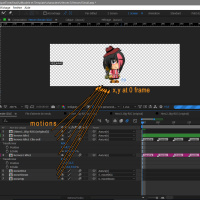
Once you have finished your RIG, make sure that before exporting your PNG sequences, each separate animation starts at the same position XY from 0 frame.
If you have animation that requires great movement, make sure that the width is the same for each separate animation.
This is not mandatory, but you may have difficulty compensating for the difference if you change the Anchor during the game for a specific animation.
**AE2,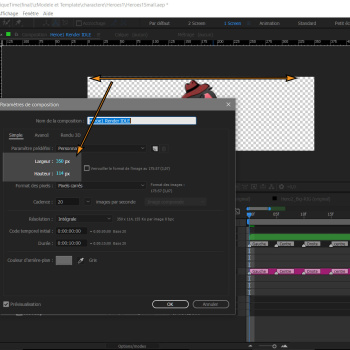
do not worry, TexturePackers pro, will offset the exeed of your animation sheet.
It will automatically split your animations to allow them to function in the games without this excesses frames alpha pixel.
Note that without the pro version, the excesses will not be cropping, and will calculate in the games as Alpha pixels && premultiplied alpha, which can affect the performance of your GPU.
**AE3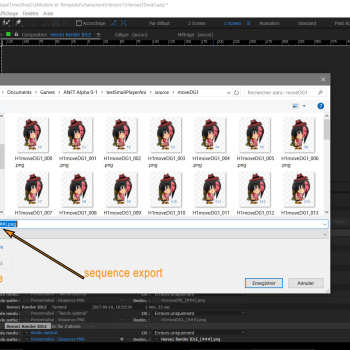
Make sure that when you export your sequence, the attribute name matches the one chosen in the software settings.
ideally I advise you a sequence of 3 frame numbers. [###]
I suggest adobe AfterEffects or spriterPro.
Once you have finished your RIG, make sure that before exporting your PNG sequences, each separate animation starts at the same position XY from 0 frame.
If you have animation that requires great movement, make sure that the width is the same for each separate animation.
This is not mandatory, but you may have difficulty compensating for the difference if you change the Anchor during the game for a specific animation.
**AE2,
do not worry, TexturePackers pro, will offset the exeed of your animation sheet.
It will automatically split your animations to allow them to function in the games without this excesses frames alpha pixel.
Note that without the pro version, the excesses will not be cropping, and will calculate in the games as Alpha pixels && premultiplied alpha, which can affect the performance of your GPU.
**AE3
Make sure that when you export your sequence, the attribute name matches the one chosen in the software settings.
ideally I advise you a sequence of 3 frame numbers. [###]
**TexP1 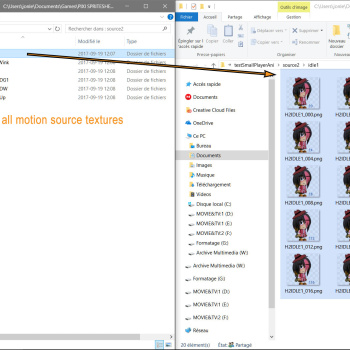
Now that we have all our source images in PNG sequences.
We have built distinctive folder and name for animation source.
NOTE: It is important to structure and separate the sources to find you and work more efficiently.
We will build a leaf that can be used in PIXI with texture packer.
I strongly recommend the pro version which offers an optimization and remarkable performance during the rendering in games.
**TexP2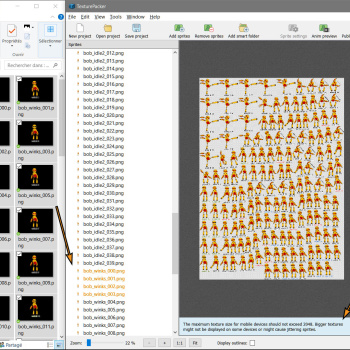
For this example, we will use the sources available in the demo.
We'll use the Rig Bob.
We chose the PIXI.JS Framework in texturePackers
We have dragged the integrity of each source animation file into texture packer.
Texture packer should calculate that the size of the file is too large.
So we switch to multipack mode, which allows splitter in several small file animations.
Be left as it is, or manually adjust the MAXSIZE, but at your own risk can make some memory Glitches !.
**TexP3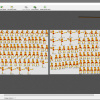
We work exclusively with the multi pack option and a limit of 2048p
And we will export the rendering and let texturePackers realize the million calculations in our place.
**TexP4
A faith export, you will have a rendering json files that will operate in pixi.js and leaf associate auto-increment.
We are ready to move to the configuration of our animate Object in the plugin.
Now that we have all our source images in PNG sequences.
We have built distinctive folder and name for animation source.
NOTE: It is important to structure and separate the sources to find you and work more efficiently.
We will build a leaf that can be used in PIXI with texture packer.
I strongly recommend the pro version which offers an optimization and remarkable performance during the rendering in games.
**TexP2
For this example, we will use the sources available in the demo.
We'll use the Rig Bob.
We chose the PIXI.JS Framework in texturePackers
We have dragged the integrity of each source animation file into texture packer.
Texture packer should calculate that the size of the file is too large.
So we switch to multipack mode, which allows splitter in several small file animations.
Be left as it is, or manually adjust the MAXSIZE, but at your own risk can make some memory Glitches !.
**TexP3
We work exclusively with the multi pack option and a limit of 2048p
And we will export the rendering and let texturePackers realize the million calculations in our place.
**TexP4
A faith export, you will have a rendering json files that will operate in pixi.js and leaf associate auto-increment.
We are ready to move to the configuration of our animate Object in the plugin.
<span style="color: #00b300">MODULE INTRODUCTION :
We can now configure our Objects that we want in our project.
To do this make sure you have your favorite software to open the js file.
**js1,1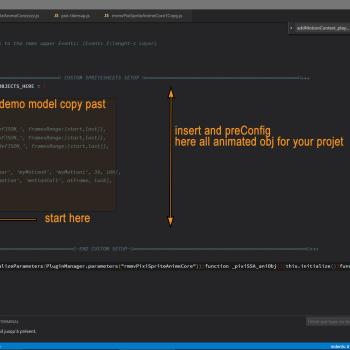
If you have the compressor version of the plugin you should with something like this.
If you have a good notion in JavaScript I would rather recommend the uncompressed version.
It also contains all the comments of the development.
It will also allow you to easily access the prototype and modify the lines you want.
**js1,2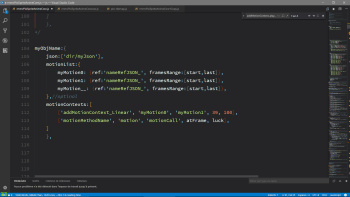
This script is the basic syntax of all animations objects.
You can duplicate it as much faith as you want, it is in this code that you will fill in the information
We will see globally how to fill in this information with your sheets that texture packer made you.
myObjName is the name of your animation Object that acts as a group.
It will group all desired behavior specifically for that object.
The name must be unique and ideally refer to the animation context you want to exploit.
for example for a cloud or a window one could put Nuage_blabla_01 or menu_window_bg ..
json: [''] is the path of all JSON files you want to associate with your animation.
Normally the name of the .JSON file is the same as the name of the .png animation sheets
You must specify the full path from the root of your project or the JSON file you want to associate with.
NOTE: If you have the texture packer multipack option, you do not need to register all JSON files.
The plugin will automatically check all other JSON associate to this pack.
If you do not use pack multipack texture packer, you will need to manually save them.
motionList: {}. These here you will be able to save all the animation associated with your object as an object
the name may be the name of your choice, ideally in relation to the direction you have created.
However, it must be unique to this group.
motionList: {}. These here you will be able to save all the animation associated with your object as an object
the name may be the name of your choice, ideally in relation to the direction you have created.
However, it must be unique to this group.
2 property are mandatory.
You must specify the string name of your animation in your json file.
It normally corresponds to the same name when you have to export your animation.
And then indicate the start and end frame in an array.
** mod1.1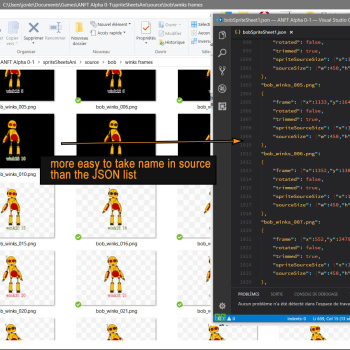
normally for a simple animation you will enter the start and end frames.
But for a more complex animation, you can separate the frames for the same animation.
Example here for a nod.
motionContexts: this is optional and allows you to inject the animation from the context of your animation.
Normally for pictures you will prefer to use script commands.
The motionContext allows you to save contexts that are checked whenever your character changes frame.
All the list of motion contexts applicable for each module is available at the bottom.
Some contexts may vary depending on the module and the type of Object.
To do this make sure you have your favorite software to open the js file.
**js1,1
If you have the compressor version of the plugin you should with something like this.
If you have a good notion in JavaScript I would rather recommend the uncompressed version.
It also contains all the comments of the development.
It will also allow you to easily access the prototype and modify the lines you want.
**js1,2
This script is the basic syntax of all animations objects.
You can duplicate it as much faith as you want, it is in this code that you will fill in the information
We will see globally how to fill in this information with your sheets that texture packer made you.
myObjName is the name of your animation Object that acts as a group.
It will group all desired behavior specifically for that object.
The name must be unique and ideally refer to the animation context you want to exploit.
for example for a cloud or a window one could put Nuage_blabla_01 or menu_window_bg ..
json: [''] is the path of all JSON files you want to associate with your animation.
Normally the name of the .JSON file is the same as the name of the .png animation sheets
You must specify the full path from the root of your project or the JSON file you want to associate with.
NOTE: If you have the texture packer multipack option, you do not need to register all JSON files.
The plugin will automatically check all other JSON associate to this pack.
If you do not use pack multipack texture packer, you will need to manually save them.
motionList: {}. These here you will be able to save all the animation associated with your object as an object
the name may be the name of your choice, ideally in relation to the direction you have created.
However, it must be unique to this group.
motionList: {}. These here you will be able to save all the animation associated with your object as an object
the name may be the name of your choice, ideally in relation to the direction you have created.
However, it must be unique to this group.
2 property are mandatory.
You must specify the string name of your animation in your json file.
It normally corresponds to the same name when you have to export your animation.
And then indicate the start and end frame in an array.
** mod1.1
normally for a simple animation you will enter the start and end frames.
But for a more complex animation, you can separate the frames for the same animation.
Example here for a nod.
motionContexts: this is optional and allows you to inject the animation from the context of your animation.
Normally for pictures you will prefer to use script commands.
The motionContext allows you to save contexts that are checked whenever your character changes frame.
All the list of motion contexts applicable for each module is available at the bottom.
Some contexts may vary depending on the module and the type of Object.
The Animation Picture module allows you to display animated images at different locations.
It is also composed of a layer management (z-index) compatible also with the layers of rmmv in the ShaderTilemap.
Any faith note that I have developed this plugin for my personal needs, and that I am a parallax mapper and I do not use the graphical platform in any case rmmv.
The plugin therefore supports just the necessary, but ideally it is fully operational for the parallax mapper.
My priority was compatibilities with the Layers of the Vent, parallax and Picture.
However I also added support for rmmv drawing layers, but is optional.
In the settings of the pluginManager
** plug1.1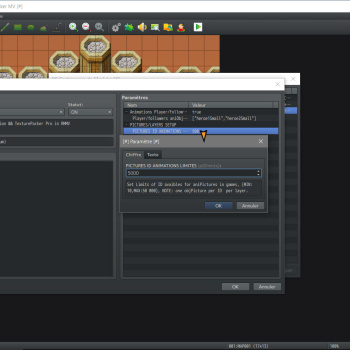
Set your image limit in sets.
min 10 and maximum 50,000, according to ems test this does not affect the performance, but, increases the Ram memory of the JS
At the start of the game, the plugin pre permanently builds all the elements in memory, this avoids being rebuilt at each scene or card change.
** plug1.2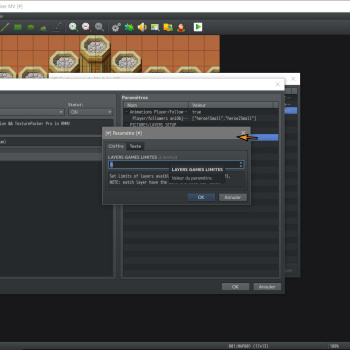
Now, indicate the number of layers you want for Picture.
I was inspired by the system in UNITY, for the moment we can not rename the layers.
But normally, in a logical context, you will define a layer group for the menu, for the text, for the images on the map.
I put the limit to 10 at the moment.
** plug1.3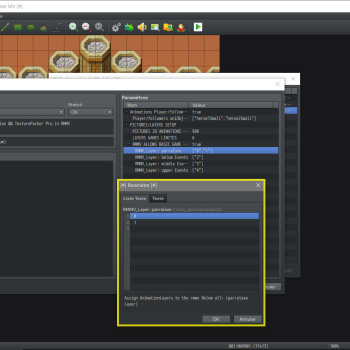
Now these optional, because by default, all the layers are injected into the rmmv TOP layers.
However, it is possible to assign layer to a specific layer of rpgMaker.
Thus, when you want to change layer an image for which hovers or is found under a picture.
It will also be possible to inject it into a layer of rmm.
It is sufficient in the list to indicate 1 or more layer that will be injected into the ShaderTilemap
Being a parallax mapper, I have to limit the choices reasonably a 4 layer in rmmv.
parallax, belowEvents, middleEvents, upperEvents
For the picture module, the creation of an object is limited only to this syntax in order to function.
We pass the loop: true property to also indicate that by default we want this motion to play in a loop.
Then in games, we just have to call the command script to create a copy of this object, and assign it to an id and a layer.
we finish with the .Play method and we indicate the name of the motion we want to play.
This animation will run in loop and will have no contexts to evaluate
It is also possible to assign a variable to retrieve it in your scope and play this simple animation in this way.
pixiSSA.createAniPicture var will return module animationControler_Pictures
It is also composed of a layer management (z-index) compatible also with the layers of rmmv in the ShaderTilemap.
Any faith note that I have developed this plugin for my personal needs, and that I am a parallax mapper and I do not use the graphical platform in any case rmmv.
The plugin therefore supports just the necessary, but ideally it is fully operational for the parallax mapper.
My priority was compatibilities with the Layers of the Vent, parallax and Picture.
However I also added support for rmmv drawing layers, but is optional.
In the settings of the pluginManager
** plug1.1
Set your image limit in sets.
min 10 and maximum 50,000, according to ems test this does not affect the performance, but, increases the Ram memory of the JS
At the start of the game, the plugin pre permanently builds all the elements in memory, this avoids being rebuilt at each scene or card change.
** plug1.2
Now, indicate the number of layers you want for Picture.
I was inspired by the system in UNITY, for the moment we can not rename the layers.
But normally, in a logical context, you will define a layer group for the menu, for the text, for the images on the map.
I put the limit to 10 at the moment.
** plug1.3
Now these optional, because by default, all the layers are injected into the rmmv TOP layers.
However, it is possible to assign layer to a specific layer of rpgMaker.
Thus, when you want to change layer an image for which hovers or is found under a picture.
It will also be possible to inject it into a layer of rmm.
It is sufficient in the list to indicate 1 or more layer that will be injected into the ShaderTilemap
Being a parallax mapper, I have to limit the choices reasonably a 4 layer in rmmv.
parallax, belowEvents, middleEvents, upperEvents
For the picture module, the creation of an object is limited only to this syntax in order to function.
PHP:
simpleLoopPicture1:{
    json:['spriteSheetsAni/sheets/multiPack/bobSpriteSheet1'],
    motionList:{
        motionLoop:{ref:'bob_idle1_',framesRange:[0,39],loop:true},
        },
},Then in games, we just have to call the command script to create a copy of this object, and assign it to an id and a layer.
PHP:
pixiSSA.createAniPicture(0,4,' simpleLoopPicture1').play(' motionLoop ');This animation will run in loop and will have no contexts to evaluate
It is also possible to assign a variable to retrieve it in your scope and play this simple animation in this way.
PHP:
var myVar = pixiSSA.createAniPicture(0,4,'bob');
myVar.play('idl1');This module will eventually replace the animation sheet of your hero and these 3 followers.
My project has only 2 follower, so I'm not pushing my test further with the plugin.
The player and fellower need to start with motionContext prepare in advance.
for the time being.
In your pluginManager
** plug1.4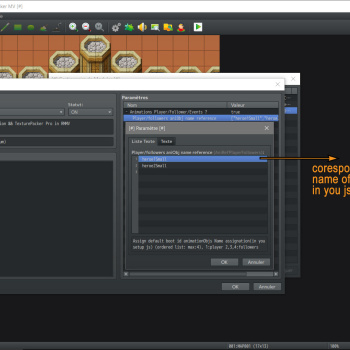
Insert in the list the names of the Object you want to assign to your character.
1: player, 2,3,4 fellower
Now, as for the Picture module, we duplicate a new Object.
The syntax remains the same, but this time we will add some additional information and property to run our character.
Our character in this demo is the one of my project.
My project is paper-type as in Mario Paper.
So only 2 possible direction, however we wish that when the character goes up or down, it plays an animation keeping the last direction valid.
We will see how to integrate the 8 direction depending on your project type.
** js1.3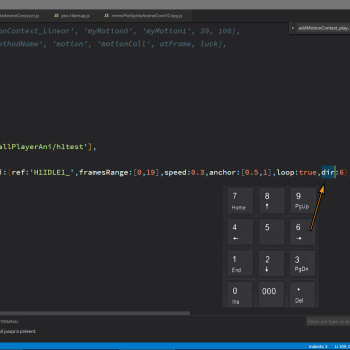
Here we have our valid animation which displays our character on the right.
We add the dir: 6 property which is required for the character module.
In rmmv the directions simply refer to your numPad.
** mod2.1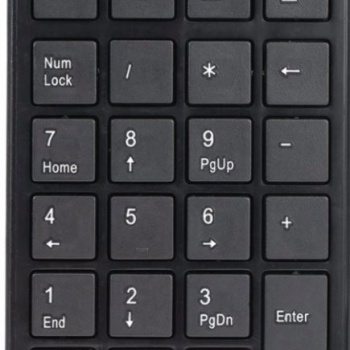
4: left, 6: right, 8: up, 2: down.
We must therefore assign the directions to our animation for our character.
For our example, we would have 4 direction, however it would be quite easy to add diagonal as well.
7,9,1,3
Our character has no animation texture on the left, we are all able to add a Scale property: [sX, sY] in order to invert these texture.
For the texture we simply assign it the same source of our file JSON.
When our character is left (4) and without movement, it will display the same texture as for idleRi, but reverse.
Be careful however if you want to use repositioning of the pivot, it will be necessary to assign the same for each animations.
This is a fast but restrictive method if you want to configure different pivots.
Now for the top (8) and bottom (2) directions, our character also has no texture when it does not move.
In the Object ref: it is quite possible to add a reference to another motion and this is conditional.
It is enough to pass an Object that points towards the motion wish.
But in our special case our character is a sheet of paper that can only look left or right.
So when the character will be motionless and will be in direction 8, it is instead passed an Object that contains the pointer.
the plugin will automatically evaluate the last valid direction.
A valid direction is automate calculate according to the type of animation inject into the plugin.
ex: here the plugin will understand that 8 and 2 can not be a valid direction, however 6 and 4 yes.
So when we press on 4,8,6,6,2, the last valid direction will be 6.
6,6,4,8,8,2, the last valid direction will be 4.
So if we press 8 and the last valid direction was 4, we want to play the idle motion if the character does not move.
Now add the remaining motions
Unlike our idle animation, our character will have special animations here when moving up or down and this depending on the directional contexts that will be added in motionContext.
Also reverse our textures to the left direction, because the character has only textures to the right.
Now add the motion contexts.
For Object assign to the Player module and follower, it is compulsory to add the motion contexts associated with the direction key as soon as the project starts.
this motion predefined contexts is addMotionContext_onMoved.
it is possible to modify it or to add it in playground, but it is obligatory to add 1 for each direction of the character
I will not go into detail, but the addMotionContext_onMoved is the only special context that is not saved in the update, for logical reason.
it will be called on demand only when a key is pressed.
All other motionContext are saved in onFrames update.
Here, at the moment when the character is moved, he will send a context of devaluation according to the animation that is in the rendering court.
When pressed a direction key, the character changes direction Pui evaluates onMoved.
So if we look at left (2), the character changes direction and becomes idle, then we ask for an evaluation of the road.
If possible we evaluate onMoved, which returns motion animation according to the key assign.
You will have understood that I thought the system to add an animation when the character changes direction.
We can finish by duplicating the integrals of this Object by taking care of changing the name by the one attribute to the follower.
And we logically change the reference of the motions and the parameters that we want to attribute to this follower.
My project has only 2 follower, so I'm not pushing my test further with the plugin.
The player and fellower need to start with motionContext prepare in advance.
for the time being.
In your pluginManager
** plug1.4
Insert in the list the names of the Object you want to assign to your character.
1: player, 2,3,4 fellower
Now, as for the Picture module, we duplicate a new Object.
The syntax remains the same, but this time we will add some additional information and property to run our character.
Our character in this demo is the one of my project.
My project is paper-type as in Mario Paper.
So only 2 possible direction, however we wish that when the character goes up or down, it plays an animation keeping the last direction valid.
We will see how to integrate the 8 direction depending on your project type.
** js1.3
Here we have our valid animation which displays our character on the right.
We add the dir: 6 property which is required for the character module.
In rmmv the directions simply refer to your numPad.
** mod2.1
4: left, 6: right, 8: up, 2: down.
We must therefore assign the directions to our animation for our character.
For our example, we would have 4 direction, however it would be quite easy to add diagonal as well.
7,9,1,3
PHP:
myPlayer1:{
    json:['testSmallPlayerAni/h1test'],
    motionList:{
            idl1Ri:{ref:'H1IDLE1_',framesRange:[0,19],speed:0.3,anchor:[0.5,1],loop:true,dir:6},
            idl1Le:{ref:'H1IDLE1_',framesRange:[0,19],scale:[-1,1],speed:0.3,anchor:[0.5,1],loop:true,dir:4},
        },
},For the texture we simply assign it the same source of our file JSON.
When our character is left (4) and without movement, it will display the same texture as for idleRi, but reverse.
Be careful however if you want to use repositioning of the pivot, it will be necessary to assign the same for each animations.
This is a fast but restrictive method if you want to configure different pivots.
Now for the top (8) and bottom (2) directions, our character also has no texture when it does not move.
In the Object ref: it is quite possible to add a reference to another motion and this is conditional.
PHP:
myPlayer1:{
    json:['testSmallPlayerAni/h1test'],
    motionList:{
            idl1Ri:{ref:'H1IDLE1_',framesRange:[0,19],speed:0.3,anchor:[0.5,1],loop:true,dir:6},
            idl1Le:{ref:'H1IDLE1_',framesRange:[0,19],scale:[-1,1],speed:0.3,anchor:[0.5,1],loop:true,dir:4},
            idlUp:{ref:{4:'idl1Le',6:'idl1Ri'},dir:8},
            idlDw:{ref:{4:'idl1Le',6:'idl1Ri'},dir:2},
        },
},But in our special case our character is a sheet of paper that can only look left or right.
So when the character will be motionless and will be in direction 8, it is instead passed an Object that contains the pointer.
the plugin will automatically evaluate the last valid direction.
A valid direction is automate calculate according to the type of animation inject into the plugin.
ex: here the plugin will understand that 8 and 2 can not be a valid direction, however 6 and 4 yes.
So when we press on 4,8,6,6,2, the last valid direction will be 6.
6,6,4,8,8,2, the last valid direction will be 4.
So if we press 8 and the last valid direction was 4, we want to play the idle motion if the character does not move.
Now add the remaining motions
PHP:
myPlayer1:{
    json:['testSmallPlayerAni/h1test'],
    motionList:{
            idl1Ri:{ref:'H1IDLE1_',framesRange:[0,19],speed:0.3,anchor:[0.5,1],loop:true,dir:6},
            idl1Le:{ref:'H1IDLE1_',framesRange:[0,19],scale:[-1,1],speed:0.3,anchor:[0.5,1],loop:true,dir:4},
            idlUp:{ref:{4:'idl1Le',6:'idl1Ri'},dir:8},
            idlDw:{ref:{4:'idl1Le',6:'idl1Ri'},dir:2},

            moveR1:{ref:'H1moveDG1_',framesRange:[0,49],anchor:[0.5,0.93]},
            moveL1:{ref:'H1moveDG1_',framesRange:[0,49],scale:[-1,1],anchor:[0.5,0.93]},
            moveUpR1:{ref:'H1moveUP_',framesRange:[0,49],anchor:[0.5,1]},
            moveDwL1:{ref:'H1moveDW_',framesRange:[0,49],anchor:[0.5,1]},
            moveUpG1:{ref:'H1moveUP_',framesRange:[0,49],scale:[-1,1],anchor:[0.5,1]},
            moveDwG1:{ref:'H1moveDW_',framesRange:[0,49],scale:[-1,1],anchor:[0.5,1]},
        },

},Also reverse our textures to the left direction, because the character has only textures to the right.
Now add the motion contexts.
For Object assign to the Player module and follower, it is compulsory to add the motion contexts associated with the direction key as soon as the project starts.
this motion predefined contexts is addMotionContext_onMoved.
it is possible to modify it or to add it in playground, but it is obligatory to add 1 for each direction of the character
PHP:
myPlayer1:{
    json:['testSmallPlayerAni/h1test'],
    motionList:{
            idl1Ri:{ref:'H1IDLE1_',framesRange:[0,19],speed:0.3,anchor:[0.5,1],loop:true,dir:6},
            idl1Le:{ref:'H1IDLE1_',framesRange:[0,19],scale:[-1,1],speed:0.3,anchor:[0.5,1],loop:true,dir:4},
            idlUp:{ref:{4:'idl1Le',6:'idl1Ri'},dir:8},
            idlDw:{ref:{4:'idl1Le',6:'idl1Ri'},dir:2},

            moveR1:{ref:'H1moveDG1_',framesRange:[0,49],anchor:[0.5,0.93]},
            moveL1:{ref:'H1moveDG1_',framesRange:[0,49],scale:[-1,1],anchor:[0.5,0.93]},
            moveUpR1:{ref:'H1moveUP_',framesRange:[0,49],anchor:[0.5,1]},
            moveDwR1:{ref:'H1moveDW_',framesRange:[0,49],anchor:[0.5,1]},
            moveUpL1:{ref:'H1moveUP_',framesRange:[0,49],scale:[-1,1],anchor:[0.5,1]},
            moveDwL1:{ref:'H1moveDW_',framesRange:[0,49],scale:[-1,1],anchor:[0.5,1]},
        },
        motionContexts:[
            ['addMotionContext_onMoved','idl1Le',{ 2:' moveDwL1', 4:' moveL1', 8:' moveUpL1', },100],
            ['addMotionContext_onMoved','idl1Ri',{ 2:' moveDwR1', 6:'moveR1', 8:' moveUpR1', },100],
        ],
},it will be called on demand only when a key is pressed.
All other motionContext are saved in onFrames update.
Here, at the moment when the character is moved, he will send a context of devaluation according to the animation that is in the rendering court.
When pressed a direction key, the character changes direction Pui evaluates onMoved.
So if we look at left (2), the character changes direction and becomes idle, then we ask for an evaluation of the road.
If possible we evaluate onMoved, which returns motion animation according to the key assign.
You will have understood that I thought the system to add an animation when the character changes direction.
We can finish by duplicating the integrals of this Object by taking care of changing the name by the one attribute to the follower.
And we logically change the reference of the motions and the parameters that we want to attribute to this follower.
This module makes it easy to add to the event animations of your Object create.
Animations are displayed only on the active map and it is also possible to add support for the move keys.
Just do as you did for the keys of your Player and follower.
In your editor, by opening an event.
Indicate in name that this is an animation event, and indicates the name of your Object in remark ..
This module is also compatible with all other Object created previously for the other module.
** plugm1.5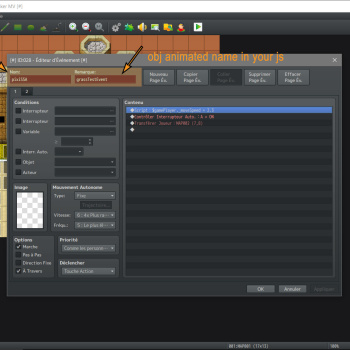
Now we need to create our new animation object in the js file.
Our turf animation will not contain management direction, so can import the direction of the vent, we will have that idle1 that will be rendered.
it is compulsory to have at least a motion with the dir: property, these also an indicator of the motion to play by default, at the time the map loads.
Here, this Object is already operational and it should display correctly on the vents that you have assigned this object name.
Add some additional motion to this obj. We want to create interactions with the characters and also the other vents.
Note that it is quite possible to create a motion but vice versa.
these a technique of reversing back animation which in most cases renders very well and saves memory.
it is enough simply to invert the frames in the frame range to invert the compiler, during the phase of the pixi loader of the textures.
Then add the contexts that will automatically apply to all the vents with this reference object.
We apply an 'addMotionContext_playerIn' to idl1, and again one faith, we can pass an object with direction, if we want the direction to be evaluated when this contexts will return true.
for the frame, here we want this contexts to evaluate itself to all the frames, so or can enter a boolean value at the places of a frame.
Then if this context is true, it has 100% to make one of the motions allocate through the steering key.
The next 2 boolean value simply indicates contexts that it must also calculate whether a follower is responding to these contexts or then also allow to calculate whether a vent responds to those contexts.
Then we add a linear contexts to all the end motions, so that a faith finish (frame 19), has 100% replay idl1.
The 'addMotionContext_playerOut' contexts can also take 2 boolean values to indicate whether this motion should act with followers or other vents.
Note also that we can pass arrays rather than strings, the plugin understands that it must apply these contexts and properties to all these motions.
Animations are displayed only on the active map and it is also possible to add support for the move keys.
Just do as you did for the keys of your Player and follower.
In your editor, by opening an event.
Indicate in name that this is an animation event, and indicates the name of your Object in remark ..
This module is also compatible with all other Object created previously for the other module.
** plugm1.5
Now we need to create our new animation object in the js file.
PHP:
grassTestEvent:{
    json:['spriteSheetsAni/sheets/singleFiles/grassV2'],
    motionList:{
        idl1:{ref:'idl1_',framesRange:[0,19],speed:0.32,anchor:[0.5,0.7],loop:true,dir:false},
    },
},it is compulsory to have at least a motion with the dir: property, these also an indicator of the motion to play by default, at the time the map loads.
Here, this Object is already operational and it should display correctly on the vents that you have assigned this object name.
Add some additional motion to this obj. We want to create interactions with the characters and also the other vents.
PHP:
grassTestEvent:{
    json:['spriteSheetsAni/sheets/singleFiles/grassV2'],
    motionList:{
        idl1:{ref:'idl1_',framesRange:[0,19],speed:0.32,anchor:[0.5,0.7],loop:true,dir:false},
        onFootD:{ref:'footD_',framesRange:[0,19],anchor:[0.5,0.7],loop:false},
        endFootD:{ref:'footD_',framesRange:[19,0],anchor:[0.5,0.7],loop:false},
        onFootG:{ref:'footG_',framesRange:[0,19],anchor:[0.5,0.7],loop:false,speed:0.35},
        endFootG:{ref:'footG_',framesRange:[19,0],anchor:[0.5,0.7],loop:false,speed:0.35},
        onFootUpDw:{ref:'grassUD_',framesRange:[0,19],anchor:[0.5,0.7],loop:false,speed:0.6},
        endFootUpDw:{ref:'grassUD_',framesRange:[19,0],anchor:[0.5,0.7],loop:false,speed:0.6},

    },
},these a technique of reversing back animation which in most cases renders very well and saves memory.
it is enough simply to invert the frames in the frame range to invert the compiler, during the phase of the pixi loader of the textures.
Then add the contexts that will automatically apply to all the vents with this reference object.
PHP:
grassTestEvent:{
    json:['spriteSheetsAni/sheets/singleFiles/grassV2'],
    motionList:{
        idl1:{ref:'idl1_',framesRange:[0,19],speed:0.32,anchor:[0.5,0.7],loop:true,dir:false},
        onFootD:{ref:'footD_',framesRange:[0,19],anchor:[0.5,0.7],loop:false},
        endFootD:{ref:'footD_',framesRange:[19,0],anchor:[0.5,0.7],loop:false},
        onFootG:{ref:'footG_',framesRange:[0,19],anchor:[0.5,0.7],loop:false,speed:0.35},
        endFootG:{ref:'footG_',framesRange:[19,0],anchor:[0.5,0.7],loop:false,speed:0.35},
        onFootUpDw:{ref:'grassUD_',framesRange:[0,19],anchor:[0.5,0.7],loop:false,speed:0.6},
        endFootUpDw:{ref:'grassUD_',framesRange:[19,0],anchor:[0.5,0.7],loop:false,speed:0.6},

    },
    motionContexts:[
        ['addMotionContext_playerIn','idl1',{4:'onFootG', 6:'onFootD',8:'onFootUpDw',2:'onFootUpDw'},true,100,true,true], // 1true:allframe, 2true:allowcolide wither follower 3true:eventColider
        ['addMotionContext_playerOut','onFootG','endFootG',true,100,true,true],
        ['addMotionContext_playerOut','onFootD','endFootD',true,100,true,true],
        ['addMotionContext_playerOut','onFootUpDw','endFootUpDw',true,100,true,true],
        ['addMotionContext_Linear',['endFootUpDw','endFootD','endFootG'],'idl1',19,100],

    ],
},for the frame, here we want this contexts to evaluate itself to all the frames, so or can enter a boolean value at the places of a frame.
Then if this context is true, it has 100% to make one of the motions allocate through the steering key.
The next 2 boolean value simply indicates contexts that it must also calculate whether a follower is responding to these contexts or then also allow to calculate whether a vent responds to those contexts.
Then we add a linear contexts to all the end motions, so that a faith finish (frame 19), has 100% replay idl1.
The 'addMotionContext_playerOut' contexts can also take 2 boolean values to indicate whether this motion should act with followers or other vents.
Note also that we can pass arrays rather than strings, the plugin understands that it must apply these contexts and properties to all these motions.
VIDEO PREVIEW AND HELP
DOWNLOAD:
version 1.0 (compress)
download
version 1.0 (unCompress dev)
download
Full DEMO 1.0 + (ALL Sources)
<span style="color: #b35900">note: dont use my grafic for your own project, its for study photoshop and afterEffect only.
download
note:
this plugin can not use in the basic rmmv combat system.
Features Mentioned
- Spoiler: showMe
- For the moment, the plugin allows the following functionality.
- Settings available in the pluginManager
- Activation / deactivation of a animation module
- Replace the hero and follower with an animated object
- Replace Events with Object animate and full support in the eventEditor.
- Addition of several motions in an animate Object
- Adds predefined or custom motionContext to make your animation live
- Preloading and caching at game start to optimize performance.
- Creating and managing infinite layer to easily manage the z-index like UNITY do.
- Context of direction that supports the directions if needed.
- easy search event animated with the new rmmv event name search in sofware
- note: all ID are use for picture Actor, Events
- SCRIPTCALL LISTS
- legend: green:finish yellow:available partially red:todo
- __________________________________________________________________________________________
- pixiSSA
- allow to global access to the plugin, also for initialise and create animated obj game.
Downloads / Referenced Files
RPG Maker Web attachments are mirrored locally when available. Other external links remain hosted by their original creator or third-party service.
License / Terms Note
credit (jonForum,dimisterjon) SpecialThanks: to codeandweb for free pro life licenses under M.I.T licence Required:
Referenced Images / Attachments
Creator Claims / Removal
If you are the original creator and want this listing reassigned, edited, or removed, join BMMPlay and contact the moderators with proof that matches the original RPG Maker Web profile, linked GitHub, itch.io page, or another public creator identity.
Replies (0)
No replies yet.
0
replies
25
views
Topic Summary
Loading summary...