


Tutorial + Demo: A building system in VX Ace - Strategy games and more!
BMM_Archive · July 15, 2026

Original Source
- Original title: Tutorial + Demo: A building system in VX Ace - Strategy games and more!
- Original author: CrazyCrab
- Original date: February 16, 2015
- Source thread: https://forums.rpgmakerweb.com/threads/tutorial-demo-a-building-system-in-vx-ace-strategy-games-and-more.36986/
- Source forum path: Game Development Engines > RPG Maker Tutorials > RMVXAce Tutorials
Summary
Hi everyone, It took me a bit to optimize and polish up this little engine, but in the end I thought ''why not'' and decided to share it with everyone. Even if you're not making a strategy game or anything like that, you may still find it useful for simple campsites or other things like that. Anyway, enough rambling, let me show you how to get from this...
Archived First Post
It took me a bit to optimize and polish up this little engine, but in the end I thought ''why not'' and decided to share it with everyone.
Even if you're not making a strategy game or anything like that, you may still find it useful for simple campsites or other things like that.
Anyway, enough rambling, let me show you how to get from this...
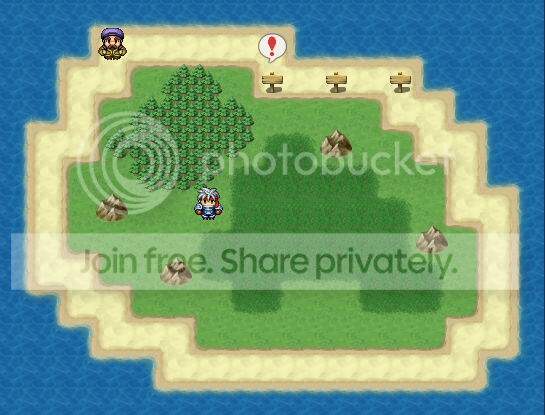
to this...
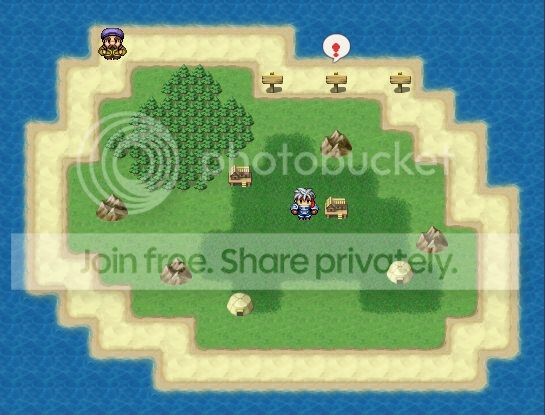
Please note that this ''engine'' uses Galv's Use Item on event Script - http://galvs-scripts.com/galvs-use-item-on-event/
and Hime's Custom Page Conditions Script - http://himeworks.com/2013/03/event-page-conditions/
They're not hard to use if you're afraid of scripting, don't worry. That said, please credit them accordingly!
Anyway, let's get started.
The Demo is filled with comments, so if you're unsure how it works please look there as well. If you're still unsure feel free to ask here or send me a PM.
This is a very basic guide on how to add a building. You should get the hang of it afterwards.
- Make sure that you have both scripts correctly installed and that they don't interfere with other things you may have.
- Create a common event that will occur when you use an item incorrectly, preferably use the 1st slot, otherwise change the ''no target'' under script setting in Galv's script. Use the demo's event as a base.
- Create an item, consumable, key, whatever. Just remember the item ID and whether it's key or not. You can use weapons and armor as well, please refer to Galv's script to learn how to do that.
- Create a common building event, whichever slot you prefer. Again, use the demo's setup as a guideline, it's really simple. Just make sure that the Conditional Branch: Script: key?(XXXXX) uses the item you've chosen! Also, don't forget to rename the self switch accordingly. (Gray Text)
- Create a parent ''space to build event''. Use the 1st page and to call the common building event, don't forget the <key> comment underneath. Then add pages to that event, each one having the custom page condition self switch that the item you used had. If you want the players to be able to interact with the building add a common event to that page.
Anyway, here's the dropbox link -https://www.dropbox.com/s/g0vctjgoaon3g3h/Tutorial%20-%20Building.exe?dl=0
Ah, and before I forget, since I didn't actually make the scripts or anything there's not need to credit me, just a thank you would be nice
Have fun! Hopefully this can be of some use to you and maybe I saved you some time as this took me quite a bit to figure it out.
Downloads / Referenced Files
Log in, then follow the RPG Maker Developers Group to see these download links.
Log in to downloadLicense / Terms Note
They're not hard to use if you're afraid of scripting, don't worry. That said, please credit them accordingly! Anyway, let's get started. The Demo is filled with comments, so if you're unsure how it works please look there as well. If you're still unsure feel free to ask here or send me a PM. This is a very basic guide on how to add a building. You should get the hang of it afterwards.
Referenced Images / Attachments
Creator Claims / Removal
If you are the original creator and want this listing reassigned, edited, or removed, join BMMPlay and contact the moderators with proof that matches the original RPG Maker Web profile, linked GitHub, itch.io page, or another public creator identity.


Replies (0)
No replies yet.
Topic Summary
Loading summary...
