

How to make a chasing monster (Like Ao Oni)
BMM_Archive · July 15, 2026

BMM_Archive
Preserved forum archive. This topic stores the original first post and locally mirrored RPG Maker Web attachments when available. It is posted by the BMMPlay archive account, not by the original creator.
Original Source
- Original title: How to make a chasing monster (Like Ao Oni)
- Original author: DestrikGamer
- Original date: September 9, 2014
- Source thread: https://forums.rpgmakerweb.com/threads/how-to-make-a-chasing-monster-like-ao-oni.31877/
- Source forum path: Game Development Engines > RPG Maker Tutorials > RMVXAce Tutorials
Summary
Hi there! I'm making a horror game and I noticed alot of people wanted to know how to make a monster that chases you through different maps and I came up with a way that worked for me. I hope you can use my system! NOTE: If you want a video tutorial click here! Switches and Variables
Archived First Post
Hi there!
I'm making a horror game and I noticed alot of people wanted to know how to make a monster that chases you through different maps and I came up with a way that worked for me. I hope you can use my system!
NOTE: If you want a video tutorial click here!
<span style="color: #696969">Switches and Variables
<span style="color: #000000">The first thing you need to do is make a few switches and variables.
Switches
<span style="color: #696969">Setting up your enemy
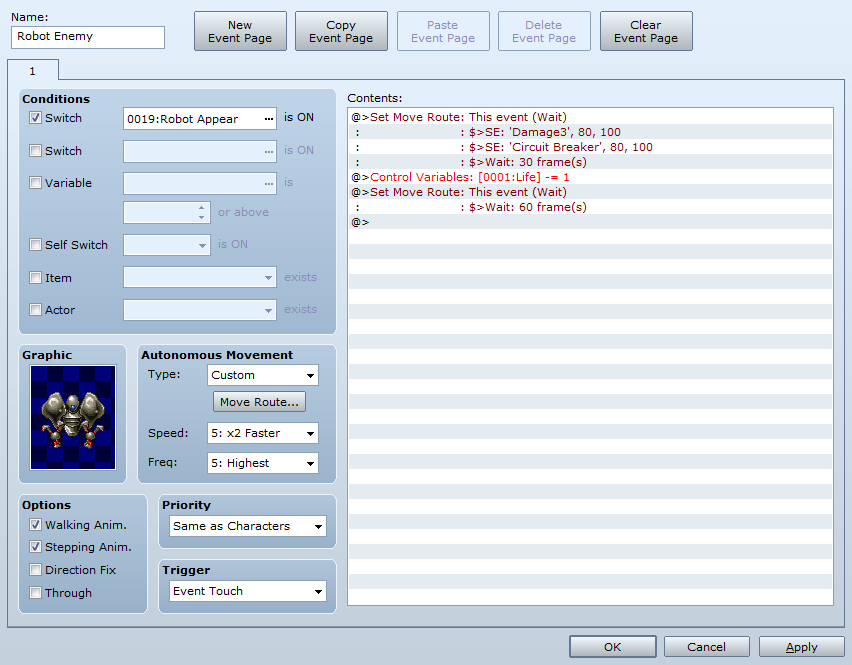
So your enemy event will look something like this

If you want the enemy to insta-kill just remove the last 2 lines and replace it with "Game Over"
My custom move route is:
"Move toward player"
"Move toward player"
"Move toward player"
"Move toward player"
"Move toward player"
"Move at random"
"Move toward player"
"Move toward player"
Of course settings such as speed move route and the event itself can be changed just make sure you have "Enemy Appear" as a switch.
Note: You must have the enemy pasted in EVERY MAP for this to work where doesn't matter
<span style="color: #696969">Setting up map transferring
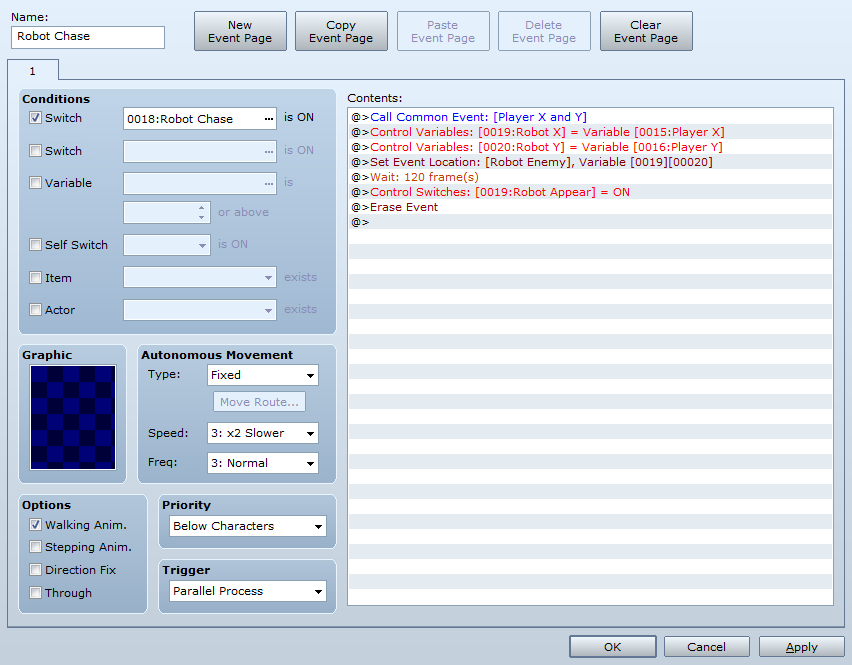
For your enemy to transfer maps you must have an event that looks like this

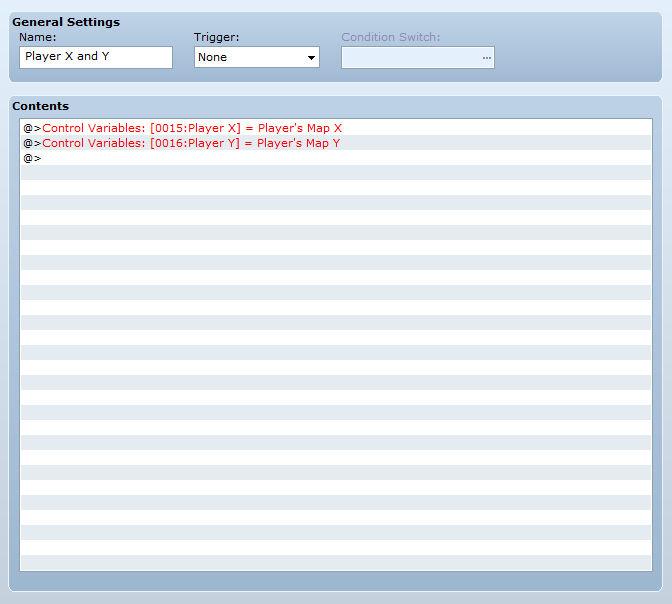
What the common event "Player X and Y" does is later in this post.
What "Wait [Number] Frame(s)" does is for example: When the player enters a new map after 2 seconds (120 frames) the enemy will appear.
Note: The set event location is "Set "Enemy" to Robot X, Robot Y"
Note: You must have this event pasted in EVERY MAP for this to work where doesn't matter
Common Events
You will need 2 common events:

Make sure the trigger is "None"!
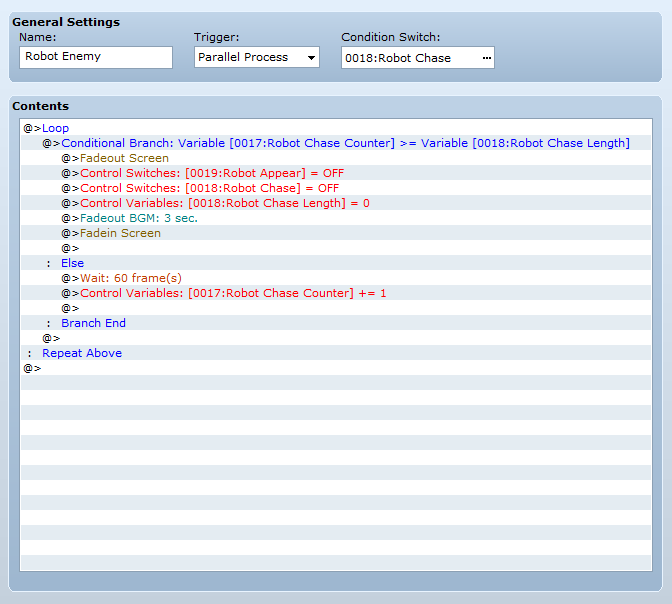
Now you need to make the Enemy common event what looks like this

This common event is basically a timer. If the time is up the monster disappears.
Now let's move on to the last event!
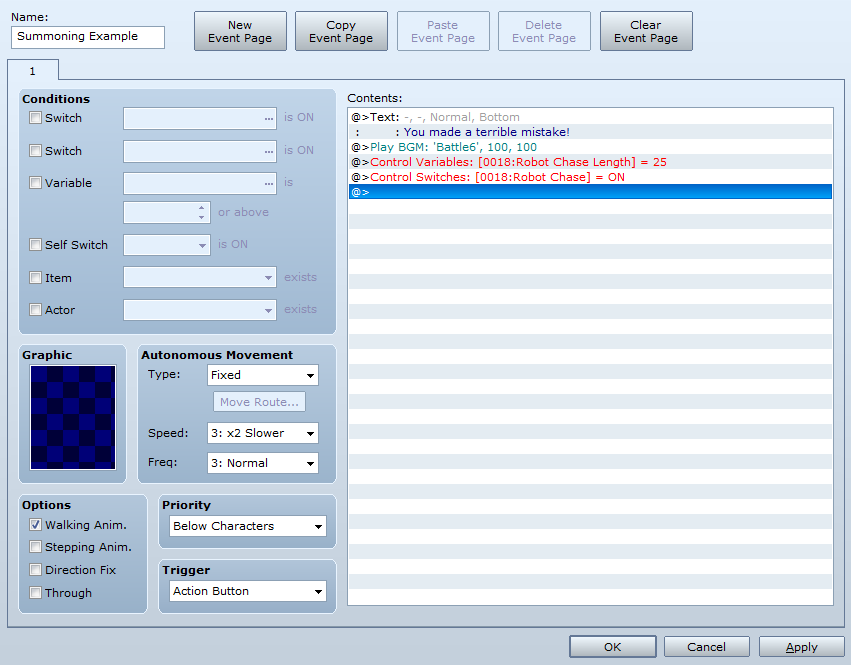
Summoning Enemy
Of course you need to summon your enemy! This event is only an example.

The "Enemy Chase Length" is how many seconds you want the enemy to chase you in this case 25.
The "Battle6" BGM is just an example for chase music that's why in the "Enemy Chase" common event there is "Fade out BGM"
Note: The "Enemy Chase Length" and "Enemy Chase = On" are required! The rest is optional!
I'm making a horror game and I noticed alot of people wanted to know how to make a monster that chases you through different maps and I came up with a way that worked for me. I hope you can use my system!
NOTE: If you want a video tutorial click here!
<span style="color: #696969">Switches and Variables
<span style="color: #000000">The first thing you need to do is make a few switches and variables.
Switches
- Enemy Chase
- Enemy Appear
- Player X
- Player Y
- Enemy X
- Enemy Y
- Enemy Chase Length
- Enemy Chase Counter
- (Optional) Life
<span style="color: #696969">Setting up your enemy
So your enemy event will look something like this
If you want the enemy to insta-kill just remove the last 2 lines and replace it with "Game Over"
My custom move route is:
"Move toward player"
"Move toward player"
"Move toward player"
"Move toward player"
"Move toward player"
"Move at random"
"Move toward player"
"Move toward player"
Of course settings such as speed move route and the event itself can be changed just make sure you have "Enemy Appear" as a switch.
Note: You must have the enemy pasted in EVERY MAP for this to work where doesn't matter
<span style="color: #696969">Setting up map transferring
For your enemy to transfer maps you must have an event that looks like this
What the common event "Player X and Y" does is later in this post.
What "Wait [Number] Frame(s)" does is for example: When the player enters a new map after 2 seconds (120 frames) the enemy will appear.
Note: The set event location is "Set "Enemy" to Robot X, Robot Y"
Note: You must have this event pasted in EVERY MAP for this to work where doesn't matter
Common Events
You will need 2 common events:
- Player X and Y
- Enemy
Make sure the trigger is "None"!
Now you need to make the Enemy common event what looks like this
This common event is basically a timer. If the time is up the monster disappears.
Now let's move on to the last event!
Summoning Enemy
Of course you need to summon your enemy! This event is only an example.
The "Enemy Chase Length" is how many seconds you want the enemy to chase you in this case 25.
The "Battle6" BGM is just an example for chase music that's why in the "Enemy Chase" common event there is "Fade out BGM"
Note: The "Enemy Chase Length" and "Enemy Chase = On" are required! The rest is optional!
Downloads / Referenced Files
RPG Maker Web attachments are mirrored locally when available. Other external links remain hosted by their original creator or third-party service.
- Local mirror: 7942-6767c7b4c59bc1238daa308da6e48d6e.png
SHA-256:6238a4497b01aec53555cac955a005465ea6c989909ff5a05c4052b10d1a5114
Original attachment URL: https://forums.rpgmakerweb.com/attachments/common-event-enemy-time-png.16408/ - Local mirror: 7943-086d6de847cc3d559af74882315dce1c.png
SHA-256:cae4e1f18057bc33a9e89933560c4d3ead60efe1c44ac223d26f1ea3f7c8f34b
Original attachment URL: https://forums.rpgmakerweb.com/attachments/common-event-player-x-and-y-png.16409/ - Local mirror: 7944-362034e4c182957db70969ef37e34201.png
SHA-256:c46bf2a7e2c20ce3bf6f7c701c32417e165fb5c7a50d1585fc0da1a84d2e929f
Original attachment URL: https://forums.rpgmakerweb.com/attachments/robot-chase-png.16410/ - Local mirror: 7945-a5551fc45cb578309c282e8746254d80.png
SHA-256:ee5d53cab4a80e2870694f15c05d1ef8e80f40d46cc5a81b561e52d1c8cbca83
Original attachment URL: https://forums.rpgmakerweb.com/attachments/robot-enemy-png.16411/ - Local mirror: 7946-5d2c4a520628fae01ce7468f38d21d59.png
SHA-256:310ed053c948cd24bbb119ae8022ef196792216be462090d819b71b1d73ec97c
Original attachment URL: https://forums.rpgmakerweb.com/attachments/summoning-example-png.16412/
Referenced Images / Attachments
Creator Claims / Removal
If you are the original creator and want this listing reassigned, edited, or removed, join BMMPlay and contact the moderators with proof that matches the original RPG Maker Web profile, linked GitHub, itch.io page, or another public creator identity.
Replies (0)
No replies yet.
0
replies
26
views
Topic Summary
Loading summary...