

Push/Pull Puzzle Tutorial
BMM_Archive · July 15, 2026

BMM_Archive
Preserved forum archive. This topic stores the original first post and locally mirrored RPG Maker Web attachments when available. It is posted by the BMMPlay archive account, not by the original creator.
Original Source
- Original title: Push/Pull Puzzle Tutorial
- Original author: A-Moonless-Night
- Original date: January 6, 2018
- Source thread: https://forums.rpgmakerweb.com/threads/push-pull-puzzle-tutorial.89479/
- Source forum path: Game Development Engines > RPG Maker Tutorials > RMVXAce Tutorials
Summary
Push/Pull Puzzle Tutorial By A-Moonless-Night Difficulty: Medium (this tutorial uses script calls) {
Archived First Post
Push/Pull Puzzle Tutorial
By A-Moonless-Night
Difficulty: Medium (this tutorial uses script calls)
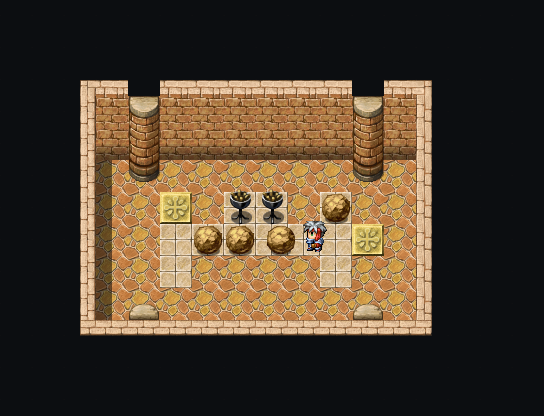
The purpose of this tutorial is to make a boulder that we can push and pull. There are far easier methods, but the mechanics of those are a little clunky, I feel, and I wanted to make a version that was similar to other games:By A-Moonless-Night
Difficulty: Medium (this tutorial uses script calls)
1. Press the action key to grab onto the boulder
2. Press the directional keys to push or pull the boulder
3. To release the boulder, press the action key again or turn away from the boulder
As an added bonus, this tutorial also includes:
1. How to create a region that you can’t push the objects onto
2. An external event to check the placement of your objects
3. Methods for resetting the puzzle
This tutorial includes some script calls in lieu of a multitude of variables and conditional branches, just to make things tidier. Copy the text as is and change the things I say to change and you should be fine.
COMPATIBILITY:
I’m not sure if this tutorial will work with pixel movement or 8-directional movement scripts.
This tutorial would only work with MV if you were to alter the script snippets so they speak Javascript, OR use a bunch of variables and conditional branches instead.
DEMO:
If you don't feel like reading big ol' wall o' text, download the demo here: https://www.dropbox.com/s/y8suj0g4bi7fgnc/Push Pull tutorial.exe?dl=0
I've tried to add comments in the events to show my workings.
CREDITS:
Feel free to credit me as A-Moonless-Night if you use this in your project, but it's not necessary.
You must credit Shaz if you use her Remember Event Position script.
TOOLS:
I’m not sure if this tutorial will work with pixel movement or 8-directional movement scripts.
This tutorial would only work with MV if you were to alter the script snippets so they speak Javascript, OR use a bunch of variables and conditional branches instead.
DEMO:
If you don't feel like reading big ol' wall o' text, download the demo here: https://www.dropbox.com/s/y8suj0g4bi7fgnc/Push Pull tutorial.exe?dl=0
I've tried to add comments in the events to show my workings.
CREDITS:
Feel free to credit me as A-Moonless-Night if you use this in your project, but it's not necessary.
You must credit Shaz if you use her Remember Event Position script.
TOOLS:
SCRIPTS:
- Remember Event Position by Shaz
Get it here: https://forums.rpgmakerweb.com/index.php?threads/remember-event-position.1853/
GRAPHICS: (Optional)
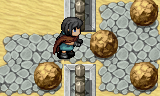
- A character set of your character pushing/pulling
VARIABLES:
- Variable 0003: Puzzle X (optional)
- Variable 0004: Puzzle Y (optional)
- Variable 0005: Region ID (optional)
- Variable 0006: Player Direction
REGIONS: (optional)
- Region ID 54: Our ‘no-go’ Region
- Region ID 20: Region for Event 1 to go onto to complete puzzle
- Region ID 21: Region for Event 2 to go onto to complete puzzle
AUDIO / SE:
- Buzzer sound (I use “Push”, 90 vol, 130 pitch)
- Pushing sound (I use “Push”, 80 vol, 100 pitch)
- Pulling sound (I use “Earth4”, 75 vol, 100 pitch)
- Switch sound (I use “Switch3”, 80 vol, 100 pitch) (optional)
Setting up the Puzzle Area (optional)
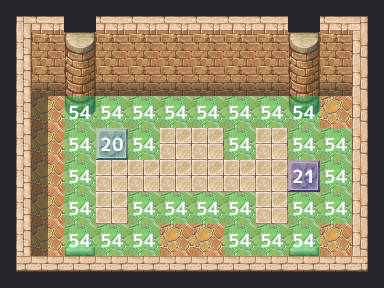
Create your map, and then your puzzle area. I like to use a different ground tile to show the areas where the objects can move, but that’s up to you. I also like to use one of the ‘symbol’ tiles to show the places where special objects should move onto to complete the puzzle.
Once you’ve done that, use the Region Editor tool to paint the outside of the puzzle area with your no-go Region. In this tutorial, this will be Region 54, which I chose just because it’s less likely to be used for scripts and things, from what I’ve seen.
If you’ve got an area that special objects should move onto to complete the puzzle, go ahead and paint those with differing Region IDs. I’ve used 20 for one and 21 for the other.
Pushable Object/Boulder
For the sake of this tutorial, I’m going to describe the pushable object as a boulder, but you can use any object/graphic that you like—whatever is relevant to you and your game. I will also include instructions for pushable objects that shouldn’t have a walking animation or should have a fixed direction, such as statues or braziers, and I’ll refer to those as fixed direction objects.
First, we’re going to create an event, choose a graphic and give it a name. If it’s a moveable boulder, I’d name it Boulder and find a nice boulder graphic (there are boulders in the ‘!Other1’ character set).
First, we’re going to create an event, choose a graphic and give it a name. If it’s a moveable boulder, I’d name it Boulder and find a nice boulder graphic (there are boulders in the ‘!Other1’ character set).
Page 1:
Page 2:
Page 3: The ‘Pushing’ Page
Page 4: The ‘Pulling’ Page
Page 5: (Optional)
This page doesn’t need any conditions, so leave those. Tick the ‘Walking Anim.’ and ‘Direction Fix’ boxes. This is so that the boulder doesn’t turn to face us when we click on it.
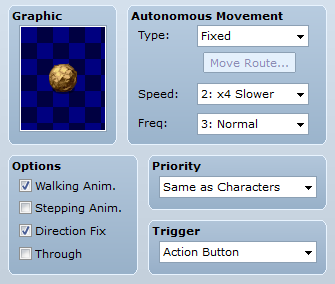
Set the trigger to Action Button and set the Speed to 2 and the Frequency to 3. This is because we want the boulder to move slowly, like we’re dragging it. Priority should be Same as Characters.
For this page, we want to simply set Self Switch A to be on and then change the Actor’s graphic to a pushing graphic (optional)—alternatively, you can do Set Move Route> Player> Stepping Anim On. This is so the player has a visual cue that the pushing/pulling mechanic is ready.
Set the trigger to Action Button and set the Speed to 2 and the Frequency to 3. This is because we want the boulder to move slowly, like we’re dragging it. Priority should be Same as Characters.
For this page, we want to simply set Self Switch A to be on and then change the Actor’s graphic to a pushing graphic (optional)—alternatively, you can do Set Move Route> Player> Stepping Anim On. This is so the player has a visual cue that the pushing/pulling mechanic is ready.
Code:
Page 1:

CONDITION: nil
OPTIONS: Walking Anim ON, Direction Fix ON
TRIGGER: Action Button
SPEED: 2: 4x slower
FREQ: 3: Normal
@> Control Self Switch: A =ON
@> Change Actor Graphic [pushing graphic] |OR| Set Move Route: Player (Wait) Stepping Anim ON
Page 2:
Copy Event Page and then Paste Event Page (for convenience’s sake).
First, we need to change the Trigger to Autorun and set the Condition to Self Switch A is ON. Delete the contents of the page.
We’re going to make a Conditional Branch to check whether the player is pressing the action key/C button (which is space/enter/Z on your keyboard). Now, we could just go Conditional Branch > Button > C is Being Pressed, but I prefer to use this little script instead:
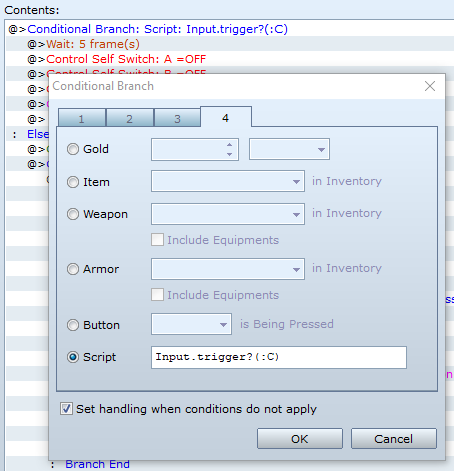
This checks if the button has been tapped, rather than pushed and held. So, on tab 4 of the Conditional Branch window, select Script and type that in. Tick ‘Set handling when conditions do not apply’.
Inside our Conditional Branch, we want to make a short wait of 5 frames, and then turn Self Switch A, B and C OFF. We also want to change our Actor Graphic back to its usual graphic (or set the Player Stepping Anim OFF).
Now, inside our Else branch for that Conditional Branch, we want to make a set of Conditional Branches that check the direction the Player is facing, and then check which buttons are being pressed.
We will need one Conditional Branch per direction, with Else off, and then some Conditional Branches nested inside each other that check the matching, opposite and other directions.
For example, if the Player was facing Down, we would check if the Down Button was being pressed, and then in the Else branch check if the Up Button was being pressed, and then in that Else branch we would check whether the Left OR Right Buttons were being pressed.
The easiest way to check multiple directions at once is to use the following script call in a Conditional Branch:
The || means OR in Ruby. To check Up or Down, you would replace the words inside the parentheses with :UP and OWN . You could also use two more Conditional Branches nested inside each other, but this seemed tidier and kills two birds with one stone.
Inside our matching direction Conditional Branch, we want to set the Self Switch B to ON. This is going to be our ‘pushing’ page (but more on that later).
Inside our opposite direction Conditional Branch, we want to set Self Switch C to ON—this will be our ‘pulling’ page.
In the other directions Conditional Branch, we want to do the same as the first Conditional Branch for pressing the action key (wait 5 frames, turn Self Switch A, B and C OFF, and change our Actor Graphic to its usual graphic/set the Player Stepping Anim OFF).
Do this for each direction. I also put a comment at the top of each Conditional Branch saying what direction it’s for, just to remind myself.
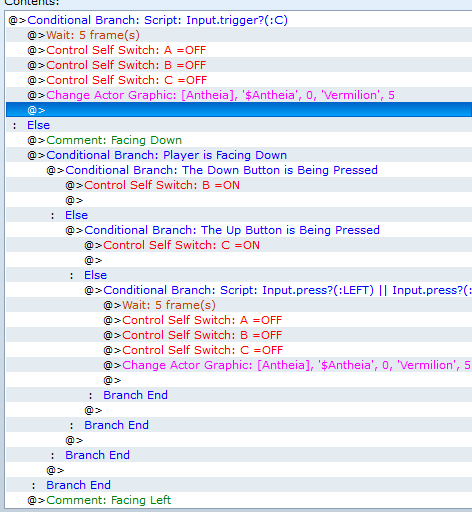
First, we need to change the Trigger to Autorun and set the Condition to Self Switch A is ON. Delete the contents of the page.
We’re going to make a Conditional Branch to check whether the player is pressing the action key/C button (which is space/enter/Z on your keyboard). Now, we could just go Conditional Branch > Button > C is Being Pressed, but I prefer to use this little script instead:
Code:
Input.trigger?(:C)This checks if the button has been tapped, rather than pushed and held. So, on tab 4 of the Conditional Branch window, select Script and type that in. Tick ‘Set handling when conditions do not apply’.
Inside our Conditional Branch, we want to make a short wait of 5 frames, and then turn Self Switch A, B and C OFF. We also want to change our Actor Graphic back to its usual graphic (or set the Player Stepping Anim OFF).
Now, inside our Else branch for that Conditional Branch, we want to make a set of Conditional Branches that check the direction the Player is facing, and then check which buttons are being pressed.
We will need one Conditional Branch per direction, with Else off, and then some Conditional Branches nested inside each other that check the matching, opposite and other directions.
For example, if the Player was facing Down, we would check if the Down Button was being pressed, and then in the Else branch check if the Up Button was being pressed, and then in that Else branch we would check whether the Left OR Right Buttons were being pressed.
The easiest way to check multiple directions at once is to use the following script call in a Conditional Branch:
Code:
Input.press?(:LEFT) || Input.press?(:RIGHT)The || means OR in Ruby. To check Up or Down, you would replace the words inside the parentheses with :UP and OWN . You could also use two more Conditional Branches nested inside each other, but this seemed tidier and kills two birds with one stone.
Inside our matching direction Conditional Branch, we want to set the Self Switch B to ON. This is going to be our ‘pushing’ page (but more on that later).
Inside our opposite direction Conditional Branch, we want to set Self Switch C to ON—this will be our ‘pulling’ page.
In the other directions Conditional Branch, we want to do the same as the first Conditional Branch for pressing the action key (wait 5 frames, turn Self Switch A, B and C OFF, and change our Actor Graphic to its usual graphic/set the Player Stepping Anim OFF).
Do this for each direction. I also put a comment at the top of each Conditional Branch saying what direction it’s for, just to remind myself.
Code:
Page 2:

CONDITION: Self Switch A =ON
OPTIONS: Walking Anim ON, Direction Fix ON
TRIGGER: Autorun
SPEED: 2: 4x slower
FREQ: 3: Normal
@> Conditional Branch: Script: Input.trigger?(:C)
    @> Wait: 5 frames
    @> Control Self Switch: A =OFF
    @> Control Self Switch: B =OFF
    @> Control Self Switch: C =OFF
    @> Change Actor Graphic: [normal] |OR| Set Move Route: Player (Wait) Stepping Anim OFF
    @>
: Else
    @> Conditional Branch: Player is Facing Down
        @> Conditional Branch: The Down Button is Being Pressed
            @> Control Self Switch: B =ON
        : Else
@> Conditional Branch: The Up Button is Being Pressed
                @> Control Self Switch: C =ON
            : Else
                @> Conditional Branch: Script: Input.press?(:LEFT) ||
Input.press?(:RIGHT)
                    @> Wait: 5 frames
                    @> Control Self Switch: A =OFF
                    @> Control Self Switch: B =OFF
                    @> Control Self Switch: C =OFF
                    @> Change Actor Graphic: [normal] |OR| Set Move Route: Player (Wait) Stepping Anim OFF
                    @>
                    Branch End
                @>
                Branch End
            @>
            Branch End
        @>
        Branch End
@> Conditional Branch: Player is Facing Left
        @> Conditional Branch: The Left Button is Being Pressed
            @> Control Self Switch: B =ON
        : Else
@> Conditional Branch: The Right Button is Being Pressed
                @> Control Self Switch: C =ON
            : Else
                @> Conditional Branch: Script: Input.press?(:UP) || Input.press?(:DOWN)
                    @> Wait: 5 frames
                    @> Control Self Switch: A =OFF
                    @> Control Self Switch: B =OFF
                    @> Control Self Switch: C =OFF
                    @> Change Actor Graphic: [normal] |OR| Set Move Route: Player (Wait) Stepping Anim OFF
                    @>
                    Branch End
                @>
                Branch End
            @>
            Branch End
        @>
        Branch End
@> Conditional Branch: Player is Facing Right
        @> Conditional Branch: The Right Button is Being Pressed
            @> Control Self Switch: B =ON
        : Else
@> Conditional Branch: The Left Button is Being Pressed
                @> Control Self Switch: C =ON
            : Else
                @> Conditional Branch: Script: Input.press?(:UP) || Input.press?(:DOWN)
                    @> Wait: 5 frames
                    @> Control Self Switch: A =OFF
                    @> Control Self Switch: B =OFF
                    @> Control Self Switch: C =OFF
                    @> Change Actor Graphic: [normal] |OR| Set Move Route: Player (Wait) Stepping Anim OFF
                    @>
                    Branch End
                @>
                Branch End
            @>
            Branch End
        @>
        Branch End
@> Conditional Branch: Player is Facing Up
        @> Conditional Branch: The Up Button is Being Pressed
            @> Control Self Switch: B =ON
        : Else
@> Conditional Branch: The Down Button is Being Pressed
                @> Control Self Switch: C =ON
            : Else
                @> Conditional Branch: Script: Input.press?(:LEFT) || Input.press?(:RIGHT)
                    @> Wait: 5 frames
                    @> Control Self Switch: A =OFF
                    @> Control Self Switch: B =OFF
                    @> Control Self Switch: C =OFF
                    @> Change Actor Graphic: [normal] |OR| Set Move Route: Player (Wait) Stepping Anim OFF
                    @>
                    Branch End
                @>
                Branch End
            @>
            Branch End
        @>
        Branch End
Page 3: The ‘Pushing’ Page
Hopefully you all are still with me! Now, let’s Copy Page 2 and then Paste Event Page. We want the Condition to be Self Switch B =ON and we want to turn Direction Fix off (unless you have a fixed object that shouldn’t turn, such as a statue). This will be our ‘pushing’ page.
For this page, we also want a Conditional Branch that checks if the action key is being pressed and turns off those same self switches, so you can just leave the one there from the previous page (provided that you copied and pasted that page). Delete the other branches.
For this page, we also want a Conditional Branch that checks if the action key is being pressed and turns off those same self switches, so you can just leave the one there from the previous page (provided that you copied and pasted that page). Delete the other branches.
This next part is if you want to have a region that the boulder cannot go onto, so just ignore this if you don’t want it.
Inside the Else branch, control Variable 3 (Puzzle X) so that it’s equal to this event’s Map X. Set the operation to Set and then select Game Data > Character > This event’s Map X. OR go to Script and enter in the following code:
You can do either; they do the same thing. Next, control Variable 4 (Puzzle Y) and set it to this event’s Map Y by either going Game Data > Character > This event’s Map Y, OR use the code above, but replace the x with y.
Now, since we’re going to be pushing the boulder, we want to check what the Region ID is for the tile behind the boulder. There’s not really any elegant way to do this, so we’re going to use a script call to check the player’s direction and then alter either the X or Y coordinates accordingly. We’ve stored those in the variables above to make it easier. Select Script Call and enter the following code:
I’ve used little comments in the script call (since I had space) to remind me which number equals which direction:
Next, we want to use Get Location Info (which is on the third tab of Event Commands underneath ‘Map’—I struggled to find it because I hadn’t used it before!) and we’re going to use this to get the Region ID from those Variables we set earlier.
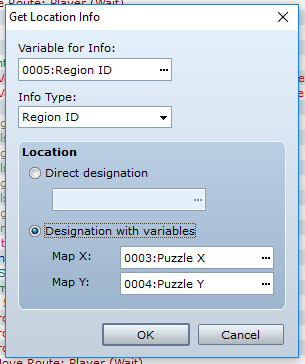
Under ‘Variable for Info’, choose Variable 5 (Region ID), and under ‘Info Type’, select Region ID. Select ‘Designation with variables’ and then put Variable 3 by Map X and Variable 4 by Map Y.
Create a Conditional Branch that checks if Variable 5 (Region ID) is equal to 54, which is the region I’ve chosen to be impassable for boulder events. Inside this Conditional Branch, we want to play our buzzer sound effect to show that the boulder can’t move, and then we want to wait 5 frames, turn Self Switch A, B and C OFF, and change our Actor Graphic to its usual graphic/set the Player Stepping Anim OFF.
Inside the Else branch of that Conditional Branch (or inside the Else branch of C Button Conditional Branch, if you didn’t want to use the Region ID gimmick), we’re going to make yet ANOTHER Conditional Branch (this tutorial involves a lot of checks, believe me), this time with a script call:
To break it down, the script call looks like this:
and asks if a tile is passable for EVID (event ID) at X and Y coordinates from Direction. You replace the EVID, X, Y and D with the relevant info. We put ! at the start of the script call so that it now asks whether a tile is NOT passable.
Now, inside this branch, much like the previous branch, we want to play our buzzer sound, wait 5 frames, turn Self Switch A, B and C OFF, and change our Actor Graphic to its usual graphic/set the Player Stepping Anim OFF.
In the Else branch, we want to play our pushing sound effect, and then we want to make the event move away from the player and the player step toward the event. This will make it seem like the player is pushing the boulder.
Then we need to use the following script call to make it so that the boulder will remember this position next time we load the map:
Make sure you have Shaz’s Remember Event Position script in your project, otherwise this will throw an error.
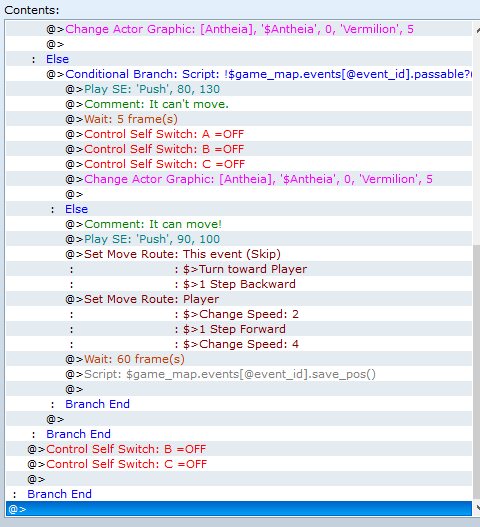
Then, at the end of all of those branches, bar the one for the C button, we want to turn Self Switches B and C off.
Inside the Else branch, control Variable 3 (Puzzle X) so that it’s equal to this event’s Map X. Set the operation to Set and then select Game Data > Character > This event’s Map X. OR go to Script and enter in the following code:
Code:
$game_map.events[event_id].xYou can do either; they do the same thing. Next, control Variable 4 (Puzzle Y) and set it to this event’s Map Y by either going Game Data > Character > This event’s Map Y, OR use the code above, but replace the x with y.
Now, since we’re going to be pushing the boulder, we want to check what the Region ID is for the tile behind the boulder. There’s not really any elegant way to do this, so we’re going to use a script call to check the player’s direction and then alter either the X or Y coordinates accordingly. We’ve stored those in the variables above to make it easier. Select Script Call and enter the following code:
Code:
I’ve used little comments in the script call (since I had space) to remind me which number equals which direction:
- Down is 2
- Left is 4
- Right is 6
- Up is 8.
If you click the top left-hand corner of your map, you’ll see the coordinates in the bottom right-hand corner are 000,000. Now, click each tile down along the left margin. As you click each tile, you’ll see the coordinates change to 000,001, and then 000,002, etc. This is the Y coordinate.
Go back to the top-left corner and this time, click along to the right along the top margin. Like before, you’ll see the numbers change, but this time it’ll be the X coordinate: 001,000, then 002,000, 003,000, etc.
Basically, we’re either adding or subtracting from the relevant coordinate to locate the tile directly behind the event.
Of course, we could use a bunch of Conditional Branches for this, but since they’re pretty simple checks (in my opinion), it’s a lot easier to just do a script call. The IF and ELSIF and ELSE statements function the same as a bunch of nested Conditional Branches.
Go back to the top-left corner and this time, click along to the right along the top margin. Like before, you’ll see the numbers change, but this time it’ll be the X coordinate: 001,000, then 002,000, 003,000, etc.
Basically, we’re either adding or subtracting from the relevant coordinate to locate the tile directly behind the event.
Of course, we could use a bunch of Conditional Branches for this, but since they’re pretty simple checks (in my opinion), it’s a lot easier to just do a script call. The IF and ELSIF and ELSE statements function the same as a bunch of nested Conditional Branches.
Next, we want to use Get Location Info (which is on the third tab of Event Commands underneath ‘Map’—I struggled to find it because I hadn’t used it before!) and we’re going to use this to get the Region ID from those Variables we set earlier.
Under ‘Variable for Info’, choose Variable 5 (Region ID), and under ‘Info Type’, select Region ID. Select ‘Designation with variables’ and then put Variable 3 by Map X and Variable 4 by Map Y.
Create a Conditional Branch that checks if Variable 5 (Region ID) is equal to 54, which is the region I’ve chosen to be impassable for boulder events. Inside this Conditional Branch, we want to play our buzzer sound effect to show that the boulder can’t move, and then we want to wait 5 frames, turn Self Switch A, B and C OFF, and change our Actor Graphic to its usual graphic/set the Player Stepping Anim OFF.
Inside the Else branch of that Conditional Branch (or inside the Else branch of C Button Conditional Branch, if you didn’t want to use the Region ID gimmick), we’re going to make yet ANOTHER Conditional Branch (this tutorial involves a lot of checks, believe me), this time with a script call:
Code:
!$game_map.events[@event_id].passable?($game_map.events[@event_id].x, $game_map.events[@event_id].y, $game_player.direction)To break it down, the script call looks like this:
Code:
$game_map.events[EVID].passable?(X, Y, D)and asks if a tile is passable for EVID (event ID) at X and Y coordinates from Direction. You replace the EVID, X, Y and D with the relevant info. We put ! at the start of the script call so that it now asks whether a tile is NOT passable.
Now, inside this branch, much like the previous branch, we want to play our buzzer sound, wait 5 frames, turn Self Switch A, B and C OFF, and change our Actor Graphic to its usual graphic/set the Player Stepping Anim OFF.
In the Else branch, we want to play our pushing sound effect, and then we want to make the event move away from the player and the player step toward the event. This will make it seem like the player is pushing the boulder.
If you have a fixed direction object, such as a statue, then make four separate Conditional Branches for each direction the player is facing, and then set a different move route inside each one. For example, if the player was facing down, you would make the statue move down, and if the player was facing left, you make the statue move left, etc. After those Conditional Branches, then do the move route for the player.
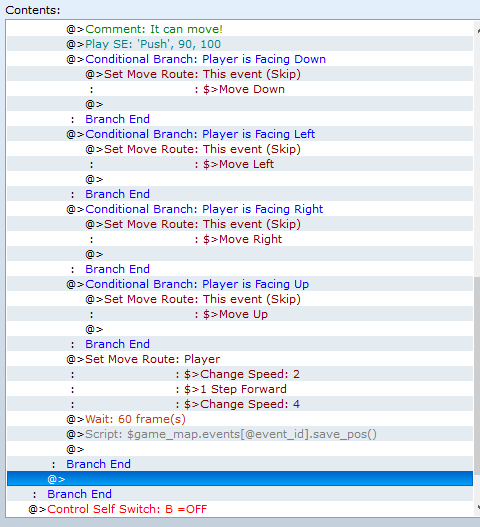
Then we need to use the following script call to make it so that the boulder will remember this position next time we load the map:
Code:
$game_map.events[@event_id].save_pos()Then, at the end of all of those branches, bar the one for the C button, we want to turn Self Switches B and C off.
Code:
Page 3:

CONDITION: Self Switch B =ON
OPTIONS: Walking Anim ON
TRIGGER: Autorun
@> Conditional Branch: Script: Input.trigger?(:C)
    @> Wait: 5 frames
    @> Control Self Switch: A =OFF
    @> Control Self Switch: B =OFF
    @> Control Self Switch: C =OFF
    @> Change Actor Graphic: [normal] |OR| Set Move Route: Player (Wait) Stepping Anim OFF    @>
: Else
    @> Control Variables: [0003: Puzzle X] = $game_map.events[event_id].x
@> Control Variables: [0004: Puzzle Y] = $game_map.events[event_id].y
@> Script: if $game_player.direction == 2 #down
$game_variables[4] += 1
elsif $game_player.direction == 4 #left
$game_variables[3] -= 1
elsif $game_player.direction == 6 #right
$game_variables[3] += 1
else #up
$game_variables[4] -= 1
end
@> Get Location Info: (VAR)[0005], Region ID, Variable [0003][0004]
@> Conditional Branch: Variable [0005: Puzzle Region ID] == 54
@> Play SE: [buzzer sound]
        @> Wait: 5 frames
        @> Control Self Switch: A =OFF
        @> Control Self Switch: B =OFF
        @> Control Self Switch: C =OFF
        @> Change Actor Graphic: [normal] |OR| Set Move Route: Player (Wait) Stepping Anim OFF
        @>
    : Else
@> Conditional Branch: Script: !$game_map.events[@event_id].passable?($game_map.events[@event_id].x, $game_map.events[@event_id].y, $game_player.direction)
        @> Play SE: [buzzer sound]
            @> Wait: 5 frames
            @> Control Self Switch: A =OFF
            @> Control Self Switch: B =OFF
            @> Control Self Switch: C =OFF
            @> Change Actor Graphic: [normal] |OR| Set Move Route: Player (Wait) Stepping Anim OFF            @>
        : Else
            @> Play SE: [pushing sound]
            @> Set Move Route: This event (skip)
                $> Turn toward Player
                $> 1 Step Backward
            @> Set Move Route: Player
                $> Change Speed: 2
                $> 1 Step Forward
                $> Change Speed: 4
            @> Wait: 60 frames
@> Script: $game_map.events[@event_id].save_pos()
            @>
            Branch End
        @>
        Branch End
    @> Control Self Switch: B =OFF
    @> Control Self Switch: C =OFF
@>
Page 4: The ‘Pulling’ Page
Now it’s time for our ‘pulling’ page. Copy Page 3 and then Paste Event Page. We want the Condition to be Self Switch C =ON.
Keep the Conditional Branch that checks for the action button being pressed, as well as the processes there (turning the self switches off and changing the actor graphic/stepping animation). Delete everything in the Else branch.
Keep the Conditional Branch that checks for the action button being pressed, as well as the processes there (turning the self switches off and changing the actor graphic/stepping animation). Delete everything in the Else branch.
Once again, this next part is for the region ID check, so skip it if you don’t want it.
We want to make a Conditional Branch and use the following script call:
This checks if the player’s region ID is NOT equal to 54, our impassable region. We use this check because the tile the boulder will end up on is the one underneath the player, since we’re pulling the boulder toward us.
Skip the above if you don’t want to use the Regions.
Now we need to check if the player can actually move onto the tile behind them, and we will do this by figuring out which direction the player is facing and setting a variable to the opposite of that. To do this, we want to use a script call:
Basically, if we’re facing Down (aka direction 2), we want to set the variable (Variable 6, Player Direction) to the opposite, which is Up (aka Direction 8), and then we do this check for each direction. Once again, this can be achieved with conditional branches, but I think this is easier.
Next, we want to do another Conditional Branch with a script call, this time to check if the tile the player will move onto is NOT passable. This is kind of like the check we did for the event in the pushing page, except using the player instead:
Let’s break it down: the script call is
and checks if the tile at X and Y coordinates is passable for the player from Direction. We put ! at the start to check if it is NOT passable, and then use the player’s current coordinates for X and Y, and then we use Variable 6 for the Direction—this variable is the one that we just loaded the opposite of the player’s current direction into.
Still with me? Inside this Conditional Branch, we want to play our buzzer sound, wait 5 frames, turn Self Switch A, B and C OFF, and change our Actor Graphic to its usual graphic/set the Player Stepping Anim OFF.
In the Else branch, we want to play our pulling sound effect, and then make the player take one step backward (with direction fix on). We make a wait of 5 frames, and then we make the boulder turn toward the player and take one step forward (with through on and direction fix on). Then wait 65 frames.
Then, like with our pushing page, we need to use this script call to make it so that the boulder will remember this position next time we load the map:
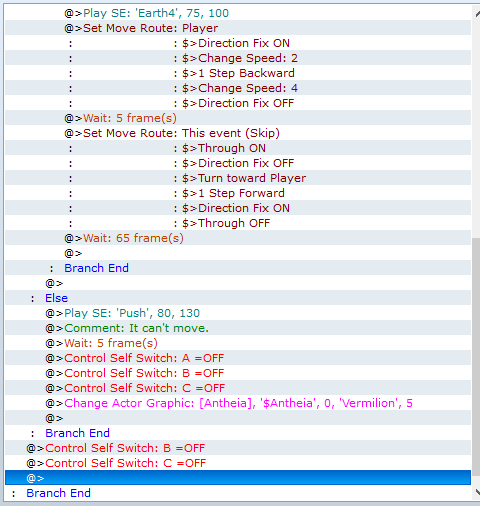
Now, we should have reached the Else branch of our previous Conditional Branch. In this one, play our buzzer sound, wait 5 frames, turn Self Switch A, B and C OFF, and change our Actor Graphic to its usual graphic/set the Player Stepping Anim OFF.
Then, at the end of all of those branches, bar the one for the C button, we want to turn Self Switches B and C off.
We want to make a Conditional Branch and use the following script call:
Code:
$game_player.region_id != 54This checks if the player’s region ID is NOT equal to 54, our impassable region. We use this check because the tile the boulder will end up on is the one underneath the player, since we’re pulling the boulder toward us.
Skip the above if you don’t want to use the Regions.
Now we need to check if the player can actually move onto the tile behind them, and we will do this by figuring out which direction the player is facing and setting a variable to the opposite of that. To do this, we want to use a script call:
Code:
if $game_player.direction == 2          #down

$game_variables[6] = 8
elsif $game_player.direction == 4      #left
$game_variables[6] = 6
elsif $game_player.direction == 6      #right
$game_variables[6] = 4
else                                                         #up
$game_variables[6] = 2
end
Basically, if we’re facing Down (aka direction 2), we want to set the variable (Variable 6, Player Direction) to the opposite, which is Up (aka Direction 8), and then we do this check for each direction. Once again, this can be achieved with conditional branches, but I think this is easier.
Next, we want to do another Conditional Branch with a script call, this time to check if the tile the player will move onto is NOT passable. This is kind of like the check we did for the event in the pushing page, except using the player instead:
Code:
!$game_player.passable?($game_player.x, $game_player.y, $game_variables[6])Let’s break it down: the script call is
Code:
$game_player.passable?(X, Y, D)and checks if the tile at X and Y coordinates is passable for the player from Direction. We put ! at the start to check if it is NOT passable, and then use the player’s current coordinates for X and Y, and then we use Variable 6 for the Direction—this variable is the one that we just loaded the opposite of the player’s current direction into.
Still with me? Inside this Conditional Branch, we want to play our buzzer sound, wait 5 frames, turn Self Switch A, B and C OFF, and change our Actor Graphic to its usual graphic/set the Player Stepping Anim OFF.
In the Else branch, we want to play our pulling sound effect, and then make the player take one step backward (with direction fix on). We make a wait of 5 frames, and then we make the boulder turn toward the player and take one step forward (with through on and direction fix on). Then wait 65 frames.
If you have a fixed direction object, such as a statue, do the move route for the player and then make four separate Conditional Branches for each direction the player is facing, and then set a different move route inside each one. For example, if the player was facing down, you would make the statue move up, and if the player was facing left, you make the statue move right, etc.
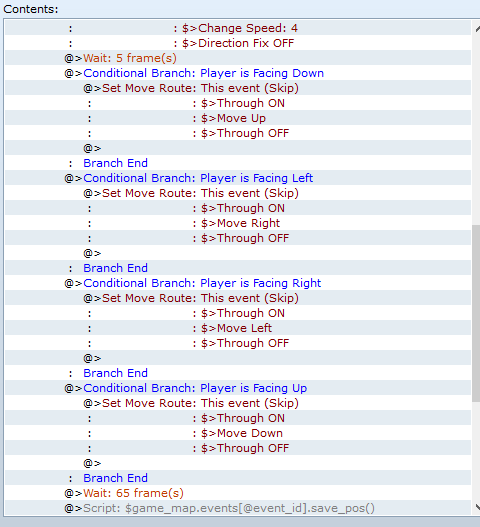
Then, like with our pushing page, we need to use this script call to make it so that the boulder will remember this position next time we load the map:
Code:
$game_map.events[@event_id].save_pos()Now, we should have reached the Else branch of our previous Conditional Branch. In this one, play our buzzer sound, wait 5 frames, turn Self Switch A, B and C OFF, and change our Actor Graphic to its usual graphic/set the Player Stepping Anim OFF.
Then, at the end of all of those branches, bar the one for the C button, we want to turn Self Switches B and C off.
Code:
Page 4:

CONDITION: Self Switch C =ON
OPTIONS: Walking Anim ON
TRIGGER: Autorun
SPEED: 2: 4x slower
FREQ: 3: Normal
@> Conditional Branch: Script: Input.trigger?(:C)
    @> Wait: 5 frames
    @> Control Self Switch: A =OFF
    @> Control Self Switch: B =OFF
    @> Control Self Switch: C =OFF
    @> Change Actor Graphic: [normal] |OR| Set Move Route: Player (Wait) Stepping Anim OFF    @>
: Else
    @> Conditional Branch: Script: $game_player.region_id != 54
        @> Script: if $game_player.direction == 2 #down
$game_variables[6] = 8
elsif $game_player.direction == 4 #left
$game_variables[6] = 6
elsif $game_player.direction == 6 #right
$game_variables[6] = 4
else #up
$game_variables[6] = 2
end
@> Conditional Branch: Script: !$game_player.passable?($game_player.x, $game_player.y, $game_variables[6])
        @> Play SE: [buzzer sound]
            @> Wait: 5 frames
            @> Control Self Switch: A =OFF
            @> Control Self Switch: B =OFF
            @> Control Self Switch: C =OFF
            @> Change Actor Graphic: [normal] |OR| Set Move Route: Player (Wait) Stepping Anim OFF    @>
: Else
    @> Play SE: [pulling sound]
    @> Set Move Route: Player
        $> Direction Fix ON
        $> Change Speed: 2
        $> 1 Step Backward
        $> Direction Fix OFF
        $> Change Speed: 4
    @> Wait: 5 frames
    @> Set Move Route: This event (skip)
        $> Through ON
        $> Direction Fix OFF
        $> Turn toward Player
        $> 1 Step Forward
        $> Direction Fix ON
        $> Through OFF
    @> Wait: 65 frames
    @> Script: $game_map.events[@event_id].save_pos()
    @>
    Branch End
: Else
@> Play SE: [buzzer sound]
            @> Wait: 5 frames
            @> Control Self Switch: A =OFF
            @> Control Self Switch: B =OFF
            @> Control Self Switch: C =OFF
            @> Change Actor Graphic: [normal] |OR| Set Move Route: Player (Wait) Stepping Anim OFF    @>
    Branch End
@> Control Self Switch: B =OFF
@> Control Self Switch: C =OFF
@>
Branch End
@>
Branch End
Page 5: (Optional)
If you want to make it so that the boulder can’t move once the puzzle is finished, there are a few ways you can do this, depending on your puzzle.
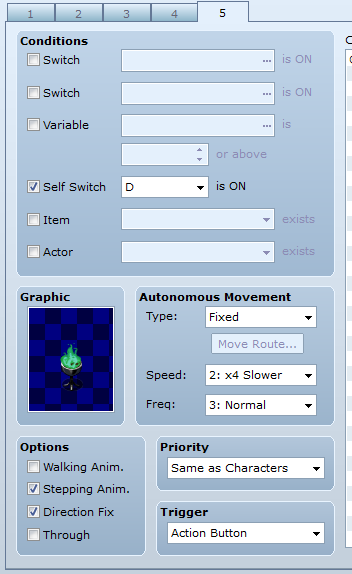
Copy Event Page 4 and delete everything, and set the Condition to be Self Switch D =ON, or a Switch that turns on when the puzzle is complete (whatever is easier). Set the Trigger to Action Button and leave the page blank.
If your graphic is a statue, you can change it to be one with glowing eyes or flames or something that makes it visually obvious to the player that they can’t move it anymore.
Copy Event Page 4 and delete everything, and set the Condition to be Self Switch D =ON, or a Switch that turns on when the puzzle is complete (whatever is easier). Set the Trigger to Action Button and leave the page blank.
If your graphic is a statue, you can change it to be one with glowing eyes or flames or something that makes it visually obvious to the player that they can’t move it anymore.
Code:
Page 5: (optional)

CONDITION: Self Switch D =ON
OPTIONS: Walking Anim OFF, Direction Fix ON (Stepping Anim ON if the graphic allows)
TRIGGER: Action Button
SPEED: 2: 4x slower
FREQ: 3: Normal
Using an external event to control your puzzle
We can also make a separate event that checks the position of our special objects. There are a couple of ways we can do this, but this is what I prefer to do:
First, decide whether you want to use region IDs to track the position of your puzzle pieces, or whether you want to use map coordinates (X and Y).
If you are going to use region IDs, I’d suggest using a separate ID for each square or area you want to push the object onto.
If you’re going to use map coordinates, you can find these by selecting the tile you want in the editor and then checking the bottom right-hand corner for the coordinates (e.g. 005,006, which is X,Y).
First, decide whether you want to use region IDs to track the position of your puzzle pieces, or whether you want to use map coordinates (X and Y).
If you are going to use region IDs, I’d suggest using a separate ID for each square or area you want to push the object onto.
If you’re going to use map coordinates, you can find these by selecting the tile you want in the editor and then checking the bottom right-hand corner for the coordinates (e.g. 005,006, which is X,Y).
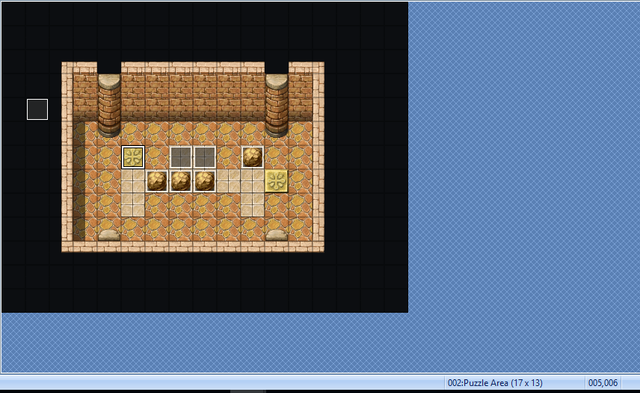
For this tutorial, we’ll use Region IDs.
Page 1 (external event):
Create an event and leave the graphic blank. We want to set the Trigger to Parallel Process.
Basically, the purpose of this event is to check whether our special object is on the spot where we want it to be, and if it is, then we want to turn said object’s self switch to D (which is the Page 5 we made earlier) to make it immovable.
So, in the contents, if we’re using Region ID, we want to create a Conditional Branch with the script call:
Change EVID to the ID of the event you want to go there and REGID to the ID of the Region you’re using.
For this tutorial, we’ll use Regions 20 and 21 for two separate objects. Event 1 will need to be pushed onto Region 20 and Event 2 will need to be pushed onto Region 21.
Basically, the purpose of this event is to check whether our special object is on the spot where we want it to be, and if it is, then we want to turn said object’s self switch to D (which is the Page 5 we made earlier) to make it immovable.
So, in the contents, if we’re using Region ID, we want to create a Conditional Branch with the script call:
Code:
$game_map.events[EVID].region_id == REGIDChange EVID to the ID of the event you want to go there and REGID to the ID of the Region you’re using.
For this tutorial, we’ll use Regions 20 and 21 for two separate objects. Event 1 will need to be pushed onto Region 20 and Event 2 will need to be pushed onto Region 21.
If you are using coordinates, then the script call will be the following:
This checks if EVID’s coordinates are equal to both XCOORD and YCOORD. && means and. Just change EVID to the ID of the event you want to go there and XCOORD and YCOORD to their respective coordinates.
Code:
$game_map.events[EVID].x == XCOORD && $game_map.events[EVID].y == XCOORDThis checks if EVID’s coordinates are equal to both XCOORD and YCOORD. && means and. Just change EVID to the ID of the event you want to go there and XCOORD and YCOORD to their respective coordinates.
Inside the conditional branch, we want to make a script call:
Code:
$game_self_switches[[@map_id, EVID, “D”]] == trueReplace EVID with the ID of your event. Play your switch sound effect, and then copy and paste the above script call, but make it so that EVID’s self switch A is equal to false. Copy and paste it again and again and do that for self switches B and C.
Now we want to change the actor’s graphic back to normal or set the stepping animation off, and we also want to set their speed to normal and turn direction fix off. This is important, otherwise they’ll keep looking like they’re pushing something or keep staring in one direction.
Finally, turn this event’s Self Switch A ON.
Copy and paste the above Conditional Branch and change the EVIDs, Region IDs, etc., so that they are relevant for our other event, Event 2. Rather than turning on Self Switch A, we want to turn Self Switch B ON.
Code:
Page 1 (external event):

TRIGGER: Parallel Process
@> Conditional Branch: Scripts: $game_map.events[1].region_id == 20
    @> Script: $game_self_switches[[@map_id, 1, “D”]] == true
    @> Play SE: [switch sound]
    @> Script: $game_self_switches[[@map_id, 1, “A”]] == false
@> Script: $game_self_switches[[@map_id, 1, “B”]] == false
@> Script: $game_self_switches[[@map_id, 1, “C”]] == false
@> Change Actor Graphic: [normal] |OR| Set Move Route: Player (Wait) Stepping Anim OFF
@> Set Move Route: Player (Wait)
$>Direction Fix OFF
$>Change Speed: 4
@> Control Self Switch: A =ON
@>
: Branch End
@> Conditional Branch: Scripts: $game_map.events[2].region_id == 21
    @> Script: $game_self_switches[[@map_id, 2, “D”]] == true
    @> Play SE: [switch sound]
    @> Script: $game_self_switches[[@map_id, 2, “A”]] == false
@> Script: $game_self_switches[[@map_id, 2, “B”]] == false
@> Script: $game_self_switches[[@map_id, 2, “C”]] == false
@> Change Actor Graphic: [normal] |OR| Set Move Route: Player (Wait) Stepping Anim OFF
@> Set Move Route: Player (Wait)
$>Direction Fix OFF
$>Change Speed: 4
@> Control Self Switch: B =ON
@>
: Branch End
Page 2 (external event):
The easiest thing is to copy the first event page and then paste event page. Set the condition to Self Switch A =ON. Delete the first Conditional Branch and change the event so that it turns its Self Switch C ON.
Code:
Page 2 (external event):

CONDITION: Self Switch A =ON
TRIGGER: Parallel Process
@> Conditional Branch: Scripts: $game_map.events[2].region_id == 21
    @> Script: $game_self_switches[[@map_id, 2, “D”]] == true
    @> Play SE: [switch sound]
    @> Script: $game_self_switches[[@map_id, 2, “A”]] == false
@> Script: $game_self_switches[[@map_id, 2, “B”]] == false
@> Script: $game_self_switches[[@map_id, 2, “C”]] == false
@> Change Actor Graphic: [normal] |OR| Set Move Route: Player (Wait) Stepping Anim OFF
@> Set Move Route: Player (Wait)
$>Direction Fix OFF
$>Change Speed: 4
@> Control Self Switch: C =ON
@>
: Branch End
Page 3 (external event):
Once again, copy the first event page, select page 2 and then paste event page—this is so it appears at the end. Set the condition to Self Switch B =ON. Delete the second Conditional Branch and change the event so that it turns its Self Switch C ON.
Alternatively, rather than having a Self Switch, you can create a switch just for this puzzle. I prefer to use self switches, purely because I’m super stingy when it comes to my switches, but it’s up to you. A regular switch is probably easier.
Alternatively, rather than having a Self Switch, you can create a switch just for this puzzle. I prefer to use self switches, purely because I’m super stingy when it comes to my switches, but it’s up to you. A regular switch is probably easier.
Code:
Page 3 (external event):

CONDITION: Self Switch B =ON
TRIGGER: Parallel Process
@> Conditional Branch: Scripts: $game_map.events[1].region_id == 20
    @> Script: $game_self_switches[[@map_id, 1, “D”]] == true
    @> Play SE: [switch sound]
    @> Script: $game_self_switches[[@map_id, 1, “A”]] == false
@> Script: $game_self_switches[[@map_id, 1, “B”]] == false
@> Script: $game_self_switches[[@map_id, 1, “C”]] == false
@> Change Actor Graphic: [normal] |OR| Set Move Route: Player (Wait) Stepping Anim OFF
@> Set Move Route: Player (Wait)
$>Direction Fix OFF
$>Change Speed: 4
@> Control Self Switch: C =ON OR Control Switches: [##: Puzzle Complete] =ON
@>
: Branch End
Page 4 (external event):
Finally, create a new event page and set the condition to Self Switch C =ON. The trigger should be Action Button.
If you would prefer to have a regular switch turn on when the puzzle is complete, set that as the trigger instead.
If you would prefer to have a regular switch turn on when the puzzle is complete, set that as the trigger instead.
Code:
Page 4 (external event):

CONDITION: Self Switch C =ON  OR Switch ##: Puzzle Complete =ON
TRIGGER: Action Button
Resetting your puzzle
But let’s say we’re playing our game and we get halfway through our puzzle and realise that we’ve stuffed it up, or we should have done it a different way. Since we’re using Shaz’s Remember Event Position script, we can’t just leave the room and come back in—everything will still be the same.
There are a few ways we can do this, and I’ll explain a couple of options below.
Option 1: I want the pieces to reset if I leave the room
Option 2: I want to use a button/lever to reset the puzzle
Option 3: I want the player to press a button to reset the puzzle
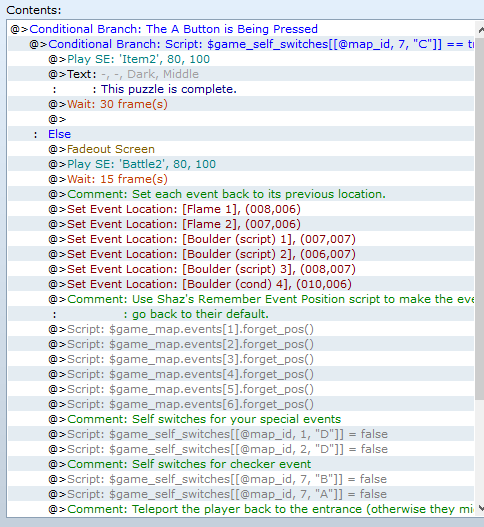
Yessir. Now, there are a couple of ways that you can do this, but having a parallel process event on the puzzle map is probably the easiest. It’s much like the lever event, except with a few changes.
Make an event and set the trigger to Parallel Process. You don’t need to fiddle with anything else.
Make a Conditional Branch that checks to see if a button is being pressed. For the sake of this tutorial, we’re going to use the A button, which is the SHIFT key.
Inside the Conditional Branch, make another Conditional Branch and use the following script call (or check if your Puzzle Switch is ON):
Here inside this Conditional Branch is where you want to put anything that should happen once the puzzle is COMPLETE, such as a message popping up saying, “this puzzle is complete; you can’t reset it”, or similar. You could play a buzzer sound as well.
In the Else branch, fadeout screen, set each Event’s location back to its original spot, and then use the script call from Shaz’s Remember Event Position script to set them back to their default position:
Then we need to turn the self switches for our special objects off:
Then we need to turn the self switches for our external checker event off, using the same script call above. Set Self Switches B and A off.
Finally, teleport the player back to the entrance or somewhere relevant outside of the puzzle map—otherwise, they could have pressed the button while they were in the middle of the puzzle and they might end up with a boulder on their head.
Wait 15 frames, and then fadein screen.
There are a few ways we can do this, and I’ll explain a couple of options below.
Option 1: I want the pieces to reset if I leave the room
For this option, you simply need to add the following to any exits you have in your puzzle room.
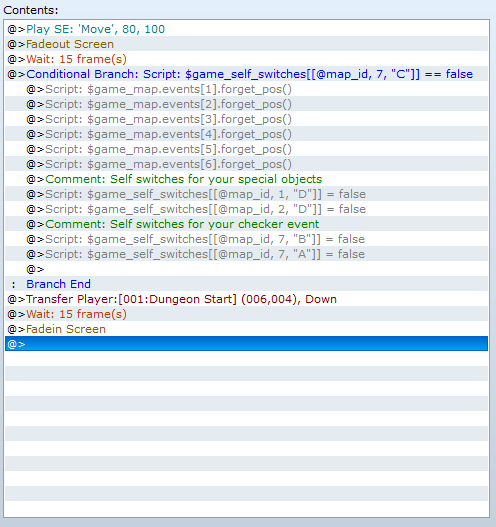
We need to check to see whether the puzzle is complete or not. Make a Conditional Branch before your Transfer Player command, and have it check to see if our puzzle switch is OFF. This is either checking if our checker event’s Self Switch C (or whatever is the self switch is for the final, empty page) is on, or checking to see if our Puzzle Complete switch is off—it depends on what you prefer.
If you’re using the self switch option, then you’ll need to use this script call in your Conditional Branch:
EVID should be the ID of the external checker event.
We don’t need to have Set Handling checked. Inside this Conditional Branch, use the following script call for each of your pushable objects:
This makes it so that the event forgets its previously remembered position and moves back to its default position.
Then we need to turn the self switches for our special objects off:
And finally, we need to turn the self switches for our external checker event off, using the same script call above. Set Self Switches B and A off.
This will only happen if the puzzle isn’t complete yet—otherwise, you’ll transfer to the next map as usual and everything will stay put.
We need to check to see whether the puzzle is complete or not. Make a Conditional Branch before your Transfer Player command, and have it check to see if our puzzle switch is OFF. This is either checking if our checker event’s Self Switch C (or whatever is the self switch is for the final, empty page) is on, or checking to see if our Puzzle Complete switch is off—it depends on what you prefer.
If you’re using the self switch option, then you’ll need to use this script call in your Conditional Branch:
Code:
$game_self_switches[[@map_id, EVID, "C"]] == falseEVID should be the ID of the external checker event.
We don’t need to have Set Handling checked. Inside this Conditional Branch, use the following script call for each of your pushable objects:
Code:
$game_map.events[EVID].forget_pos()This makes it so that the event forgets its previously remembered position and moves back to its default position.
Then we need to turn the self switches for our special objects off:
Code:
$game_self_switches[[@map_id, EVID, "D"]] = falseAnd finally, we need to turn the self switches for our external checker event off, using the same script call above. Set Self Switches B and A off.
This will only happen if the puzzle isn’t complete yet—otherwise, you’ll transfer to the next map as usual and everything will stay put.
Code:
Option 1:

@> Play SE: [transfer sound]
@> Fadeout Screen
@> Wait: 15 frames
@> Conditional Branch: Script: $game_self_switches[[@map_id, 7, “C”]] == false
    @> Script: $game_map.events[1].forget_pos()
    @> Script: $game_map.events[2].forget_pos()
    @> Script: $game_map.events[3].forget_pos()
@> Script: $game_map.events[4].forget_pos()
    @> Script: $game_self_switches[[@map_id, 1, "D"]] = false
    @> Script: $game_self_switches[[@map_id, 2, "D"]] = false
    @> Script: $game_self_switches[[@map_id, 7, "A"]] = false
@> Script: $game_self_switches[[@map_id, 7, "B"]] = false
@>
: Branch End
@> Transfer Player: [## Your Map]
@> Wait: 15 frames
@> Fadein Screen
@>
Option 2: I want to use a button/lever to reset the puzzle
First, we need to make our event. This could be a lever on the floor or a button on the wall, or even a person standing in the corner. Just make sure it’s away from the actual puzzle. Give it an appropriate graphic. For this tutorial, I’m using a lever.
For the lever, set Walking Anim and Direction Fix on. The trigger should be Action Button.
Make a Conditional Branch and use the following script call (or check if your Puzzle Switch is ON):
EVID should be the ID of your checker event.
Make sure Set Handling is checked.
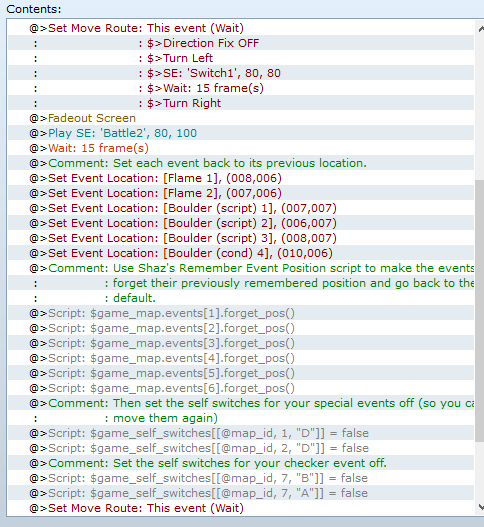
Inside this Conditional Branch, put anything you want to happen once the puzzle is COMPLETE, such as the lever clicking but not moving, a message saying “the lever is stuck”, etc.
In the Else branch, set Move Route for the lever and have it turn. It depends on what graphic you are using, but if you’re just using one of the default levers, then turn Direction Fix OFF, have it turn left, wait, and then right. You can also play a ‘switch’ sound.
Fadeout screen, and then set each Event’s location back to its original spot. This might be a little time-consuming, because you have to select each event on the map, remember its ID and where it is, and then enter that under Direct Designation.
After that, we use that script call for Shaz’s Remember Event Position script to set these events back to their default position:
Then we need to turn the self switches for our special objects off:
And finally, we need to turn the self switches for our external checker event off, using the same script call above. Set Self Switches B and A off.
Set Move Route for the lever again and have it turn down, and then set Direction Fix ON.
Wait 15 frames, and then fadein screen.
For the lever, set Walking Anim and Direction Fix on. The trigger should be Action Button.
Make a Conditional Branch and use the following script call (or check if your Puzzle Switch is ON):
Code:
$game_self_switches[[@map_id, EVID, "C"]] == trueEVID should be the ID of your checker event.
Make sure Set Handling is checked.
Inside this Conditional Branch, put anything you want to happen once the puzzle is COMPLETE, such as the lever clicking but not moving, a message saying “the lever is stuck”, etc.
In the Else branch, set Move Route for the lever and have it turn. It depends on what graphic you are using, but if you’re just using one of the default levers, then turn Direction Fix OFF, have it turn left, wait, and then right. You can also play a ‘switch’ sound.
Fadeout screen, and then set each Event’s location back to its original spot. This might be a little time-consuming, because you have to select each event on the map, remember its ID and where it is, and then enter that under Direct Designation.
After that, we use that script call for Shaz’s Remember Event Position script to set these events back to their default position:
Code:
$game_map.events[EVID].forget_pos()Then we need to turn the self switches for our special objects off:
Code:
$game_self_switches[[@map_id, EVID, "D"]] = falseAnd finally, we need to turn the self switches for our external checker event off, using the same script call above. Set Self Switches B and A off.
Set Move Route for the lever again and have it turn down, and then set Direction Fix ON.
Wait 15 frames, and then fadein screen.
Code:
Option 2:

@> Conditional Branch: Script: $game_self_switches[[@map_id, 7, “C”]] == true
    @> Set Move Route: This event (Wait)
        $> Direction Fix OFF
        $> Turn Left
        $> SE: [switch sound]
        $> Wait: 10 frames
        $> Turn Right
        $> Wait: 10 frames
        $> Turn Left
        $> Wait: 10 frames
        $> Turn Down
        $> Direction Fix ON
@>
: Else
@> Fadeout Screen
@> Wait: 15 frames
@> Set Event Location: [Event Name], (X, Y)
@> Set Event Location: [Event Name], (X, Y)
@> Set Event Location: [Event Name], (X, Y)
@> Set Event Location: [Event Name], (X, Y)
@> Script: $game_map.events[1].forget_pos()
    @> Script: $game_map.events[2].forget_pos()
    @> Script: $game_map.events[3].forget_pos()
@> Script: $game_map.events[4].forget_pos()
    @> Script: $game_self_switches[[@map_id, 1, "D"]] = false
    @> Script: $game_self_switches[[@map_id, 2, "D"]] = false
    @> Script: $game_self_switches[[@map_id, 7, "A"]] = false
@> Script: $game_self_switches[[@map_id, 7, "B"]] = false
@> Set Move Route: This event (Wait)
        $> Turn Down
        $> Direction Fix ON
@> Wait: 15 frames
@> Fadein Screen
@>
: Branch End
Option 3: I want the player to press a button to reset the puzzle
Yessir. Now, there are a couple of ways that you can do this, but having a parallel process event on the puzzle map is probably the easiest. It’s much like the lever event, except with a few changes.
Make an event and set the trigger to Parallel Process. You don’t need to fiddle with anything else.
Make a Conditional Branch that checks to see if a button is being pressed. For the sake of this tutorial, we’re going to use the A button, which is the SHIFT key.
Inside the Conditional Branch, make another Conditional Branch and use the following script call (or check if your Puzzle Switch is ON):
Code:
$game_self_switches[[@map_id, EVID, "C"]] == trueHere inside this Conditional Branch is where you want to put anything that should happen once the puzzle is COMPLETE, such as a message popping up saying, “this puzzle is complete; you can’t reset it”, or similar. You could play a buzzer sound as well.
In the Else branch, fadeout screen, set each Event’s location back to its original spot, and then use the script call from Shaz’s Remember Event Position script to set them back to their default position:
Code:
$game_map.events[EVID].forget_pos()Then we need to turn the self switches for our special objects off:
Code:
$game_self_switches[[@map_id, EVID, "D"]] = falseThen we need to turn the self switches for our external checker event off, using the same script call above. Set Self Switches B and A off.
Finally, teleport the player back to the entrance or somewhere relevant outside of the puzzle map—otherwise, they could have pressed the button while they were in the middle of the puzzle and they might end up with a boulder on their head.
Wait 15 frames, and then fadein screen.
Code:
Option 3:

@> Conditional Branch: The A Button is Being Pressed
@> Conditional Branch: Script: $game_self_switches[[@map_id, 7, “C”]] == true
        @> Play SE: [buzzer sound]
        @> Text:
            : This puzzle is complete
        @> Wait 30 frames
@>
: Else
@> Fadeout Screen
@> Wait: 15 frames
@> Set Event Location: [Event Name], (X, Y)
@> Set Event Location: [Event Name], (X, Y)
@> Set Event Location: [Event Name], (X, Y)
@> Set Event Location: [Event Name], (X, Y)
@> Script: $game_map.events[1].forget_pos()
        @> Script: $game_map.events[2].forget_pos()
        @> Script: $game_map.events[3].forget_pos()
@> Script: $game_map.events[4].forget_pos()
        @> Script: $game_self_switches[[@map_id, 1, "D"]] = false
        @> Script: $game_self_switches[[@map_id, 2, "D"]] = false
        @> Script: $game_self_switches[[@map_id, 7, "A"]] = false
@> Script: $game_self_switches[[@map_id, 7, "B"]] = false
@> Transfer Player: [## Your Map]
@> Wait: 15 frames
@> Fadein Screen
@>
: Branch End
That's all, folks—I hope you found this tutorial helpful!
For more info, check the demo.
Downloads / Referenced Files
RPG Maker Web attachments are mirrored locally when available. Other external links remain hosted by their original creator or third-party service.
License / Terms Note
CREDITS: Feel free to credit me as A-Moonless-Night if you use this in your project, but it's not necessary. You must credit Shaz if you use her Remember Event Position script. TOOLS:
Referenced Images / Attachments
Creator Claims / Removal
If you are the original creator and want this listing reassigned, edited, or removed, join BMMPlay and contact the moderators with proof that matches the original RPG Maker Web profile, linked GitHub, itch.io page, or another public creator identity.
Replies (0)
No replies yet.
0
replies
21
views
Topic Summary
Loading summary...