

Turn dead characters into 'ghosts'.
BMM_Archive · July 15, 2026

Original Source
- Original title: Turn dead characters into 'ghosts'.
- Original author: MattLikesPenguins
- Original date: April 25, 2018
- Source thread: https://forums.rpgmakerweb.com/threads/turn-dead-characters-into-ghosts.94504/
- Source forum path: Game Development Engines > RPG Maker Tutorials > RMVXAce Tutorials
Summary
If you've played the older Dragon Warrior/Dragon Quest games on the NES, you probably remember that when a party member died, their sprite changed to a hollow outline representing their 'ghost'. This tutorial will show you how to do something similar in your own game. Demo here: You will first need to create duplicates of your character sprites so that you have one 'normal' and one 'dead': {
Archived First Post
Demo here:
You will first need to create duplicates of your character sprites so that you have one 'normal' and one 'dead':
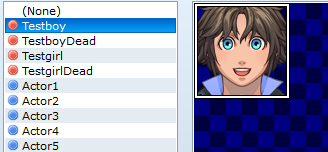
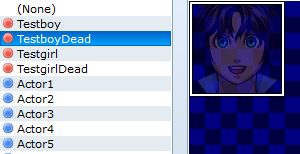
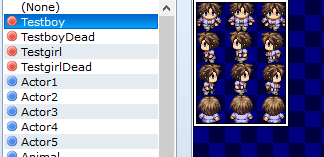
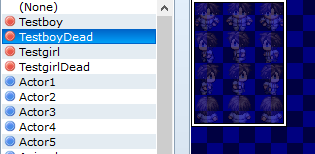
I just used Paint.net for this part. Just open the sprite, and change the Layer opacity from 255 to whatever you think looks best (the samples above were about 100 or so I believe).
Once you have that you need a common event like this:
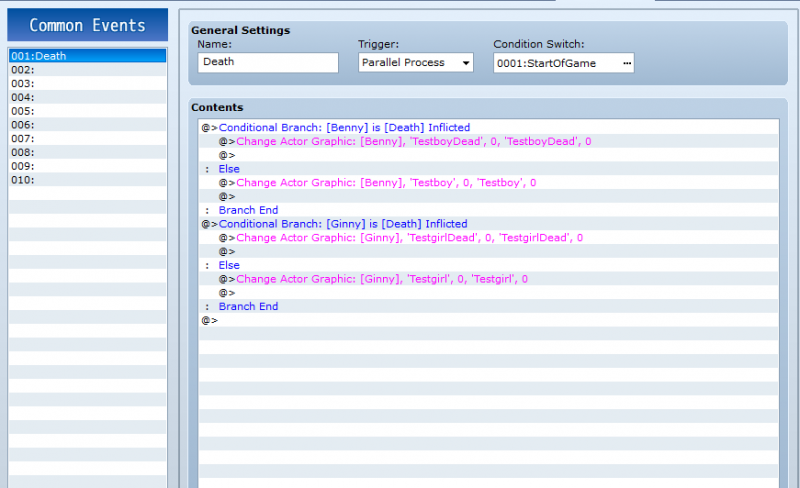
Be sure the trigger is set to Parallel Process, otherwise it won't work. The switch to trigger the event (StartOfGame in the example) needs to be turned on at the very beginning of the game.
You're done! The only flaw I can't seem to figure out is if you use an item or a spell to revive a dead character, their "dead" face in the menu won't change until you exit the menu and re-open it. I'm sure there may be a way to change that but if there is then I don't know about it.
Downloads / Referenced Files
RPG Maker Web attachments are mirrored locally when available. Other external links remain hosted by their original creator or third-party service.
- Local mirror: 66939-484e9b83d9b21b12327b42421976c937.png
SHA-256:84be31e199412e4ce5804b0f1f35f71fed4ff80d56177a1f49bd945341b8de22
Original attachment URL: https://forums.rpgmakerweb.com/attachments/testboy1-png.88440/ - Local mirror: 66943-3f5786bc2fc53623c62d95976cfc7800.png
SHA-256:d46d63aca079d4e20c58a6a444693233067b77f7dcb298ba76eb76705ea82c48
Original attachment URL: https://forums.rpgmakerweb.com/attachments/testboy2-png.88444/ - Local mirror: 66941-55fea6a3f30e40a319ccc33c1e014215.png
SHA-256:9b354a51f84f2e4fe6672057ae3d057b10bfd7263cf319ce699323040b56d3f5
Original attachment URL: https://forums.rpgmakerweb.com/attachments/testboy3-png.88442/ - Local mirror: 66942-8c3fa8c60a78f444beb517f2c66c7db3.png
SHA-256:b170a1c7aec69804a9c70fdd891088abc075dbe5ddaa52167d6ef8184bfe70b6
Original attachment URL: https://forums.rpgmakerweb.com/attachments/testboy4-png.88443/ - Local mirror: 66944-c140a5c618febe1bc17b2c933b503d1e.png
SHA-256:4fe9b2bf971361f591ac337b5bf9c074114eb988937d095c692c7a2630a0e114
Original attachment URL: https://forums.rpgmakerweb.com/attachments/deadcomevedemo-png.88445/
Referenced Images / Attachments
Creator Claims / Removal
If you are the original creator and want this listing reassigned, edited, or removed, join BMMPlay and contact the moderators with proof that matches the original RPG Maker Web profile, linked GitHub, itch.io page, or another public creator identity.
Replies (0)
No replies yet.
Topic Summary
Loading summary...