

Two small tricks to make the world seem more lively
BMM_Archive · July 15, 2026

Original Source
- Original title: Two small tricks to make the world seem more lively
- Original author: Canini
- Original date: October 2, 2016
- Source thread: https://forums.rpgmakerweb.com/threads/two-small-tricks-to-make-the-world-seem-more-lively.69155/
- Source forum path: Game Development Engines > RPG Maker Tutorials > RMVXAce Tutorials
Summary
This is my first tutorial, aimed at beginners. If there are any way I can improve it, feel free to give me feedback below! Making the world and the character feel real is harder than it looks. Perhaps you have created your first short game, familiarized yourself with the rpgmaker engine. But you feel that your game world feels too static, the NPCs just bit players instead of real characters with lives of their own. This tutorial is meant for beginners wanting to get the game world to seem more...
Archived First Post
Making the world and the character feel real is harder than it looks. Perhaps you have created your first short game, familiarized yourself with the rpgmaker engine. But you feel that your game world feels too static, the NPCs just bit players instead of real characters with lives of their own. This tutorial is meant for beginners wanting to get the game world to seem more "real". To get you into the thinking I have prepared two examples to look at together. All are made with the default assets of Rpgmaker VX Ace.
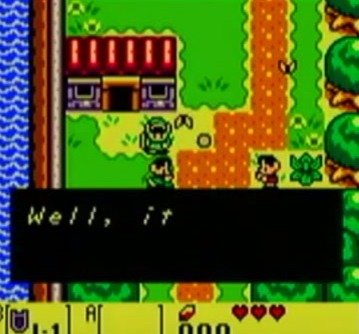
The first example is lifted straight from Links Awakening. Kids shouldn´t stand totally still and say "Welcome to Corneria" over and over, they should be playing! So we are going to create a couple of kids playing, as well as making them talk with the player from a distance without the player´ss input, making them seem like they have agency of their own.
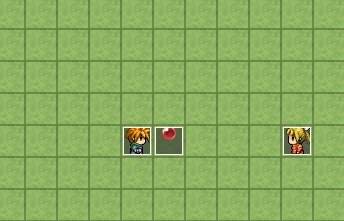
We start by placing three events out and choose graphics for them. The boy and girl are found under the actor1 subtab and the ball is taken from other1.
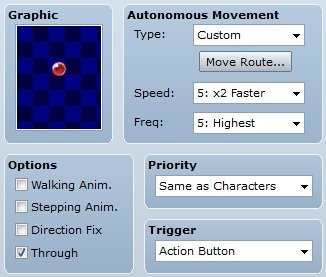
For the ball, make sure the walking animation is checked out and the through option is checked in. Otherwise the ball will act as a character walking, meaning it will "blink" through the colors in its animation sheet. Furthermore the ball will stop if the characters comes into contact with it. With the options like this it will seem like the ball is thrown over the characters! Next, set the speed and frequency to the above, the type to custom and then click the move route button.
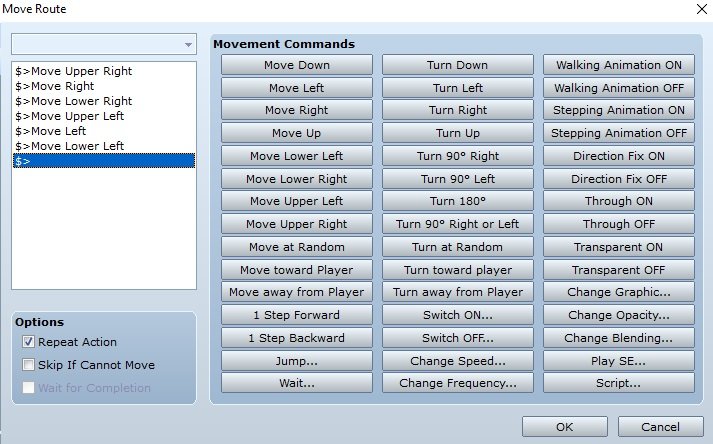
Set the move commands like this and check in the repeat action command. Now it will seem like the ball is throw into the air in an angle, making it seem more natural.
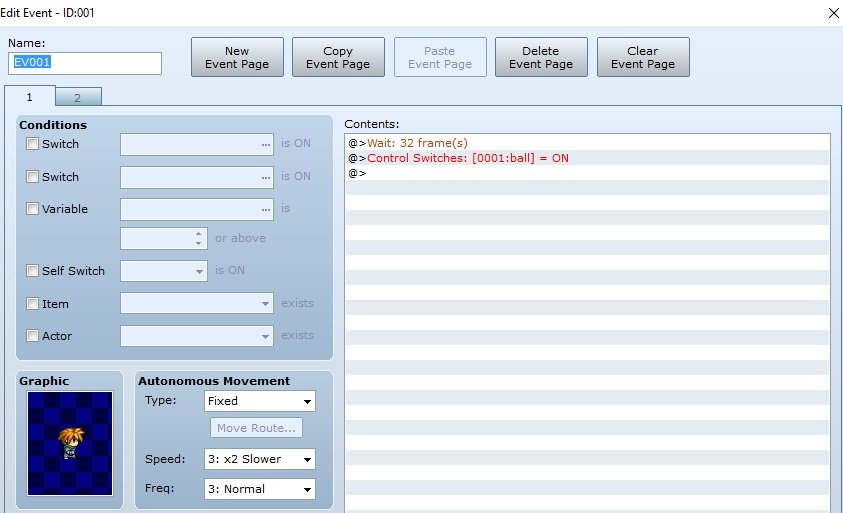
Let us set up the actors next! Having a natural movement for the ball is no good if the characters just stand there without moving. Make two event pages, setting the first one up like this. The trigger for this event should be set to parallell process.
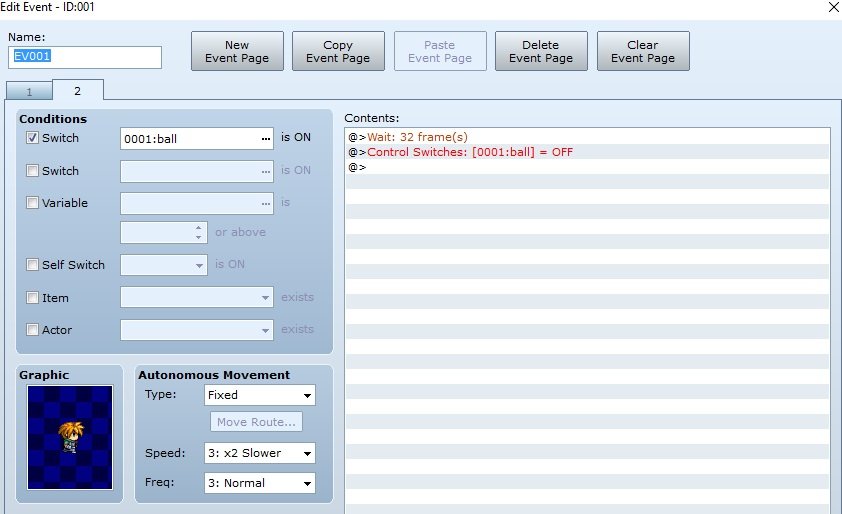
The second page should look like this. What we have done here is creating a switch that periodically turning on and off, making the graphics change so that it appears as if the character is moving as the ball is thrown. Naturally it will look even better if you have custom jumping graphics! You may have to fiddle around a bit with the timing to make it look natural.
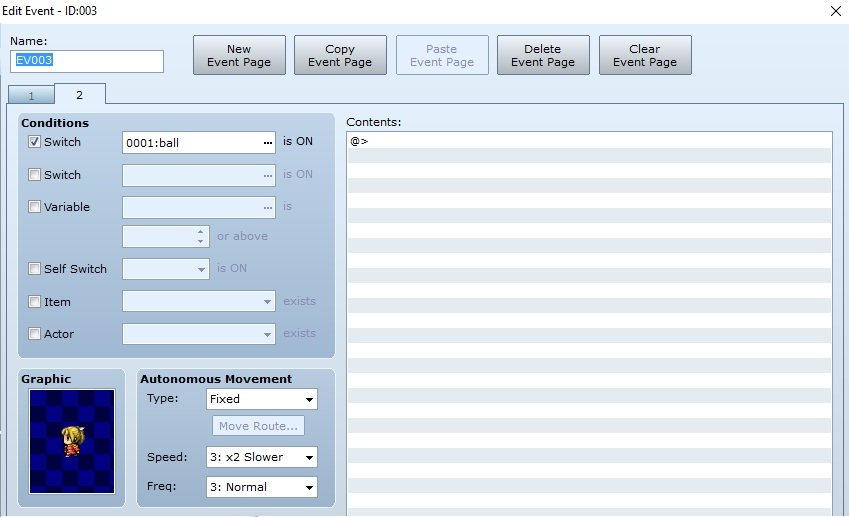
Next, we create the same two event pages with changing graphics for the girl, but we do not have to set up the timing and switch change. Just make sure the event still reacts to the switch, though!
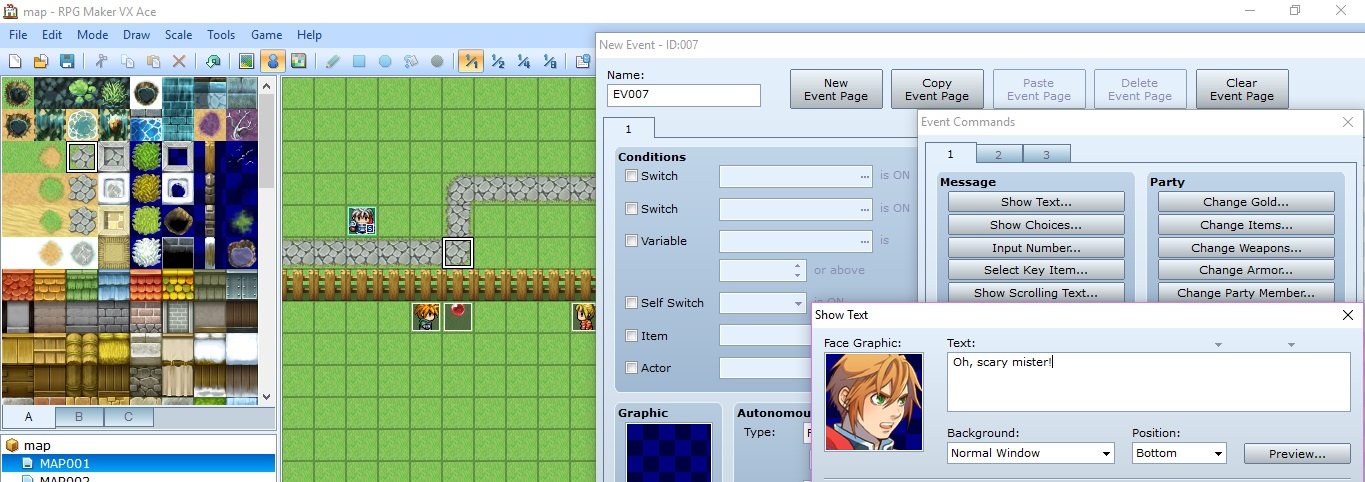
Now the character will speak while the hero walks past!
The second trick:
Being instructed by the mayor of the town to find a treasure that the evil Lord Calibri has taken and hidden is not very fun, but it can be made more engaging by the player actually witnessing the events before the quest is handed out. So let us make it so the evil Lord Calibri throws the chest away as the player walks down the path.
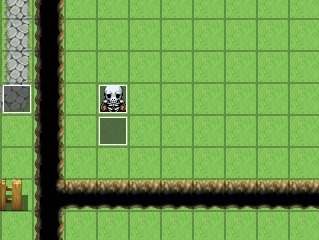
Once again we create three events, one that the character steps on to initiate the animation, one for the skeleton and one for the chest.
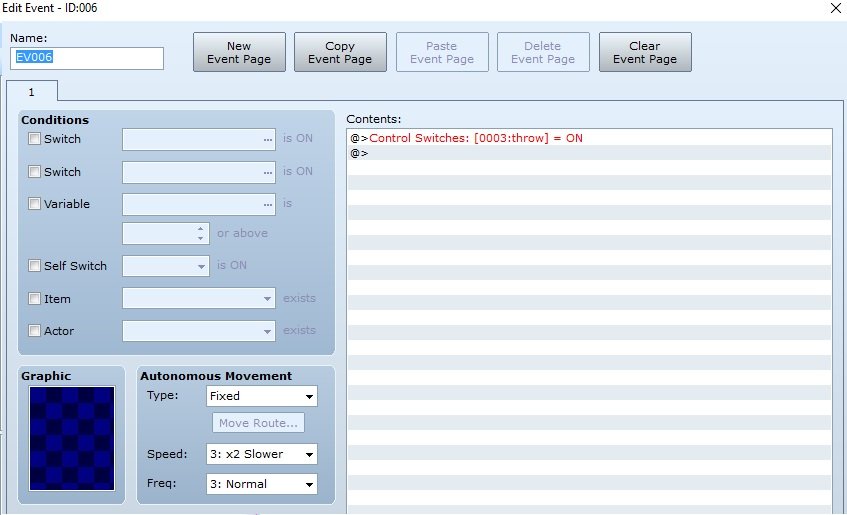
For the first event we set it up like this and set the trigger to player touch.
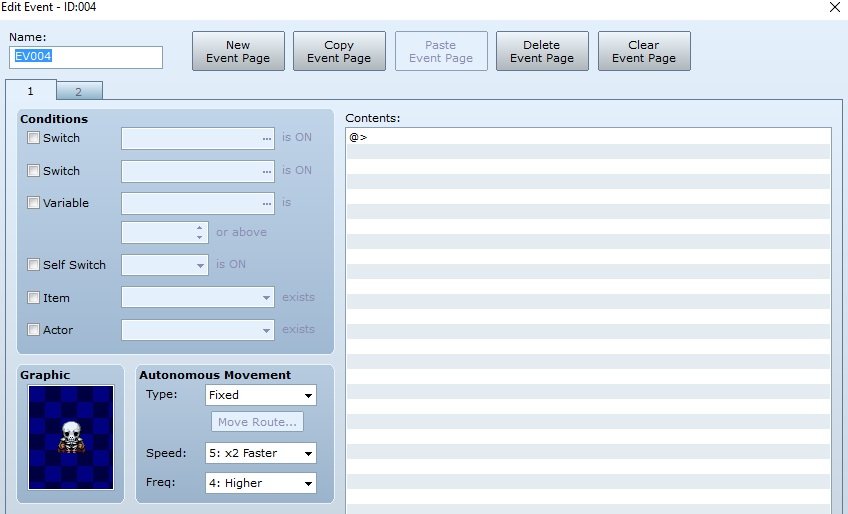
We need two event pages for the skeleton, the first do not need to be filled with anything.
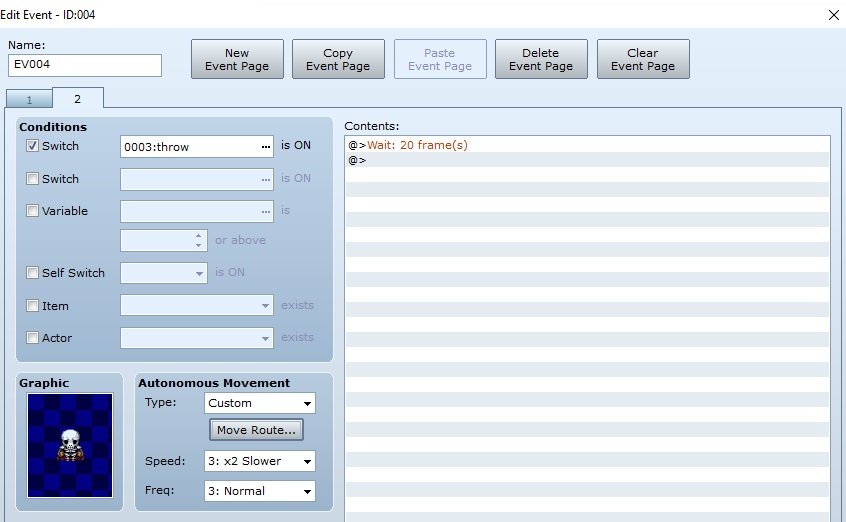
The second page is set up like this. You can fiddle around with the speed and frequency to make the character move faster or slower. I want the skeleton to sort of shamble, so I left him fairly slow.
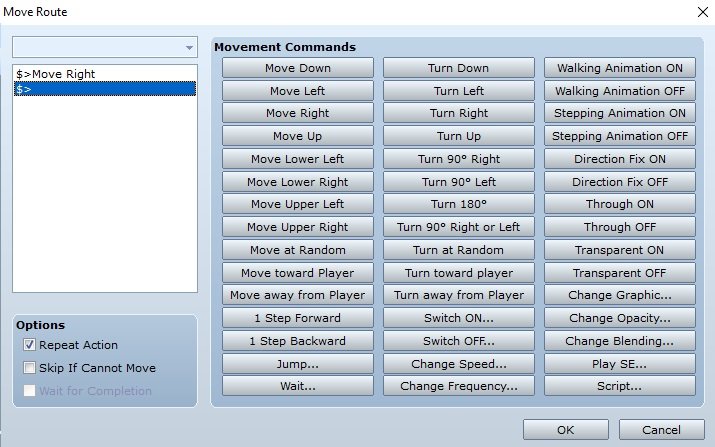
I just want the character to move out of the map, so having a single repeating move right command is enough.
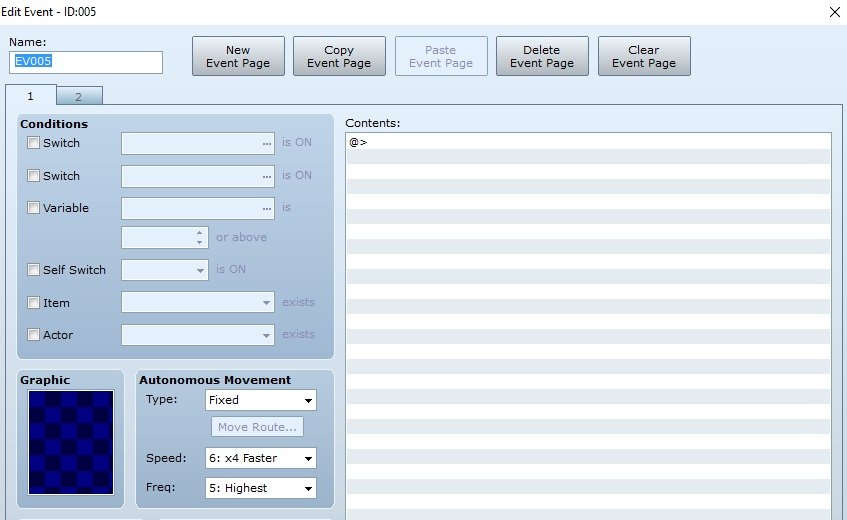
Lastly we have the chest event, which we can leave completely empty, no graphics, nothing.
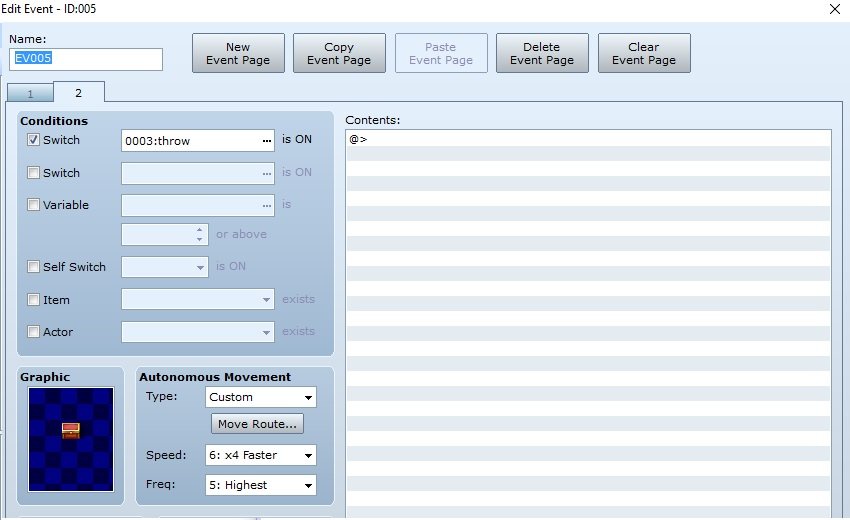
For the second page we create a chest and set up custom movement.
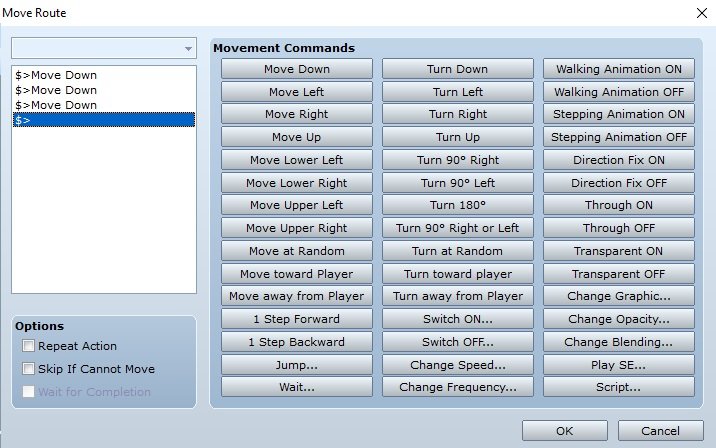
Set it like this, but make sure that the repeat option is checked out. We do not need for the chest to be thrown again!
And there you have it! I have here included a video on how this will look in practice. Here are some questions to think about and hopefully solve yourself:
1 Can you make it so that the kid only finds the player scary the first time, and makes a more friendly greeting afterwards?
2 If we would implement Lord Calibri in a game, the event would play out every single time the player enters the map. Can you make it so that the event only plays out once?
Downloads / Referenced Files
RPG Maker Web attachments are mirrored locally when available. Other external links remain hosted by their original creator or third-party service.
- Local mirror: 29909-e65bb6fb3b2dfb3de03f6842faae2a1d.png
SHA-256:25f7b8a159732ff04e427e897013bc6154dc484e8b580a19ee49c32502f671ca
Original attachment URL: https://forums.rpgmakerweb.com/attachments/zeldabal-png.49004/ - Local mirror: 29894-17c78391df421ce4476a7b3ce9198009.jpg
SHA-256:fd2d9ad08d7b46b8fee831eb4d245fdb2f62a1a3cb6437c5dccd61ecd4272c44
Original attachment URL: https://forums.rpgmakerweb.com/attachments/1-jpg.48989/ - Local mirror: 29895-b57cc158fe1896daa650f719eca5d290.jpg
SHA-256:79d93c1983805ab78426d2da6dae12575f07b29c0f4c62c4c22ac738dafab91b
Original attachment URL: https://forums.rpgmakerweb.com/attachments/2-jpg.48990/ - Local mirror: 29896-c4a5b0e2c1ad47d2269ed2cc8dd6ecad.jpg
SHA-256:9d11aae694cc9361d41a3d7fe9c287f071add4b9f22a73ad99771809bcf58203
Original attachment URL: https://forums.rpgmakerweb.com/attachments/3-jpg.48991/ - Local mirror: 29897-48ad5e565cedffea0e3a974d7a9a78d3.jpg
SHA-256:bbf0b0fe114ba1972bbae143e4ddc3697aa6b1568b17bb2e067f2b3b1ccf0cf4
Original attachment URL: https://forums.rpgmakerweb.com/attachments/4-jpg.48992/ - Local mirror: 29898-c3d86568a8defaff56e703eaa7977908.jpg
SHA-256:bbbf499436d9baa2cd5e4f7f3643d05591c4011b070e5b8e56b5e6646249f52c
Original attachment URL: https://forums.rpgmakerweb.com/attachments/5-jpg.48993/ - Local mirror: 29899-90e77af6704de036a0dc3836672ca6fe.jpg
SHA-256:9d7002da53dfaeaaf7d02cb62f4d680d0d228b3725dd485745428210c9539f8f
Original attachment URL: https://forums.rpgmakerweb.com/attachments/6-jpg.48994/ - Local mirror: 29908-c9f498a8e67b7a198febe3eb9accb859.jpg
SHA-256:235fbc4a6f1a11d66000ad9cf7bdeaa2e76fe34af001cd3ad9e97f31eb4bf432
Original attachment URL: https://forums.rpgmakerweb.com/attachments/15-jpg.49003/ - Local mirror: 29900-b742edf5258d139b8d62f87c139f157f.jpg
SHA-256:dd7da51110ad478565acf1806f364ff1468d4fdfcf2da9bf32ebc34e58ce2d98
Original attachment URL: https://forums.rpgmakerweb.com/attachments/7-jpg.48995/ - Local mirror: 29901-cd8458339bc45f81c799aa596825b2c6.jpg
SHA-256:f8147896733d15193eac020906cce8e961e15ffcf1348855cb9b2142af5cef4b
Original attachment URL: https://forums.rpgmakerweb.com/attachments/8-jpg.48996/ - Local mirror: 29902-e6d9cc8c14edcfe02f7b9a58c5efdd33.jpg
SHA-256:e71fded1f47dd775481ab871a3d4caf45569e5caf52b12647c630aca0b4e116b
Original attachment URL: https://forums.rpgmakerweb.com/attachments/9-jpg.48997/ - Local mirror: 29903-50280cb5023a58f769c4747376a999da.jpg
SHA-256:cef3c7183f4b465a24385431ceb0903047b8950e077f12f62281658418024245
Original attachment URL: https://forums.rpgmakerweb.com/attachments/10-jpg.48998/ - Local mirror: 29904-4186a2f641baf4332835d9b3c5a0b184.jpg
SHA-256:066a5e4482dc24832ed4634c058bcb6faf20d2248a5caab0ec34d74ce0a78c40
Original attachment URL: https://forums.rpgmakerweb.com/attachments/11-jpg.48999/ - Local mirror: 29905-adaa99e538cb7cd0a2466be0b45b68af.jpg
SHA-256:7ca714371ade96e9aff6f2c36a23021e0799501a34950748bea11ccfb4a7d7bc
Original attachment URL: https://forums.rpgmakerweb.com/attachments/12-jpg.49000/ - Local mirror: 29906-7168f2bbcced22de4e7eaa26cddd4845.jpg
SHA-256:7a97abf7b575c9918833229d9e08537c54c0d005d8f52066f586bf32655e2d62
Original attachment URL: https://forums.rpgmakerweb.com/attachments/13-jpg.49001/ - Local mirror: 29907-b5467f40da1777822eb43fe405f9c56c.jpg
SHA-256:a91e9ee592a741f19ce4fb333a050dd28625c1a849dd9bcc2b31efe393218d83
Original attachment URL: https://forums.rpgmakerweb.com/attachments/14-jpg.49002/
Referenced Images / Attachments
Creator Claims / Removal
If you are the original creator and want this listing reassigned, edited, or removed, join BMMPlay and contact the moderators with proof that matches the original RPG Maker Web profile, linked GitHub, itch.io page, or another public creator identity.
Replies (0)
No replies yet.
Topic Summary
Loading summary...