Preserved forum archive. This topic stores the original first post and locally mirrored RPG Maker Web attachments when available. It is posted by the BMMPlay archive account, not by the original creator.
Original Source
- Original title: Error Messages On Purpose
- Original author: HexMozart88
- Original date: August 15, 2016
- Source thread: https://forums.rpgmakerweb.com/threads/error-messages-on-purpose.66860/
- Source forum path: Game Development Engines > RPG Maker Tutorials > RMVXAce Tutorials
Summary
Here I will be showing you how to make your game show an error message and crash on purpose. So first, we need our message. So in a script call, say msg = "Text." That'll set what text is going to come up.
Archived First Post
Here I will be showing you how to make your game show an error message and crash on purpose.
So first, we need our message. So in a script call, say
msg = "Text."
That'll set what text is going to come up.
Next, we need to actually insert it into the message. So in the same script call, right underneath that, put,
msgbox(sprintf(msg))
Where msgbox is the error window. After you're done that, set your event trigger (I'd recommend player touch). And maybe set a graphic.
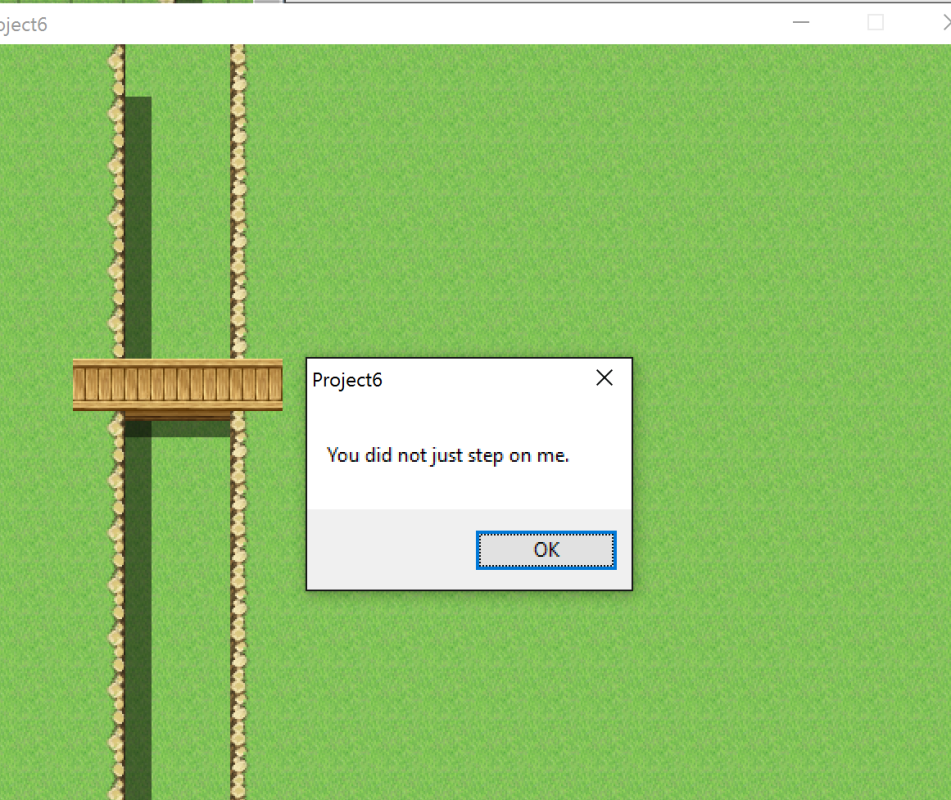
Now it should look something like this:
But, you'll also notice that the game keeps going after that, but in windowed form. If you would like the game to close directly after, go into your script call, and right below the last line, put "exit" which is the equivalent of saying "SceneManager.exit", which closes the game. Any script calls involving the SceneManager usually don't need a definition, so we don't need to define "exit" either. Now, save your event, and start your game. It should spawn the error message upon touching the event.
For most, you may not need this in your game (though you never know), but I find this to be a rather good scripting exercise because you can play around with it and take it apart to see what does what. Hope you enjoyed this!

So first, we need our message. So in a script call, say
msg = "Text."
That'll set what text is going to come up.
Next, we need to actually insert it into the message. So in the same script call, right underneath that, put,
msgbox(sprintf(msg))
Where msgbox is the error window. After you're done that, set your event trigger (I'd recommend player touch). And maybe set a graphic.
Now it should look something like this:
Protected download
But, you'll also notice that the game keeps going after that, but in windowed form. If you would like the game to close directly after, go into your script call, and right below the last line, put "exit" which is the equivalent of saying "SceneManager.exit", which closes the game. Any script calls involving the SceneManager usually don't need a definition, so we don't need to define "exit" either. Now, save your event, and start your game. It should spawn the error message upon touching the event.
For most, you may not need this in your game (though you never know), but I find this to be a rather good scripting exercise because you can play around with it and take it apart to see what does what. Hope you enjoyed this!

Downloads / Referenced Files
Log in to download
Log in, then follow the RPG Maker Developers Group to see these download links.
Log in to downloadReferenced Images / Attachments
Creator Claims / Removal
If you are the original creator and want this listing reassigned, edited, or removed, join BMMPlay and contact the moderators with proof that matches the original RPG Maker Web profile, linked GitHub, itch.io page, or another public creator identity.
Replies (0)
No replies yet.
0
replies
1
view
Topic Summary
Loading summary...