

Arrow Tile Puzzle Without Scripting
BMM_Archive · July 15, 2026

BMM_Archive
Preserved forum archive. This topic stores the original first post and locally mirrored RPG Maker Web attachments when available. It is posted by the BMMPlay archive account, not by the original creator.
Original Source
- Original title: Arrow Tile Puzzle Without Scripting
- Original author: dnel57
- Original date: July 23, 2016
- Source thread: https://forums.rpgmakerweb.com/threads/arrow-tile-puzzle-without-scripting.65767/
- Source forum path: Game Development Engines > RPG Maker Tutorials > RMVXAce Tutorials
Summary
Thanks to HitYourGrandma(Veteran Member) for my first tip. Let's say you are planning to have a chain of 8 tiles facing down 6 tiles facing right and
Archived First Post
Thanks to <span style="color: #696969">HitYourGrandma(Veteran Member) for my first tip.
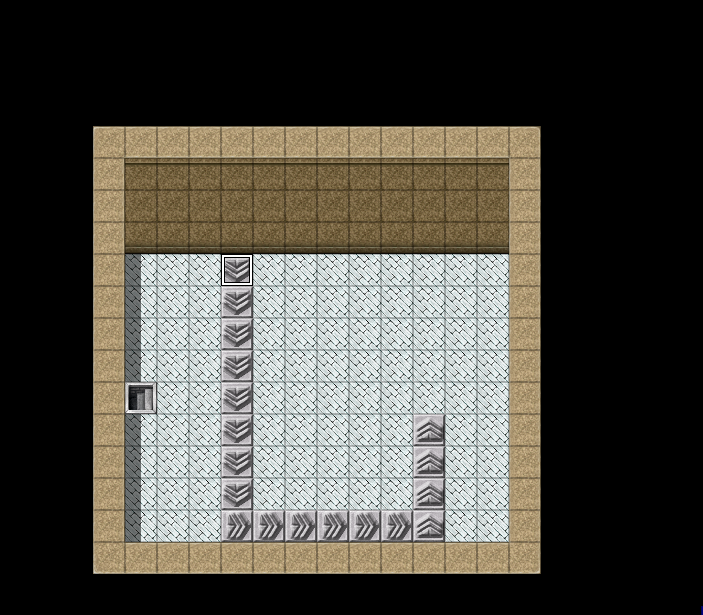
Let's say you are planning to have a chain of
8 tiles facing down
6 tiles facing right and
4 tiles facing up(for example),
First,place all the tiles in position and don't be
concerned with events at this point.
See pic below.
Next,click on the Edit mode icon in your toolbar.
Now,Right click the first tile you would be stepping on
to start the chain.
Then,click New Event .
You need not add a graphic to the event page.
The move route is what moves you,not the arrows.
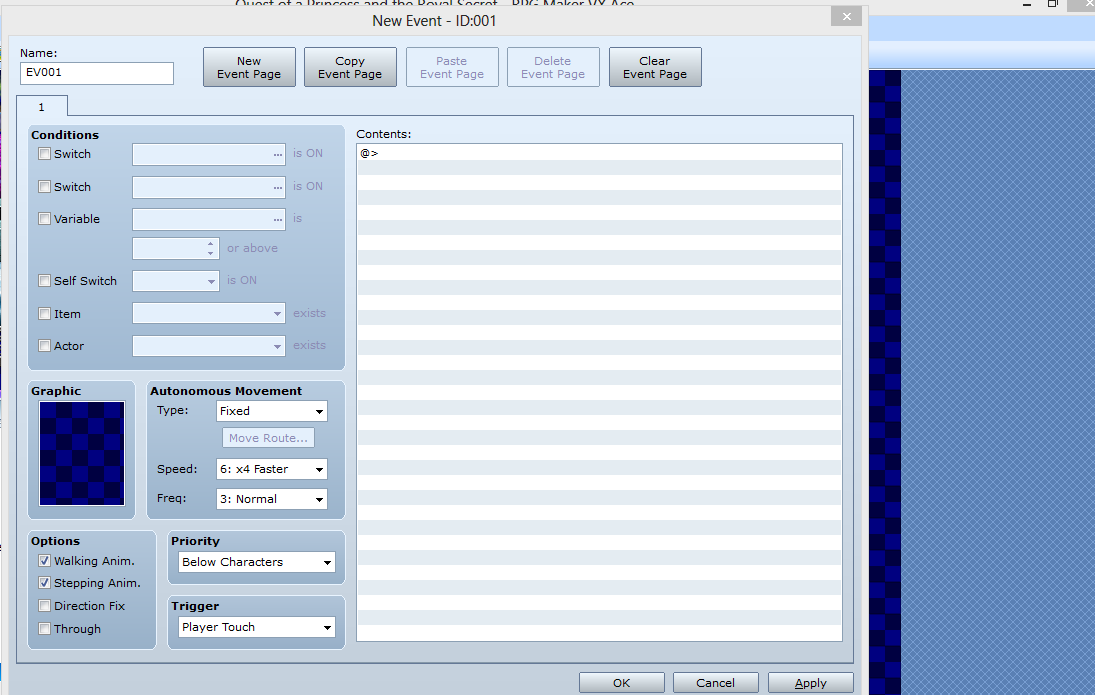
I clicked
Walking anim. and
Stepping anim.
Nothing else under Options
Next,under Autonomous Movement
I left
Fixed checked
Speed 6:x4 Faster
Frequency Normal
Priority Below Character
Trigger Player Touch
Should look like this:
Next,under Contents: to your right,
Double click the first line under Contents:
where the @> is
The editor will open (see below)
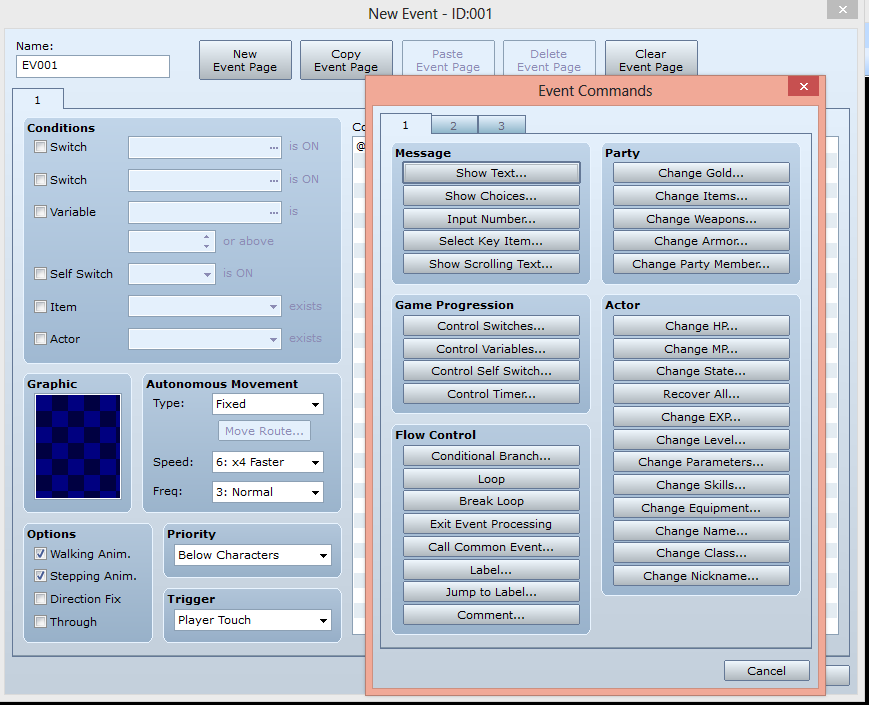
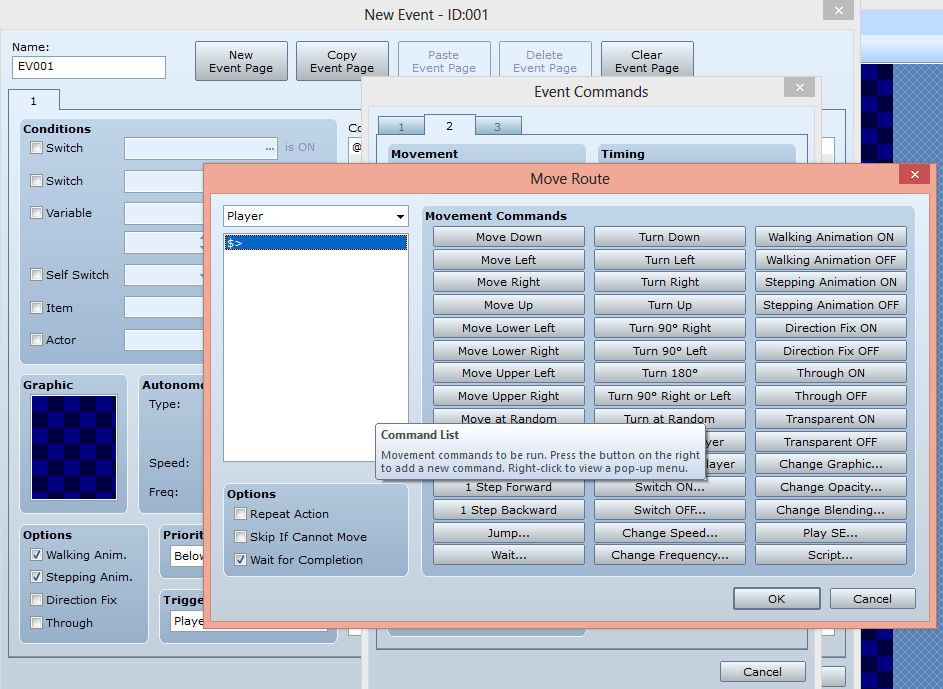
Then,click on Tab #2
Next,Click Set Move Route ,a menu will open.See pic below.
When planning a chain,DO NOT count your start tile.
There are 9 tiles facing down,but we are only moving 8.
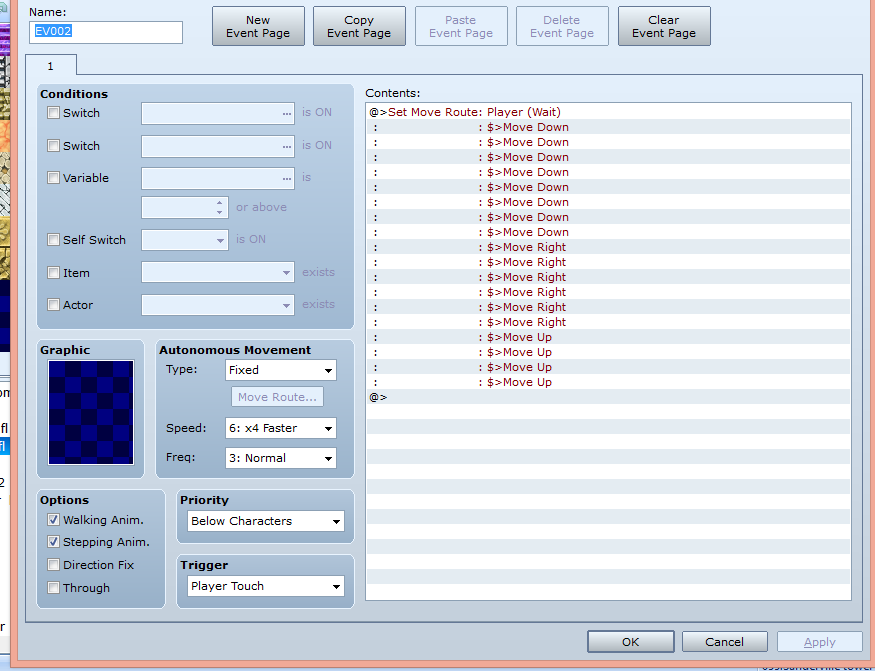
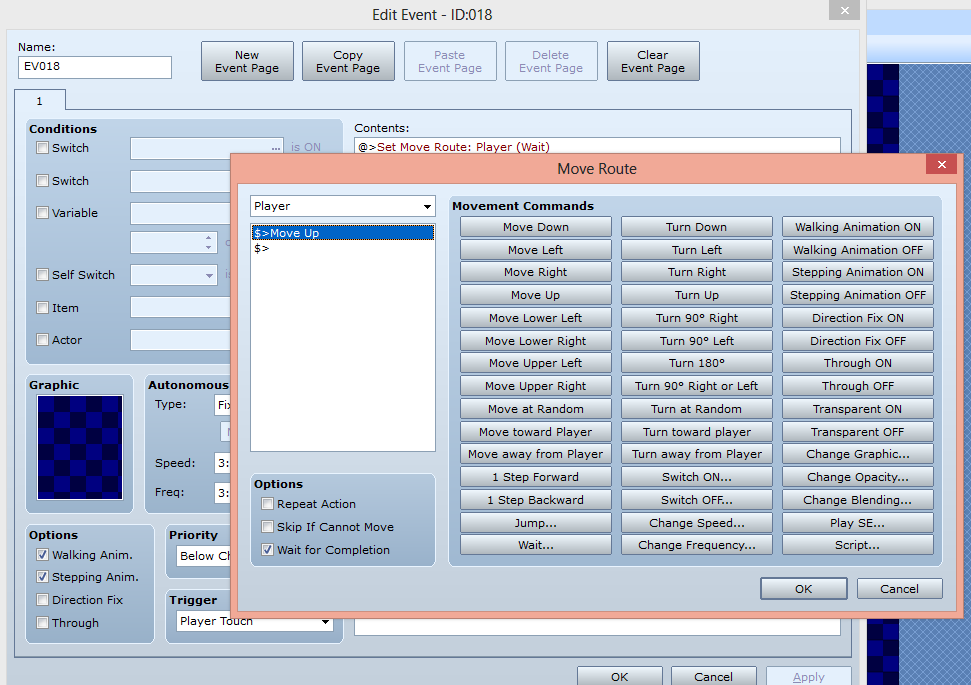
Click Move Down 8 times
Click Move Right 6 times
Click Move up 4 times ;3 times to complete the chain
and once to step off of the last arrow tile.
Should look like the figure below:
IMPORTANT!
When done entering your route,Make sure you click OK
at the bottom of the Editor page and OK on the Event page.
If you don't,it won't save it and you'll have to start all over again.
And that would....well,you know.
Now,play test the puzzle.It should work start to finish.YaY!!
BUT..............................there's always a but!
If you walk on any tile other than the first one,nothing happens??
Might as well be floor tiles!??
After experimenting,I discovered that every tile needs an Event on it for the chain to work from ANY tile in the chain.
One way to do this,is to right click and copy the Event from the first tile and Paste it onto all the other tiles.
(It's easier to Paste it in one tile at a time,then edit,then go to the next tile.)
One reason is that you won't lose your place.
The other reason I will explain further down.
Right click on the second tile ,click Paste .After pasting in the Event ,right click again,click Edit Event right click where says Set Move Route under Contents: and click Edit .
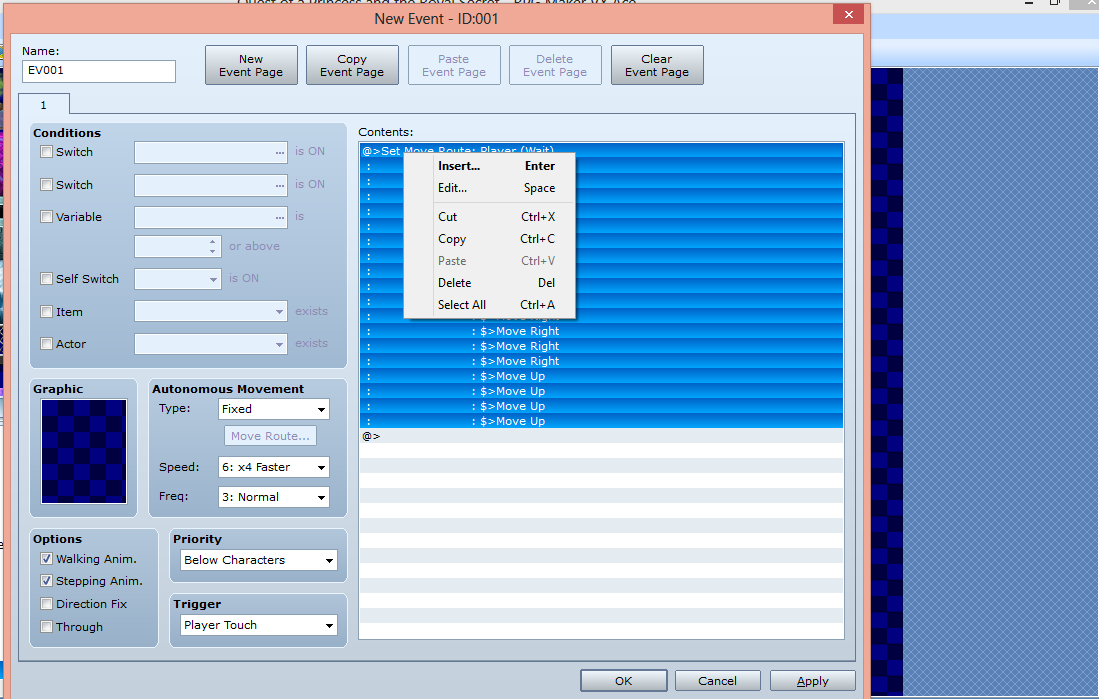
In the white box on the left,right click
the first Move Down and click Delete.
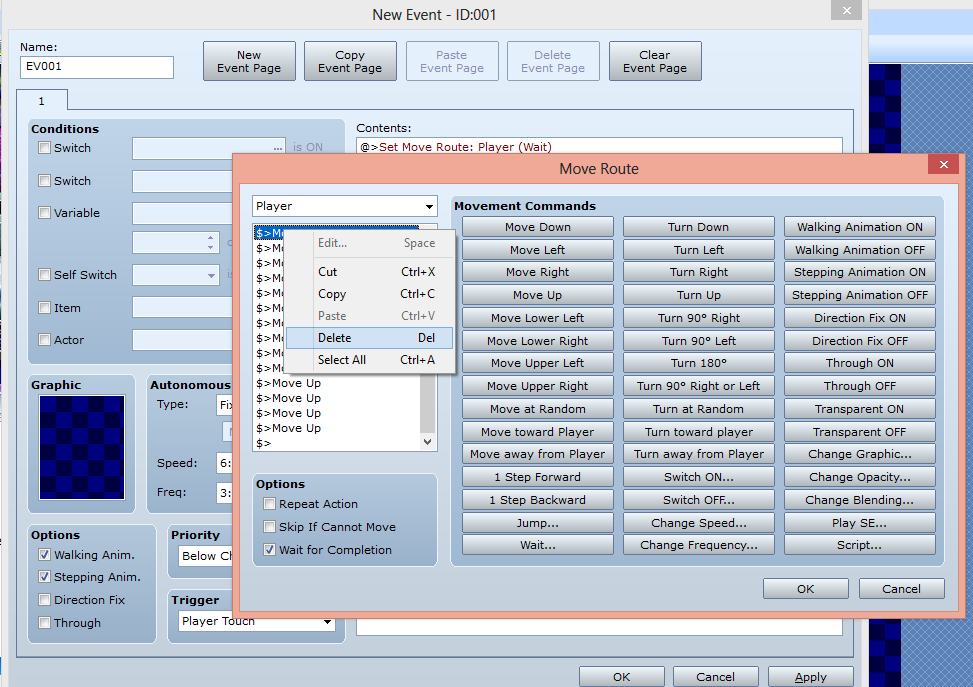
On the next tile down do the same and delete TWO of the Move Downs.
Keep doing the same operation by deleting one more
entry than the previous tile.
Now,the other reason for pasting one tile at a time:
When you get used to this,you will see that after deleting
several entries,that you can just copy and paste the event of
whatever tile you are on into the remaining tiles and save
some deleting moves.
For instance,when you get to the bottom tile (first tile pointing right),
the Event for that tile will end up looking like this:
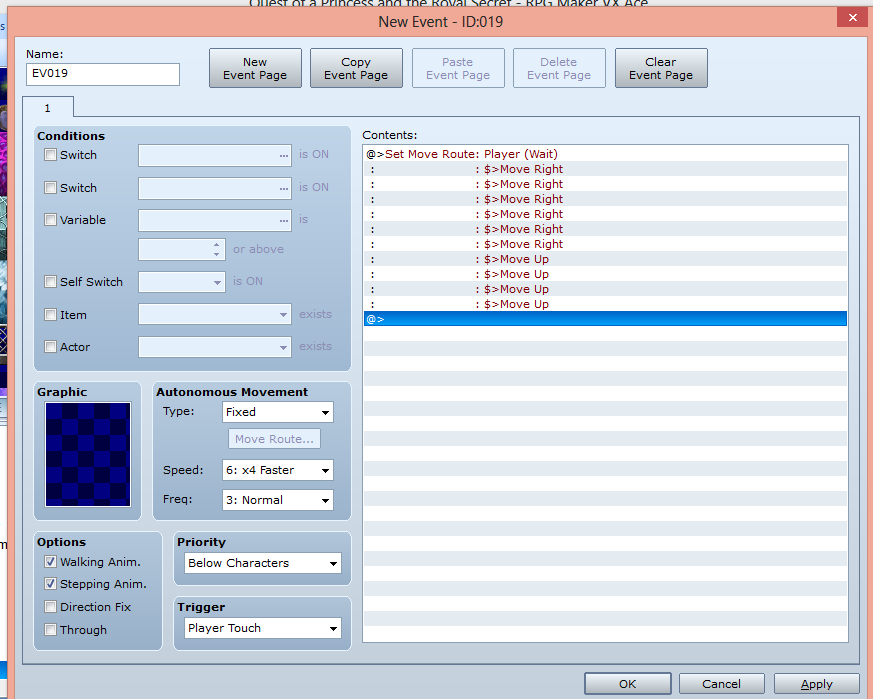
You'll see that all the Move Down entries are gone!
So,now,you can copy and paste THAT tile for the rest of the chain and eliminate deleting all the Move Down entries.
And,of course,if you have a long chain;30 tiles or so,this trick is invaluable because you can do it anywhere in the chain and save a lot of deleting moves.
When you get to the last arrow tile,DO NOT
delete the last Move Up .
If you do,the player will not walk off of the last tile by her/himself .
Sounds complicated,but,once you do a couple,it's not that bad.
Now,when you Play Test,the chain will execute when
you step on ANY tile,it will complete the chain from that point on.
Tip I figured out:If you have room,you can just make the event for the first tile and then,flank all tiles with black squares,boxes,barrels,walls;any non passable items.
Example below:
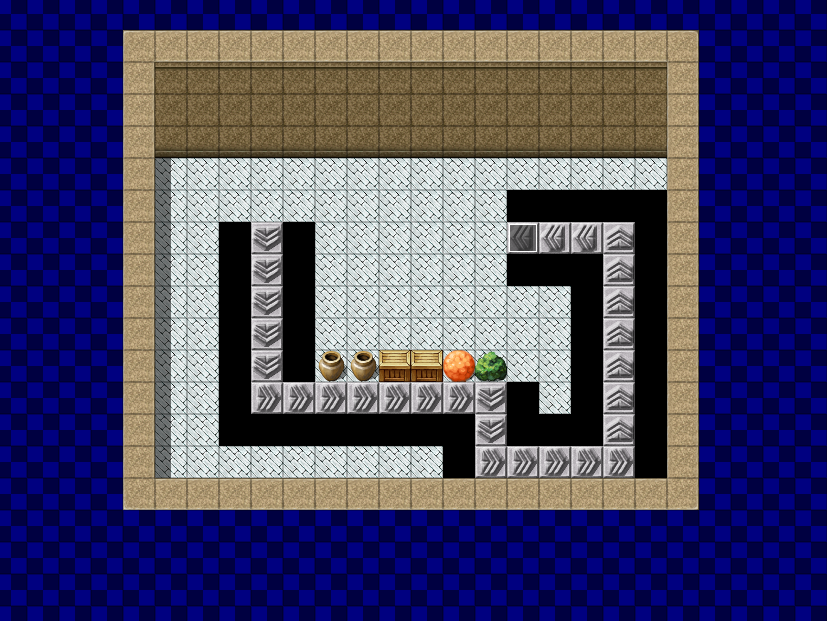
That way,you can't enter any other tile.
So you don't need events on every tile.
However,you will need an event for
the last tile in the chain.
In this case,Move Left once.
Otherwise,you will be able to enter the chain and
walk all the way back to the beginning.
This may not be THE way to achieve
this,but,it is a way that works!
There may be another way? Easier? Less time consuming?
If anyone comes up with one or knows of one.
Please let me know.
I hope this helps anyone wanting to have arrow tile puzzles as part of their project.
Let's say you are planning to have a chain of
8 tiles facing down
6 tiles facing right and
4 tiles facing up(for example),
First,place all the tiles in position and don't be
concerned with events at this point.
See pic below.
Next,click on the Edit mode icon in your toolbar.
Now,Right click the first tile you would be stepping on
to start the chain.
Then,click New Event .
You need not add a graphic to the event page.
The move route is what moves you,not the arrows.
I clicked
Walking anim. and
Stepping anim.
Nothing else under Options
Next,under Autonomous Movement
I left
Fixed checked
Speed 6:x4 Faster
Frequency Normal
Priority Below Character
Trigger Player Touch
Should look like this:
Next,under Contents: to your right,
Double click the first line under Contents:
where the @> is
The editor will open (see below)
Then,click on Tab #2
Next,Click Set Move Route ,a menu will open.See pic below.
When planning a chain,DO NOT count your start tile.
There are 9 tiles facing down,but we are only moving 8.
Click Move Down 8 times
Click Move Right 6 times
Click Move up 4 times ;3 times to complete the chain
and once to step off of the last arrow tile.
Should look like the figure below:
IMPORTANT!
When done entering your route,Make sure you click OK
at the bottom of the Editor page and OK on the Event page.
If you don't,it won't save it and you'll have to start all over again.
And that would....well,you know.
Now,play test the puzzle.It should work start to finish.YaY!!
BUT..............................there's always a but!
If you walk on any tile other than the first one,nothing happens??
Might as well be floor tiles!??
After experimenting,I discovered that every tile needs an Event on it for the chain to work from ANY tile in the chain.
One way to do this,is to right click and copy the Event from the first tile and Paste it onto all the other tiles.
(It's easier to Paste it in one tile at a time,then edit,then go to the next tile.)
One reason is that you won't lose your place.
The other reason I will explain further down.
Right click on the second tile ,click Paste .After pasting in the Event ,right click again,click Edit Event right click where says Set Move Route under Contents: and click Edit .
In the white box on the left,right click
the first Move Down and click Delete.
On the next tile down do the same and delete TWO of the Move Downs.
Keep doing the same operation by deleting one more
entry than the previous tile.
Now,the other reason for pasting one tile at a time:
When you get used to this,you will see that after deleting
several entries,that you can just copy and paste the event of
whatever tile you are on into the remaining tiles and save
some deleting moves.
For instance,when you get to the bottom tile (first tile pointing right),
the Event for that tile will end up looking like this:
You'll see that all the Move Down entries are gone!
So,now,you can copy and paste THAT tile for the rest of the chain and eliminate deleting all the Move Down entries.
And,of course,if you have a long chain;30 tiles or so,this trick is invaluable because you can do it anywhere in the chain and save a lot of deleting moves.
When you get to the last arrow tile,DO NOT
delete the last Move Up .
If you do,the player will not walk off of the last tile by her/himself .
Sounds complicated,but,once you do a couple,it's not that bad.
Now,when you Play Test,the chain will execute when
you step on ANY tile,it will complete the chain from that point on.
Tip I figured out:If you have room,you can just make the event for the first tile and then,flank all tiles with black squares,boxes,barrels,walls;any non passable items.
Example below:
That way,you can't enter any other tile.
So you don't need events on every tile.
However,you will need an event for
the last tile in the chain.
In this case,Move Left once.
Otherwise,you will be able to enter the chain and
walk all the way back to the beginning.
This may not be THE way to achieve
this,but,it is a way that works!
There may be another way? Easier? Less time consuming?
If anyone comes up with one or knows of one.
Please let me know.
I hope this helps anyone wanting to have arrow tile puzzles as part of their project.
Downloads / Referenced Files
RPG Maker Web attachments are mirrored locally when available. Other external links remain hosted by their original creator or third-party service.
- Local mirror: 26811-f7cdd1ef5d6e56be51c008055195585f.png
SHA-256:9fd291415af0b6b52644badab7cd618f5ee2254ea9ef842a9f3c8e634e9ba3a8
Original attachment URL: https://forums.rpgmakerweb.com/attachments/tut1-png.44555/ - Local mirror: 26812-ad17c0a9c9fbddaf3bf1424299a384da.png
SHA-256:cb9fdb7c842524e12f33588ff29a9f084962571cdec5c9040850c6fa6c768556
Original attachment URL: https://forums.rpgmakerweb.com/attachments/tut2-png.44556/ - Local mirror: 26815-fa6e669371e6bd1fdd4d44bd4a3046f0.png
SHA-256:98a020e019d0a023e195598a57b877f085e48c0d0abc7a897c90b4c02ba06ddf
Original attachment URL: https://forums.rpgmakerweb.com/attachments/tut3b-png.44559/ - Local mirror: 26813-82100abb614d5a31a5409cb15b8afd34.png
SHA-256:977b52a426ff027d1592f9dd1f83dd3ba874c2a31e4e4df2b133dfce9b4ccb81
Original attachment URL: https://forums.rpgmakerweb.com/attachments/tut5-png.44557/ - Local mirror: 26817-35bfc6a4d6d6c24d97ee57b69db6919e.png
SHA-256:22bd2c0da2f58aba0d0258d526534c8c55a36833bc4da2c7bf5071d1121c90a5
Original attachment URL: https://forums.rpgmakerweb.com/attachments/tut3-png.44561/ - Local mirror: 26818-882537baadd3200532b400e2868ae631.png
SHA-256:ebdcc703d7faa1dfe5b0d4f1d0216a13bf0fd1120de1e6d07d0739344510b611
Original attachment URL: https://forums.rpgmakerweb.com/attachments/tut7-png.44562/ - Local mirror: 26819-8b1d2a94d0d0f8b9d4fcf47cda5d52da.png
SHA-256:d194495504e00dbf8529a8ed3462f76f4fe964d0e69fa7bf7b56cccba0f6f6a4
Original attachment URL: https://forums.rpgmakerweb.com/attachments/tut8-png.44563/ - Local mirror: 26820-51993ce74f56557cbf00febdfaa1592d.png
SHA-256:6887adadfc5543d985ee69ce4fd52c6d9f2b900afd240b9a41937fdda8db322b
Original attachment URL: https://forums.rpgmakerweb.com/attachments/tut9a-png.44564/ - Local mirror: 26821-b95be68e9bc1fdbb4ca1c76b59130207.png
SHA-256:caf99ff6138356d1eaa8be8fce1df0b5368389875a4355dae14c7257d14a9f5e
Original attachment URL: https://forums.rpgmakerweb.com/attachments/tut10-png.44565/ - Local mirror: 26822-578f546e1d7340beeedd163d32688457.png
SHA-256:7894db9132f1c657105e8fdfd93f3ee7ae103d3bedcc94935f4da0482f3d5344
Original attachment URL: https://forums.rpgmakerweb.com/attachments/tut6-png.44566/
Referenced Images / Attachments
Creator Claims / Removal
If you are the original creator and want this listing reassigned, edited, or removed, join BMMPlay and contact the moderators with proof that matches the original RPG Maker Web profile, linked GitHub, itch.io page, or another public creator identity.
Replies (0)
No replies yet.
0
replies
32
views
Topic Summary
Loading summary...