

Treetops behind cliff edges - problem & solution
BMM_Archive · July 15, 2026

BMM_Archive
Preserved forum archive. This topic stores the original first post and locally mirrored RPG Maker Web attachments when available. It is posted by the BMMPlay archive account, not by the original creator.
Original Source
- Original title: Treetops behind cliff edges - problem & solution
- Original author: Kryterion
- Original date: April 18, 2013
- Source thread: https://forums.rpgmakerweb.com/threads/treetops-behind-cliff-edges-problem-solution.11844/
- Source forum path: Game Development Engines > RPG Maker Tutorials > RMVXAce Tutorials
Summary
I was mapping recently when I came across an unusual problem that is best described with pictures. { "lightbox_close": "Close", "lightbox_next": "Next",
Archived First Post
I was mapping recently when I came across an unusual problem that is best described with pictures.
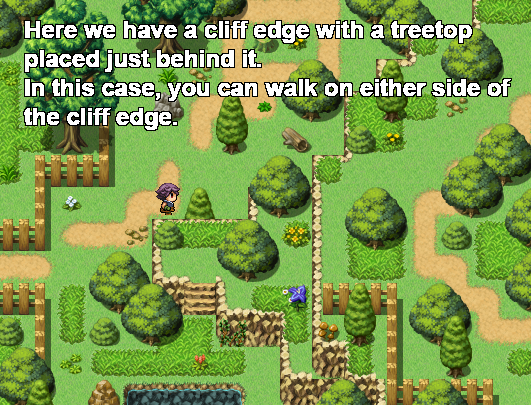
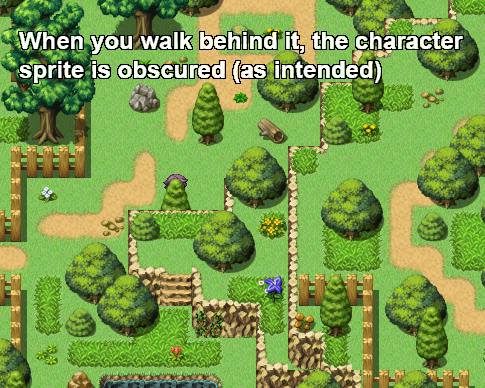
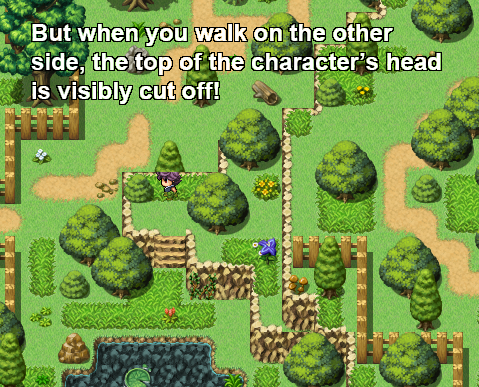
The reason for this is obvious: the passage for the tile is set to 'star', so it always appears above the character, no matter where you're standing. Clearly this is not acceptable! We want it to appear above the character when you're standing 'behind' it, and below when you're standing 'in front' of it - i.e., when you're on the cliff edge. The solution is pretty simple: you need to create the graphic as an event that 'knows' where you are on the map, so that it can change its priority accordingly. Experienced eventers have probably already worked out what I'm going to say (or else done this problem already), but for beginners, I'll explain it step-by-step.
First, create an event anywhere on the map. Preferably somewhere where it won't interfere with the play at all (I put these sort of events in the top-left so I can find it again if I need to). The only thing this event is going to contain is a variable that keeps track of the player's map co-ordinates. In this case, we're only concerned by the character's y-position.
Set the event trigger to parallel process.
In the event contents, right-click, insert > game progression > control variables.
Create a variable with the name of 'player y' (or some other useful description).
Leave the operation as 'set'.
Set the operand as game data > character > player > map y.
That's it for this event. Now go to where you want to place the treetop, and make a note of the map co-ordinates (it's given in the bottom right-hand corner of the screen). Again, we're only concerned by its y-position (remember grid co-ordinates are always given in the format "x,y" so it's the second number we want). For convenience I will refer to this number as 'event y'.
All that this event is going to contain is a process that watches the variable 'player y' and flips its priority accordingly. So again, set the event trigger to parallel process. Set the graphic to the treetop (obviously), and set the priority as 'above characters'.
In the event contents, place a conditional branch.
Set the condition for the branch as a variable > player y (or whatever you named it) > greater than > constant > [event y]. (While you're here, deselect the tick at the bottom that says 'set event handling when conditions do not apply', just for neatness.)
In the outcome of the branch, put control self switch > A = ON.
Now copy & paste the event page you just made.
In event tab 2, change the event's condition to self switch A is ON, and change the priority to below characters.
Change the condition of the branch from greater than to less than or equal to, and change the outcome of the branch to self switch A is OFF.
That's it! A simple, but I hope you agree, elegant solution to the problem. Now you can copy & paste the treetop event around the map as you need it. Just remember to change the value of [event y] everytime you place it.
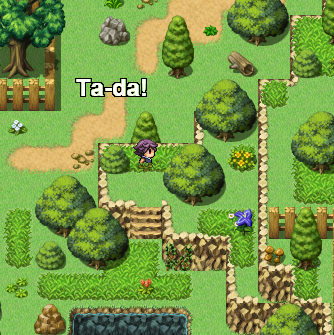
The reason for this is obvious: the passage for the tile is set to 'star', so it always appears above the character, no matter where you're standing. Clearly this is not acceptable! We want it to appear above the character when you're standing 'behind' it, and below when you're standing 'in front' of it - i.e., when you're on the cliff edge. The solution is pretty simple: you need to create the graphic as an event that 'knows' where you are on the map, so that it can change its priority accordingly. Experienced eventers have probably already worked out what I'm going to say (or else done this problem already), but for beginners, I'll explain it step-by-step.
First, create an event anywhere on the map. Preferably somewhere where it won't interfere with the play at all (I put these sort of events in the top-left so I can find it again if I need to). The only thing this event is going to contain is a variable that keeps track of the player's map co-ordinates. In this case, we're only concerned by the character's y-position.
Set the event trigger to parallel process.
In the event contents, right-click, insert > game progression > control variables.
Create a variable with the name of 'player y' (or some other useful description).
Leave the operation as 'set'.
Set the operand as game data > character > player > map y.
That's it for this event. Now go to where you want to place the treetop, and make a note of the map co-ordinates (it's given in the bottom right-hand corner of the screen). Again, we're only concerned by its y-position (remember grid co-ordinates are always given in the format "x,y" so it's the second number we want). For convenience I will refer to this number as 'event y'.
All that this event is going to contain is a process that watches the variable 'player y' and flips its priority accordingly. So again, set the event trigger to parallel process. Set the graphic to the treetop (obviously), and set the priority as 'above characters'.
In the event contents, place a conditional branch.
Set the condition for the branch as a variable > player y (or whatever you named it) > greater than > constant > [event y]. (While you're here, deselect the tick at the bottom that says 'set event handling when conditions do not apply', just for neatness.)
In the outcome of the branch, put control self switch > A = ON.
Now copy & paste the event page you just made.
In event tab 2, change the event's condition to self switch A is ON, and change the priority to below characters.
Change the condition of the branch from greater than to less than or equal to, and change the outcome of the branch to self switch A is OFF.
That's it! A simple, but I hope you agree, elegant solution to the problem. Now you can copy & paste the treetop event around the map as you need it. Just remember to change the value of [event y] everytime you place it.
Downloads / Referenced Files
RPG Maker Web attachments are mirrored locally when available. Other external links remain hosted by their original creator or third-party service.
- Local mirror: 1003-bbc3a3dee07dc18e8a4bad97a361b3f0.png
SHA-256:9bf2d9fe5ff33a7b9f121c91d2788d9f2441740eb6f0f49064ecd79dc5548047
Original attachment URL: https://forums.rpgmakerweb.com/attachments/tut_1-png.5225/ - Local mirror: 1004-f1d47faeae40c9dbf2a0183bf78b65a5.png
SHA-256:c4f23d1e0a719db440c343ca7680045a1e76e441afbcd519d9a103841b59dc7f
Original attachment URL: https://forums.rpgmakerweb.com/attachments/tut_2-png.5226/ - Local mirror: 1005-632daf0d2f47b870bda55b0ff2b4da0c.png
SHA-256:36add2683be2868dcc09880cd4316cecab744643e2a587a4ef124db0c1a61689
Original attachment URL: https://forums.rpgmakerweb.com/attachments/tut_3-png.5227/ - Local mirror: 1006-c5dd7004a4833d8ecc0e1f610b9882a8.png
SHA-256:844c51ef4b89c6d01b64e5a89ab3e85ce97d8340c2698efa3e502d7250aed6e5
Original attachment URL: https://forums.rpgmakerweb.com/attachments/tut_4-png.5228/
Referenced Images / Attachments
Creator Claims / Removal
If you are the original creator and want this listing reassigned, edited, or removed, join BMMPlay and contact the moderators with proof that matches the original RPG Maker Web profile, linked GitHub, itch.io page, or another public creator identity.
Replies (0)
No replies yet.
0
replies
26
views
Topic Summary
Loading summary...