

Scan Skill
BMM_Archive · July 15, 2026

BMM_Archive
Preserved forum archive. This topic stores the original first post and locally mirrored RPG Maker Web attachments when available. It is posted by the BMMPlay archive account, not by the original creator.
Original Source
- Original title: Scan Skill
- Original author: Mango
- Original date: February 14, 2016
- Source thread: https://forums.rpgmakerweb.com/threads/scan-skill.56851/
- Source forum path: Game Development Engines > RPG Maker Tutorials > RMVXAce Tutorials
Summary
Finally, I've put together a few things to create a Scan Skill! Basically, a Scan skill is a skill that allows you to look at the enemy's stats! So, let me explain this in the easiest way I can: Open up Database.
Archived First Post
Finally, I've put together a few things to create a Scan Skill!
Basically, a Scan skill is a skill that allows you to look at the enemy's stats!
So, let me explain this in the easiest way I can:
Open up Database.
Click on the "Common Events" tab.
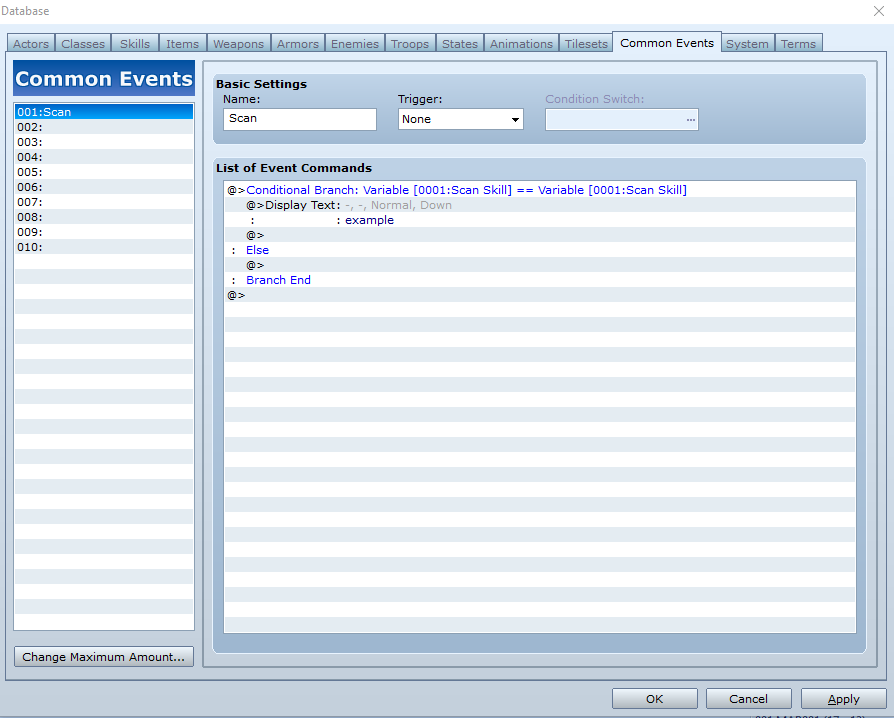
Double click an event command, and from the "1" tab, click "Conditional Branch".
In Conditional Branch, click Variable, then open up the Variable screen. In the screen, rename it to anything, then click OK.
Underneath Conditional Branch (but above Else), double click event command and then click Display Text..
If anyone could reply or answer this, please tell me how to show the enemy's name, hp, mp, etcetera.
Next, open Skills and add a skill corresponding to the Common Event.
None of this really matters, except for the right section.
Double click on On Use Effects.
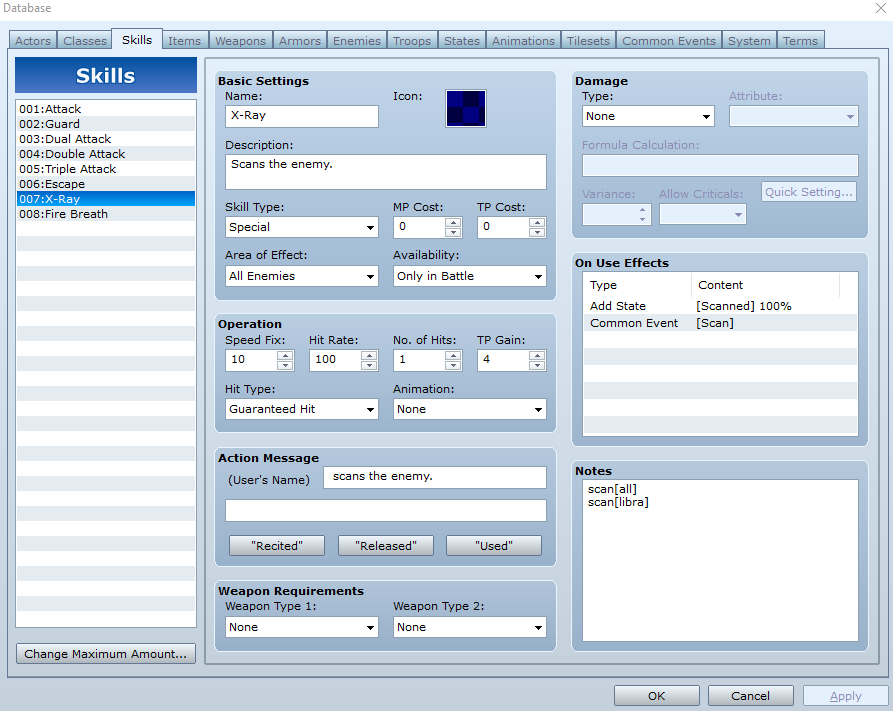
Then go to Common Event, and go to Common Events and choose your scan event, then click OK.
Click Apply, and OK.
That's all I can think of! Any questions or problems, just mention in the comments.
Basically, a Scan skill is a skill that allows you to look at the enemy's stats!
So, let me explain this in the easiest way I can:
Open up Database.
Click on the "Common Events" tab.
Double click an event command, and from the "1" tab, click "Conditional Branch".
In Conditional Branch, click Variable, then open up the Variable screen. In the screen, rename it to anything, then click OK.
Underneath Conditional Branch (but above Else), double click event command and then click Display Text..
If anyone could reply or answer this, please tell me how to show the enemy's name, hp, mp, etcetera.
Next, open Skills and add a skill corresponding to the Common Event.
None of this really matters, except for the right section.
Double click on On Use Effects.
Then go to Common Event, and go to Common Events and choose your scan event, then click OK.
Click Apply, and OK.
That's all I can think of! Any questions or problems, just mention in the comments.
Downloads / Referenced Files
RPG Maker Web attachments are mirrored locally when available. Other external links remain hosted by their original creator or third-party service.
- Local mirror: 18326-ba5f495ffe033719fac9d71b9c6291f3.png
SHA-256:ae2ac04aa6d500357c71b9231bf5349ea2735ec1fb9c9fa29ced382e5fa08c0a
Original attachment URL: https://forums.rpgmakerweb.com/attachments/ba5f495ffe033719fac9d71b9c6291f3-png.31705/ - Local mirror: 18331-52f7c5520909838b0792906e6a34b05a.png
SHA-256:a1bf09a5f2de316d6b41b331808326136c11fe4a259532ac95528779e89f1a68
Original attachment URL: https://forums.rpgmakerweb.com/attachments/52f7c5520909838b0792906e6a34b05a-png.31710/
Referenced Images / Attachments
Creator Claims / Removal
If you are the original creator and want this listing reassigned, edited, or removed, join BMMPlay and contact the moderators with proof that matches the original RPG Maker Web profile, linked GitHub, itch.io page, or another public creator identity.
Replies (0)
No replies yet.
0
replies
17
views
Topic Summary
Loading summary...