

MV"Mirror Portraits" in Coversation plugin (WW|Converse)
BMM_Archive · July 15, 2026

Original Source
- Original title: "Mirror Portraits" in Coversation plugin (WW|Converse)
- Original author: WickedWolfy
- Original date: July 1, 2018
- Source thread: https://forums.rpgmakerweb.com/threads/mirror-portraits-in-coversation-plugin-ww-converse.97105/
- Source forum path: Game Development Engines > RPG Maker Javascript Plugins > JS Plugin Releases (RMMV)
Summary
TLDR: Can display "talking heads" portraits on the right side of the box Can miror-flip portraits to face the other way Simple and small plugin that should require less work than cutting direction-facing images
Archived First Post
- Can display "talking heads" portraits on the right side of the box
- Can miror-flip portraits to face the other way
- Simple and small plugin that should require less work than cutting direction-facing images
- YANFLY MesageCore compatible
Long Read:
Dear Maker-colleagues,
My sincere apologies if similar tech was already posted. And I am sorry if I have dropped this in the wrong woods.
I am rather shy of sharing my work, but hopefully this works out for someone else as it did for me.
So first of all I feel silly sharing "yet another plugin" for conversation, but for all my searching I have found no simple way to rotate character portraits, displaying them on the right side of the conversation box... And definitely have not seen any plugins that would allow for a quick-mirror-flip of portraits in conversions.
Yes, you can have many different faces to use, cut to occasion, facing every which way... but I wanted something that would work with "defaults" - MV generated images (Blondie is an MV-tool generated face), default NPC faces (redhead girl is in "Evil" standard package). Also without having to load many different files for the "same" face in the game.
And I wanted an effect of two (or more) people talking - they look at one another from two sides of the conversation circle, with the protagonist being always on the left, facing right. And sometimes someone needs to "look away" from a conversation for extra dramatic effect or to look "distracted" from conversation.
This is also intended to be rather lightweight, quick and dirty solution. I am sure a much more robust solution could be implemented, but this has filled my need pretty well.
So without further ado, here it is.
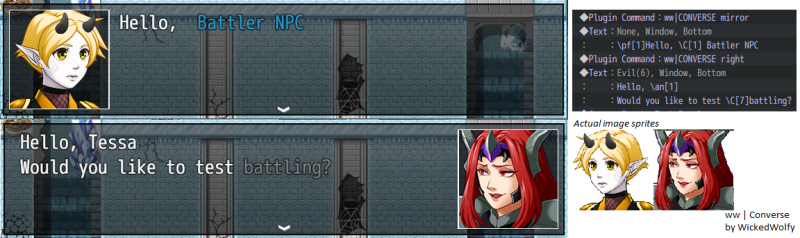
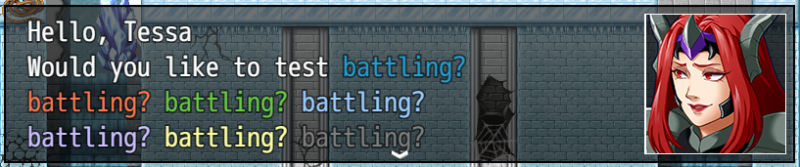
This works for me with YANFLY MessageCore - colors and even portrait of-first-party-character displays have worked just fine.
This does modify Window_Message functions:
- drawMessageFace
- newLineX
There is, unfortunately, no way (that I found) to make theses work with other plugins that overwrite the same function, since these two functions are essential to mirroring works.
There might be another way, but it would not fit the "simple and lightweight" description I was going for for my project.
How to use:
- This is for RPG Maker MV
- Put the plugin somewhere at the bottom of the "conversation UI" plugins
- Set some settings (Kept it as simple and as straightforward as possible)
- Add some "plugin" lines to your conversation stack
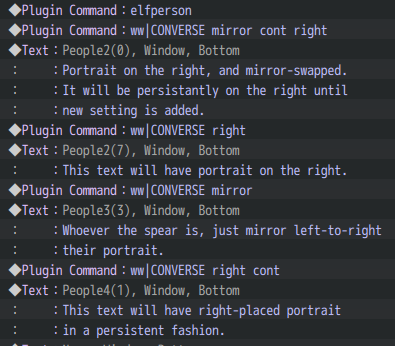
Full list of command lines are as follows:
- "ww|CONVERSE right" - Next speaker will be drawn on the right side
- "ww|CONVERSE right mirror" - Next speaker will be drawn on the right side and face image will be mirrored horizontally
- "ww|CONVERSE right cont mirror cont" - Speaker will be drawn on the right side and face image will be mirrored horizontally (And this will continue until "reset" is called. Great if the character has a long speech, so you don't have to call function over and over)
- "ww|CONVERSE reset" - resets all options to default: no mirror or placement
1.3.2 - Update to detect "special size cases" for YEP MessageCore. More detailed description in the thread. (per @JohnOminae)
1.3.1 - Fix issue with not working plugin parameters (thanks @keizz )
1.3.0 - Added option to overwrite/set MessageBox width (per @JohnOminae and @Gregaur Thanks for heads up, mates.)
1.2.2 - Initial post, after I've worked out the first kinks (or so I think)
Terms of use:
- If you want to use it for your game, regardless of it is commercial or free - feel absolutely free to do so.
- If you want to post here to PM me about the game you use my code with - that's grand, but not required. (I just like seeing what other folks are capable of)
- One thing I ask is PLEASE do not rip off my code. If you have ideas - let me know. If you absolutely need to rip off my code, I guess that can't be helped... But give me a note of thanks in your plugin description and link to the original. You don't have to, but its always nice. Maybe I will feel good about my work and make something else that's interesting to someone. =)
- Have a case that's not in the bullet-point above? Feel free to PM me.
Thanks for looking. I am open to comments, questions and suggestions.
How to get:
Full GitHub
Latest Version on Github (1.3.1)
Downloads / Referenced Files
RPG Maker Web attachments are mirrored locally when available. Other external links remain hosted by their original creator or third-party service.
- Source: Full GitHub
License / Terms Note
Terms of use: - If you want to use it for your game, regardless of it is commercial or free - feel absolutely free to do so. - If you want to post here to PM me about the game you use my code with - that's grand, but not required. (I just like seeing what other folks are capable of) - One thing I ask is PLEASE do not rip off my code. If you have ideas - let...
Referenced Images / Attachments
Creator Claims / Removal
If you are the original creator and want this listing reassigned, edited, or removed, join BMMPlay and contact the moderators with proof that matches the original RPG Maker Web profile, linked GitHub, itch.io page, or another public creator identity.
Replies (0)
No replies yet.
Topic Summary
Loading summary...