

Protect Your Scripts
BMM_Archive · July 15, 2026

Original Source
- Original title: Protect Your Scripts
- Original author: Dragon12
- Original date: August 23, 2015
- Source thread: https://forums.rpgmakerweb.com/threads/protect-your-scripts.44004/
- Source forum path: Game Development Engines > RPG Maker Tutorials > RMVXAce Tutorials
Summary
Hello guys if you bought scripts from somewhere like luna engine and khas ultra light and ask someone to made it for you so you may think what happen if your game is decrypt and use your script for free! SO here I COme with this tutorial to save your scripts... Start from here Step 1 - Open data manager in your script editor(it is on the top) then scrol it and you found something like this {
Archived First Post
Start from here
Step 1 - Open data manager in your script editor(it is on the top) then scrol it and you found something like this
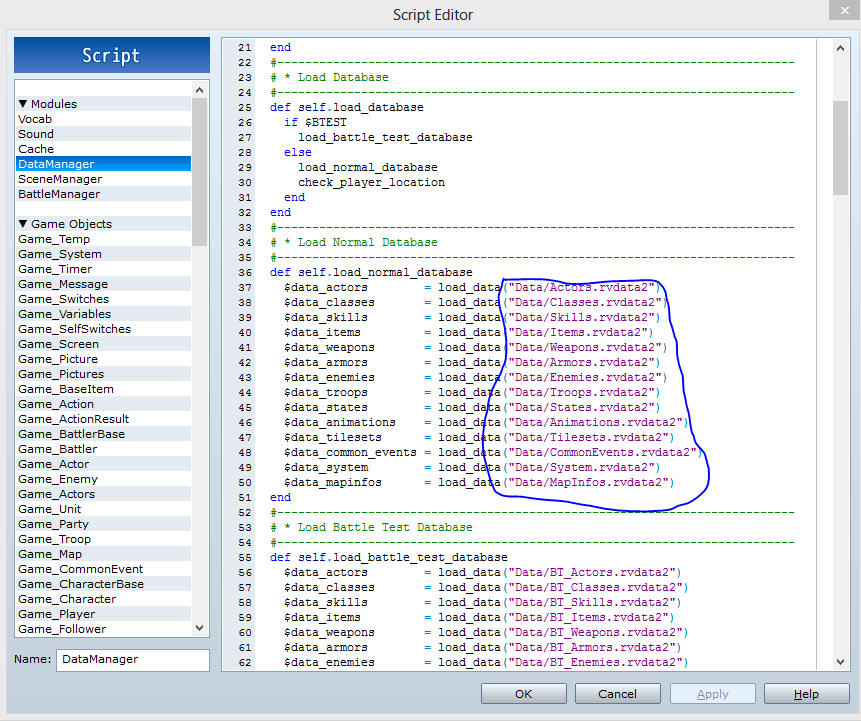
you have to edit thing under the blue line like this
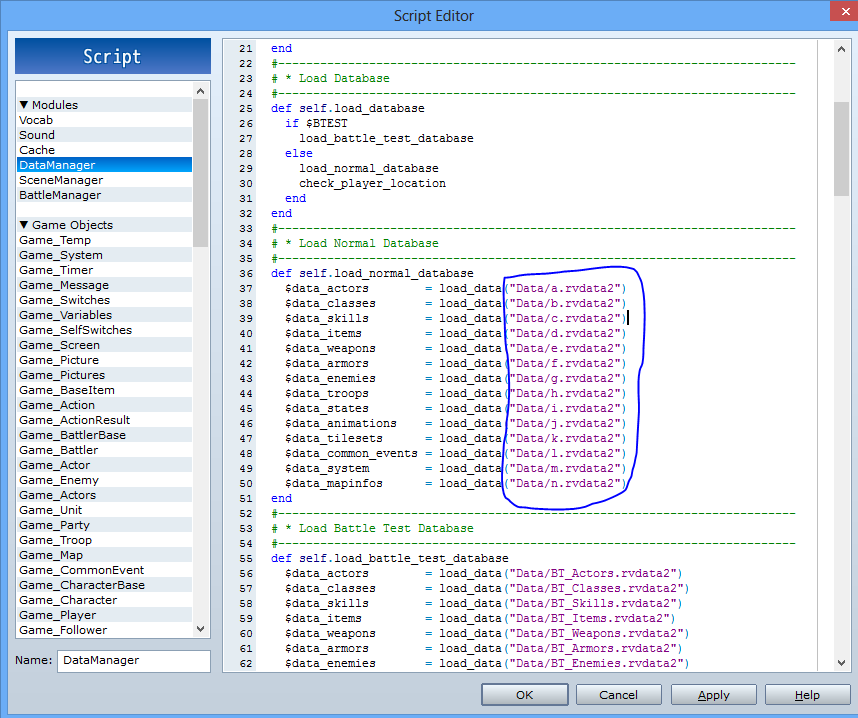 (You can use any name for that)!
Step 2 - now open your game folder and open Game (Not .exe file)
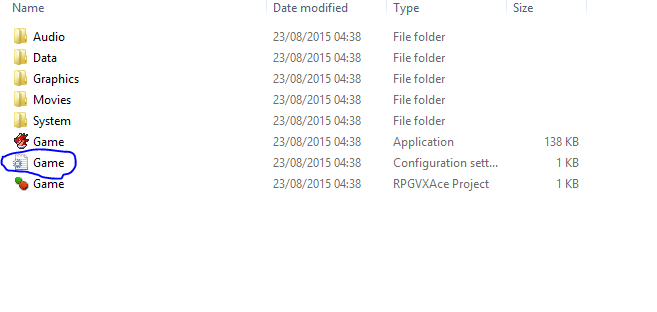
open it in notepad like this
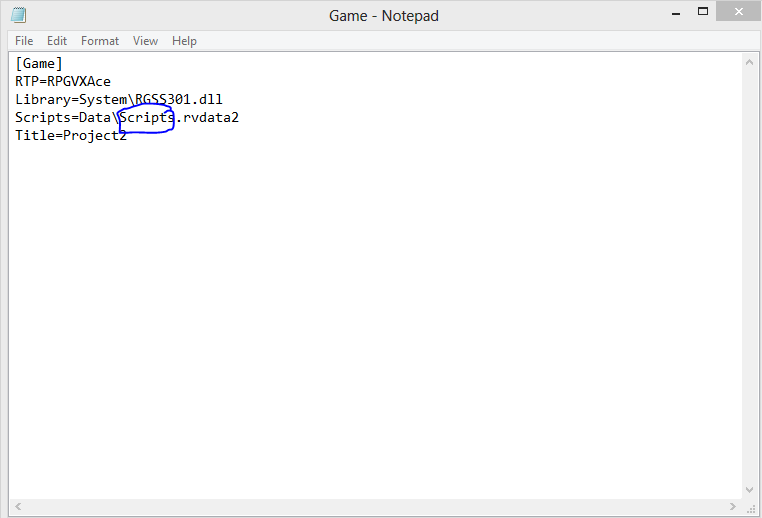 here you see scipts is under blue line..
you have to edit it like this
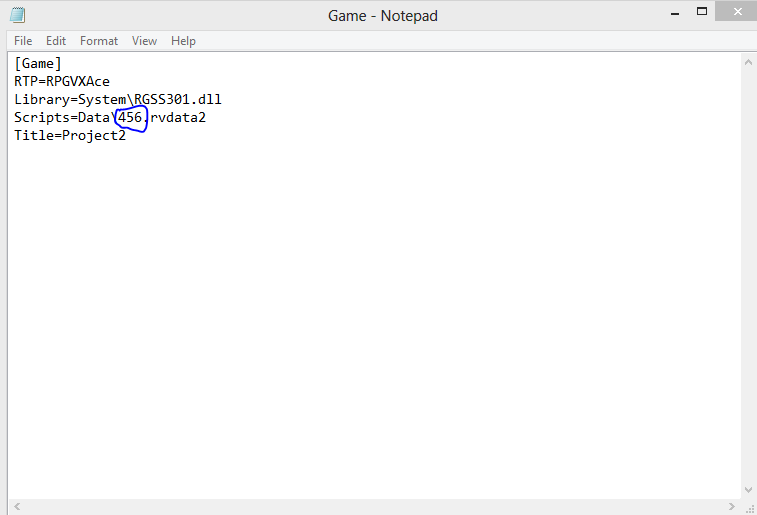 (any name)
Step 3 - Now we have to make a new folder i make a folder with name 123 now follow step 1 again
(Step 1 - Open data manager in your script editor(it is on the top) then scrol it and you found something like this
)Step 4 - change data to 123 (your folder name) like this
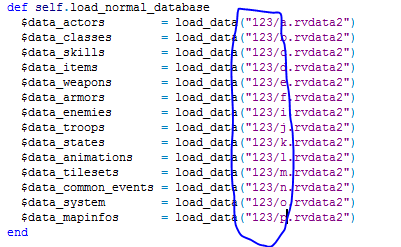
you have to edit the Game file also like this
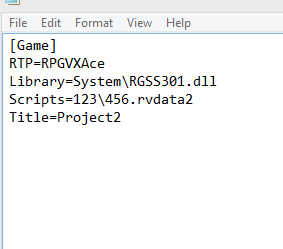
step 5 - now open data folder in your game folder like this
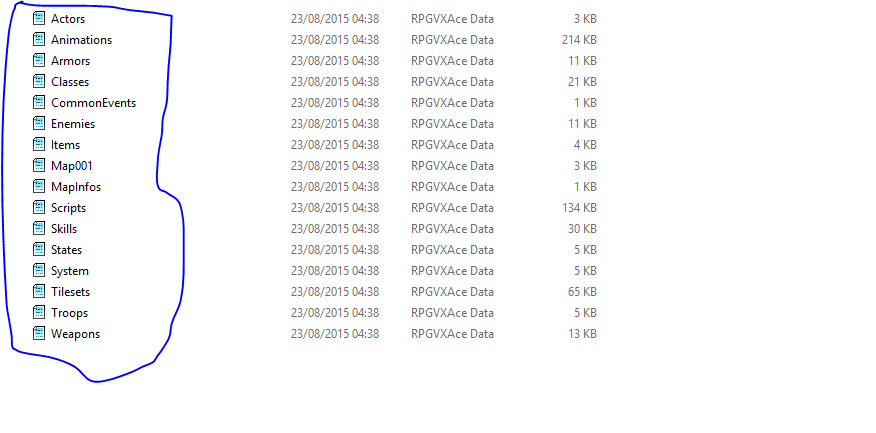
change the files under blue line (except map000 (map000 is you map name it can be map001, map099)) like this
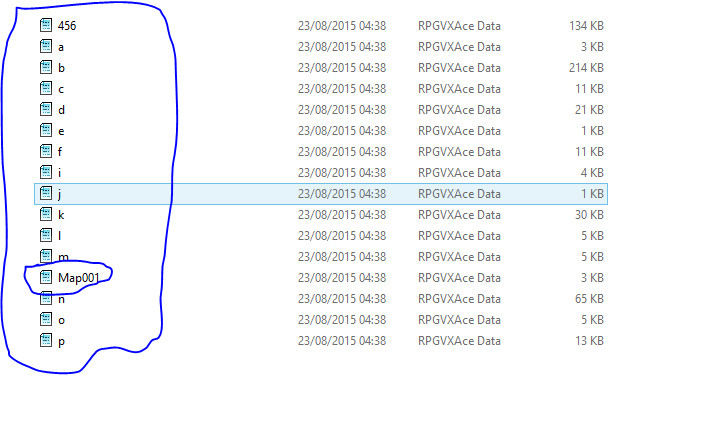
Step 6 - Now copy all the files from data to 123 (folder name) (except map000 (map000 is you map name it can be map001, map099))
Step 7 - Use any Custom Encrypter like this one (http://forums.rpgmakerweb.com/index.php?/topic/20775-tools-anti-rgss-decrypter/)
And Done!
FAQ
1- Is this free?
Ans- No you have to pay 100000 Crore USD for this(Just kiding)
2- Is this unbreakable?
ans- No, Nothing is Impossible but it takes to much time just for hacking this.
3- I have a Question
ans - Ask here!
Thanks For Reading!
Downloads / Referenced Files
RPG Maker Web attachments are mirrored locally when available. Other external links remain hosted by their original creator or third-party service.
- Local mirror: 12587-8988642db1cd4a8a09d154d4ef662ad0.png
SHA-256:ca5d8946aa5aaa5d8419c7ccbd45bad8035caa66710b79e9ce828248313b469f
Original attachment URL: https://forums.rpgmakerweb.com/attachments/capture-png.23258/ - Local mirror: 12579-65045d58b8624273ae5e6375410753b2.png
SHA-256:69f738df2697b44888c41abe5c7e0c1192833f2e30afc10debd67b1cd12c28b1
Original attachment URL: https://forums.rpgmakerweb.com/attachments/1-png.23250/ - Local mirror: 12580-e2786849789b7e7fac8590a1daadfeaa.png
SHA-256:c03b720ebab6195267cfe57fa8e6459b8ba82af79d46267f44f2641c7d997578
Original attachment URL: https://forums.rpgmakerweb.com/attachments/2-png.23251/ - Local mirror: 12581-0c2fd0889217c9479755a11471124259.png
SHA-256:5a19d6d7ef3a2439dc09d498a429168becf0791524f0ba4cf05b7c6e40e8a35f
Original attachment URL: https://forums.rpgmakerweb.com/attachments/3-png.23252/ - Local mirror: 12582-87e92e89cc547fadcf2fb35afc195261.png
SHA-256:56ee185aaa3e8553c37bc7cc3eb022f1e19c30138f9469ec628e252f01bcb300
Original attachment URL: https://forums.rpgmakerweb.com/attachments/4-png.23253/ - Local mirror: 12585-55f864d9a4bd836adb3c99e60fd4700b.png
SHA-256:b0dddb736cd7972432a13235d321333fc56de89d22f01ee3be86a3b0ab83c21e
Original attachment URL: https://forums.rpgmakerweb.com/attachments/7-png.23256/ - Local mirror: 12586-da042bc3186bf7a5d565ead30265682f.png
SHA-256:1754c92c9f53cff162f7828a70c1525f2eaf7569d04383a40920f855deccdc3f
Original attachment URL: https://forums.rpgmakerweb.com/attachments/8-png.23257/ - Local mirror: 12583-7046c69c65c1a2fc354c8dc97f485baf.png
SHA-256:af030c9516500235d12dddaa9dfab2b35cc885c2cdbc79ce2dbe7352c6f9ab38
Original attachment URL: https://forums.rpgmakerweb.com/attachments/5-png.23254/ - Local mirror: 12584-5c3684cba1786fd1d18bbdb02096f580.png
SHA-256:82b268448bb6a1b058402c60ea6cb189084e8b5a017b51e4efd43959e75c6277
Original attachment URL: https://forums.rpgmakerweb.com/attachments/6-png.23255/
Referenced Images / Attachments
Creator Claims / Removal
If you are the original creator and want this listing reassigned, edited, or removed, join BMMPlay and contact the moderators with proof that matches the original RPG Maker Web profile, linked GitHub, itch.io page, or another public creator identity.
Replies (0)
No replies yet.
Topic Summary
Loading summary...