Preserved forum archive. This topic stores the original first post and locally mirrored RPG Maker Web attachments when available. It is posted by the BMMPlay archive account, not by the original creator.
Original Source
- Original title: Basic Evented Alchemy Gathering using tile swaps
- Original author: Quailar
- Original date: March 21, 2015
- Source thread: https://forums.rpgmakerweb.com/threads/basic-evented-alchemy-gathering-using-tile-swaps.38041/
- Source forum path: Game Development Engines > RPG Maker Tutorials > RMVXAce Tutorials
Summary
Basic Evented Alchemy Gathering I was searching for a way to create a harvest/gather system for alchemy or cooking. I wanted a system that didnt use events to create items for harvest. By using Terrain tags and tile layer Ids, you can place as many harvesting items you want n a map without using an event for each. You will need this game extension here or in demo:
Archived First Post
Basic Evented Alchemy Gathering
I was searching for a way to create a harvest/gather system for alchemy or cooking. I wanted a system that didnt use events to create items for harvest.
By using Terrain tags and tile layer Ids, you can place as many harvesting items you want n a map without using an event for each.
You will need this game extension here or in demo:
http://forums.rpgmakerweb.com/index.php?/topic/25040-ace-useful-script-call-reference/
No tutorial, should be fairly simple demo.
Setup:
1 - Parallel
1- Common Event
Label all tileset items to be used for harvesting with Terrain tag #
You will need to know your tile layers by ID# for swap(using XS-Variable HUD is a great easy way to get them)
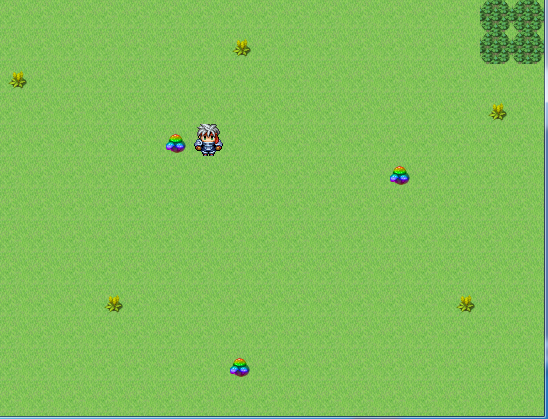
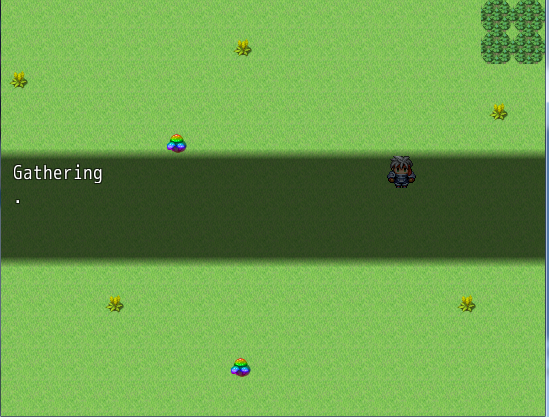
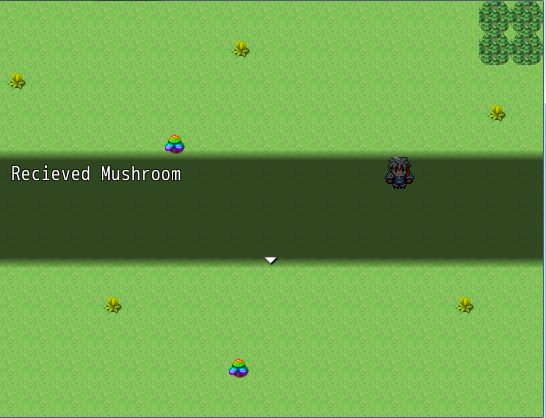
Press Enter When over item for harvest
Features:
Unlimited number of harvestabe items.
No map events required
Uses tile swaps
Demo:
http://s000.tinyupload.com/?file_id=10899988343447240067
Protected downloadProtected downloadProtected download
I was searching for a way to create a harvest/gather system for alchemy or cooking. I wanted a system that didnt use events to create items for harvest.
By using Terrain tags and tile layer Ids, you can place as many harvesting items you want n a map without using an event for each.
You will need this game extension here or in demo:
http://forums.rpgmakerweb.com/index.php?/topic/25040-ace-useful-script-call-reference/
#--------------------------------------------------------------------------
#Modifications
#--------------------------------------------------------------------------
#Changed Line 88 in Game_Event
#from
# if near_the_screen? && @stop_count > stop_count_threshold
#to
# if @stop_count > stop_count_threshold
#--------------------------------------------------------------------------
# REGION MANIPULATION
#--------------------------------------------------------------------------
class Game_Map
def setTileRegion(reg_x,reg_y,reg_id)
if reg_id > 63 || reg_id < 0
reg_id = 0
end
@thirdvalue = "%14b" % self.data[reg_x, reg_y, 3]
# binary split of the two elements
@bLEFT = @thirdvalue[0,6] # REGION ID IN BINARY
@bRIGHT = @thirdvalue[6,8] # SHADOW ID IN BINARY
@bLEFT = "%6b" % reg_id
@newvalue = @bLEFT.to_s + @bRIGHT.to_s
@newvalue = @newvalue.to_i(2)
self.data[reg_x, reg_y, 3] = @newvalue
end
def getTileRegion(reg_x,reg_y)
# gets a 14 bit long binary string from the map data array
@thirdvalue = "%14b" % self.data[reg_x, reg_y, 3]
# binary split of the two elements
@bLEFT = @thirdvalue[0,6] # REGION ID IN BINARY
@bRIGHT = @thirdvalue[6,8] # SHADOW ID IN BINARY
# converts the binary string back to an integer and returns
return(@bLEFT.to_i(2))
end
def getTileShadowID(reg_x,reg_y)
# gets a 14 bit long binary string from the map data array
@thirdvalue = "%14b" % self.data[reg_x, reg_y, 3]
# returns binary split of the two elements
@bLEFT = @thirdvalue[0,6] # REGION ID IN BINARY
@bRIGHT = @thirdvalue[6,8] # SHADOW ID IN BINARY
# converts the binary string back to an integer and returns
return(@bRIGHT.to_i(2))
end
#--------------------------------------------------------------------------
# MAP MANIPULATION
#--------------------------------------------------------------------------
def getTileIDByLayer(x,y,layer)
return(self.data[x,y,layer])
end
def setTileIDByLayer(x,y,layer,tile_ID)
self.data[x,y,layer] = tile_ID
end
end
#--------------------------------------------------------------------------
# Save Tile Manipulation
#--------------------------------------------------------------------------
class Game_System
def changeTileByInternalID(map_id,x,y,layer,intID)
initialize_pos_list(map_id, layer)
tid = intID
@swapped_pos_tiles[map_id][layer][y] = [] if @swapped_pos_tiles[map_id][layer][y].nil?
@swapped_pos_tiles[map_id][layer][y][x] = tid
$game_map.load_new_map_data
end
end
#--------------------------------------------------------------------------
# Battler Additions
#--------------------------------------------------------------------------
class Game_Battler < Game_BattlerBase
def wtype_equipped?(wtype_id)
return weapons.any? {|weapon| weapon.wtype_id == wtype_id }
end
def atype_equipped?(atype_id)
return armors.any? {|armor| armor.atype_id == atype_id}
end
end

#Modifications
#--------------------------------------------------------------------------
#Changed Line 88 in Game_Event
#from
# if near_the_screen? && @stop_count > stop_count_threshold
#to
# if @stop_count > stop_count_threshold
#--------------------------------------------------------------------------
# REGION MANIPULATION
#--------------------------------------------------------------------------
class Game_Map
def setTileRegion(reg_x,reg_y,reg_id)
if reg_id > 63 || reg_id < 0
reg_id = 0
end
@thirdvalue = "%14b" % self.data[reg_x, reg_y, 3]
# binary split of the two elements
@bLEFT = @thirdvalue[0,6] # REGION ID IN BINARY
@bRIGHT = @thirdvalue[6,8] # SHADOW ID IN BINARY
@bLEFT = "%6b" % reg_id
@newvalue = @bLEFT.to_s + @bRIGHT.to_s
@newvalue = @newvalue.to_i(2)
self.data[reg_x, reg_y, 3] = @newvalue
end
def getTileRegion(reg_x,reg_y)
# gets a 14 bit long binary string from the map data array
@thirdvalue = "%14b" % self.data[reg_x, reg_y, 3]
# binary split of the two elements
@bLEFT = @thirdvalue[0,6] # REGION ID IN BINARY
@bRIGHT = @thirdvalue[6,8] # SHADOW ID IN BINARY
# converts the binary string back to an integer and returns
return(@bLEFT.to_i(2))
end
def getTileShadowID(reg_x,reg_y)
# gets a 14 bit long binary string from the map data array
@thirdvalue = "%14b" % self.data[reg_x, reg_y, 3]
# returns binary split of the two elements
@bLEFT = @thirdvalue[0,6] # REGION ID IN BINARY
@bRIGHT = @thirdvalue[6,8] # SHADOW ID IN BINARY
# converts the binary string back to an integer and returns
return(@bRIGHT.to_i(2))
end
#--------------------------------------------------------------------------
# MAP MANIPULATION
#--------------------------------------------------------------------------
def getTileIDByLayer(x,y,layer)
return(self.data[x,y,layer])
end
def setTileIDByLayer(x,y,layer,tile_ID)
self.data[x,y,layer] = tile_ID
end
end
#--------------------------------------------------------------------------
# Save Tile Manipulation
#--------------------------------------------------------------------------
class Game_System
def changeTileByInternalID(map_id,x,y,layer,intID)
initialize_pos_list(map_id, layer)
tid = intID
@swapped_pos_tiles[map_id][layer][y] = [] if @swapped_pos_tiles[map_id][layer][y].nil?
@swapped_pos_tiles[map_id][layer][y][x] = tid
$game_map.load_new_map_data
end
end
#--------------------------------------------------------------------------
# Battler Additions
#--------------------------------------------------------------------------
class Game_Battler < Game_BattlerBase
def wtype_equipped?(wtype_id)
return weapons.any? {|weapon| weapon.wtype_id == wtype_id }
end
def atype_equipped?(atype_id)
return armors.any? {|armor| armor.atype_id == atype_id}
end
end

No tutorial, should be fairly simple demo.
Setup:
1 - Parallel
1- Common Event
Label all tileset items to be used for harvesting with Terrain tag #
You will need to know your tile layers by ID# for swap(using XS-Variable HUD is a great easy way to get them)
Press Enter When over item for harvest
Features:
Unlimited number of harvestabe items.
No map events required
Uses tile swaps
Demo:
http://s000.tinyupload.com/?file_id=10899988343447240067
Protected downloadProtected downloadProtected download
Features Mentioned
- Unlimited number of harvestabe items.
- No map events required
- Uses tile swaps
- Demo:
- "lightbox_close": "Close",
- "lightbox_next": "Next",
- "lightbox_previous": "Previous",
- "lightbox_error": "The requested content cannot be loaded. Please try again later.",
- "lightbox_start_slideshow": "Start slideshow",
- "lightbox_stop_slideshow": "Stop slideshow",
- "lightbox_full_screen": "Full screen",
- "lightbox_thumbnails": "Thumbnails",
- "lightbox_download": "Download",
- "lightbox_share": "Share",
- "lightbox_zoom": "Zoom",
- "lightbox_new_window": "New window",
- "lightbox_toggle_sidebar": "Toggle sidebar"
Downloads / Referenced Files
Log in to download
Log in, then follow the RPG Maker Developers Group to see these download links.
Log in to downloadReferenced Images / Attachments
Creator Claims / Removal
If you are the original creator and want this listing reassigned, edited, or removed, join BMMPlay and contact the moderators with proof that matches the original RPG Maker Web profile, linked GitHub, itch.io page, or another public creator identity.
Replies (0)
No replies yet.
0
replies
1
view
Topic Summary
Loading summary...