


MZEli Class Curves - Build the status of your classes independent of the editor!
BMM_Archive · July 15, 2026

Preserved forum archive. This topic stores the original first post and locally mirrored RPG Maker Web attachments when available. It is posted by the BMMPlay archive account, not by the original creator.
Original Source
- Original title: Eli Class Curves - Build the status of your classes independent of the editor!
- Original author: Eliaquim
- Original date: October 7, 2020
- Source thread: https://forums.rpgmakerweb.com/threads/eli-class-curves-build-the-status-of-your-classes-independent-of-the-editor.128394/
- Source forum path: Game Development Engines > RPG Maker Javascript Plugins > JS Plugin Releases (RMMZ)
Summary
{ "lightbox_close": "Close", "lightbox_next": "Next", "lightbox_previous": "Previous",
Archived First Post

Author: Hakuen Studio
Introduction
Balancing your game battles can be a difficult challenge! it is a fact that RPG Maker MV already makes some resources available in the class database. Although you have some ways to change the way your status increases when you level up, you still don't have full control.
Well, with this plugin, you will be able to choose how you want each of your normal parameters to increase at each level, in each class!
Features
• Add a status curve for each standard parameter, fully customizable and independent of the editor.
• You can use fixed values.
• You can use random values.
• You can use values within a minimum and maximum range.
• You can use formulas.
• Works for enemies, if you are using EliMZ_EnemyClass.js
• Works with custom parameters, if you are using EliMZ_CustomParameters.js
• Growth chance value, which allows you to control when a parameter will increase or not on level up. Similar to the Fire Emblem series.
• Change growth chance rate based on items, equipment, skills, or state!
• Decide if an actor will always join in the party with initial stats, regarding its level.
How to use
♦ Plugin Parameters ♦
● Minimum Stats parameter
This is the minimum value for all classes at level zero. You can leave it the way it is, but you can also change.
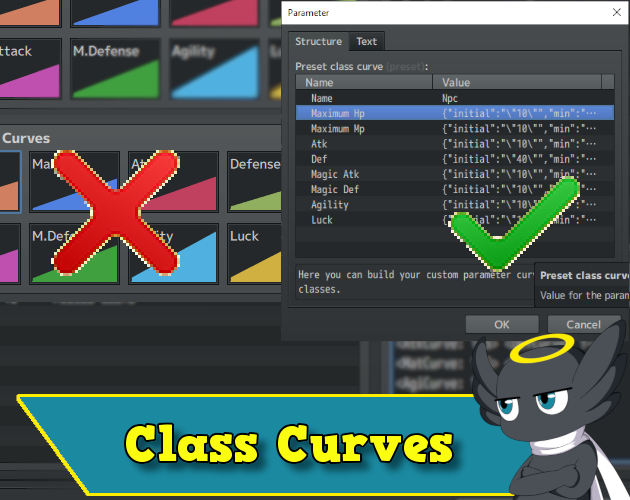
● Preset Class Curves
Here is where you will build your Custom Curves. You notice 5 other parameters in there:
• Name → The name of the curve to be referenced in the Data note field.
• Growth Chance → The chance rate for the parameter increase when leveling up.
• Initial → The initial value of level 1 for this class.
• Min → The minimum amount the actor can earn when leveling up.
• Max → The maximum amount an actor can earn when leveling up.
• Cap → The maximum value that a parameter can reach in this class.
• Bonus → Used on the Class Promotion Plugin.
■ Observations:
• You can use formulas in all tags.
• You can use the "this" keyword to refer to the actor.
• You can use '\v[id]' to get the value of a variable.
• If you want a fixed value, use the same value for MIN and MAX.
NOTE¹: By default, the growth chance will always be 100%. This means that every time an actor levels up, the parameter will take the value set on the min and max. If you set another value than 100, the actor can raise a level but not always get a chance to increase the stats.
You can build as many as you want.
♦ Data Note Fields ♦
• Now you only need to use the following on the Class notes field.
<CustomCurve:Name>
Optionally, you can change the Growth Chance rate in-game through the use of items, skills, states, and equipment.
You just need to use the following note tags:
<GrowthChanceParam: param:value, param:value>
Replace "param" with one of the following: mhp, mmp, atk, def, mat, mdf, agi, luk
Or if using Eli Custom Parameter:
<GrowthChanceCParam: Cparam:value, Cparam:value>
Replace "Cparam" with the short name of the custom parameter.
***ATTENTION! All notes are case sensitive!***
■ Observations:
• By default, if an actor joins the party at a level higher than 1, the plugin will calculate the level-ups automatically.
But you can also prevent this from happening, and let the actor join in the party always with initial stats, independent of the level.
Just use the note tag on the Actor note field:
<HoldCurve: Level>
It will hold the initial stats until the specified level.
If you do not set a custom curve to a class note field, it will take the first one in the plugin parameters as default.
♦ Script calls ♦
• $gameActors.actor(ID).paramsHistory(classId) - Returns an array with the value of each parameter at each actor's level.
• $gameActors.actor(ID).cparamsHistory(classId) - Returns an array with the value of each parameter at each actor's level.
• $gameActors.actor(ID).lastParamsGain() - Returns an array with the last values received by the actor when leveling up. Use "CParam" for custom parameters.
• $gameActors.actor(ID).lastCParamsGain() - The same as above, but for custom parameters.
• $gameActors.actor(ID).paramBase(paramId) - Returns the current value of the informed parameter.
• $gameActors.actor(ID).cparamBase(paramId) - Returns the current value of the informed custom parameter.
For the script calls below, the arguments can be understood like that:
• paramId - Replace with a param id.
• isCustom - Set to true, if you want to check for custom parameters. (default is false)
• classId - The class id to check (default is the current class)
• $gameActors.actor(ID).initialParamCurve(paramId, isCustom, classId) - Returns the initial value of the given parameter.
• $gameActors.actor(ID).minParamCurve(paramId, isCustom, classId) - Returns the minimum value of the given parameter curve.
• $gameActors.actor(ID).maxParamCurve(paramId, isCustom, classId) - Returns the maximum value of the given parameter curve.
• $gameActors.actor(ID).capParamCurve(paramId, isCustom, classId) - Returns the maximum value that a class parameter can have.
• $gameActors.actor(ID).paramGrowthChance(paramId, isCustom, classId) - Return the growth chance for this parameter.
● Minimum Stats parameter
This is the minimum value for all classes at level zero. You can leave it the way it is, but you can also change.
● Preset Class Curves
Here is where you will build your Custom Curves. You notice 5 other parameters in there:
• Name → The name of the curve to be referenced in the Data note field.
• Growth Chance → The chance rate for the parameter increase when leveling up.
• Initial → The initial value of level 1 for this class.
• Min → The minimum amount the actor can earn when leveling up.
• Max → The maximum amount an actor can earn when leveling up.
• Cap → The maximum value that a parameter can reach in this class.
• Bonus → Used on the Class Promotion Plugin.
■ Observations:
• You can use formulas in all tags.
• You can use the "this" keyword to refer to the actor.
• You can use '\v[id]' to get the value of a variable.
• If you want a fixed value, use the same value for MIN and MAX.
NOTE¹: By default, the growth chance will always be 100%. This means that every time an actor levels up, the parameter will take the value set on the min and max. If you set another value than 100, the actor can raise a level but not always get a chance to increase the stats.
You can build as many as you want.
♦ Data Note Fields ♦
• Now you only need to use the following on the Class notes field.
<CustomCurve:Name>
Optionally, you can change the Growth Chance rate in-game through the use of items, skills, states, and equipment.
You just need to use the following note tags:
<GrowthChanceParam: param:value, param:value>
Replace "param" with one of the following: mhp, mmp, atk, def, mat, mdf, agi, luk
Or if using Eli Custom Parameter:
<GrowthChanceCParam: Cparam:value, Cparam:value>
Replace "Cparam" with the short name of the custom parameter.
***ATTENTION! All notes are case sensitive!***
■ Observations:
• By default, if an actor joins the party at a level higher than 1, the plugin will calculate the level-ups automatically.
But you can also prevent this from happening, and let the actor join in the party always with initial stats, independent of the level.
Just use the note tag on the Actor note field:
<HoldCurve: Level>
It will hold the initial stats until the specified level.
If you do not set a custom curve to a class note field, it will take the first one in the plugin parameters as default.
♦ Script calls ♦
• $gameActors.actor(ID).paramsHistory(classId) - Returns an array with the value of each parameter at each actor's level.
• $gameActors.actor(ID).cparamsHistory(classId) - Returns an array with the value of each parameter at each actor's level.
• $gameActors.actor(ID).lastParamsGain() - Returns an array with the last values received by the actor when leveling up. Use "CParam" for custom parameters.
• $gameActors.actor(ID).lastCParamsGain() - The same as above, but for custom parameters.
• $gameActors.actor(ID).paramBase(paramId) - Returns the current value of the informed parameter.
• $gameActors.actor(ID).cparamBase(paramId) - Returns the current value of the informed custom parameter.
For the script calls below, the arguments can be understood like that:
• paramId - Replace with a param id.
• isCustom - Set to true, if you want to check for custom parameters. (default is false)
• classId - The class id to check (default is the current class)
• $gameActors.actor(ID).initialParamCurve(paramId, isCustom, classId) - Returns the initial value of the given parameter.
• $gameActors.actor(ID).minParamCurve(paramId, isCustom, classId) - Returns the minimum value of the given parameter curve.
• $gameActors.actor(ID).maxParamCurve(paramId, isCustom, classId) - Returns the maximum value of the given parameter curve.
• $gameActors.actor(ID).capParamCurve(paramId, isCustom, classId) - Returns the maximum value that a class parameter can have.
• $gameActors.actor(ID).paramGrowthChance(paramId, isCustom, classId) - Return the growth chance for this parameter.
Screenshot


Terms of Use
Update Log
Hakuen Studio Class Curve for RPG Maker MZ by Hakuen Studio
A new way to build class stats on RPG Maker MZ!
 hakuenstudio.itch.io
Features Mentioned
- Add a status curve for each standard parameter, fully customizable and independent of the editor.
- You can use fixed values.
- You can use random values.
- You can use values within a minimum and maximum range.
- You can use formulas.
- Works for enemies, if you are using EliMZ_EnemyClass.js
- Works with custom parameters, if you are using EliMZ_CustomParameters.js
- Growth chance value, which allows you to control when a parameter will increase or not on level up. Similar to the Fire Emblem series.
- Change growth chance rate based on items, equipment, skills, or state!
- Decide if an actor will always join in the party with initial stats, regarding its level.
Downloads / Referenced Files
Log in to download
Log in, then follow the RPG Maker Developers Group to see these download links.
Log in to downloadLicense / Terms Note
Terms of Use Update Log Hakuen Studio Class Curve for RPG Maker MZ by Hakuen Studio A new way to build class stats on RPG Maker MZ!
Referenced Images / Attachments
Creator Claims / Removal
If you are the original creator and want this listing reassigned, edited, or removed, join BMMPlay and contact the moderators with proof that matches the original RPG Maker Web profile, linked GitHub, itch.io page, or another public creator identity.
Replies (0)
No replies yet.
0
replies
15
views
Topic Summary
Loading summary...

