





Preserved forum archive. This topic stores the original first post and locally mirrored RPG Maker Web attachments when available. It is posted by the BMMPlay archive account, not by the original creator.
Original Source
- Original title: Scanning System Without Scripting
- Original author: Vez'nan
- Original date: January 11, 2015
- Source thread: https://forums.rpgmakerweb.com/threads/scanning-system-without-scripting.35787/
- Source forum path: Game Development Engines > RPG Maker Tutorials > RMVXAce Tutorials
Summary
Hello and welcome to: [IMG]http://forums.rpgmakerweb.com/uploads/monthly_01_2015/post-55854-0-66543400-1421660553.png[/IMG] In this topic,I'll teach you how to make a scan system without scripting or complicated stuff.Without further adieu,let us
Archived First Post
Hello and welcome to:
[IMG]http://forums.rpgmakerweb.com/uploads/monthly_01_2015/post-55854-0-66543400-1421660553.png[/IMG]
In this topic,I'll teach you how to make a scan system without
scripting or complicated stuff.Without further adieu,let us
begin,shall we?
STEP 1:
Make like,16 variables:
1.Enemy A Hp
2.Enemy B Hp
3.Enemy C Hp
4.Enemy D Hp
5.Enemy A Mp
6.Enemy B Mp
7.Enemy C Mp
8.Enemy D Mp
9.Max Enemy A Hp
10.Max Enemy B Hp
11.Max Enemy C Hp
12.Max Enemy D Hp
13.Max Enemy A Mp
14.Max Enemy B Mp
15.Max Enemy C Mp
16.Max Enemy D Mp
STEP 2:
Make at least 1 common event.
Make a switch=17.Battle Scanning ONN
Type in:
"column 1:Control Switch:17.Battle Scanning ONN"
STEP 3:
Make a skill called 'Scan' or 'Libra'
Add the effect located at the left of the skill,
put in Common Event : [scan Common Event ID]
STEP 4:
At every troop slot,make 1 event and
Example:
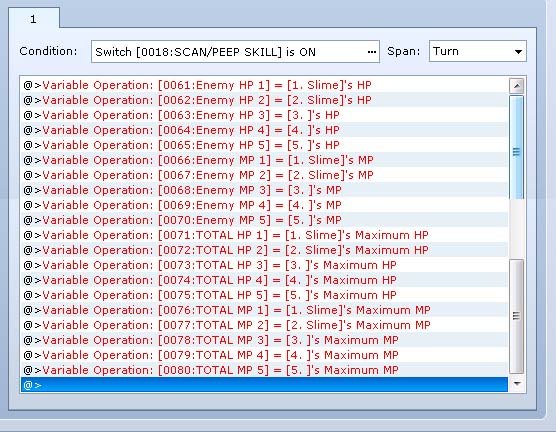
"column 1:Control Variable:1.Enemy A Hp: Enemy 1's Hp"
^ ^ ^
Make it to the all 4 enemy hp variable
The 'Enemy A Mp' variable, just copy the same
at the up as I did but change the "Enemy 1's Hp" to "Enemy 1's Mp"
If you don't understand see this:
Protected download
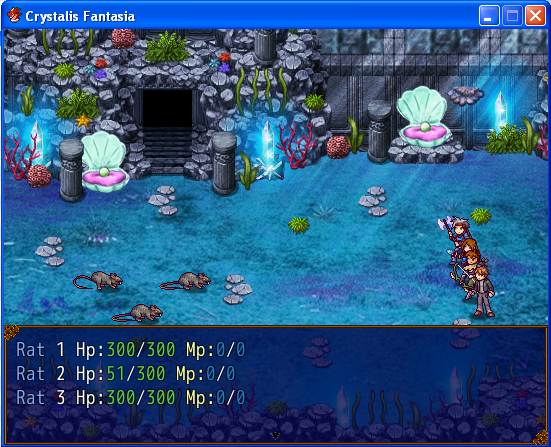
Then you shoud make a text like this:
\c[6]Slime A\c[0] \v[Enemy A Hp Variable ID] / \v[Max Enemy A Hp Variable ID]HP \v[Enemy A Mp Variable ID] / \v[Max Enemy A Mp Variable ID]MP
\c[6]Slime B\c[0] \v[Enemy B Hp Variable ID] / \v[Max Enemy B Hp Variable ID]HP \v[Enemy B Mp Variable ID] / \v[MaxEnemy B Mp Variable ID]MP
This one is very important.At the bottom,control the "Battle
Scanning ONN" Switch to Off.
STEP 5:
You're DONE!!!
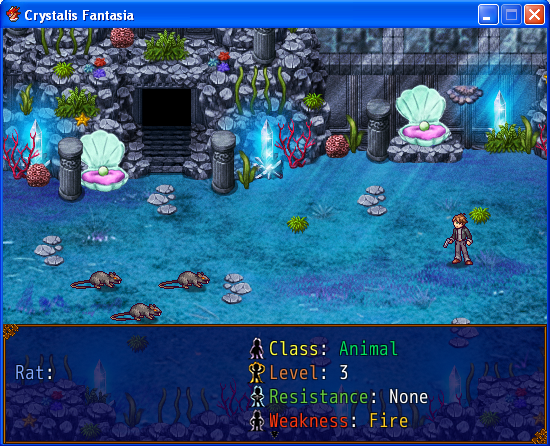
Check out mine:
Protected download
Protected download
Pretty awesome huh?
I also used Theolized's Enemy Class and Level
Search them in Google if you want them.
Protected download
[IMG]http://forums.rpgmakerweb.com/uploads/monthly_01_2015/post-55854-0-66543400-1421660553.png[/IMG]
In this topic,I'll teach you how to make a scan system without
scripting or complicated stuff.Without further adieu,let us
begin,shall we?
STEP 1:
Make like,16 variables:
1.Enemy A Hp
2.Enemy B Hp
3.Enemy C Hp
4.Enemy D Hp
5.Enemy A Mp
6.Enemy B Mp
7.Enemy C Mp
8.Enemy D Mp
9.Max Enemy A Hp
10.Max Enemy B Hp
11.Max Enemy C Hp
12.Max Enemy D Hp
13.Max Enemy A Mp
14.Max Enemy B Mp
15.Max Enemy C Mp
16.Max Enemy D Mp
STEP 2:
Make at least 1 common event.
Make a switch=17.Battle Scanning ONN
Type in:
"column 1:Control Switch:17.Battle Scanning ONN"
STEP 3:
Make a skill called 'Scan' or 'Libra'
Add the effect located at the left of the skill,
put in Common Event : [scan Common Event ID]
STEP 4:
At every troop slot,make 1 event and
Example:
"column 1:Control Variable:1.Enemy A Hp: Enemy 1's Hp"
^ ^ ^
Make it to the all 4 enemy hp variable
The 'Enemy A Mp' variable, just copy the same
at the up as I did but change the "Enemy 1's Hp" to "Enemy 1's Mp"
If you don't understand see this:
Protected download
Then you shoud make a text like this:
\c[6]Slime A\c[0] \v[Enemy A Hp Variable ID] / \v[Max Enemy A Hp Variable ID]HP \v[Enemy A Mp Variable ID] / \v[Max Enemy A Mp Variable ID]MP
\c[6]Slime B\c[0] \v[Enemy B Hp Variable ID] / \v[Max Enemy B Hp Variable ID]HP \v[Enemy B Mp Variable ID] / \v[MaxEnemy B Mp Variable ID]MP
This one is very important.At the bottom,control the "Battle
Scanning ONN" Switch to Off.
STEP 5:
You're DONE!!!
Check out mine:
Protected download
Protected download
Pretty awesome huh?
I also used Theolized's Enemy Class and Level
Search them in Google if you want them.
Protected download
Downloads / Referenced Files
Log in to download
Log in, then follow the RPG Maker Developers Group to see these download links.
Log in to downloadReferenced Images / Attachments
Creator Claims / Removal
If you are the original creator and want this listing reassigned, edited, or removed, join BMMPlay and contact the moderators with proof that matches the original RPG Maker Web profile, linked GitHub, itch.io page, or another public creator identity.
Replies (0)
No replies yet.
0
replies
1
view
Topic Summary
Loading summary...