

How to make a Custom Battle Scene with Forced Inputs
BMM_Archive · July 15, 2026

Original Source
- Original title: How to make a Custom Battle Scene with Forced Inputs
- Original author: RyokuHasu
- Original date: June 3, 2014
- Source thread: https://forums.rpgmakerweb.com/threads/how-to-make-a-custom-battle-scene-with-forced-inputs.27762/
- Source forum path: Game Development Engines > RPG Maker Tutorials > RMVXAce Tutorials
Summary
This will ONLY work with the DEFAULT battle system. In this Tutorial I will show you how I made a "Tutorial" battle where the player could only use the commands he was told to use. This is a a general guild and you may have to change it to fit your own needs however all the information oh how to get one going is here. Copy the Scene_Battle script and paste it in section for Script inserts {
Archived First Post
In this Tutorial I will show you how I made a "Tutorial" battle where the player could only use the commands he was told to use. This is a a general guild and you may have to change it to fit your own needs however all the information oh how to get one going is here.
Copy the <span style="color: #ff0000">Scene_Battle script and paste it in section for Script inserts
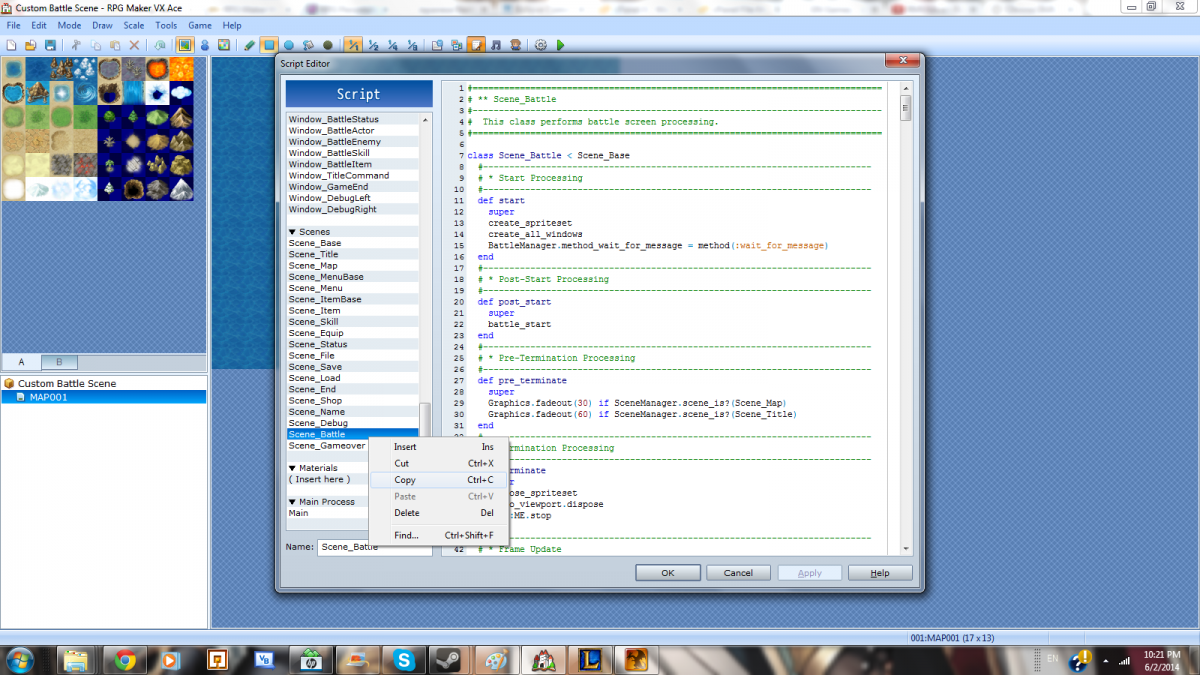
Rename it to <span style="color: #ff0000">Scene_Tutorial
Create Tutorial Battle Troop in the <span style="color: #ff0000">FIRST SLOT
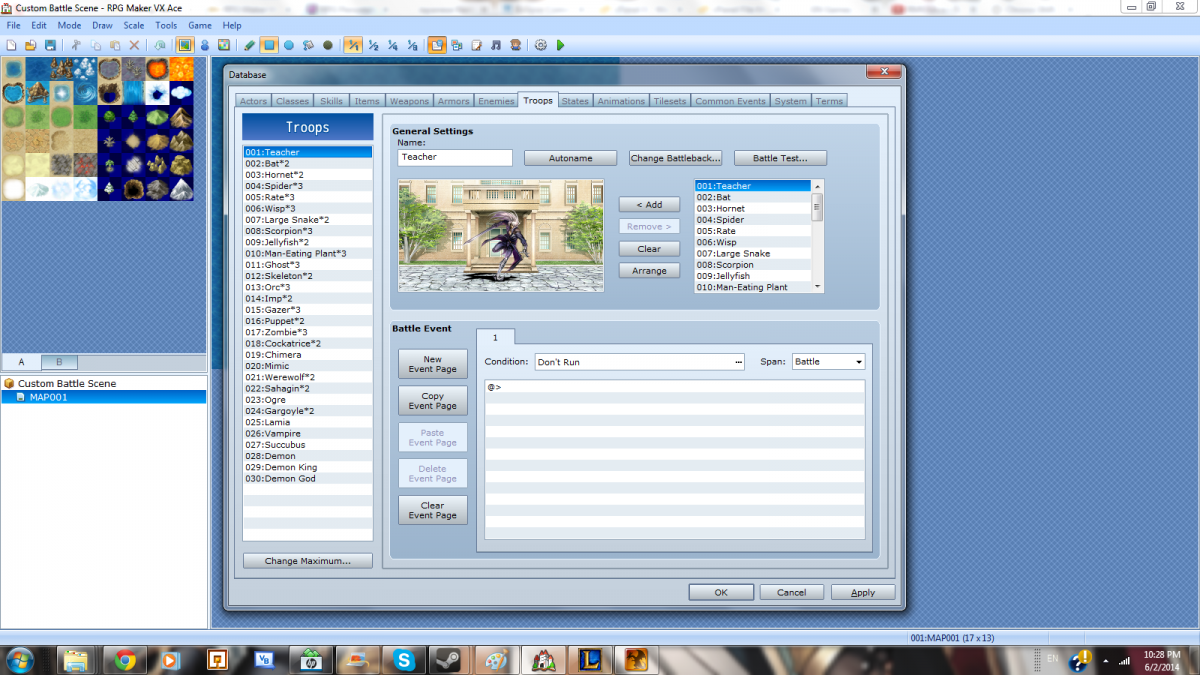
Next Create your Instructions for the player for each turn.
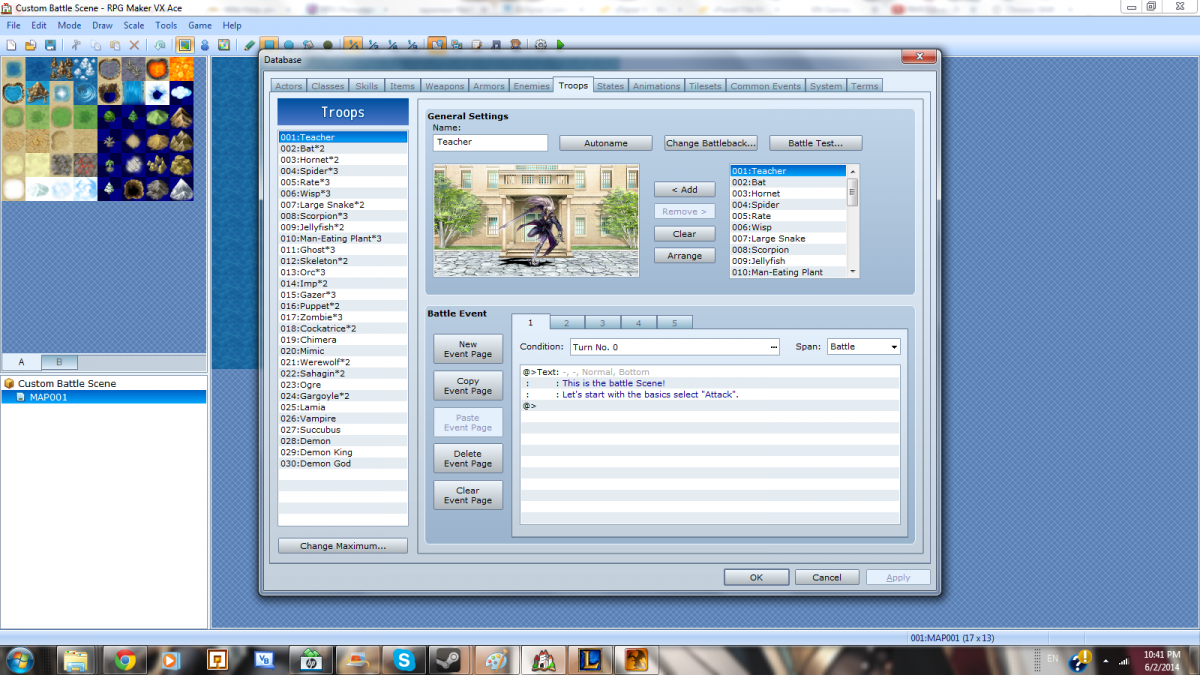
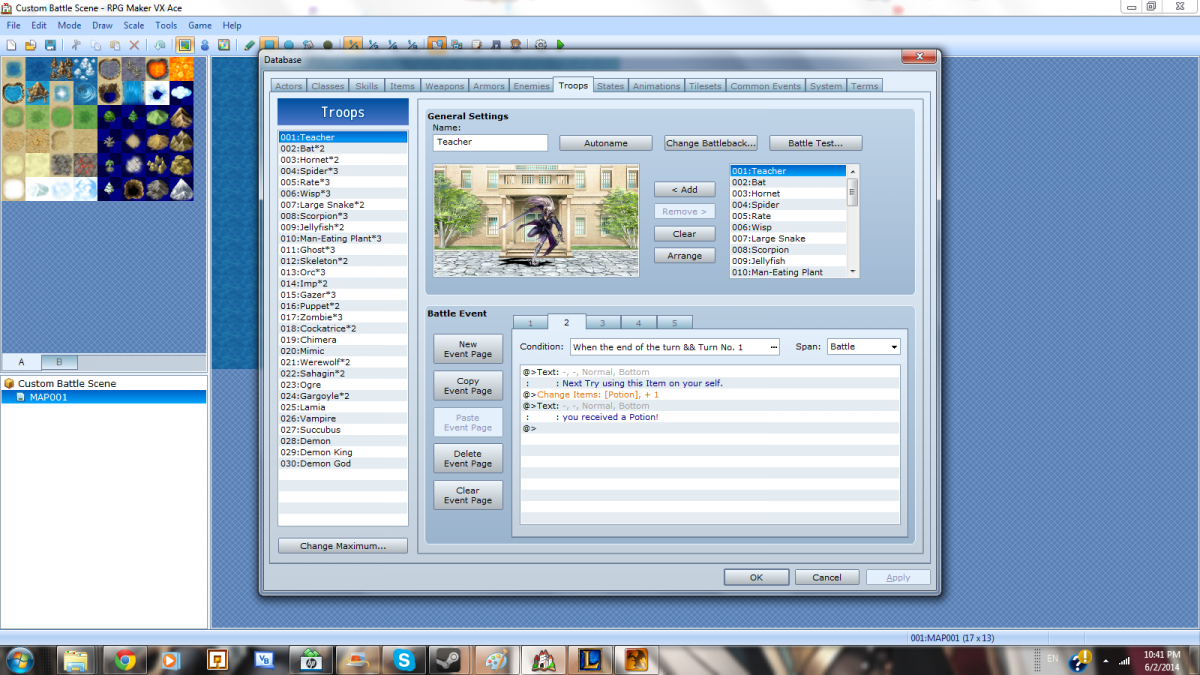
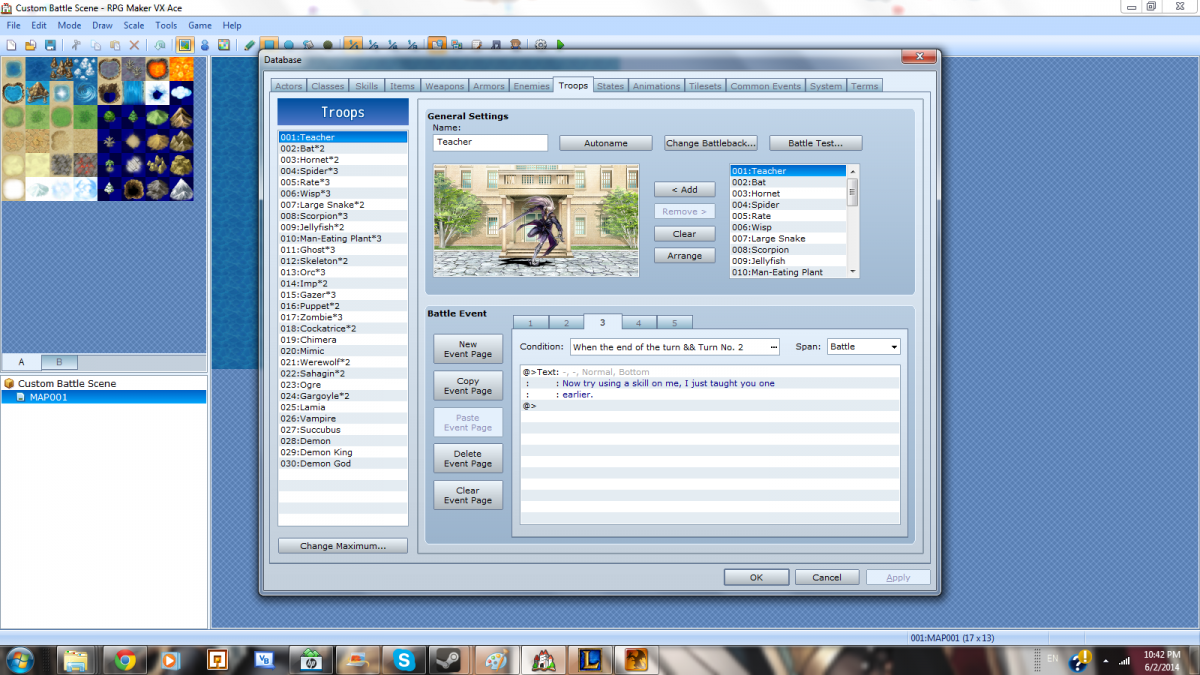
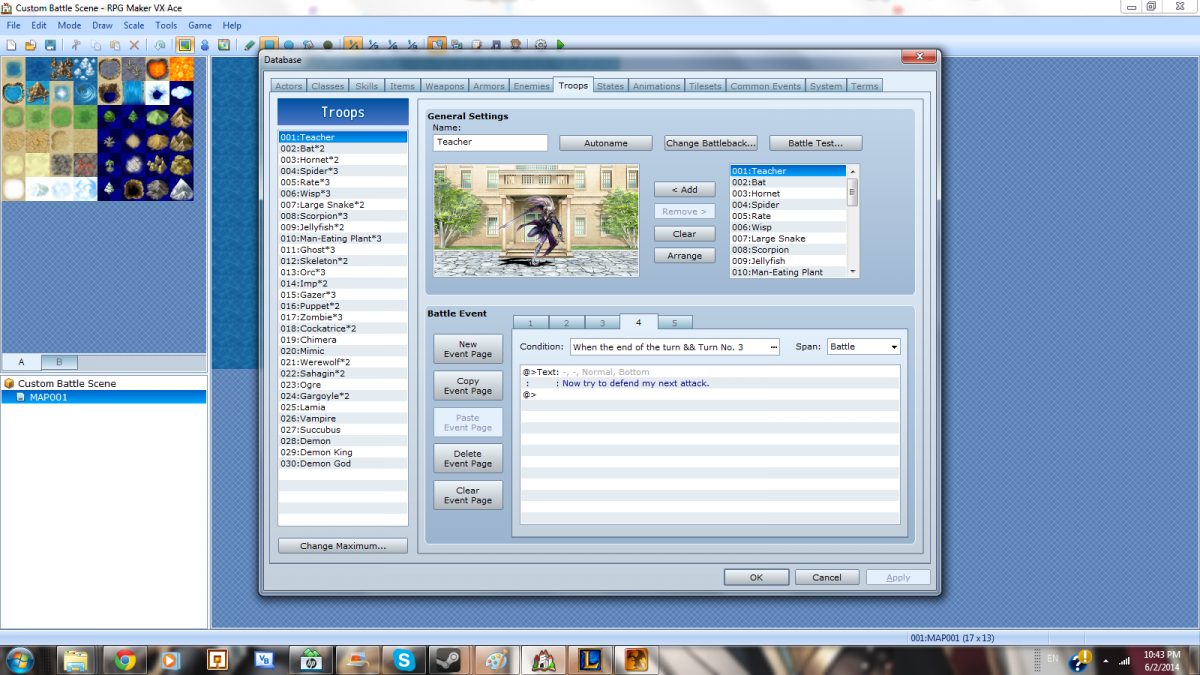
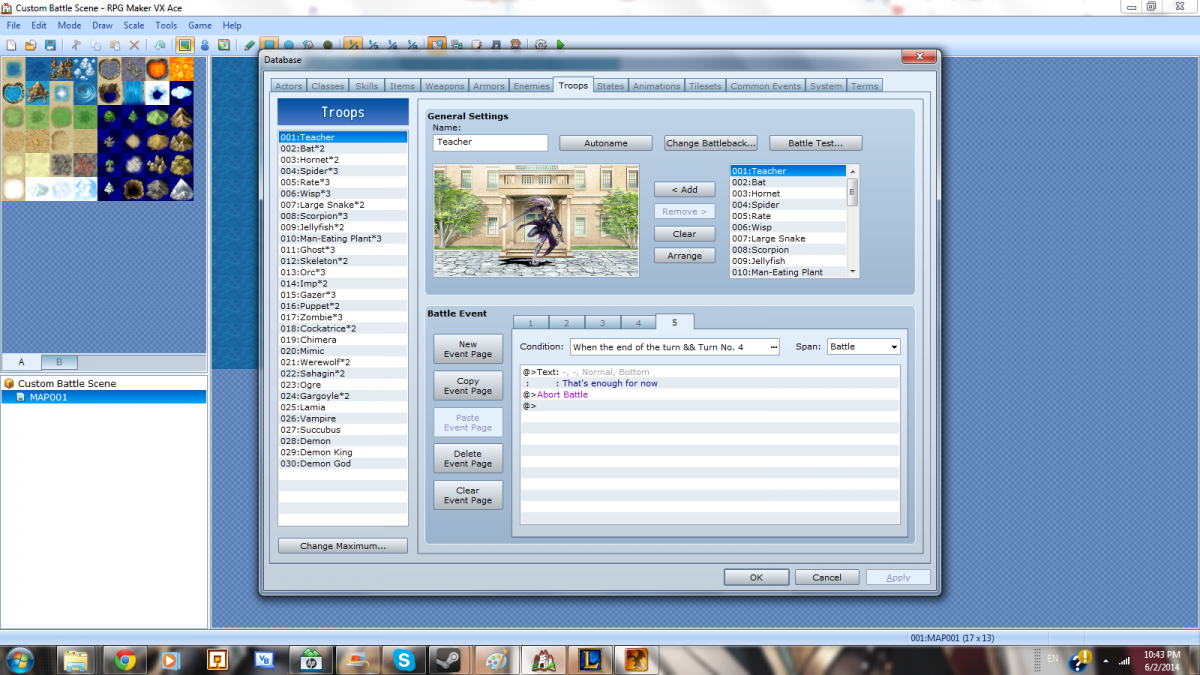
Next add in event command to change a variable for each prompt given, using the<span style="color: #ff0000"> FIRST VARIABLE
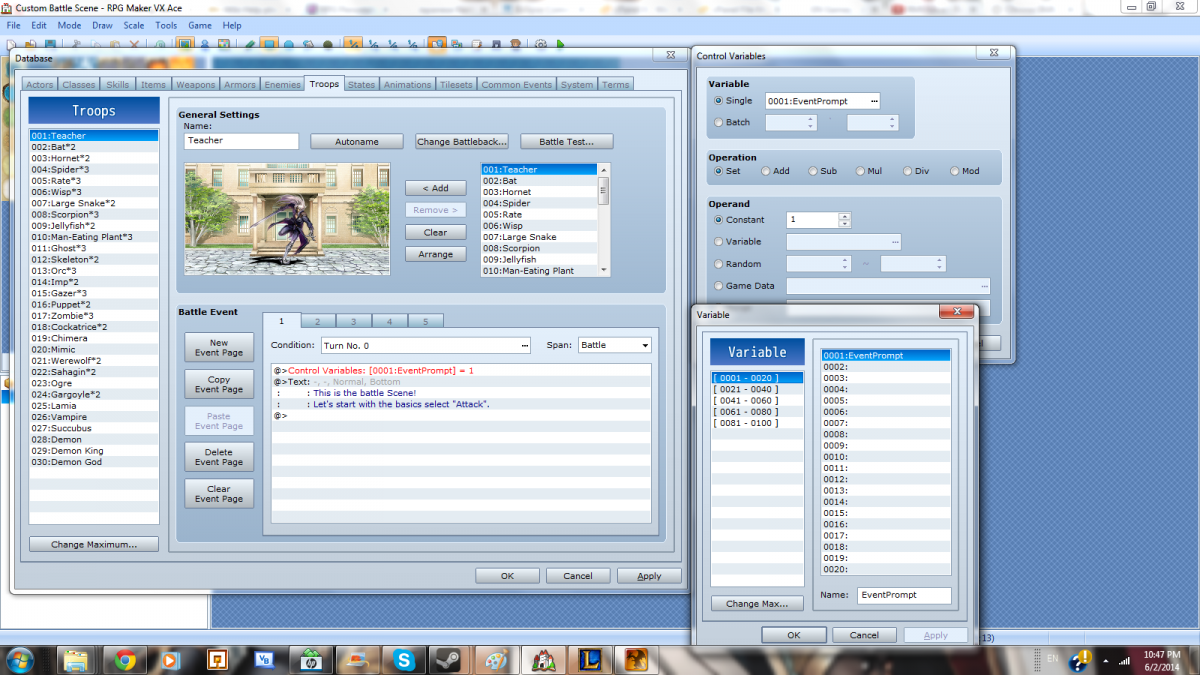
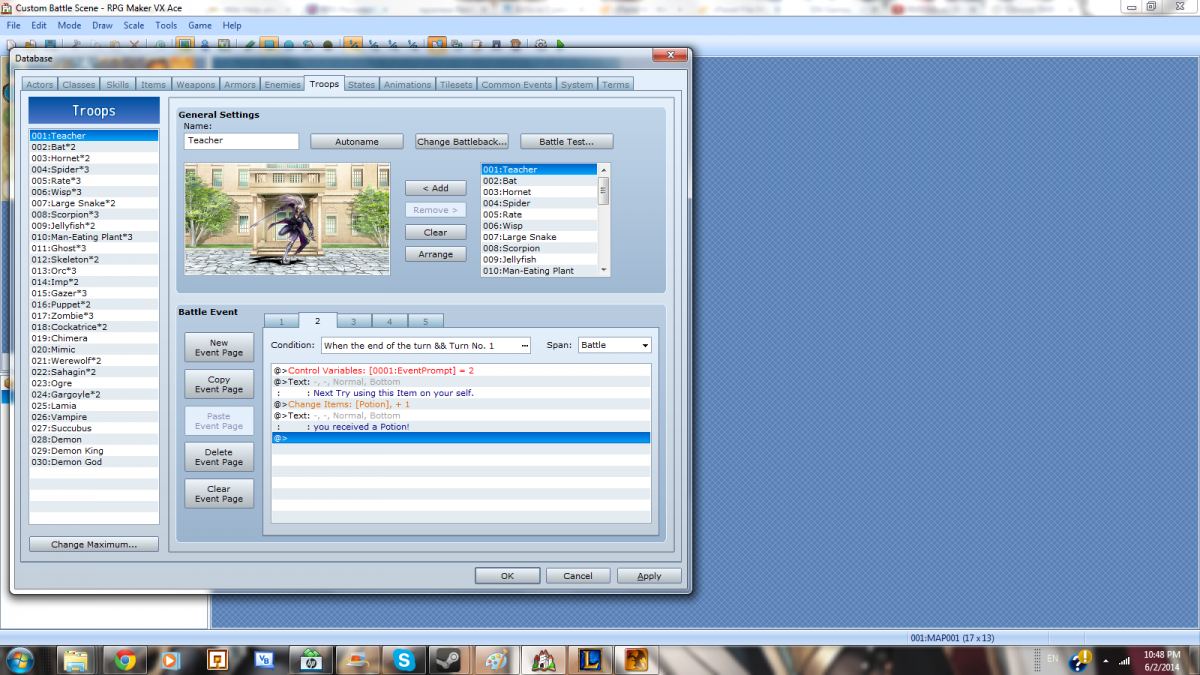
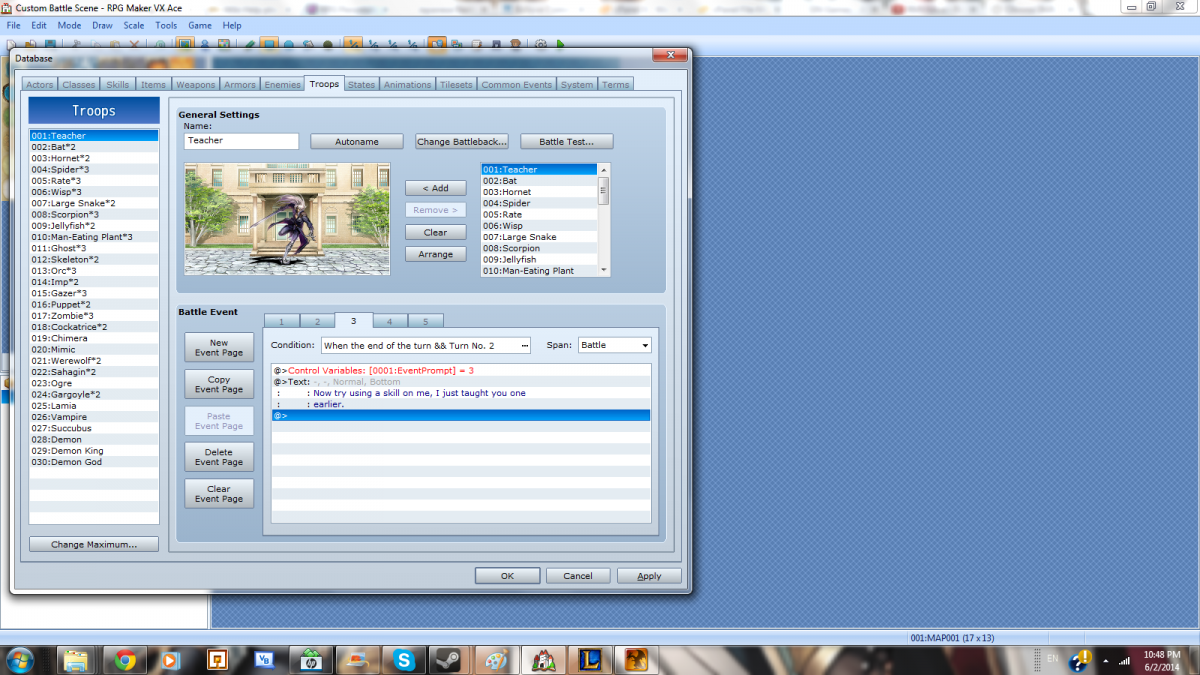
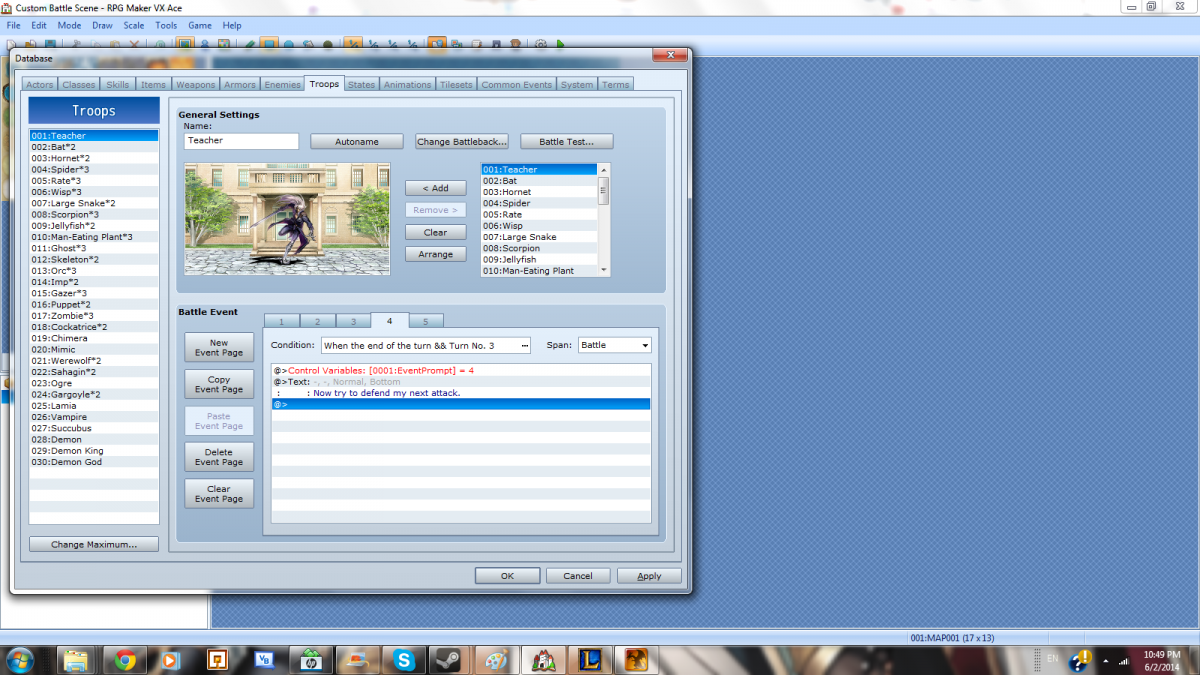
Lastly before we Edit the Scripts Create an Event to Launch the tutorial battle
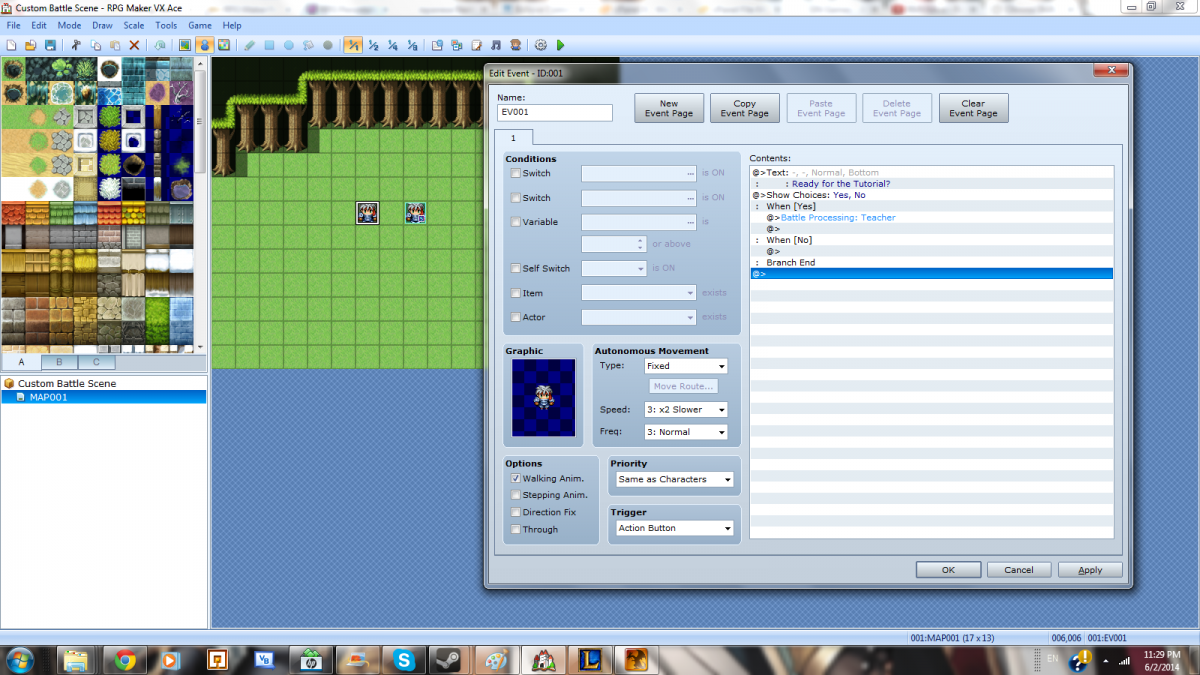
Now we are ready to start Editing the Scripts!
in the Script <span style="color: #ff0000">Game_Interpreter use Ctrl+F to find "Battle Processing" (line 1095 in stock scripts)
change the line
SceneManager.call(Scene_Battle)to
if troop_id == 1 SceneManager.call(Scene_Tutorial)else SceneManager.call(Scene_Battle)endnext in your <span style="color: #ff0000">Scene_Tutorial
Find "def post_start"
Below "super" add
BattleManager.save_bgm_and_bgsBattleManager.play_battle_bgmFind "def pre_terminate"
Bellow "super" add
BattleManager.replay_bgm_and_bgsNow that all that's left is to Block out all actions except the one we want
<span style="color: #ff0000">**Form this point on the tutorial is based on the Images included. This is subject for you to change for your own personal needs
Find "def command_attack" and replace the whole block with
def command_attack if $game_variables[1] == 1 BattleManager.actor.input.set_attack select_enemy_selection else start_actor_command_selection endendFind "def command_skill" and replace the whole block with
def command_skill if $game_variables[1] == 3 && @actor_command_window.current_ext == 3 @skill_window.actor = BattleManager.actor @skill_window.stype_id = @actor_command_window.current_ext @skill_window.refresh @skill_window.show.activate else start_actor_command_selection end end** "@actor_command_window.current_ext == 3" can change if you are using multiple skill types and want one specific type used
Find "def command_guard" and replace the block with
def command_guard if $game_variables[1] == 4 BattleManager.actor.input.set_guard next_command else start_actor_command_selection endendFind "def command_item" and replace the block with
def command_item if $game_variables[1] == 2 @item_window.refresh @item_window.show.activate else start_actor_command_selection endendCongrats on your new Forced Inputs Tutorial Battle Scene!
Downloads / Referenced Files
RPG Maker Web attachments are mirrored locally when available. Other external links remain hosted by their original creator or third-party service.
- Local mirror: 5916-dbd266703b14731c958d9a93a78e7a4a.png
SHA-256:a81ecba4ae74c30009a8f20913b877f9426b6c3203d74580bc982f102291cf0c
Original attachment URL: https://forums.rpgmakerweb.com/attachments/copy-scene_battle-png.13448/ - Local mirror: 5917-8ba71530705f72963ad4439ad38fe378.png
SHA-256:8131d4b46471a6e0086cebab214d1a1d901f71a739c618d23186e2447d72b81c
Original attachment URL: https://forums.rpgmakerweb.com/attachments/create-tutorial-battle-troop-png.13449/ - Local mirror: 5918-bac33b23e6b16533d9ab15ae9fe99dc1.png
SHA-256:c339004847084b1232b9dd88fee66bf0ffd02667b4d9c553c31916122b4f97f0
Original attachment URL: https://forums.rpgmakerweb.com/attachments/instruct-1-png.13450/ - Local mirror: 5919-86cf83cbe6494a0426e67be0595941c5.png
SHA-256:97e44897f408f9d7ede5bbf72fbda836a68305eb409bdd03fc8c31c2d58fce2b
Original attachment URL: https://forums.rpgmakerweb.com/attachments/instruct-2-png.13451/ - Local mirror: 5920-d5f2e3874398d54624b8fee9a2177483.png
SHA-256:52920e0da7c18b4832e51b3cb5597d7e801803960e5e3498fb5dc2da5f607c87
Original attachment URL: https://forums.rpgmakerweb.com/attachments/instruct-3-png.13452/ - Local mirror: 5921-98a100f3d4f912dac77b881854fbd5bb.png
SHA-256:406da33125ea6918a1e1e447d41e0e8a54fd5cb1f6cb9d097cad9486abdc28d0
Original attachment URL: https://forums.rpgmakerweb.com/attachments/instruct-4-png.13453/ - Local mirror: 5922-617867e36a9918261d9227f1d6b4bf1b.png
SHA-256:ff0f487a57568c059271e76676ac69d4628d64b8fd06475dbdc3f65b828d2891
Original attachment URL: https://forums.rpgmakerweb.com/attachments/instruct-5-png.13454/ - Local mirror: 5923-c2545ce6ae588856972a49540c34f9de.png
SHA-256:03b58f14d1156d80ebd87ca895965d1ffca2cb08c2be5774940d76a8689dd405
Original attachment URL: https://forums.rpgmakerweb.com/attachments/variable-1-png.13455/ - Local mirror: 5924-36925fe26455542c6759356b74849bb2.png
SHA-256:3ee46da9e9d84cdac509bc0a89bafa024c2755cf8ad62d83772875ada0b599df
Original attachment URL: https://forums.rpgmakerweb.com/attachments/variable-2-png.13456/ - Local mirror: 5925-e9901ed0aab36ebe7753362949ba2ff1.png
SHA-256:d00a3db7dd35421cb9c54299f818ea8224f81ee206cd82d77d34337283572c7e
Original attachment URL: https://forums.rpgmakerweb.com/attachments/variable-3-png.13457/ - Local mirror: 5926-9e1a3abc9ac786dc3a801973341612d3.png
SHA-256:426f591814640c2794de02c08510b49fec12c4418493212972d676d02f236ba6
Original attachment URL: https://forums.rpgmakerweb.com/attachments/variable-4-png.13458/ - Local mirror: 5927-ba3d6d0c936b3c41962490480b6915e4.png
SHA-256:ca087974f7e7ed7b613eba3084910cf53429a415d558006292bf4e6cdf616486
Original attachment URL: https://forums.rpgmakerweb.com/attachments/event-png.13460/
Referenced Images / Attachments
Creator Claims / Removal
If you are the original creator and want this listing reassigned, edited, or removed, join BMMPlay and contact the moderators with proof that matches the original RPG Maker Web profile, linked GitHub, itch.io page, or another public creator identity.
Replies (0)
No replies yet.
Topic Summary
Loading summary...