

MVItem Level Plugin
BMM_Archive · July 15, 2026

BMM_Archive
Preserved forum archive. This topic stores the original first post and locally mirrored RPG Maker Web attachments when available. It is posted by the BMMPlay archive account, not by the original creator.
Original Source
- Original title: Item Level Plugin
- Original author: ReturnOH
- Original date: November 26, 2018
- Source thread: https://forums.rpgmakerweb.com/threads/item-level-plugin.102582/
- Source forum path: Game Development Engines > RPG Maker Javascript Plugins > JS Plugin Releases (RMMV)
Summary
Item Level Plugin Introduction: Hello o/ This is my first plugin. It may be raw, but it works.
Archived First Post
Item Level Plugin
Hello o/
This is my first plugin. It may be raw, but it works.
I thought to share it, maybe someone could find it useful.
Features:
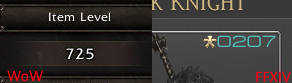
The plugin shows in your game the Item Level parameter, like the most famous MMORPGs:
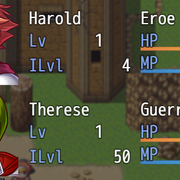
With this plugin you can assign to your Armor and Weapon a "Power Level".
The Item Level shown in the menu is the average between all equipped items.
How to use:
There are only few things to know to use this plugin:
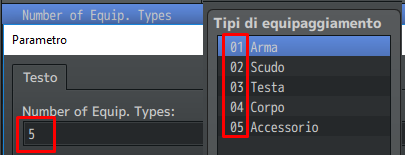
♦You must set in the plugin parameters the exact number of equip. types setted in the database.
Default value is 5.
:
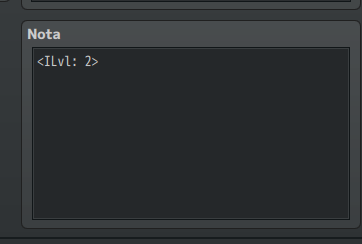
♦You must insert in every used Weapon and Armor's notetag: <ILvl: X>
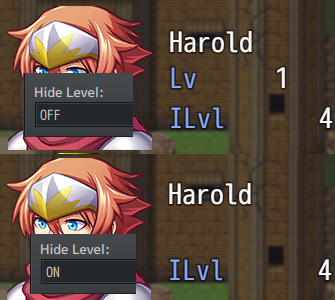
♦You can edit Hide Level parameter to hide the actual level of the actors:
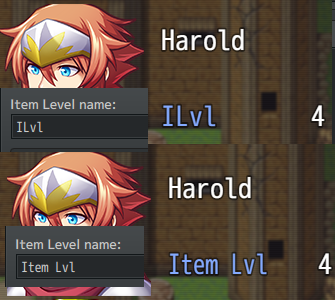
♦You can edit the name of Item Level parameter:
Download:
https://www.dropbox.com/s/gottoan8qch3y87/ItemLevel.js?dl=0
Bugs & Conflicts:
TypeError: cannot read property 'trim' of undefined
The notetag for the Weapons and Armors are mandatory.
Be sure that every item that can be equipped in game, has the notetag.
Credits:
Credits to: IsoBlyte
Free for use in both non-commercial and commercial projects.
Features Mentioned
- The plugin shows in your game the Item Level parameter, like the most famous MMORPGs:
- "lightbox_close": "Close",
- "lightbox_next": "Next",
- "lightbox_previous": "Previous",
- "lightbox_error": "The requested content cannot be loaded. Please try again later.",
- "lightbox_start_slideshow": "Start slideshow",
- "lightbox_stop_slideshow": "Stop slideshow",
- "lightbox_full_screen": "Full screen",
- "lightbox_thumbnails": "Thumbnails",
- "lightbox_download": "Download",
- "lightbox_share": "Share",
- "lightbox_zoom": "Zoom",
- "lightbox_new_window": "New window",
- "lightbox_toggle_sidebar": "Toggle sidebar"
- With this plugin you can assign to your Armor and Weapon a "Power Level".
- The Item Level shown in the menu is the average between all equipped items.
- How to use:
- There are only few things to know to use this plugin:
Downloads / Referenced Files
RPG Maker Web attachments are mirrored locally when available. Other external links remain hosted by their original creator or third-party service.
License / Terms Note
Credits: Credits to: IsoBlyte Free for use in both non-commercial and commercial projects.
Referenced Images / Attachments
Creator Claims / Removal
If you are the original creator and want this listing reassigned, edited, or removed, join BMMPlay and contact the moderators with proof that matches the original RPG Maker Web profile, linked GitHub, itch.io page, or another public creator identity.
Replies (0)
No replies yet.
0
replies
25
views
Topic Summary
Loading summary...