

How to make quest and junk items sellable.
BMM_Archive · July 15, 2026

Original Source
- Original title: How to make quest and junk items sellable.
- Original author: 100LittleDreams
- Original date: February 11, 2014
- Source thread: https://forums.rpgmakerweb.com/threads/how-to-make-quest-and-junk-items-sellable.23606/
- Source forum path: Game Development Engines > RPG Maker Tutorials > RMVXAce Tutorials
Summary
Oki, I'm guessing people who are new to using Modern Algebra's Quest Journal Script are wondering how to make quest items dropped from mobs sellable. (Basically so you don't have unneeded items clogging your bag and maybe make a bit of extra cash too.) Well here is how to do it:
Archived First Post
how to make quest items dropped from mobs sellable.
(Basically so you don't have unneeded items clogging your bag
Well here is how to do it:
- <span style="color: #0000cd">Create the item and it's description. Set the scope and occasion to none/never
Then set it to be consumable. (
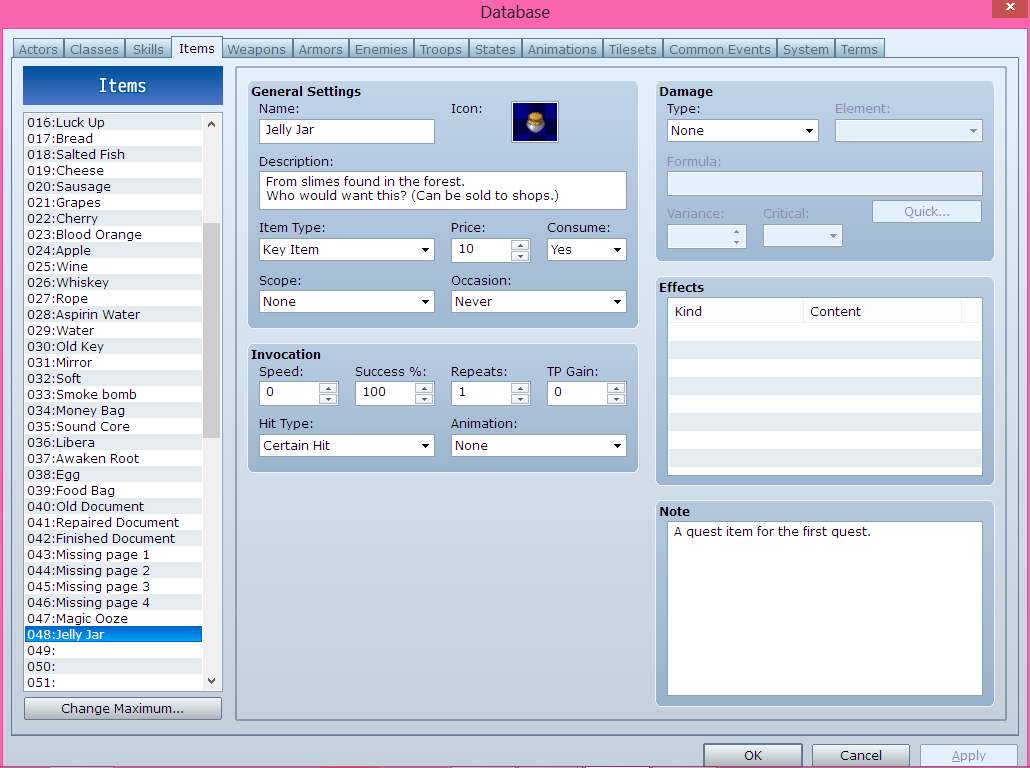
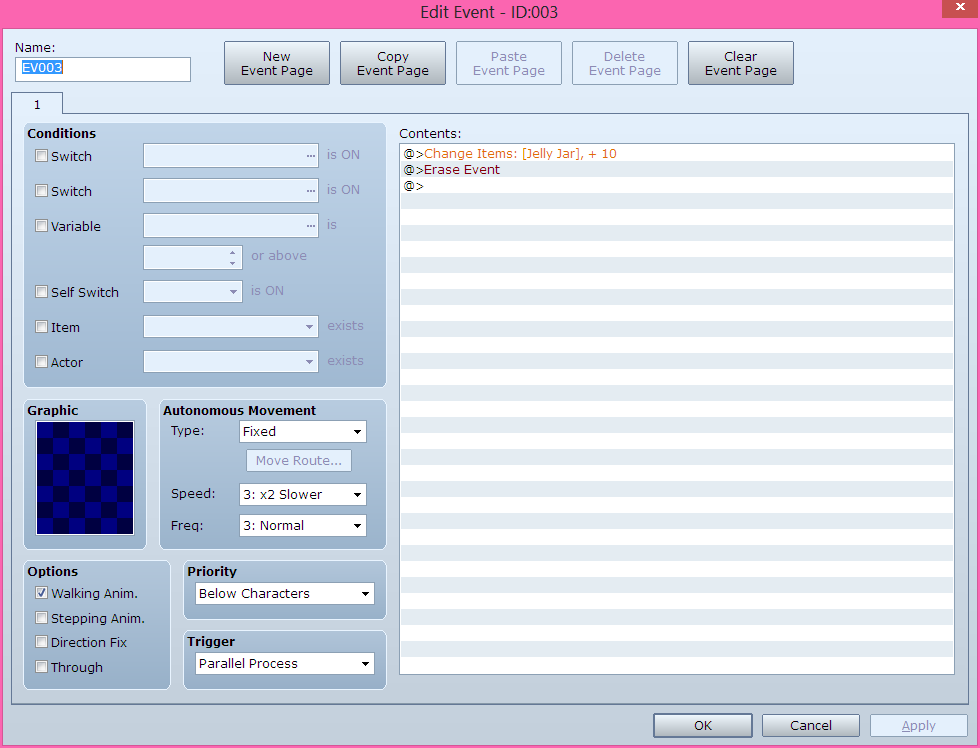
- <span style="color: #0000cd">Now to test it in your game. Open your game file in RPG Maker VX Ace and create
a erase event under it.<span style="color: #ff0000"> (I recommend you put as parallel process if you set it to autorun it may not follow the erase event
<span style="color: #ff0000">and basically freeze your game; since autorun disables movement)
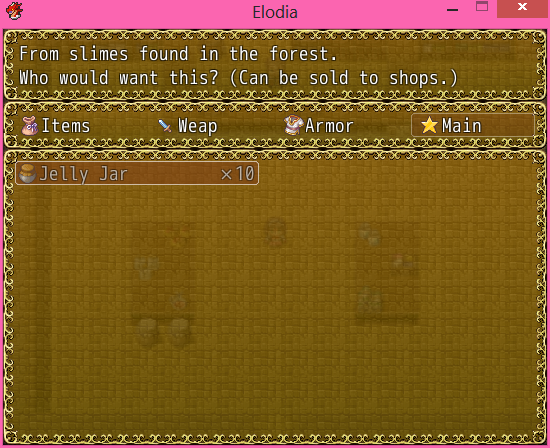
- <span style="color: #0000cd">Start your game and check to see if the item is in your inventory. <span style="color: #a9a9a9">(You can also use a treasure chest to gain the item
a worthless item you want to sell it to the NPC.
- <span style="color: #0000cd">Open the shop process by talking to the NPC. As you can see the item is sellable. Select the amount of the item
<span style="color: #0000cd">
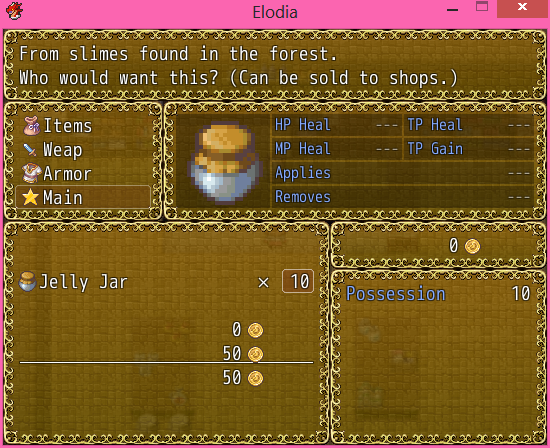
Well there is how to do it. Also this can be good for random junk items that mobs keep spamming you with such as
bat wings, eyeballs, etc. Or if you have a alchemy system and want to make good junk to sell for more cash. Also
your junk items can be normal items also. Just change the Item Type to normal.
Downloads / Referenced Files
RPG Maker Web attachments are mirrored locally when available. Other external links remain hosted by their original creator or third-party service.
- Local mirror: 4325-fc75814dfd4b75cc5d17f8ef335f0707.png
SHA-256:b8d0267efd497556576db20d76b7292f18c8c4f3d7d03f2285e4ad54a5b50345
Original attachment URL: https://forums.rpgmakerweb.com/attachments/1-png.11191/ - Local mirror: 4326-3fb66b686e9fdf7b8b8627fa3cc98628.png
SHA-256:5342d816acbca37a49d3b5d3819a48bcb51e6a25dea27f5d26a617c25cf1776d
Original attachment URL: https://forums.rpgmakerweb.com/attachments/2-png.11192/ - Local mirror: 4327-65348ee685a0d3ee098bc31006324289.png
SHA-256:57628d8bfc718569c5c5c6a0aef1132460aea4096e7d84852a8250b5c71c1906
Original attachment URL: https://forums.rpgmakerweb.com/attachments/4-png.11193/ - Local mirror: 4328-9fc4d02422576781b470fb7e28426cd9.png
SHA-256:14cbcd7b2dc629494686f5ba27ad49a61bde7bb2df7b8acaa64aa6421a974055
Original attachment URL: https://forums.rpgmakerweb.com/attachments/5-png.11194/
Referenced Images / Attachments
Creator Claims / Removal
If you are the original creator and want this listing reassigned, edited, or removed, join BMMPlay and contact the moderators with proof that matches the original RPG Maker Web profile, linked GitHub, itch.io page, or another public creator identity.
Replies (0)
No replies yet.
Topic Summary
Loading summary...