

MZEli Balloon Position - Easily change the position of the balloons!
BMM_Archive · July 15, 2026

BMM_Archive
Preserved forum archive. This topic stores the original first post and locally mirrored RPG Maker Web attachments when available. It is posted by the BMMPlay archive account, not by the original creator.
Original Source
- Original title: Eli Balloon Position - Easily change the position of the balloons!
- Original author: Eliaquim
- Original date: October 29, 2020
- Source thread: https://forums.rpgmakerweb.com/threads/eli-balloon-position-easily-change-the-position-of-the-balloons.129292/
- Source forum path: Game Development Engines > RPG Maker Javascript Plugins > JS Plugin Releases (RMMZ)
Summary
{ "lightbox_close": "Close", "lightbox_next": "Next", "lightbox_previous": "Previous",
Archived First Post

Author: Hakuen Studio
Introduction
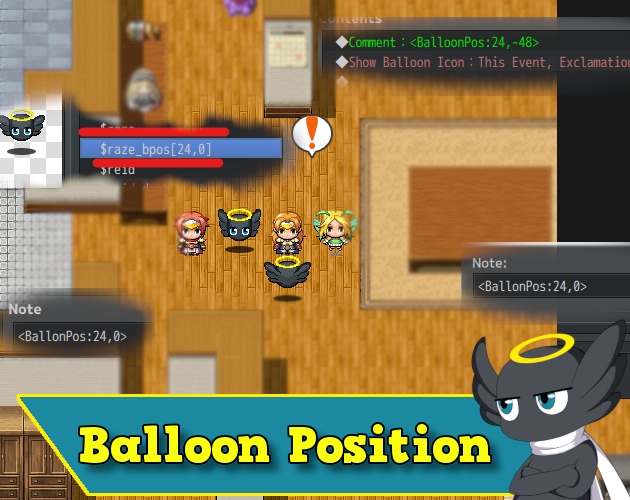
• This plugin was created with the intention of giving you more flexibility regarding the position of the balloon in the characters. It is useful if you want to use sprite sheets other than the MZ standard.
Features
Changing the position of the balloons:
• Through the notes field.
• Through the file name.
• Through comments on the event pages.
How to use
To use this plugin it is necessary to keep in mind that it will not assign a new position for the balloon, but rather, add (or subtract) value from the original position.
That is, it works as an offset.
Thus, the balloon's standard X position is equivalent to the character's X position (on the screen). The balloon's Y position is equal to the character's Y position - the height of the sprite (this.y - this.height).
Having understood that, it is very easy to use the plugin.
In the plugin parameters, choose where you want the plugin to look for the X and Y offset values for the balloons of events and players.
• Notes field:
- Put the following in the notes field (for event and player - It is case-sensitive):
<BalloonPos: x, y>
Replace X and Y with the values you want.
*For the player use the note field from the actor database.
• Filename:
- You need to add "bpos[x, y]" in the file name. For example:
Actor1_bpos[30,40].png
• Comments (Only works for the event)
- Add the same as the notes field:
<BalloonPos: x, y>
However, it is not case-sensitive here.
That is, it works as an offset.
Thus, the balloon's standard X position is equivalent to the character's X position (on the screen). The balloon's Y position is equal to the character's Y position - the height of the sprite (this.y - this.height).
Having understood that, it is very easy to use the plugin.
In the plugin parameters, choose where you want the plugin to look for the X and Y offset values for the balloons of events and players.
• Notes field:
- Put the following in the notes field (for event and player - It is case-sensitive):
<BalloonPos: x, y>
Replace X and Y with the values you want.
*For the player use the note field from the actor database.
• Filename:
- You need to add "bpos[x, y]" in the file name. For example:
Actor1_bpos[30,40].png
• Comments (Only works for the event)
- Add the same as the notes field:
<BalloonPos: x, y>
However, it is not case-sensitive here.
Terms of Use
Update Log
 hakuenstudio.itch.io
Update Log
Hakuen Studio Balloon Position for RPG Maker MZ by Hakuen Studio
Easily configure your balloon positions for custom characters!
hakuenstudio.itch.io
Features Mentioned
- Changing the position of the balloons:
- Through the notes field.
- Through the file name.
- Through comments on the event pages.
Downloads / Referenced Files
RPG Maker Web attachments are mirrored locally when available. Other external links remain hosted by their original creator or third-party service.
License / Terms Note
Terms of Use Update Log Hakuen Studio Balloon Position for RPG Maker MZ by Hakuen Studio Easily configure your balloon positions for custom characters!
Referenced Images / Attachments
Creator Claims / Removal
If you are the original creator and want this listing reassigned, edited, or removed, join BMMPlay and contact the moderators with proof that matches the original RPG Maker Web profile, linked GitHub, itch.io page, or another public creator identity.
Replies (0)
No replies yet.
0
replies
27
views
Topic Summary
Loading summary...