

MVShow Plugins Usage
BMM_Archive · July 15, 2026

BMM_Archive
Preserved forum archive. This topic stores the original first post and locally mirrored RPG Maker Web attachments when available. It is posted by the BMMPlay archive account, not by the original creator.
Original Source
- Original title: Show Plugins Usage
- Original author: ovate
- Original date: October 14, 2018
- Source thread: https://forums.rpgmakerweb.com/threads/show-plugins-usage.101092/
- Source forum path: Game Development Engines > RPG Maker Javascript Plugins > JS Plugin Releases (RMMV)
Summary
ShowPluginsUsage - 2018/09/23 (Ver.1.0) Creator name: kido0617 Overview Plugin for showing plugins usage in console
Archived First Post
ShowPluginsUsage - 2018/09/23 (Ver.1.0)
Creator name: kido0617
Overview
Plugin for showing plugins usage in console
Features
After installation, list of plugins that are unused/on/off shown in console
Version compatibility- RPG Maker MV 1.6 or higher
Preview
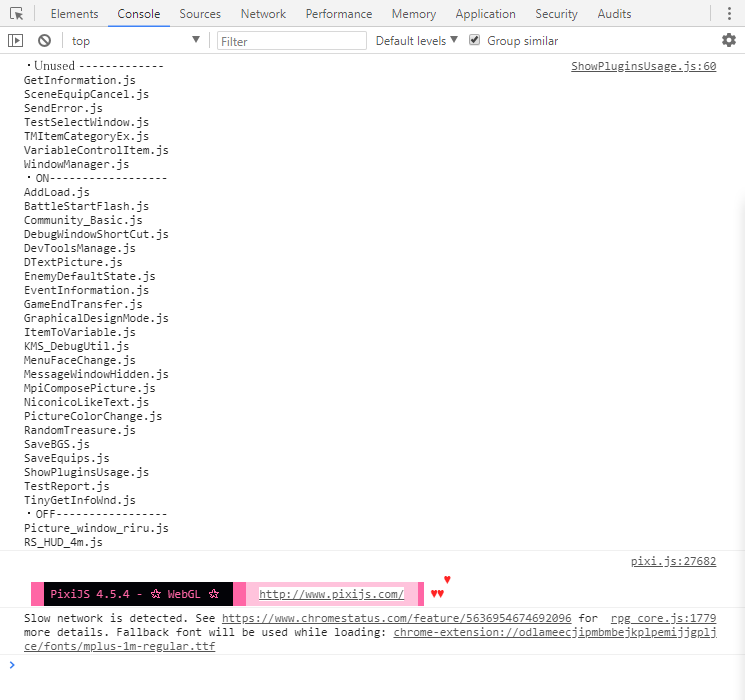
Plugin preview-
Credit and Thanks: kido0617
Terms of Use- Free for commercial and non-commercial use.
License - Public Domain
You can download js file from the thread attachment or Dropbox link: https://www.dropbox.com/s/nmcbn8wtrn91cga/ShowPluginsUsage.js?dl=1
Creator name: kido0617
Overview
Plugin for showing plugins usage in console
Features
After installation, list of plugins that are unused/on/off shown in console
Version compatibility- RPG Maker MV 1.6 or higher
Preview
Plugin preview-
Code:
/*---------------------------------------------------------------------------*
 * 2018/09/23 @kido0617
 * [URL]https://kido0617.github.io/[/URL]
 * Public Domain
 * Please use freely, credit not necessary
 * Ver.1.0
 *---------------------------------------------------------------------------*/

/*:
 * @plugindesc Plugin for showing plugins usage in console
 * @author @kido0617
 * @help
 * Details:
 * [URL]https://kido0617.github.io/rpgmaker/2018-09-24-plugin-usage[/URL]
 * After installation, list of plugins that are unused/on/off shown in console
 * Version compatibility- RPG Maker MV 1.6 or higher
 *
*/


(function(){

  var path = './js/plugins/';
  var fs = require('fs');
  var files = fs.readdirSync(path);
  var usage = {
    on: [],
    off: [],
    ununsed: []
  };

  for(var file of files){
    if(fs.statSync(path + file).isDirectory()) continue;
    var target = null;
    for(var p of $plugins){
      if(file.split('.js')[0] == p.name) {
        target = p;
        break;
      }
    }
    if(!target) usage.ununsed.push(file);
    else{
      if(p.status) usage.on.push(file);
      else usage.off.push(file);
    }
  }
  var endOfLine = require('os').EOL;
  var text = '';
  text += '・Unused--------------' + endOfLine;
  for(var f of usage.ununsed){
    text += f + endOfLine;
  }
  text += endOfLine;
  text += '・ON------------------' + endOfLine;
  for(f of usage.on){
    text += f + endOfLine;
  }
  text += endOfLine;
  text += '・OFF-----------------' + endOfLine;
  for(f of usage.off){
    text += f + endOfLine;
  }

  console.log(text);

})();
Credit and Thanks: kido0617
Terms of Use- Free for commercial and non-commercial use.
License - Public Domain
You can download js file from the thread attachment or Dropbox link: https://www.dropbox.com/s/nmcbn8wtrn91cga/ShowPluginsUsage.js?dl=1
Features Mentioned
- After installation, list of plugins that are unused/on/off shown in console
- Version compatibility- RPG Maker MV 1.6 or higher
- Preview
- "lightbox_close": "Close",
- "lightbox_next": "Next",
- "lightbox_previous": "Previous",
- "lightbox_error": "The requested content cannot be loaded. Please try again later.",
- "lightbox_start_slideshow": "Start slideshow",
- "lightbox_stop_slideshow": "Stop slideshow",
- "lightbox_full_screen": "Full screen",
- "lightbox_thumbnails": "Thumbnails",
- "lightbox_download": "Download",
- "lightbox_share": "Share",
- "lightbox_zoom": "Zoom",
- "lightbox_new_window": "New window",
- "lightbox_toggle_sidebar": "Toggle sidebar"
- Plugin preview
- Spoiler
Downloads / Referenced Files
RPG Maker Web attachments are mirrored locally when available. Other external links remain hosted by their original creator or third-party service.
License / Terms Note
* Please use freely, credit not necessary * Ver.1.0 *---------------------------------------------------------------------------*/ /*:
Referenced Images / Attachments
Creator Claims / Removal
If you are the original creator and want this listing reassigned, edited, or removed, join BMMPlay and contact the moderators with proof that matches the original RPG Maker Web profile, linked GitHub, itch.io page, or another public creator identity.
Replies (0)
No replies yet.
0
replies
16
views
Topic Summary
Loading summary...