

[Suggestion] Bookkeeping game changer for giant projects: switch reordering
BMM_Archive · July 15, 2026

Original Source
- Original title: [Suggestion] Bookkeeping game changer for giant projects: switch reordering
- Original author: rpg_el
- Original date: September 3, 2020
- Source thread: https://forums.rpgmakerweb.com/threads/suggestion-bookkeeping-game-changer-for-giant-projects-switch-reordering.126678/
- Source forum path: Game Development Engines > RPG Maker MZ Support > RPG Maker MZ Feedback
Summary
Motivation: The CTRL+F introduction in MV for the switch selector was honestly an absolute game changer for me. Before, larger projects weren't really manageable at all for me. Once I got past two hundred switches which happens quickly for me when lots of narrative choices and detail interactions on maps add up, it just became impossible to find old stuff anymore. Cue for a repeated 1-2 minute break just to find a switch that I know exist, but that I just can't recall where I put it. Now even 600+...
Archived First Post
Now even 600+ switches (and I have that many in one project) are somewhat manageable, but it's still not very fun because it's a bit of an unintentional chaos. The search helps, but doesn't fix the underlying issue: even with the best initial ordering with area A's switches in 1-100, area B in 101-200, ... one area will eventually outgrow its range and it will end up in chaos when I need to overflow into unanticipated ranges. (Also compare the "-----Reserved" range in the initial "Skills" MZ database, any large project will eventually run out of that space and clash with the "-----Enemy" marker. It's just how all large projects eventually go.) So, here is what I think would fix that for switches where it is most needed:
Description of the Feature:
I think the following feature would be another game changer for giant projects: Switch Reordering. The idea is to let me move a switch to a different number, but also all associated event uses will be automatically changed so that the original number/slot is "cleaned" for (re)use. Obviously, this would be similarly helpful to have for at the very least also Variables, Items, Skills, Weapons, and Armors, IMHO in descending order of usefulness. But I am proposing it for switches first since again here, I think it would be the biggest game changer for giant projects.
Mockups:
Here is how I think it should work:
Step 1: Open Switch Selector from anywhere
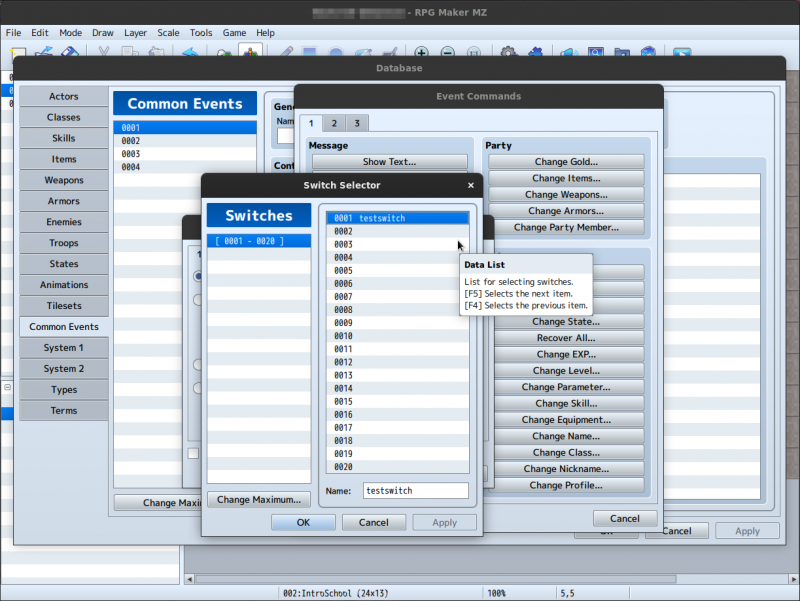
Step 2: Pick "Move..." in context menu of switch
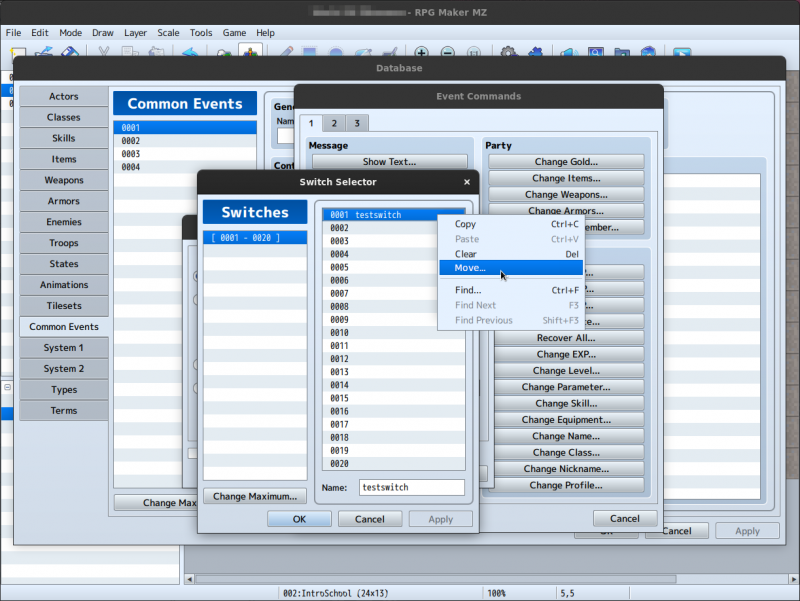
Step 3: Wait for calculation which collects what will be affected, and what slots are definitely unused
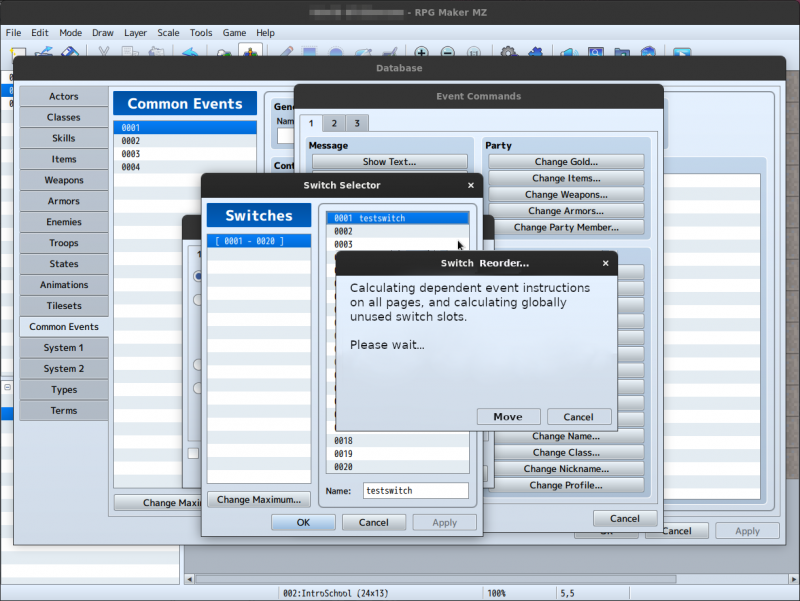
Step 4: Pick new slot which can only be one calculated as unused by all event pages in the entire project
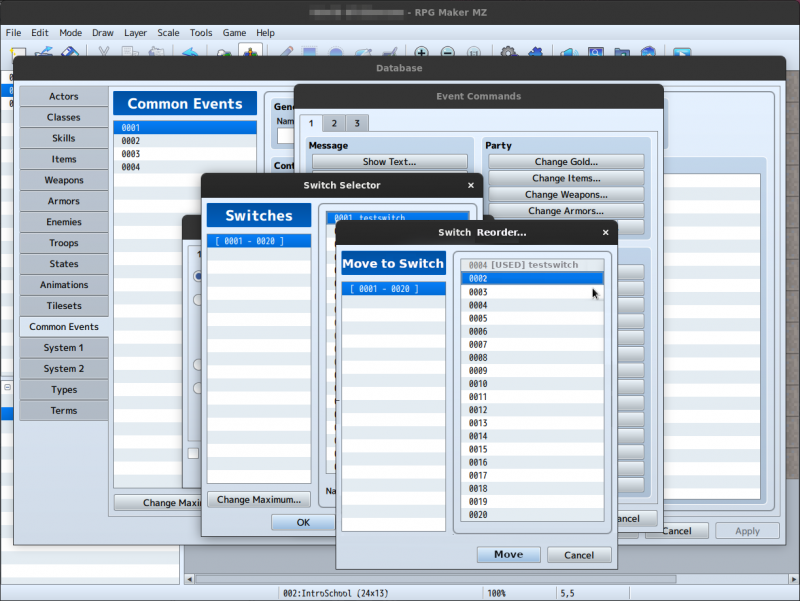
Step 5: Wait for result while all events have their references to this switch swapped out with new number
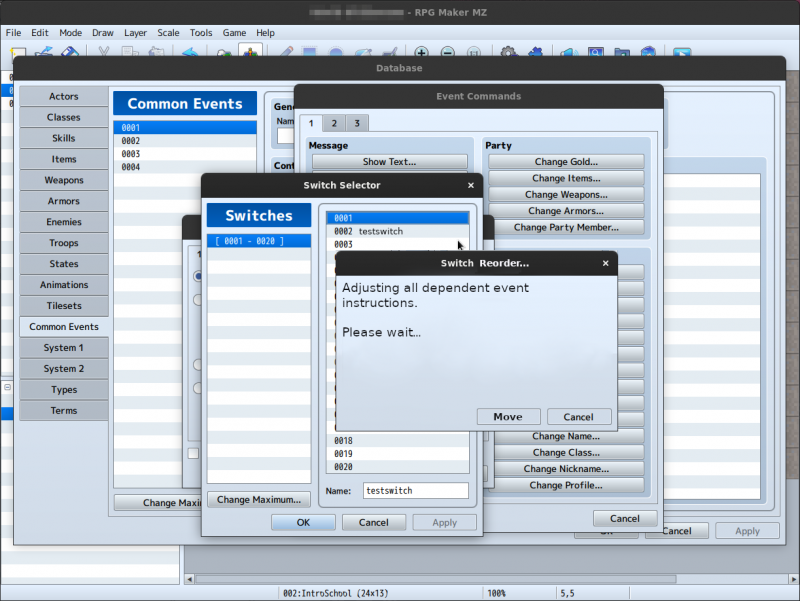
Step 6: Enjoy! Your switch has now been reordered!
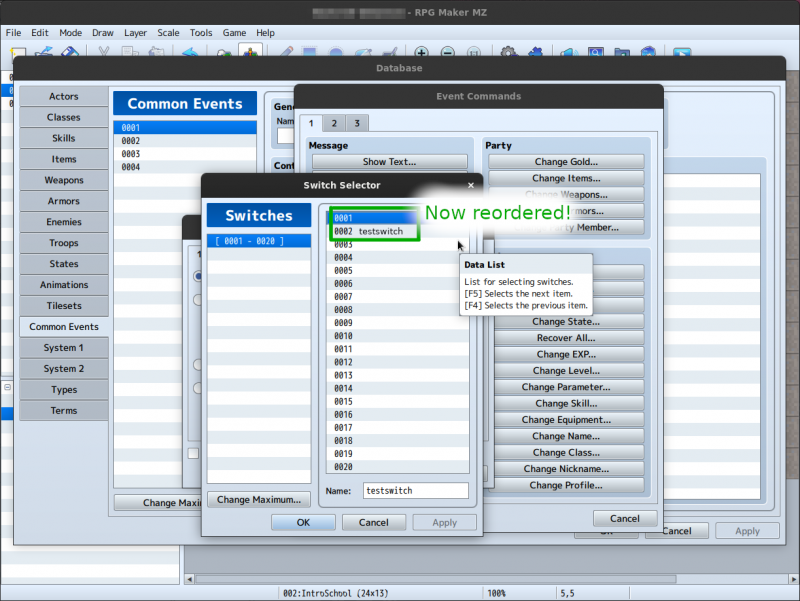
I apologize since this has likely been proposed before. But the mockup hopefully is useful to see how it could work in practice.
Possible issues with this feature:
I imagine implementing it such that really all references in any sort of event instruction are reliably changed might be somewhat challenging. Also, plugin commands that somehow indirectly refer to switches (since I think it's not directly possible as recognized @arg @type right now) would still need to be adapted manually. And I'm not sure a new user would understand the usefulness of it.
Downloads / Referenced Files
RPG Maker Web attachments are mirrored locally when available. Other external links remain hosted by their original creator or third-party service.
- Local mirror: 138227-0f1031c7e2e33c3ae3ed904f3baa0f4d.png
SHA-256:19e20511148eaf9a403b12c8725d19798cca8697f9f65e06714b64bb7dbb5f80
Original attachment URL: https://forums.rpgmakerweb.com/attachments/moveswitch1-png.159147/ - Local mirror: 138228-9f562f6b1babb1e292e06d22072d8227.png
SHA-256:5f64b730d213f335ad7c8c3faf75023762f4a46afd874c668285b03601be3788
Original attachment URL: https://forums.rpgmakerweb.com/attachments/moveswitch2-png.159148/ - Local mirror: 138233-8873a6be41f6bd1f9604db1ef0a56630.png
SHA-256:60a35906f3b5b0325b9e36da360b988104d66ed3fc88627cc296da0025098054
Original attachment URL: https://forums.rpgmakerweb.com/attachments/moveswitch3-png.159153/ - Local mirror: 138230-943b7abd2117430dabcc0d68ecd87f52.png
SHA-256:40f9b88b9e66fb57cc8e62bc3eb1ad62695a41d9371853a1b8d6cb0ba44a44c1
Original attachment URL: https://forums.rpgmakerweb.com/attachments/moveswitch4-png.159150/ - Local mirror: 138234-45ae0096a81a18d795fb2f3771af0b85.png
SHA-256:1fedfcc7bd84d5f945c520de96badb115a6142f159358007dd9878b6e7a45144
Original attachment URL: https://forums.rpgmakerweb.com/attachments/moveswitch5-png.159154/ - Local mirror: 138232-3fd3c7023c511a869d079bd447a08bb6.png
SHA-256:75977331b1e79f9616ee9dc2cfcfdc5fe738b5960a8e46b1402af755ba4f0948
Original attachment URL: https://forums.rpgmakerweb.com/attachments/moveswitch6-png.159152/
Referenced Images / Attachments
Creator Claims / Removal
If you are the original creator and want this listing reassigned, edited, or removed, join BMMPlay and contact the moderators with proof that matches the original RPG Maker Web profile, linked GitHub, itch.io page, or another public creator identity.
Replies (0)
No replies yet.
Topic Summary
Loading summary...