

XNA/Xbox 360/Windows XNA EXPORTS OF IGM
BMM_Archive · July 15, 2026

Original Source
- Original title: XNA/Xbox 360/Windows XNA EXPORTS OF IGM
- Original author: DarkFact
- Original date: April 23, 2014
- Source thread: https://forums.rpgmakerweb.com/threads/xna-xbox-360-windows-xna-exports-of-igm.26323/
- Source forum path: Game Development Engines > Legacy Engine Support > IGM Support
Summary
Ok it's no secret I have been totally getting my rear end beat down with a plethora of bugs that have yet been addressed to IGM, (clears throat) we did pay for it more than a 64 bit patch is in order here. Any how. I have a fix for all you that plan Xbox deployment. I have to run it through the peer review guys and may have to offer different options to those that have games with guitar or drums but essentially this code here will fix the...
Archived First Post
The good news is this engine is soooooooo modifiable once it's exported. It presents problems with how the main interface talks to the engine but I am working to add a way to read switches and memories to let me know when you want to multiply/divide or other complex math. Well, I'm getting ahead of myself here. One thing at a time. I plan to fix IGM. Since no one else fricking will and it's too good an engine at the core to let it fall to the wayside.
So here's the code.
public void InitPlayerControllerType(bool reset) { if (reset) { if (GamePad.GetState(PlayerIndex.One).Buttons.Start == ButtonState.Pressed) { //Controller 1 Pressed Start Log them in and get it setup. playerIndex = 0; } if (GamePad.GetState(PlayerIndex.Two).Buttons.Start == ButtonState.Pressed) { //Controller 2 Pressed Start Log them in and get it setup. playerIndex = 1; } if (GamePad.GetState(PlayerIndex.Three).Buttons.Start == ButtonState.Pressed) { //Controller 3 Pressed Start Log them in and get it setup. playerIndex = 2; } if (GamePad.GetState(PlayerIndex.Four).Buttons.Start == ButtonState.Pressed) { //Controller 4 Pressed Start Log them in and get it setup. playerIndex = 3; } } else { playerIndex = 0; foreach (ControllerType controllerType in ControllerTypes) { if (IsController(controllerType, ButtonType.Start, ButtonStatusType.Impact)) break; playerIndex++; } if (StorageComponent != null && StorageComponent.PlayerIndex != PlayerIndex) StorageComponent.DisposeStorage(); } } void ShowSignIn() { Guide.ShowSignIn(1, false); }You will need to see the attached images for the places to insert. It's caused by an out of order command to call the guide for sign in coupled with a complete lack of regard to the rules of the evil checklist that state "Thou shall just pick up any controller sign in and use that controller without having to switch for any other features during that session or unless the player signs into a new controller. At which time that controller becomes the player one controller." That's not it verbatim and I am being a bit of an arse about it, but I have spent almost 72 hours learning and redoing this code just so I can have Rofaxan be able to save scores, etc. The profiles are tied directly to the save game. So profile 1 and profile 1's save game are exclusive to one another, meaning profile 2 can't load or even see your save game as usable. However, the glitch in the IGM systems comes when I am not logged in and start the game from controller 2 as player 1 and then it obviously goes, "No player signed in and this game needs to make save data so let's get the person signed in." well it can't because the code is structured around the first detected controller and not the one being used by the player to start the game the code is in some cases 2-3 indexes off. Depending on which controller you grab. This causes IGM to pass to XNA the wrong index and causes the screen to get caught in a loop or to even pull up the storage screen and the controller lit up with the 1 light has to be used. Hence the breech of the code of ethics for XBLIG. The player has to put down one controller and use the other then go back to the controller they initially used and that's if it gets that far. It usually just loops the login because the console is smart enough to see the problem in the controller and index. The fix for this is to sense on a start screen (the reason why all indie games have one) is to grab that start press and which controller so we can sign them in properly and let them save and even feed to Xbox Live the player's comings and goings in the game such as "PlayerTag, Playing Community Game, on Stage 10".
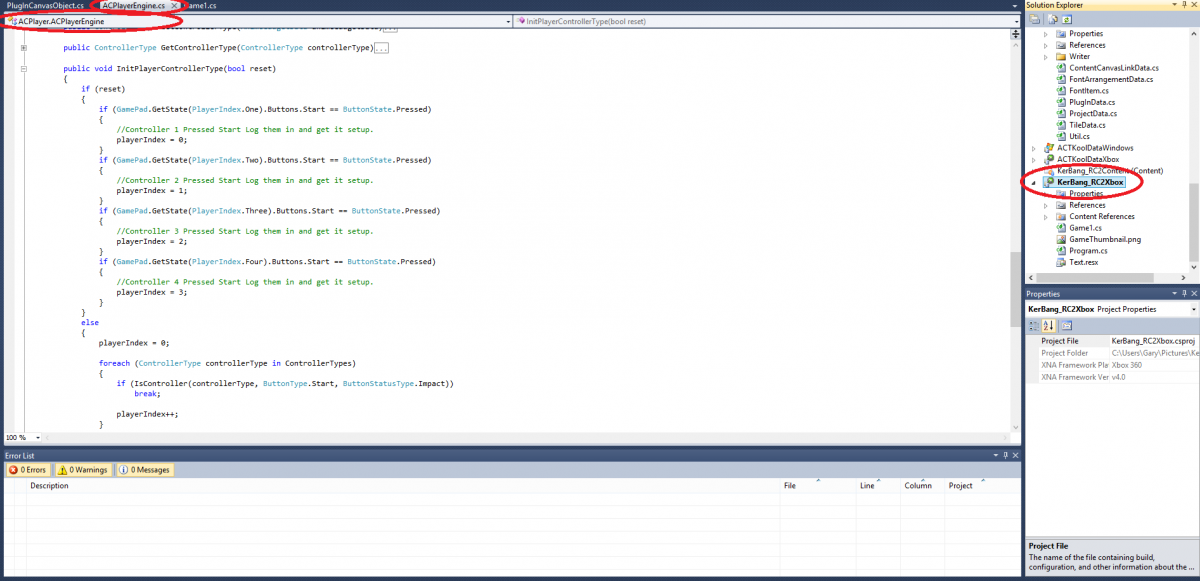
The above image shows in red where you need to be to find the code. The tell tale indicator in C# says line 1801-1802 or so. Remember on yours it will have your project name where mine is Kerbang_RC2.
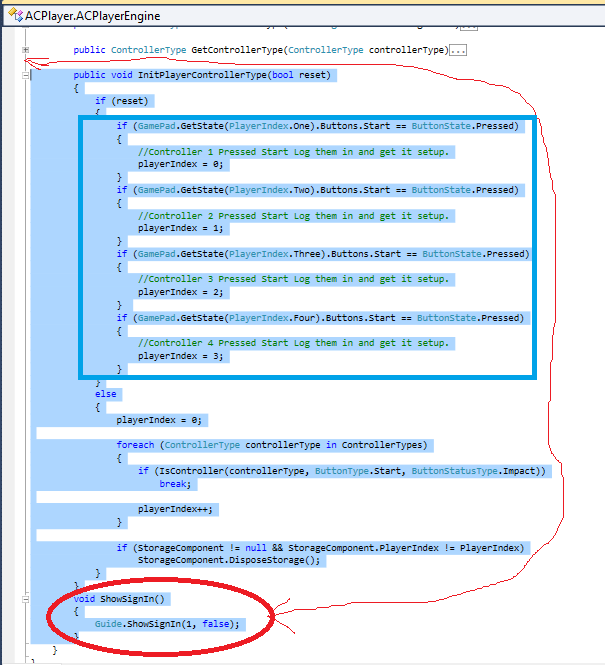
The blue box is the code you will have to copy and paste from above. A couple of key items to note. Is that I moved the Xbox live sign in call below that small part of the routine I added. The reason for this is you have
to know which controller hit start. Where the player is trying to play from. Once you have that you can then grab his index and controller used and it's all down hill from there. Now this isn't fully tested yet. But it's behaviors will at least help with the Xbox testing getting stuck in a login loop because it's using the wrong controller index. But the other noteworthy item is I removed their original index and replaced it with the if...Thens that handle the controller/player indexing and properly assign the index integer by hand. The system in this engines code is pretty to look at but can be a bit confusing especially since I am a novice LOL.
Before I would submit a game and lose two weeks to a kicked peer review let me run it through them first and see if it is 100%. That being said if anyone sees an issue in the revamp by all means let me know and we'll see if we can't make it a more suitable fix. I am sure a switch or case situation would be more pretty to look at than the method I employed.
Downloads / Referenced Files
RPG Maker Web attachments are mirrored locally when available. Other external links remain hosted by their original creator or third-party service.
- Local mirror: 5308-eca5cf0933aabf4ed574cfd74db0bbd5.png
SHA-256:c1ee12cfc813d4a689ecda04fec4749159bcf7d4ae681c6b0c34ca58ac2ccb43
Original attachment URL: https://forums.rpgmakerweb.com/attachments/whereto1-png.12612/ - Local mirror: 5309-4488785e8b8f4143f606ddaec111f2bb.png
SHA-256:d2dd1c1f3c76e6371102cfad1662346e350312aafb5264ebf16979eaebc7d56c
Original attachment URL: https://forums.rpgmakerweb.com/attachments/whereto2-png.12613/
Referenced Images / Attachments
Creator Claims / Removal
If you are the original creator and want this listing reassigned, edited, or removed, join BMMPlay and contact the moderators with proof that matches the original RPG Maker Web profile, linked GitHub, itch.io page, or another public creator identity.
Replies (0)
No replies yet.
Topic Summary
Loading summary...