

Make Map Function on Graphic Menu Item
BMM_Archive · July 15, 2026

Original Source
- Original title: Make Map Function on Graphic Menu Item
- Original author: DarkFact
- Original date: March 24, 2014
- Source thread: https://forums.rpgmakerweb.com/threads/make-map-function-on-graphic-menu-item.25337/
- Source forum path: Game Development Engines > Legacy Engine Support > IGM Support
Summary
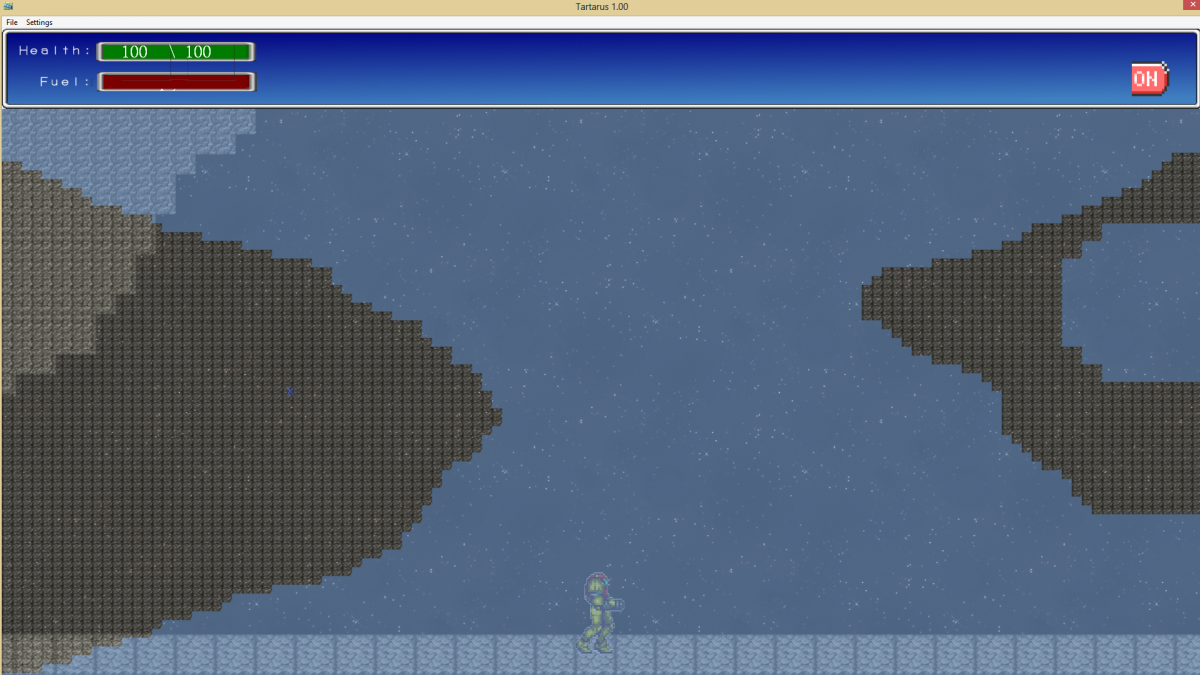
Okay got a simple 2x2 canvas. This canvas has a make shift map to learn the make map check box for the graphic menu item. You can call the map by simply pressing start and make it go away by pressing start again. Ok so far. For some reason those when I do the math on paper the "X" (which is blue) seems to be extremely far away from the players actual location on the map. I was wondering if the powers that be have a recommendation or if this...
Archived First Post
You can see where the player is standing in the image below and where the Blue "X" appears on the map and they are not even in the ballpark. I am sure it may have something to do with the scale of the map vs. the image size but I am not able to lock down the relationship to get it dialed in so the map is visible for the area in one screen - the score board at the top (128 vertical pixels).
Any ideas or anyone know anything I'd appreciate any info that could help.
Downloads / Referenced Files
RPG Maker Web attachments are mirrored locally when available. Other external links remain hosted by their original creator or third-party service.
- Local mirror: 4995-629c6fab9aff9bb102f2bb9af236ca81.png
SHA-256:07e3a538e961a9c58842612d065cf455664727c8901c401a2152495ff1efc4c4
Original attachment URL: https://forums.rpgmakerweb.com/attachments/screenshot4-png.12122/
Referenced Images / Attachments
Creator Claims / Removal
If you are the original creator and want this listing reassigned, edited, or removed, join BMMPlay and contact the moderators with proof that matches the original RPG Maker Web profile, linked GitHub, itch.io page, or another public creator identity.
Replies (0)
No replies yet.
Topic Summary
Loading summary...