

MVMeta Controls by Olivia
BMM_Archive · July 15, 2026

Original Source
- Original title: Meta Controls by Olivia
- Original author: Archeia
- Original date: September 24, 2018
- Source thread: https://forums.rpgmakerweb.com/threads/meta-controls-by-olivia.100406/
- Source forum path: Game Development Engines > RPG Maker Javascript Plugins > JS Plugin Releases (RMMV)
Summary
This is a RPG Maker MV plugin that lets you control switches and variables that last across a meta level on a game. A switch or variable designated to function as a meta switch or meta variable can persist across different save files. To assist in controlling meta properties of the game some more, the developer can assign common events to run at the start of a new game or when a game is loaded. Saving the game can also register map data to variables. Instructions {
Archived First Post
This is a RPG Maker MV plugin that lets you control switches and variables that last across a meta level on a game. A switch or variable designated to function as a meta switch or meta variable can persist across different save files. To assist in controlling meta properties of the game some more, the developer can assign common events to run at the start of a new game or when a game is loaded. Saving the game can also register map data to variables.
Instructions
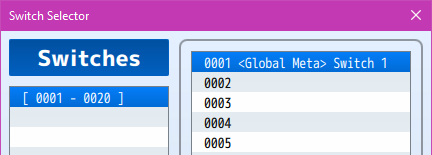
<Global Meta>
- Place this in the name of a switch or variable that you want to have its data persist across different saves and even new games. This does not have to be the full name. It can be just a part of the switch or variable's name.</global>
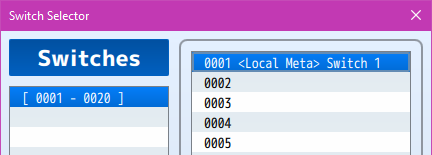
<Local Meta>
- Place this in the name of a switch or variable that you want to have its data persist across only related saves. This does not have to be the full name. It can be a part of the switch or variable's name.
Plugin Parameters
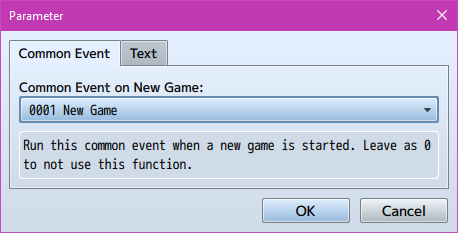
Common Event on New Game: Run this common event when a new game is started. Leave as 0 to not use this function.
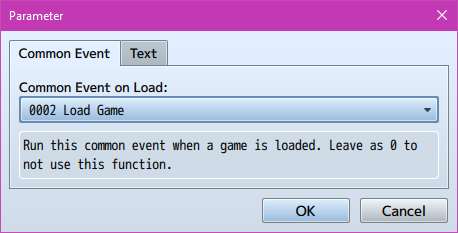
Common Event on Load: Run this common event when a game is loaded. Leave as 0 to not use this function.
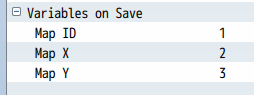
Variables on Save: If any of these are set to variables, then those variables will acquire the Map ID, Map X position, or Map Y position whenever the player makes a save.
Which Saves Are Affected By <Local Meta> ?
Let's say you create three new games A, B, and C.
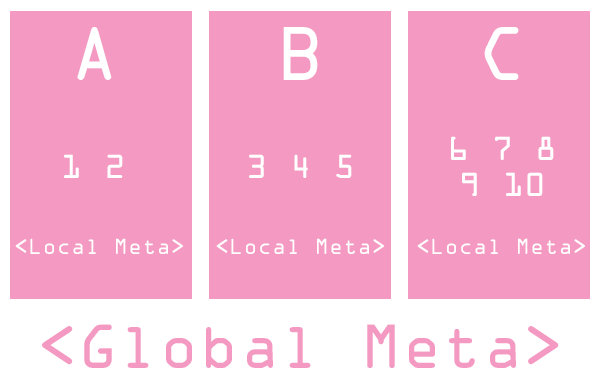
If in playthrough A, you save in files 1 and 2, then <Local Meta> data will affect both files 1 and 2. They will not affect the saves from playthroughs B and C. To affect playthroughs B and C, it will have to be <Global Meta>.
In playthrough B, you save in files 3, 4, 5. The saves made in playthroughs A and C will not be affected by the <Local Meta> data made during playthrough B and its saves. To affect them all, use <Global Meta>.
For playthrough C, save files 6, 7, 8, 9, 10 are used. All other playthroughs are completely unaffected by the <Local Meta> data used in playthrough C. To affect other playthroughs, <Global Meta> has to be used.
But there is a warning: <Local Meta> will not affect related playthroughs for save files made before installing this plugin. This is due to the lack proper linking across those saves to be used for meta data.
WARNING!!!
This plugin is made for RPG Maker MV versions 1.6.1 and below. If you update RPG Maker MV past that and this plugin breaks, I am NOT responsible for it.
Terms of Use
1. These plugins may be used in free or commercial games.
2. 'Fallen Angel Olivia' must be given credit in your games.
3. You are allowed to edit the code.
4. Do NOT change the filename, parameters, and information of the plugin.
5. You are NOT allowed to redistribute these Plugins.
6. You may NOT take code for your own released Plugins without credit.
Changelog
- None
https://fallenangelolivia.itch.io/meta-controls
Downloads / Referenced Files
RPG Maker Web attachments are mirrored locally when available. Other external links remain hosted by their original creator or third-party service.
License / Terms Note
Terms of Use 1. These plugins may be used in free or commercial games. 2. 'Fallen Angel Olivia' must be given credit in your games. 3. You are allowed to edit the code.
Referenced Images / Attachments
Creator Claims / Removal
If you are the original creator and want this listing reassigned, edited, or removed, join BMMPlay and contact the moderators with proof that matches the original RPG Maker Web profile, linked GitHub, itch.io page, or another public creator identity.
Replies (0)
No replies yet.
Topic Summary
Loading summary...