

MZPOG_ChoicesWindowPlusPlus: Condition, customize and Randomize the order of choices in the choice window.
BMM_Archive · July 15, 2026

Original Source
- Original title: POG_ChoicesWindowPlusPlus: Condition, customize and Randomize the order of choices in the choice window.
- Original author: Logica
- Original date: November 9, 2020
- Source thread: https://forums.rpgmakerweb.com/threads/pog_choiceswindowplusplus-condition-customize-and-randomize-the-order-of-choices-in-the-choice-window.129706/
- Source forum path: Game Development Engines > RPG Maker Javascript Plugins > JS Plugin Releases (RMMZ)
Summary
Context: Games that do not have a linear narrative usually require the player to make choices through dialogue. By default, the RPG MAKER MZ choice window brings little variety of options to the developer besides the possibility to align it horizontally. Description: This plugin brings a little more control over the choice window. Among these options is the possibility of conditioning a choice to a database switch. License: Free for personal or commercial use. How to use this plugin?
Archived First Post
Description: This plugin brings a little more control over the choice window. Among these options is the possibility of conditioning a choice to a database switch.
License: Free for personal or commercial use.
How to use this plugin?
Before using this script, you need to adjust the plugin settings. The functions of this plugin are controlled by activating and disconnecting switches from the database and by assigning values to the database variables.
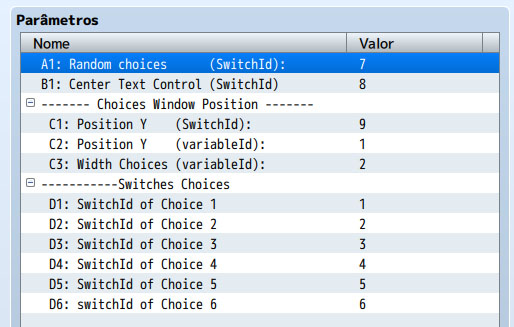
A1: Database switch number that enables or disables randomization of the choice window.
B1: Switch (ID)that turns the text centering on or off.
C1: Turns on or off the function of setting the vertical position of the windows choice window.
C2: Database variable that controls the vertical position of the choice window.
C3: Variable that defines the width of window choices.
D1 .. D6: Set the switch that activates the display of choiceS.
Plugin Commands
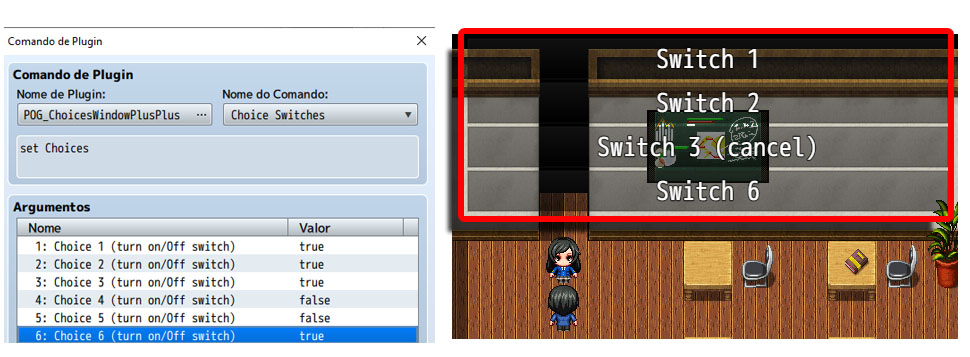
Choice Switches: By default the RPG MAKER MZ allows the display of up to 6 choices for the player. With this plugin, an option to choose the window of choices is only displayed if the switch that the control is on. The controller switch must be defined in the plugin settings.
This plugin command allows you to change the status of the switches that control the display of options in the choice window.
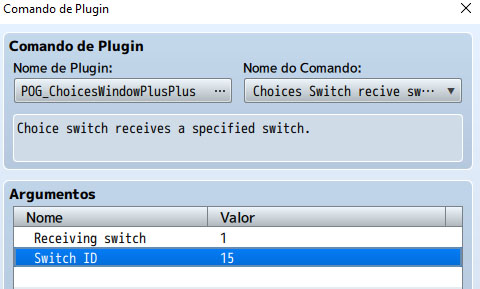
Choices Switch recive switch: By default, the RPG MAKER MZ does not have the option of assigning a value from one switch to another switch.
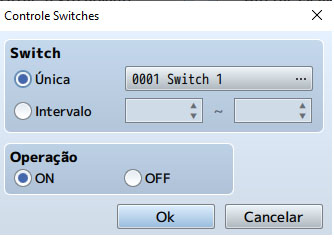
This plugin command allows you to assign the value of any switch to the value of one of the 6 switches that control the display of choices in the choice window!
Downloads / Referenced Files
RPG Maker Web attachments are mirrored locally when available. Other external links remain hosted by their original creator or third-party service.
License / Terms Note
License: Free for personal or commercial use. How to use this plugin? Before using this script, you need to adjust the plugin settings. The functions of this plugin are controlled by activating and disconnecting switches from the database and by assigning values to the database variables. {
Referenced Images / Attachments
Creator Claims / Removal
If you are the original creator and want this listing reassigned, edited, or removed, join BMMPlay and contact the moderators with proof that matches the original RPG Maker Web profile, linked GitHub, itch.io page, or another public creator identity.
Replies (0)
No replies yet.
Topic Summary
Loading summary...