

Special use of parallel process (no plugin required)
BMM_Archive · July 15, 2026

BMM_Archive
Preserved forum archive. This topic stores the original first post and locally mirrored RPG Maker Web attachments when available. It is posted by the BMMPlay archive account, not by the original creator.
Original Source
- Original title: Special use of parallel process (no plugin required)
- Original author: Awayamatana
- Original date: December 19, 2023
- Source thread: https://forums.rpgmakerweb.com/threads/special-use-of-parallel-process-no-plugin-required.163989/
- Source forum path: Game Development Engines > RPG Maker Tutorials > RMMZ Tutorials
Summary
I'm using Google Translate, so it may be a strange translation. Please point it out. I will teach you the ultimate techniques for those who want to reduce the use of plugins, variables, and switches as much as possible. These techniques are the same as for plugins.
Archived First Post
I'm using Google Translate, so it may be a strange translation.
Please point it out.
I will teach you the ultimate techniques for those who want to reduce the use of plugins, variables, and switches as much as possible.
These techniques are the same as for plugins.
There's no need to use them when you can't think of a use for them.
Preparation
Create a common event like the one below.

Parallel process event that runs only once
Execute the parallel process only once immediately after the conditions are met.
procedure:
1. Set the trigger to "Parallel".
2. Enter the events you want to execute.
3. Enter the common event "Remove parallel process" at the end of the contents.
Example: An event where the weather changes depending on the value when a variable is changed.
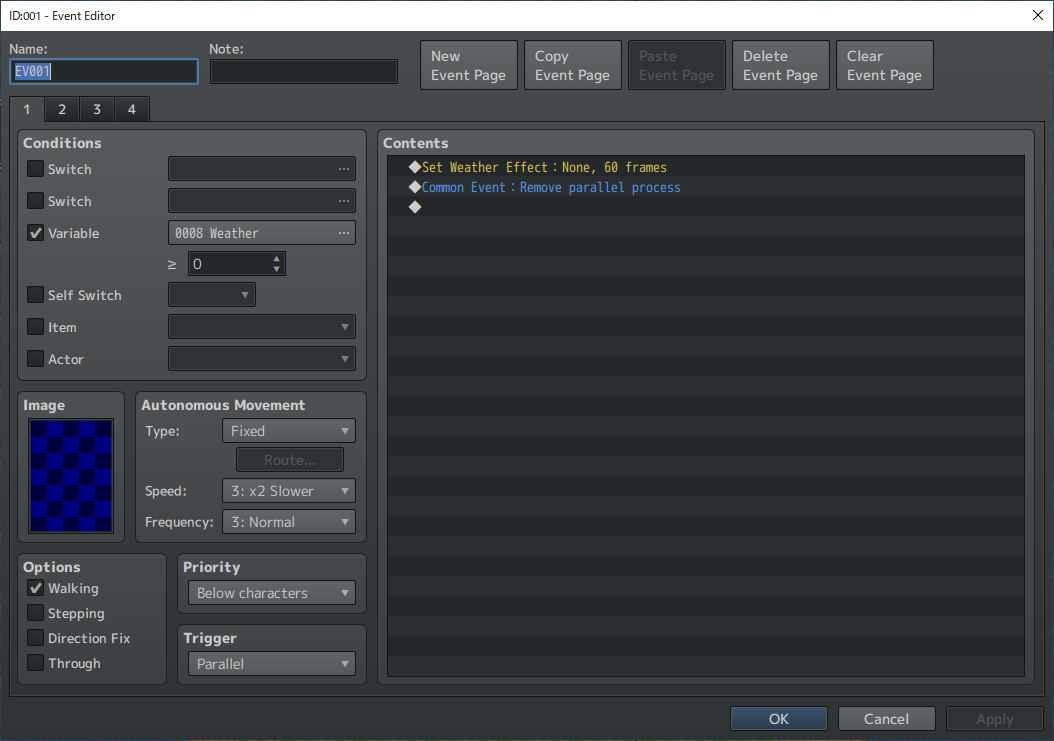
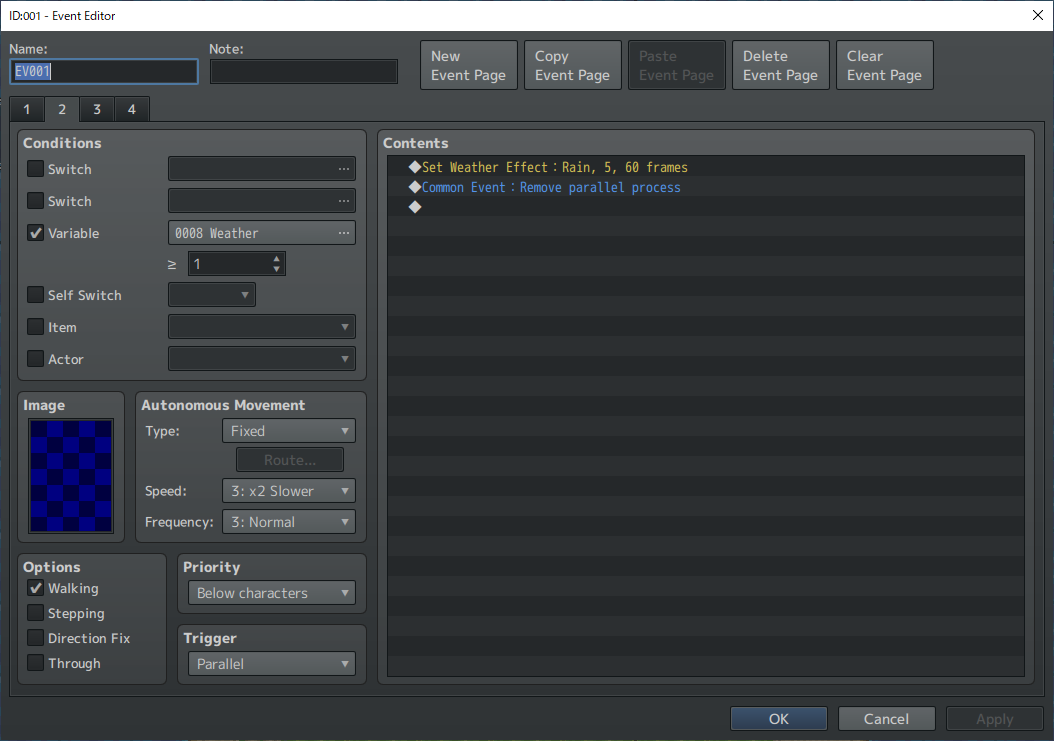
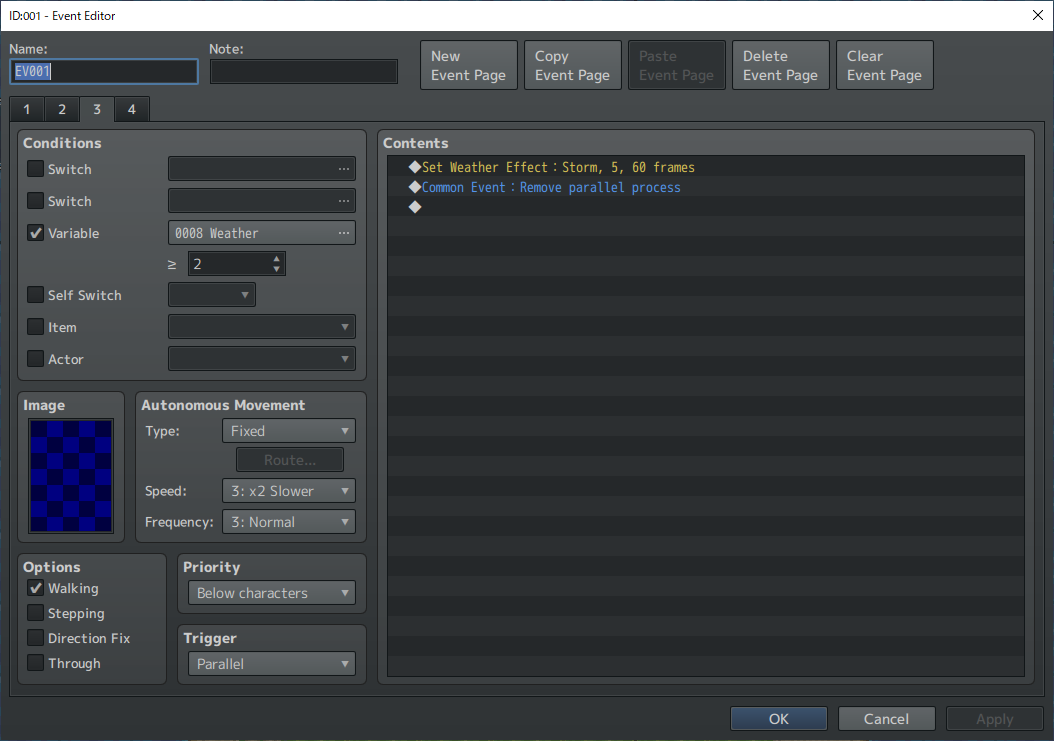
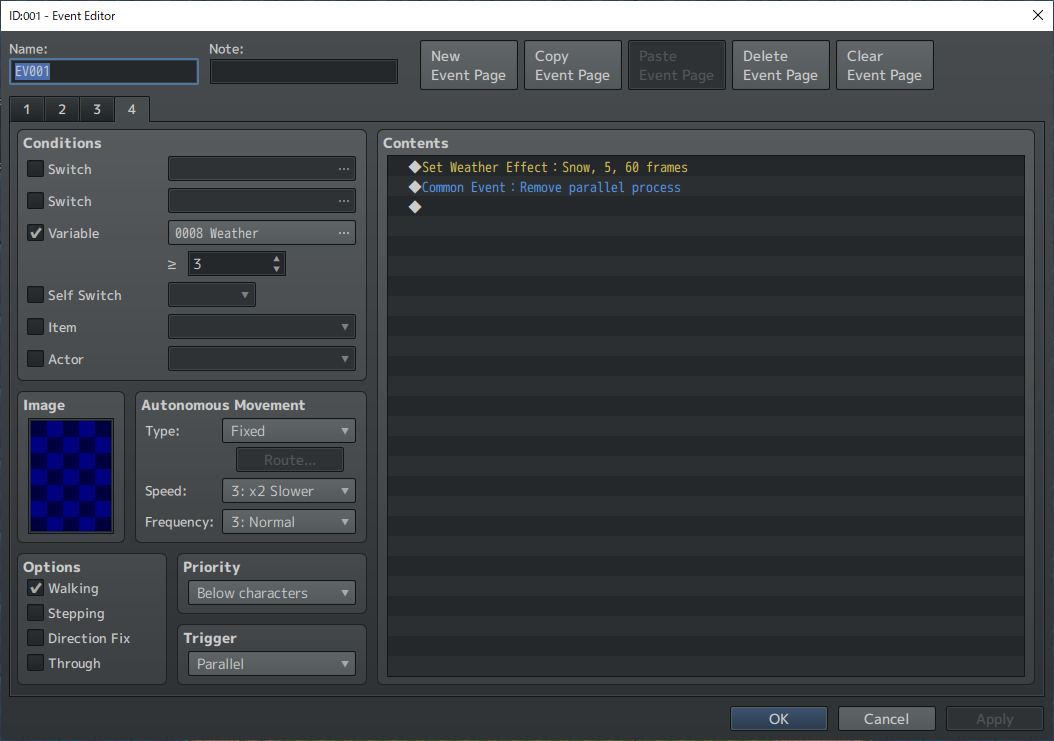
Event that allows other trigger to run after a parallel process runs only once
Use this when you want to prepare for an event that meets the conditions.
procedure:
1. Set the trigger to "Parallel".
2. Create a conditional branch.
3. Enter the commands to use for preparation.
4. Enter the common event "Remove parallel process".
5. Override trigger.
The numbers on the right side can be 0 to 3, and each corresponds to "Action Button" to "Autorun".
6. Enter "Exit Event Processing."
7. Enter the events to run after preparation.
Example: Translucent person
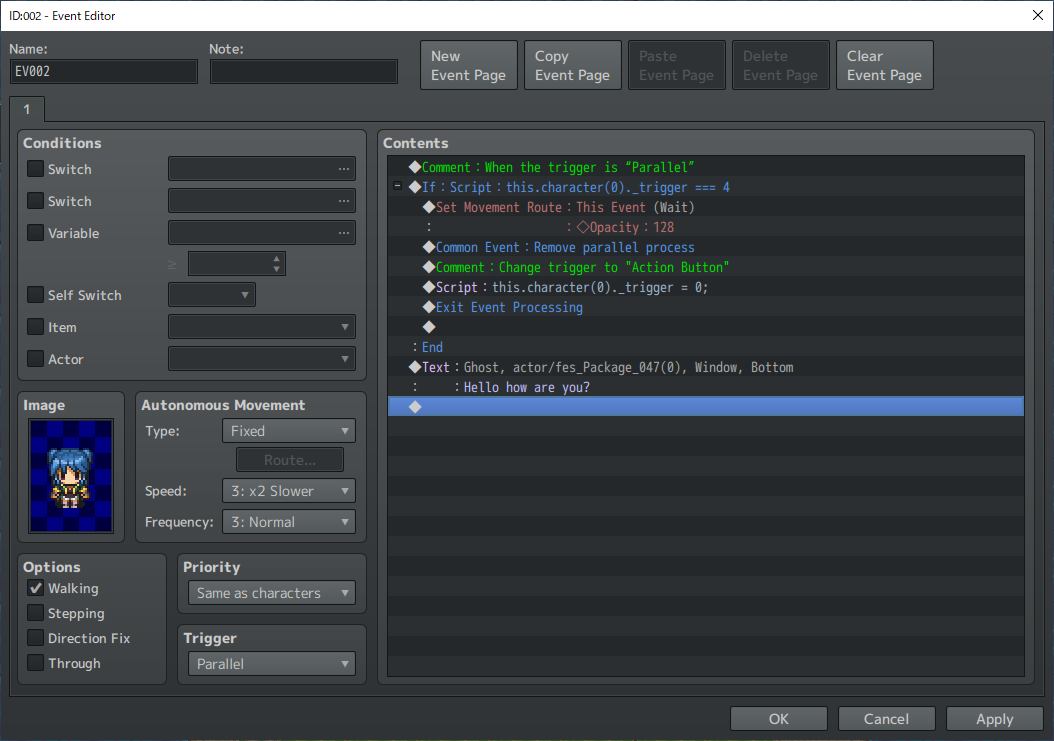
Two triggers
You can create events that can be talked to while running parallel processes.
procedure:
1. Set the trigger to "Parallel".
2. Create a conditional branch.
3. Override trigger.
The numbers on the right side can be 0 to 3, and each corresponds to "Action Button" to "Autorun".
4. Enter “Loop”.
5. Input the events used for parallel process.
6. Enter “Wait”.
7. Input events without parallel process.
Example: A person who always displays a balloon except when an event is running
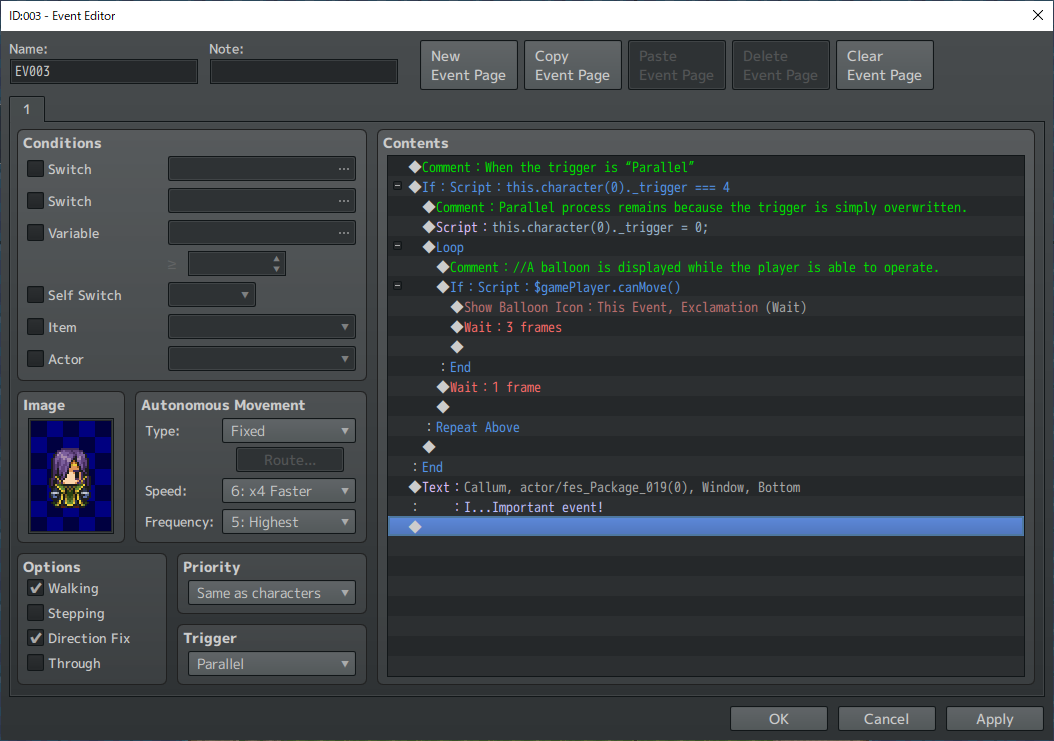
I've only shown a few simple examples, so there may be many other uses that I can't imagine!
Please point it out.
I will teach you the ultimate techniques for those who want to reduce the use of plugins, variables, and switches as much as possible.
These techniques are the same as for plugins.
There's no need to use them when you can't think of a use for them.
Preparation
Create a common event like the one below.
JavaScript:
const character = this.character(0);
character._interpreter = null;
character._trigger = null;
Parallel process event that runs only once
Execute the parallel process only once immediately after the conditions are met.
procedure:
1. Set the trigger to "Parallel".
2. Enter the events you want to execute.
3. Enter the common event "Remove parallel process" at the end of the contents.
Example: An event where the weather changes depending on the value when a variable is changed.
Event that allows other trigger to run after a parallel process runs only once
Use this when you want to prepare for an event that meets the conditions.
procedure:
1. Set the trigger to "Parallel".
2. Create a conditional branch.
JavaScript:
this.character(0)._trigger === 44. Enter the common event "Remove parallel process".
5. Override trigger.
JavaScript:
this.character(0)._trigger = 0;6. Enter "Exit Event Processing."
7. Enter the events to run after preparation.
Example: Translucent person
Two triggers
You can create events that can be talked to while running parallel processes.
procedure:
1. Set the trigger to "Parallel".
2. Create a conditional branch.
JavaScript:
this.character(0)._trigger === 4
JavaScript:
this.character(0)._trigger = 0;4. Enter “Loop”.
5. Input the events used for parallel process.
6. Enter “Wait”.
7. Input events without parallel process.
Example: A person who always displays a balloon except when an event is running
I've only shown a few simple examples, so there may be many other uses that I can't imagine!
Downloads / Referenced Files
RPG Maker Web attachments are mirrored locally when available. Other external links remain hosted by their original creator or third-party service.
- Local mirror: 267681-397b4cf33931fb12b437c31f6ec81699.png
SHA-256:47f245a53bb4dcbdefadd6b1d6dd3d0bca87e93ae713577e78cd385a3b3e52e9
Original attachment URL: https://forums.rpgmakerweb.com/attachments/1702996453348-png.288601/ - Local mirror: 267682-de68de5e87773040b7b917b28bfa7456.png
SHA-256:514e503400a5537ebdec71a9948244f9cdfdd3783a38c2896547dc337b6c594b
Original attachment URL: https://forums.rpgmakerweb.com/attachments/1702996784750-png.288602/ - Local mirror: 267683-cdc12854f92229a103fa195ae2a213f6.png
SHA-256:2ba5e469badf45caee88bbe3719ead0f570445c8b622fe2a3acb9752d4c4e34b
Original attachment URL: https://forums.rpgmakerweb.com/attachments/1702996804579-png.288603/ - Local mirror: 267684-f559f5b756d92937bec747427b0e0b09.png
SHA-256:0007e34c3d852c14d2638d6df08914a3d29661cc58ae1cca9d2ff493e2d1e88d
Original attachment URL: https://forums.rpgmakerweb.com/attachments/1702996861981-png.288604/ - Local mirror: 267689-c5ec6bfbae9148079d5c8d329628a0dd.png
SHA-256:8bc06e61e2d14e182a69559bc1e1d4c4c54d1c3b346549d207d37cf7eeb7233f
Original attachment URL: https://forums.rpgmakerweb.com/attachments/1702998409661-png.288609/ - Local mirror: 267702-06ea4a7a42b4bfca7e76c3ccbf362d34.png
SHA-256:7d001aa43086fe121cbf9810802a77250c8f8b3129f2ecb12dcf9ac5872d3784
Original attachment URL: https://forums.rpgmakerweb.com/attachments/1703000277900-png.288622/
Referenced Images / Attachments
Creator Claims / Removal
If you are the original creator and want this listing reassigned, edited, or removed, join BMMPlay and contact the moderators with proof that matches the original RPG Maker Web profile, linked GitHub, itch.io page, or another public creator identity.
Replies (0)
No replies yet.
0
replies
18
views
Topic Summary
Loading summary...