

MZPOG_AlertRegion: Enables / disables switches by positioning the Player
BMM_Archive · July 15, 2026

Original Source
- Original title: POG_AlertRegion: Enables / disables switches by positioning the Player
- Original author: Logica
- Original date: October 6, 2020
- Source thread: https://forums.rpgmakerweb.com/threads/pog_alertregion-enables-disables-switches-by-positioning-the-player.128335/
- Source forum path: Game Development Engines > RPG Maker Javascript Plugins > JS Plugin Releases (RMMZ)
Summary
License: Free for personal or commercial use. Context: In games where player positioning is important for gameplay to trigger events depending on the player's position, it can be a tiring and repetitive task to exhaustion if all the tasks that involve this are done only by event commands. Description: This script allows the developer to activate / deactivate switches when the player enters a land marked as a preconfigured region.
Archived First Post
License: Free for personal or commercial use.
Context: In games where player positioning is important for gameplay to trigger events depending on the player's position, it can be a tiring and repetitive task to exhaustion if all the tasks that involve this are done only by event commands.
Description: This script allows the developer to activate / deactivate switches when the player enters a land marked as a preconfigured region.
How to use this script: No plugin configuration is required. After activating it in the RPG MAKER MZ it will be ready to be used!
Configuring the map regions: For each map, the developer can configure up to 255 different regions. Setting up a region is quite simple, as long as the developer inserts a tag in the “Note” field in the Map settings where he wants the alert to work. The following theme tag structure:
- <alertRegion is the tag suffix
- ID is the region number
- switchIdis the number of the database switch that will be manipulated.
- value is the value to be assigned to the switch. It can be true, false or temp.
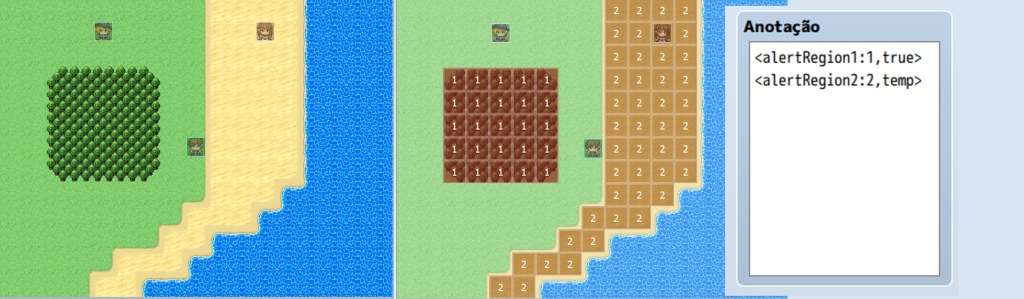
Alert types: There are basically two types of alerts, a permanent alert and a temporary alert
2) Permanent alert: in this type of alert, a database switch is activated or deactivated when the player moves to a terrain marked as a pre-configured region. When he leaves this land, the state of the switch will not be changed.
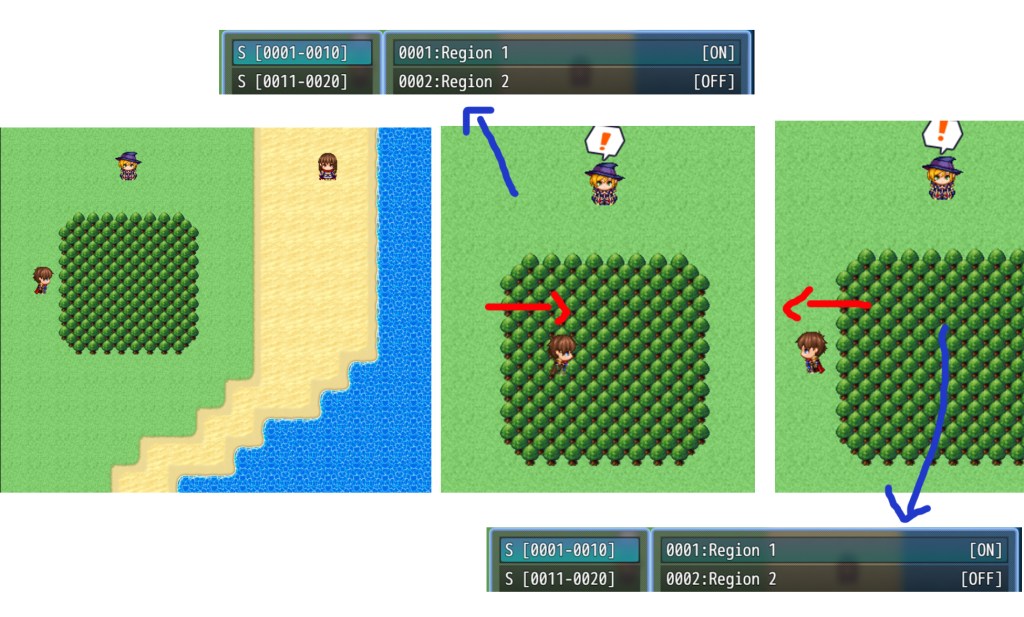
To set up a Permanent Alert, assign "true" or "false" to the value in the tag configuration.
Example 1: ACTIVATE switch 1 in the database when the player enters region 4.
Example 2: DISABLE switch 2 from the database when the player enters region 10.
2) Temporary Alert: In this type of alert, a database switch is ON as long as the player remains in a terrain marked as a pre-configured region. When he leaves this terrain, the switch is turned off.
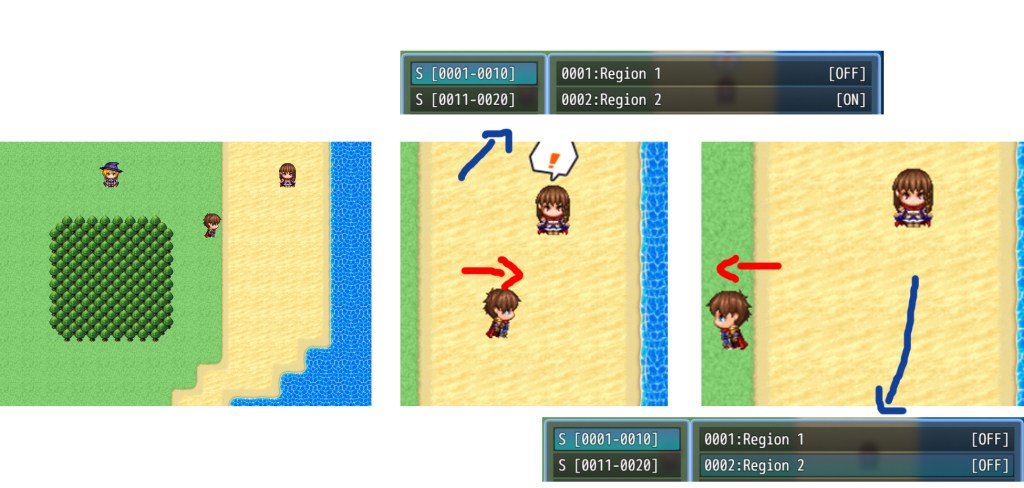
To configure the temporary alert tag, assign “temp” to value in the tag configuration.
Example 3: Set switch number 3 in the database to be activated while the player remains on a terrain marked as region 89.
Downloads / Referenced Files
RPG Maker Web attachments are mirrored locally when available. Other external links remain hosted by their original creator or third-party service.
License / Terms Note
License: Free for personal or commercial use. Context: In games where player positioning is important for gameplay to trigger events depending on the player's position, it can be a tiring and repetitive task to exhaustion if all the tasks that involve this are done only by event commands. Description: This script allows the developer to activate / deactivate switches when the player enters a land marked as a preconfigured region. How to use this script: No plugin configuration is required....
Referenced Images / Attachments
Creator Claims / Removal
If you are the original creator and want this listing reassigned, edited, or removed, join BMMPlay and contact the moderators with proof that matches the original RPG Maker Web profile, linked GitHub, itch.io page, or another public creator identity.
Replies (0)
No replies yet.
Topic Summary
Loading summary...