

MVRamza's Dynamic Class Equip Notes -=Updated to v1.10 Sep 17, 2017=-
BMM_Archive · July 15, 2026

Original Source
- Original title: Ramza's Dynamic Class Equip Notes -=Updated to v1.10 Sep 17, 2017=-
- Original author: ramza
- Original date: September 13, 2017
- Source thread: https://forums.rpgmakerweb.com/threads/ramzas-dynamic-class-equip-notes-updated-to-v1-10-sep-17-2017.83955/
- Source forum path: Game Development Engines > RPG Maker Javascript Plugins > JS Plugin Releases (RMMV)
Summary
Greetings everyone, I come bearing a small utility plugin that might save someone a bit of work in the future. Ramza's Dynamic Class Equip Notes v1.10 What does it do? This plugin runs a function to dynamically update the note tags on weapons and armor at runtime. It runs once, on the title screen, and directly overwrites the string stored in the 'infoTextTop' variable on all weapons and armor.
Archived First Post
Ramza's Dynamic Class Equip Notes v1.10
What does it do?
- This plugin runs a function to dynamically update the note tags on weapons and armor at runtime. It runs once, on the title screen, and directly overwrites the string stored in the 'infoTextTop' variable on all weapons and armor.
- It requires the YEP_ItemCore plugin to work, as that is the plugin that makes use of the above value.
- The plugin writes the names of specified classes in your project, and colors them according to whether or not that class can equip the item being viewed. It looks like this:
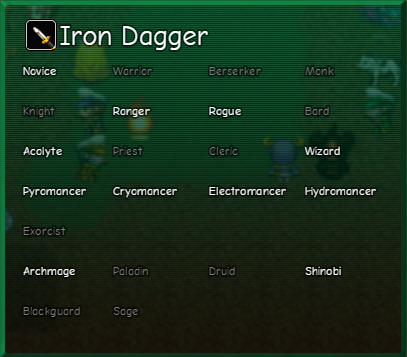
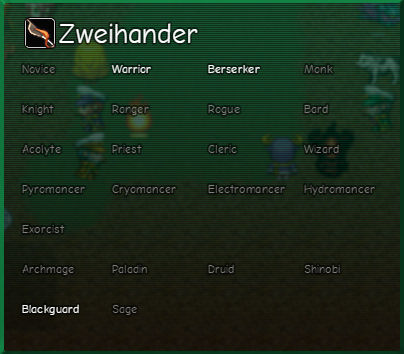
- The order in which you put the classIds into the parameter box is the order they show up in the window.
- The number of columns can be adjusted (if your window is wider)
- The spacing between columns can also be changed.
- The text colors are also customizable
- If you want to insert a blank space (as in my screenshot) use 'null' in place of a classId (without the quotes).
- New in v1.10:
- Added plugin parameters to blank the text for specific classes on this window
- Unlocking a class via the YEP_ClassChangeCore plugin commands will also set the classname to be unblanked on this window
- After unlocking a previously blank class, the plugin command UpdateHiddenClasses will need to be called, which will rewrite all of the usability information for all items to show the class name for the new unlocked class(es).
- If unlocking multiple blanked classes at the same time, unlock them all via plugin command first, and then call UpdateHiddenClasses, this command will causes a brief pause, which will be longer the more classes, weapons, and armors you have in your database. Calling it multiple times when unnecessary will cause a long hang time.
- YEP_ItemCore
- YEP_MessageCore
- An unused actor slot in your database. Do not use an actor that ever joins the party for this.
The window shows in the item scene by default when you're looking at a weapon or armor. It is normally blank and only contains the name of the item at the top. On the YEP_EquipCore equip scene, you can also see this info pane by pressing left or right when selecting a weapon or armor to swap. On this scene, the info pane shows up where the parameter change window is.
Why make this plugin?
In case you can't tell, I had personal need of such a plugin. The default info pane is mostly useless in my personal project, so I figured I'd use the space to show classes that could equip the item I was looking at. Problem is, I couldn't find a way to dynamically do this, meaning I had to paste several lines of escape codes, with a couple of numbers different each time for every single item in my project. As you can imagine, that wasn't a fun time.
Terms of Use:
- You may use this plugin in your commercial or non-commercial games, with credit to me, Ramza.
- You may make changes to the plugin, to add features, or compatibility with other plugins, for your own personal use.
- You may share these changes as their own plugin extension to this one.
- You may not directly share modified versions of this plugin publicly.
- You may not claim ownership of this plugin.
- You must also abide by the terms of use of all dependency plugins
I don't know if anyone else in the world can benefit from this plugin as much as I do, but if even one other person needs something like this, here it is.
Downloads / Referenced Files
RPG Maker Web attachments are mirrored locally when available. Other external links remain hosted by their original creator or third-party service.
- Download: Ramza's Dynamic Class Equip Notes
- Local mirror: 50406-25968f38aa7cd31468b30f12bdea7926.png
SHA-256:efd4fd8ae5f5f4b0042bf8f8dc4a9ba69345872280fdfaf0c4bece1ead51cb32
Original attachment URL: https://forums.rpgmakerweb.com/attachments/ramza_cen_001-png.71908/ - Local mirror: 50407-eae39b627e85e8530bf51dead5298adf.png
SHA-256:c15c14e140cd6d2eb3dd917c61fd77a44f54278d499d3d96108828b47faf091e
Original attachment URL: https://forums.rpgmakerweb.com/attachments/ramza_cen_002-png.71909/
License / Terms Note
Terms of Use: You may use this plugin in your commercial or non-commercial games, with credit to me, Ramza. You may make changes to the plugin, to add features, or compatibility with other plugins, for your own personal use. You may share these changes as their own plugin extension to this one.
Referenced Images / Attachments
Creator Claims / Removal
If you are the original creator and want this listing reassigned, edited, or removed, join BMMPlay and contact the moderators with proof that matches the original RPG Maker Web profile, linked GitHub, itch.io page, or another public creator identity.
Replies (0)
No replies yet.
Topic Summary
Loading summary...