

RPG Maker MZ - v1.1.0 Update
BMM_Archive · July 15, 2026

Original Source
- Original title: RPG Maker MZ - v1.1.0 Update
- Original author: RPGMakerWeb
- Original date: October 29, 2020
- Source thread: https://forums.rpgmakerweb.com/threads/rpg-maker-mz-v1-1-0-update.129288/
- Source forum path: Game Development Engines > RPG Maker MZ Support > RPG Maker MZ Software Updates
Summary
Hello RPG Makers! Thank you for using RPG Maker MZ, as always, we appreciate your support! We hope you are enjoying it so far. The latest update for RPG Maker MZ, Version 1.1.0, is now live with new features, changes and bug fixes! New features You can now add the Tileset Property, STAR, to Tileset A.
Archived First Post
Thank you for using RPG Maker MZ, as always, we appreciate your support! We hope you are enjoying it so far. The latest update for RPG Maker MZ, Version 1.1.0, is now live with new features, changes and bug fixes!
New features
- You can now add the Tileset Property, STAR, to Tileset A.
- Added the "Align bottom" option for animations.
Updates
- Character Generator Faces have been updated so they can be moved without showing any cropping.
- The following plugins have been updated:
- ExtraImage.js
- AdjustPictureGraphical.js
- DevToolsManage.js
- ChangeEquipOnBattleMZ.js
- BattleVoiceMZ.js
- SubMembersAttendBattle.js
Bug Fixes
- Eyebrows have been updated to fit correctly with any skin color.
- The graphic in tilesets/Outside_B big window A has been updated.
- When changing window size, actor/ event / map position, they will no longer be positioned incorrectly.
- When an effect could not play correctly, it will no longer display the wrong error message.
- Adjusted Code to prevent gauges from overlapping text when HP, MP and TP are more than 2 characters.
- When an ally has AI set and they cannot hurt the enemy, it will no longer soft lock.
- Portuguese translation of move route, Turn away from player, is now fixed.
- Changed the output "browser" to "Browser / Android / IOS" for better understanding.
- "Browser" export now deploys all files in the folder selected before creating the www folder.
- Deployment process now removes non game related ID files from the deployed version: atsumaru_id.txt, workshop.json, workshop.png
How to update your project(s):
- Create a backup of your project or only its data and js folders. Updating can sometimes cause your project to break so this is for the safety of your hard work!
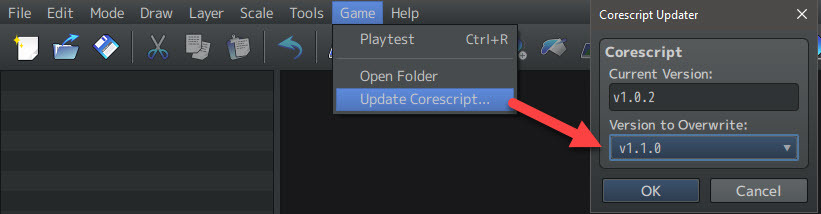
- Update your project by going to the Main Tool Bar -> Game -> Update Corescript option.
- To get the graphical updates, create a new project and copy the following files from the newly created project to your project folder:
- img/tilesets/Outside_B.png
Downloads / Referenced Files
RPG Maker Web attachments are mirrored locally when available. Other external links remain hosted by their original creator or third-party service.
- Download: DOWNLOAD LINK FOR STANDALONE INSTALLER
Referenced Images / Attachments
Creator Claims / Removal
If you are the original creator and want this listing reassigned, edited, or removed, join BMMPlay and contact the moderators with proof that matches the original RPG Maker Web profile, linked GitHub, itch.io page, or another public creator identity.
Replies (0)
No replies yet.
Topic Summary
Loading summary...