

MZN_Benchmark
BMM_Archive · July 15, 2026

Original Source
- Original title: N_Benchmark
- Original author: Nolonar
- Original date: September 17, 2020
- Source thread: https://forums.rpgmakerweb.com/threads/n_benchmark.127498/
- Source forum path: Game Development Engines > RPG Maker Javascript Plugins > JS Plugin Releases (RMMZ)
Summary
I made this plugin out of curiosity, and figured maaaybe someone might want to use it. N_Benchmark adds a benchmark option to your game, accessible from within the title screen. { "lightbox_close": "Close",
Archived First Post
N_Benchmark adds a benchmark option to your game, accessible from within the title screen.
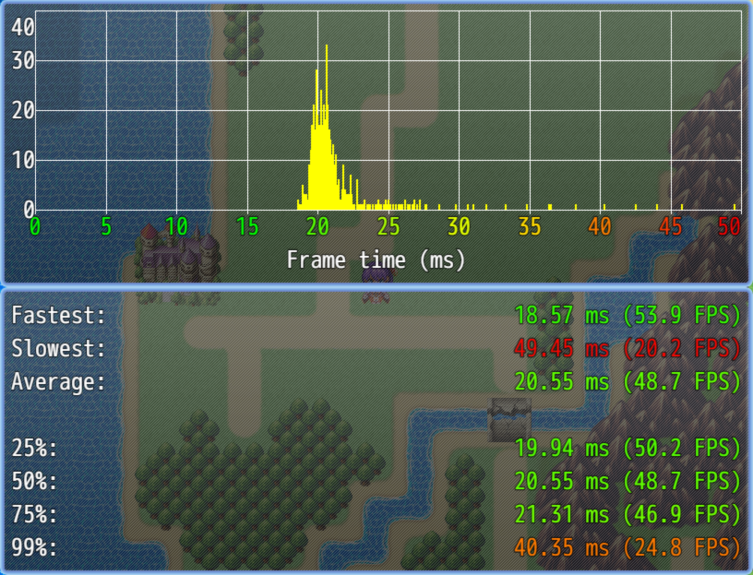
Might be useful to determine how a specific plugin affects your game's performance. It might also be useful for players to determine if their PC can run Crysis or not...
- Players can not control the character during benchmark.
- Autosave is disabled during benchmark.
- Benchmark can either be timed, or scripted.
- Timed means the benchmark will automatically end after some time (configurable).
- Scripted means the benchmark only ends with the "Stop benchmark" plugin command.
- After the benchmark has ended, you can see the above windows detailing how well your PC can run Crysis (if at all).
- The x-axis represents either frame time (how long it took to draw a frame) or FPS.
- The y-axis represents how often a given frame time (or FPS) was achieved.
- Frame time/FPS numbers are colored for convenience:
- Green: > 60 FPS
- Yellow: 30 FPS
- Red: < 20 FPS
- Players can leave the benchmark at any time by pressing "Ok" or "Cancel" (by default, this is Enter or Esc on PC keyboards).
- The benchmark can also turn a switch on (if desired). You can use that to create events that only run during a benchmark.
Benchmarking best practices
- Make sure your benchmark is deterministic (meaning there is no random element) or as close to deterministic as possible. You want to benchmark your game, not your (or your players') luck.
- Make sure you benchmark the most demanding scene in your game, to have a better understanding of how well your game performs.
- If you feel like your benchmark is not presentable (too weird, ugly, or whatever), remember that you can disable benchmarks for players. The players won't even see there's a benchmark option.
You can get this plugin (and more) on GitHub: https://github.com/Nolonar/RM_Plugins-Benchmark
Just in case you can't find the download link: https://github.com/Nolonar/RM_Plugins-Benchmark/releases/latest/download/N_Benchmark.js
Terms of use
MIT License
In short: you're free to use it on any project (commercial or not) or modify it as you wish, as long as you won't remove the license and the copyright from the plugin.
Downloads / Referenced Files
RPG Maker Web attachments are mirrored locally when available. Other external links remain hosted by their original creator or third-party service.
- Source: https://github.com/Nolonar/RM_Plugins-Benchmark
- Source: https://github.com/Nolonar/RM_Plugins-Benchmark/releases/latest/download/N_Benchmark.js
License / Terms Note
Terms of use MIT License In short: you're free to use it on any project (commercial or not) or modify it as you wish, as long as you won't remove the license and the copyright from the plugin.
Referenced Images / Attachments
Creator Claims / Removal
If you are the original creator and want this listing reassigned, edited, or removed, join BMMPlay and contact the moderators with proof that matches the original RPG Maker Web profile, linked GitHub, itch.io page, or another public creator identity.
Replies (0)
No replies yet.
Topic Summary
Loading summary...