

MZrpg_el's PositionalSound.js
BMM_Archive · July 15, 2026

Original Source
- Original title: rpg_el's PositionalSound.js
- Original author: rpg_el
- Original date: September 16, 2020
- Source thread: https://forums.rpgmakerweb.com/threads/rpg_els-positionalsound-js.127428/
- Source forum path: Game Development Engines > RPG Maker Javascript Plugins > JS Plugin Releases (RMMZ)
Summary
rpg_el's PositionalSound.js v1.0.6 Description: Here is a plugin to play BGS from map events with the according stereo panning/volume fading based on player position. There are new plugin commands you can use in your event page to start playing a BGS from the current event, or another event on the same map by id, and the sound will play from the event until the event is erased, or the player leaves the map, or you use a plugin command to stop it. The sounds need to be restarted every time...
Archived First Post
Description:
Here is a plugin to play BGS from map events with the according stereo panning/volume fading based on player position. There are new plugin commands you can use in your event page to start playing a BGS from the current event, or another event on the same map by id, and the sound will play from the event until the event is erased, or the player leaves the map, or you use a plugin command to stop it. The sounds need to be restarted every time the player revisits a map if that is desired, similarly to moving an event around all the playback is an "only applicable until map is left" effect. A battle will temporarily mute all events on a map, but sound will resume on its own once the battle ends.
Possible uses: fireplace emitting fire sound, water sounds coming from the location of an actual small pond on a specific spot of the map, ...
Download:
https://wobble.ninja/rpgm/plugins/PositionalSound.js
Note:
If you use this in your game, note your usage by listing "PositionalSound.js by rpg_el/Ellie" in your credits. Please don't redistribute this plugin outside of a game, e.g. as part of a plugin collection, without asking me.
Edit: Usage Guide:
Because it's easy to accidentally just put a sound instruction into a parallel event and have it run each frame (which will lag your game), here is a good performant way of how to set up a sound that works with a pair of events:
Step 1: Add your regular event with any regular interactions as you would like, for example a fire place (please note it's a regular "Action Button" event with text, nothing special):
Step 2: Now add a hidden partner event that auto-launches as soon as the map starts due to being "Parallel", that will make your fireplace emit a sound, and that will self-destruct once the setup work is done:
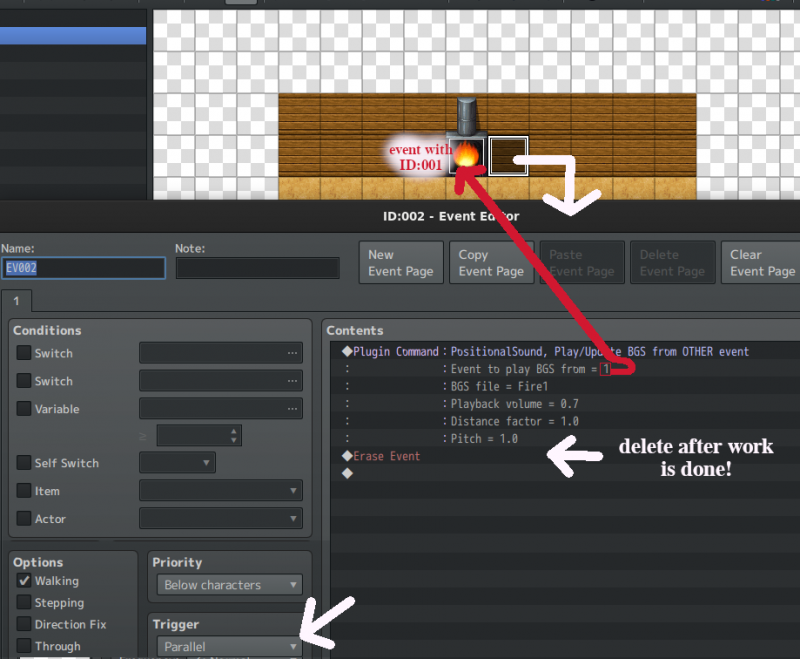
Please note the "1" for "Event to play BGS from" refers to the fireplace's "ID:001" event id. So the special thing here is the "Erase Event": the partner event (with ID:002 in this case) can erase itself because the sound will play as long as the event it is emitting from exists, which in this case is the fireplace (with ID:001) - so it's no longer needed after starting playback and can go away. This is very performance efficient, because you won't have any parallel event that continues to run in the background the entire time.
Downloads / Referenced Files
RPG Maker Web attachments are mirrored locally when available. Other external links remain hosted by their original creator or third-party service.
- Download: https://wobble.ninja/rpgm/plugins/PositionalSound.js
- Local mirror: 139993-41e9bf134a88a2438f211e4be64f89a2.png
SHA-256:aace9c560b5d6df04924a1cb9f0ad6538469cf931a93b7ecda5c4a487d2f264a
Original attachment URL: https://forums.rpgmakerweb.com/attachments/eventsetup2-png.160913/
License / Terms Note
If you use this in your game, note your usage by listing "PositionalSound.js by rpg_el/Ellie" in your credits. Please don't redistribute this plugin outside of a game, e.g. as part of a plugin collection, without asking me. Edit: Usage Guide: Because it's easy to accidentally just put a sound instruction into a parallel event and have it run each frame (which will lag your game), here is a good performant way of how to set up a sound that works...
Referenced Images / Attachments
Creator Claims / Removal
If you are the original creator and want this listing reassigned, edited, or removed, join BMMPlay and contact the moderators with proof that matches the original RPG Maker Web profile, linked GitHub, itch.io page, or another public creator identity.
Replies (0)
No replies yet.
Topic Summary
Loading summary...