

RPGVXA Line of Sight script
BMM_Archive · July 16, 2026

Original Source
- Original title: RPGVXA Line of Sight script
- Original author: Clexor
- Original date: September 14, 2017
- Source thread: https://forums.rpgmakerweb.com/threads/rpgvxa-line-of-sight-script.83994/
- Source forum path: Game Development Engines > Ruby Game System (RGSS) Scripts > Learning Ruby and RGSSx
Summary
Hello guys, I'm working on a project right now which is using a custom tactical battle system I am writing from the ground up (I know that may be cringe worthy in itself, and for that I am sorry #notsorry). For this system I have made several different sections of script. The system utilizes the player character as a cursor to navigate and select things with. The system is inspired by D&D, and I will be attempting to use things such as Line of Sight (LoS) and cover. At the...
Archived First Post
I'm working on a project right now which is using a custom tactical battle system I am writing from the ground up (I know that may be cringe worthy in itself, and for that I am sorry #notsorry). For this system I have made several different sections of script. The system utilizes the player character as a cursor to navigate and select things with. The system is inspired by D&D, and I will be attempting to use things such as Line of Sight (LoS) and cover. At the moment the system has a working draft system, for selecting the characters to battle; random character placement, based on selected teams during the draft; a tracing movement system, in which the player traces the route the character should move using the "cursor"; and options for melee and ranged attacks. These systems at the moment all work well enough... but there are some things I am sure I could improve.
The one that has been on my mind the longest is the LoS system mentioned before. I currently use an adapted version of Bresenham's Line Algorithm that looks like so:
(FORGIVE MY AWFUL CODE HABITS! I CAN CHANGE!)
#---------------------------------------------------------------------
# Line of Sight
#---------------------------------------------------------------------

 def lineofsight

   #variable names are self explanitory
   distance = $game_variables[43]
   targetx = $game_variables[23]
   targety = $game_variables[24]
   attackerx = $game_variables[6]
   attackery = $game_variables[7]

   #dy and dx are deltas used for calculating x's per y or vice versa
   dy = 0
   dx = 0

   # x and y are the final values of the coordinates for each grid step
   x = attackerx
   y = attackery

   #This first section determines the direction we are moving
   #and is sets our dx and dy values for our delta int he second part
   quadrantx = attackerx - targetx
   quadranty = attackery - targety

     #First Quadrant
     if quadrantx < 0 and quadranty < 0

       dx = targetx - attackerx
       dy = targety - attackery

     #Second Quadrant
     elsif quadrantx < 0 and quadranty > 0

       dx = targetx - attackerx
       dy = attackery - targety

     #Third Quadrant
     elsif quadrantx > 0 and quadranty > 0

       dx = attackerx - targetx
       dy = attackery - targety

     #Fourth Quadrant
     elsif quadrantx > 0 and quadranty < 0

       dx = attackerx - targetx
       dy = targety - attackery

     end


   delta = 2*dy-dx


  #This loop calculates the x and y of each square in our line
  #and checks for solid objects
  #delta helps us determine if we have made the right number of x or y steps
  #if we have it swaps the variable we change that time around and resets
  for checked in 1..distance

     #First Quadrant
     if quadrantx < 0 and quadranty < 0

       if delta > 0
       y = y + 1
       delta = delta - 2*dx

       end

     checked = checked + 1 # for the for loop
     x = x + 1
     delta = delta + 2*dy

     #Second Quadrant
     elsif quadrantx < 0 and quadranty > 0

       if delta > 0
       y = y - 1
       delta = delta - 2*dx

       end

     checked = checked + 1 # for the for loop
     x = x + 1
     delta = delta + 2*dy

     #Third Quadrant
     elsif quadrantx > 0 and quadranty > 0

       if delta > 0
       y = y - 1
       delta = delta - 2*dx

       end

     checked = checked + 1 # for the for loop
     x = x - 1
     delta = delta + 2*dy

     #Fourth Quadrant
     elsif quadrantx > 0 and quadranty < 0

       if delta > 0
       y = y + 1
       delta = delta - 2*dx

       end

     checked = checked + 1 # for the for loop
     x = x - 1
     delta = delta + 2*dy

     #Vertical down
     elsif quadrantx == 0 and quadranty < 0

       y = y + 1

     #Vertical up
     elsif quadrantx == 0 and quadranty > 0

       y = y - 1

     #Horizontal right
     elsif quadrantx < 0 and quadranty == 0

       x = x + 1

     #Horizontal left
     elsif quadrantx > 0 and quadranty == 0

       x = x - 1

     end


     #this checks the square to see if a solid object is occupying it

      if $game_map.region_id(x, y) == 1 #region one marks a solid object

        #this is the switch for the event to tell the player if the shot is valid or not
        $game_switches[19] = true

      end

    end


end
This works , except for one thing These pictures show a situation that explains this clearly (ignore the crappy UI and placeholder sprites):
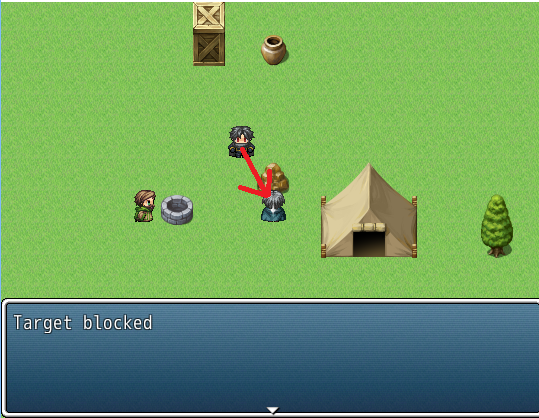
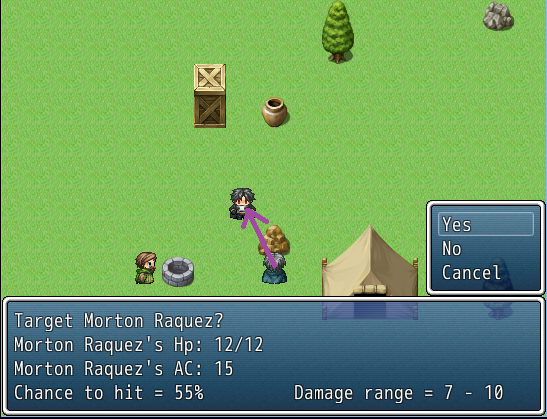
The math the code uses does not account for the fact that the next step, though blocked, may not be blocked if the opposite step was taken first (x step first for vertical movement or y for horizontal). I'm trying to find a preferably easy way to solve this issue, but I understand if you think scraping this algorithm is in my best interests. I am also open to feedback and critique as I am pretty new in terms of scripting on any heavy basis. My educational background is in electrical engineering for control systems, and many of the programming courses I had to take didn't go far beyond the basics of variable use because, often, GUIs I would have to work with on industrial machines didn't need a lot beyond that. I am absorbing things quickly, but I have a LOOOOONG way to go.
EDIT: Not too long after I posted this I considered the idea of looping the whole method twice but reversing the attacker and target coordinates on the second loop. Then have the events take the better of the two outcomes. I think this will fix short distance checks, but I'm not sure if it will lead to more issues. Any thoughts?
Downloads / Referenced Files
RPG Maker Web attachments are mirrored locally when available. Other external links remain hosted by their original creator or third-party service.
- Local mirror: 50463-c936d94d73372f676a35ea3a449d4df6.png
SHA-256:af0cafed7f7a0b79daae3a3a1f6cddaf4ac9006a45863f099ef932ab68d07147
Original attachment URL: https://forums.rpgmakerweb.com/attachments/los1-png.71965/ - Local mirror: 50464-70ce96d11669bb031240d93b646245d7.png
SHA-256:e548b3d93a2221d452db1df6f2b6b7f9e55018d1e9c83b9ab898e02ea576da18
Original attachment URL: https://forums.rpgmakerweb.com/attachments/los2-png.71966/
Referenced Images / Attachments
Creator Claims / Removal
If you are the original creator and want this listing reassigned, edited, or removed, join BMMPlay and contact the moderators with proof that matches the original RPG Maker Web profile, linked GitHub, itch.io page, or another public creator identity.
Replies (0)
No replies yet.
Topic Summary
Loading summary...