

Ruby in RMMV Explanation
BMM_Archive · July 16, 2026

Original Source
- Original title: Ruby in RMMV Explanation
- Original author: mogwai
- Original date: March 4, 2017
- Source thread: https://forums.rpgmakerweb.com/threads/ruby-in-rmmv-explanation.75566/
- Source forum path: Game Development Engines > Ruby Game System (RGSS) Scripts > Learning Ruby and RGSSx
Summary
I just wanted to share a neat thing I learned this late/early morning. You can use the node js in the Chromium RPG Maker MV game wrapper to put Ruby rb scripts in your games/apps. Here is a quick working example that puts a game message. This one is over simplified, but the possibilities are limitless. The first script block is javascript, but I promise this is more about the Ruby. (more explanation in comments) PHP:
Archived First Post
Here is a quick working example that puts a game message. This one is over simplified, but the possibilities are limitless.
The first script block is javascript, but I promise this is more about the Ruby. (more explanation in comments)
// the MV javascript
var runMyRubyScript = function(){
   // I can't get the global "_dirname" to work on my mac
   var pn = document.location.pathname;
   var _dir = pn.match(/^\/\w:\//) !== null ?
       unescape(pn.replace(/^\/|index\.html$/g, '')) // windows path
     :
       unescape(pn.replace(/index\.html$/, '')); // mac path
   // I also need to combine my dir with node path on Mac
   var path = require('path');
   var myRubyScript = path.join(_dir, "js/plugins/myRubyScript.rb");
   var proc = require('child_process');
   var env = Object.create(process.env);
       env.myRubyVariable = "Hello! I'm from a Ruby script!";
   // this is an ENV variable that can be read in your rb
   var inspect = proc.spawn("ruby", [myRubyScript], {env:env});
   inspect.stderr.on('data', function(data) {
       console.log(data.toString());
       // this reads from the ruby errors if any
   });
   inspect.stdout.sync = true;
   // this ^ keeps it from returning the buffer array
   inspect.stdout.on('data', function(data) {
       $gameMessage.add(data.toString());
   });
};# myRubyScript.rb
STDOUT.sync = true
$stdout.sync = true
# this ^ keeps the stdout from being a bunch of numbers,
# I'm not sure which one to use, so I use both.
# Perhaps one is wrong, but it seems to work either way.
myMessage = ENV["myRubyVariable"]
# this ^ is the environment variable set from the node js
# global process.env
puts myMessage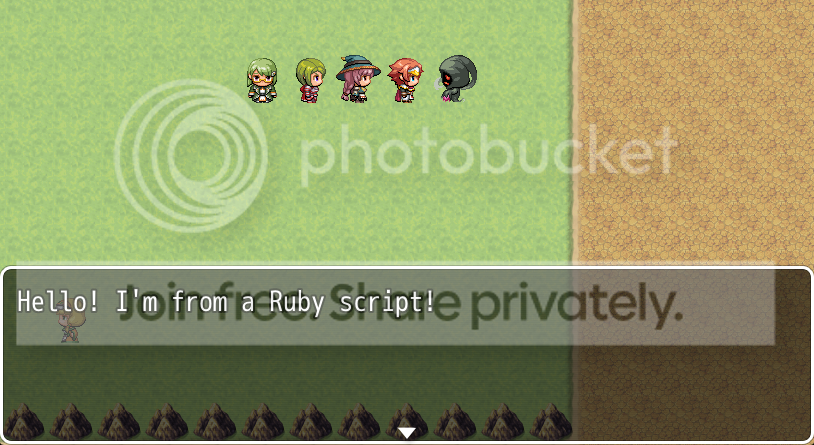
Here are links to the references I found on Google that I learned all this from.
Child Process | Node.js v7.7.1 Documentation
- node.js - using spawn function with NODE_ENV=production - Stack Overflow
- Spawning Ruby from Node.js - How to require within the Ruby file? - Stack Overflow
- Node.js spawn child process and get terminal output live - Stack Overflow
- node.js - How to live stream output from ruby script using child_process.spawn - Stack Overflow
- javascript - How can I write blocking in stdout with node.js? - Stack Overflow
Side note: It's my understanding that node only runs in the offline wrapper (I think...), so it won't work in browsers or phones, but there are other ways to process Ruby for online games in the same concept, like PHP proc_open for example.
EDIT:
EDIT EDIT: I had to install Ruby and check the box to run RB scripts, to get this to work in Windows.
Downloads / Referenced Files
RPG Maker Web attachments are mirrored locally when available. Other external links remain hosted by their original creator or third-party service.
Referenced Images / Attachments
Creator Claims / Removal
If you are the original creator and want this listing reassigned, edited, or removed, join BMMPlay and contact the moderators with proof that matches the original RPG Maker Web profile, linked GitHub, itch.io page, or another public creator identity.
Replies (0)
No replies yet.
Topic Summary
Loading summary...