

Items in battle: problems with custom script
BMM_Archive · July 16, 2026

Original Source
- Original title: Items in battle: problems with custom script
- Original author: Jono99
- Original date: September 14, 2016
- Source thread: https://forums.rpgmakerweb.com/threads/items-in-battle-problems-with-custom-script.68284/
- Source forum path: Game Development Engines > Ruby Game System (RGSS) Scripts > Learning Ruby and RGSSx
Summary
I'm currently working on a game where one of the mechanics is that party members can hold onto items. At the moment, I'm having a slight problem: if I try to click on an item the actor has that the inventory doesn't, nothing happens as opposed to the processing that usually happens on items when they are clicked on. Here is the code I made that I'm using (yes, I know that the party inventory system doesn't work like my script does, but I designed the inventory script with the...
Archived First Post
Here is the code I made that I'm using (yes, I know that the party inventory system doesn't work like my script does, but I designed the inventory script with the actors having a limited amount of total items as opposed to practically infinite items in the party's inventory):
------------------------Actor Inventory-------------------------
class Game_Actor
attr_reader :items
#--------------------------------------------------------------------------
# * Setup
#--------------------------------------------------------------------------
def setup(actor_id)
@items = []
@actor_id = actor_id
@name = actor.name
@nickname = actor.nickname
init_graphics
@class_id = actor.class_id
@level = actor.initial_level
@exp = {}
@equips = []
init_exp
init_skills
init_equips(actor.equips)
clear_param_plus
recover_all
end
#--------------------------------------------------------------------------
# * Gain item
#--------------------------------------------------------------------------
def gain_item(item)
if item.class == Fixnum
@items.push($data_items[item]) if @items.size < max_items
elsif item.class == RPG::Item
@items.push(item) if @items.size < max_items
end
end
#--------------------------------------------------------------------------
# * Lose item
#--------------------------------------------------------------------------
def lose_item(item)
if has_item?(item)
if item.class == Fixnum
@items.delete_first $data_items[item] # delete_first is a custom made method for the Array class that deletes the first instance of the data it's looking for.
elsif item.class == RPG::Item
@items.delete_first item
end
end
end
#--------------------------------------------------------------------------
# * Max items
#--------------------------------------------------------------------------
def max_items
return 10
end
#--------------------------------------------------------------------------
# * Has item?
#--------------------------------------------------------------------------
def has_item?(item)
if item.class == Fixnum
return @items.include?($data_items[item])
elsif item.class == RPG::Item
return @items.include?(item)
end
end
end
---------------------------------Actor Inventory Battle--------------------------------
class Window_BattleActorItem < Window_BattleItem
def show
refresh_list
@help_window.show
super
end
def make_item_list
refresh_list
end
def refresh_list
if @actor
@data = @actor.items
else
@data = []
end
@data.push(nil) if @data.size == 0
end
def draw_item(index)
item = @data[index]
if item
rect = item_rect(index)
rect.width -= 4
draw_item_name(item, rect.x, rect.y, true)
end
end
def actor=(actor)
return if @actor == actor
@actor = actor
refresh
end
def ok_enabled?
true
end
end
class Scene_Battle
def create_item_window
@item_window = Window_BattleItem.new(@help_window, @info_viewport)
@item_window.set_handlerok, methodon_item_ok))
@item_window.set_handlercancel, methodon_item_cancel))
@item_window.set_handlerpageup, methodswitch_to_aitem))
@item_window.set_handlerpagedown,methodswitch_to_aitem))
@item_window.height /= 2
create_actor_item_window
end
def create_actor_item_window
@aitem_window = Window_BattleActorItem.new(@help_window, @info_viewport)
@aitem_window.set_handlerok, methodon_aitem_ok))
@aitem_window.set_handlercancel, methodon_item_cancel))
@aitem_window.set_handlerpageup, methodswitch_to_item))
@aitem_window.set_handlerpagedown,methodswitch_to_item))
@aitem_window.y += @item_window.height
@aitem_window.height /= 2
end
def switch_to_aitem
@item_window.deactivate
@aitem_window.activate
end
def switch_to_item
@aitem_window.deactivate
@item_window.activate
end
def command_item
@aitem_window.actor = BattleManager.actor
@aitem_window.refresh
@aitem_window.show
@item_window.refresh
@item_window.show.activate
end
def on_aitem_ok
@item = @aitem_window.item
BattleManager.actor.input.set_item(@item.id)
if !@item.need_selection?
@item_window.hide
@aitem_window.hide
next_command
elsif @item.for_opponent?
select_enemy_selection
else
select_actor_selection
end
$game_party.last_item.object = @item
end
end
Please help.
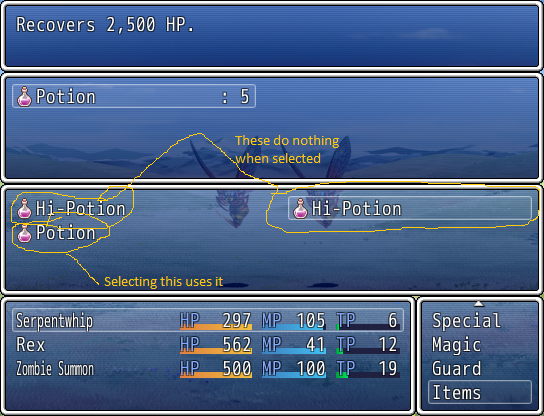
Downloads / Referenced Files
RPG Maker Web attachments are mirrored locally when available. Other external links remain hosted by their original creator or third-party service.
- Local mirror: 28720-53270325b467ecf7a57291ed890e6fe9.png
SHA-256:3b43010346acde906b8c94b3122d9b8f31da109acc633f1efbd9f2e6b9e52e6a
Original attachment URL: https://forums.rpgmakerweb.com/attachments/a-necromancers-tale-14_09_2016-1_02_20-pm-png.47440/
Referenced Images / Attachments
Creator Claims / Removal
If you are the original creator and want this listing reassigned, edited, or removed, join BMMPlay and contact the moderators with proof that matches the original RPG Maker Web profile, linked GitHub, itch.io page, or another public creator identity.
Replies (0)
No replies yet.
Topic Summary
Loading summary...