

Quest Log Script - Need some Help.
BMM_Archive · July 16, 2026

BMM_Archive
Preserved forum archive. This topic stores the original first post and locally mirrored RPG Maker Web attachments when available. It is posted by the BMMPlay archive account, not by the original creator.
Original Source
- Original title: Quest Log Script - Need some Help.
- Original author: Keniisu
- Original date: March 29, 2015
- Source thread: https://forums.rpgmakerweb.com/threads/quest-log-script-need-some-help.38338/
- Source forum path: Game Development Engines > Ruby Game System (RGSS) Scripts > Learning Ruby and RGSSx
Summary
Hi I'm currently making a quest log script and am wondering how to set-up the following... If Statements - Like..If [questid001] is complete, then activate this option of dialogue. Quest Info - ID, Quest Name, Description, Giver, and Location.
Archived First Post
Hi
I'm currently making a quest log script and am wondering how to set-up the following...
My Script:
Here's my screenshots of progress:


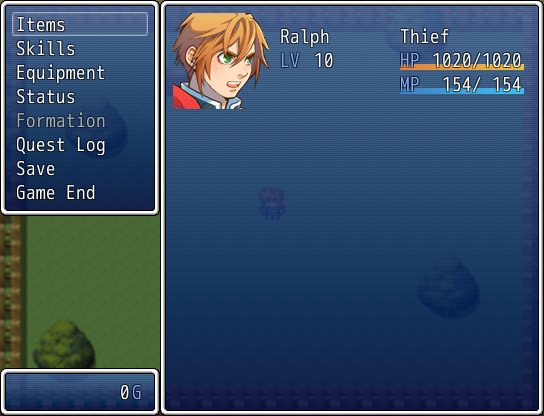
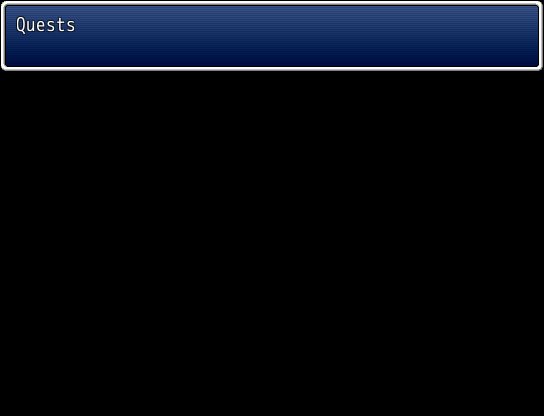
I'm currently making a quest log script and am wondering how to set-up the following...
- If Statements - Like..If [questid001] is complete, then activate this option of dialogue.
- Quest Info - ID, Quest Name, Description, Giver, and Location.
- Quest Start and End Commands - accept.questid001 or something similar.
- Icon for Quest - How to add an icon next to a Quest's name.
- Window Boxes - How to make more window boxes to fit the rest of the screen
My Script:
class MyCustomScene < Scene_Base#--------------------------------------------------------------------------# * Start Processing#--------------------------------------------------------------------------def startsuper()@my_window = Window_Help.new()@my_array = []@my_array[0] = "Quests"@my_window.set_text(@my_array[rand (1)])end#--------------------------------------------------------------------------# * Post-Start Processing#--------------------------------------------------------------------------def post_startsuper()end#--------------------------------------------------------------------------# * Frame Update#--------------------------------------------------------------------------def updatesuper()return_scene() if Input.trigger?A)end#--------------------------------------------------------------------------# * Pre-Termination Processing#--------------------------------------------------------------------------def pre_terminateend#--------------------------------------------------------------------------# * Termination Processing#--------------------------------------------------------------------------def terminatesuper()@my_window.dispose()endend#==============================================================================# ** Window_MenuCommand#------------------------------------------------------------------------------# This command window appears on the menu screen.#==============================================================================class Window_MenuCommand < Window_Command#--------------------------------------------------------------------------# * For Adding Original Commands#--------------------------------------------------------------------------alias dp3_custscene_windowmenucommand_addorigcommand_023fj add_original_commands#--------------------------------------------------------------------------def add_original_commandsdp3_custscene_windowmenucommand_addorigcommand_023fj()add_command("Quest Log", :custscene, true)endend#==============================================================================# ** Scene_Menu#------------------------------------------------------------------------------# This class performs the menu screen processing.#==============================================================================class Scene_Menu < Scene_MenuBase#--------------------------------------------------------------------------# * Create Command Window#--------------------------------------------------------------------------alias dp3_custscene_scenemenu_createcommandwindow_023fj create_command_window#--------------------------------------------------------------------------def create_command_windowdp3_custscene_scenemenu_createcommandwindow_023fj()@command_window.set_handlercustscene, methodcommand_custscene))enddef command_customsceneSceneManager.call(MyCustomScene)endend
Downloads / Referenced Files
RPG Maker Web attachments are mirrored locally when available. Other external links remain hosted by their original creator or third-party service.
- Local mirror: 10367-9b0f5489c556aa77a786c9f4ee9c398c.jpg
SHA-256:f0567ab472001133d9f1b9ce2389d2075910911554caabc0f808cd8a01a4d219
Original attachment URL: https://forums.rpgmakerweb.com/attachments/game-2015-03-28-21-21-39-461-jpg.20088/ - Local mirror: 10368-07ce7caf2df95fc6d7f36e203d4a5e16.jpg
SHA-256:1925b34a6176c7e99c9f1909f110c1c00d097a4f615b6c229e69bd9a76824376
Original attachment URL: https://forums.rpgmakerweb.com/attachments/game-2015-03-28-21-21-42-905-jpg.20089/
Referenced Images / Attachments
Creator Claims / Removal
If you are the original creator and want this listing reassigned, edited, or removed, join BMMPlay and contact the moderators with proof that matches the original RPG Maker Web profile, linked GitHub, itch.io page, or another public creator identity.
Replies (0)
No replies yet.
0
replies
22
views
Topic Summary
Loading summary...