

In-Game Menu Editing
BMM_Archive · July 16, 2026

Original Source
- Original title: In-Game Menu Editing
- Original author: Anime
- Original date: June 26, 2015
- Source thread: https://forums.rpgmakerweb.com/threads/in-game-menu-editing.41634/
- Source forum path: Game Development Engines > Ruby Game System (RGSS) Scripts > RGSS Scripts (RMXP) > RGSS Script Requests
Summary
To start this all off, I am a complete newbie at this computer language and to RPG making in general. So what I would like to know is how I can remove certain options from the in-game menu. Specifically, I would like to remove the currency, skill, equip, status, and play time options. If this is way too much to remove, is it possible to replace them with other things like an option setting to enter/exit full screen or a load option (like the continue option in the title menu)....
Archived First Post
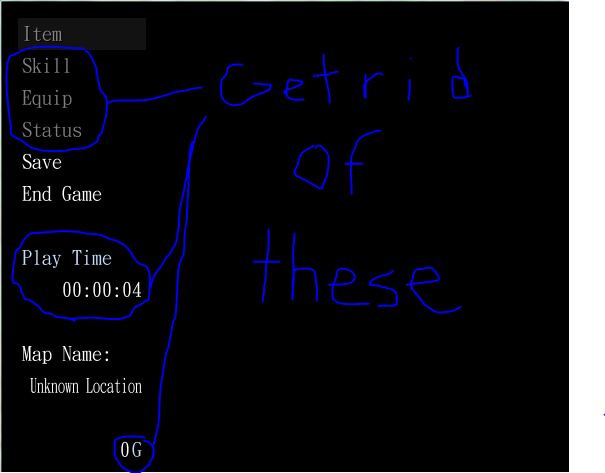
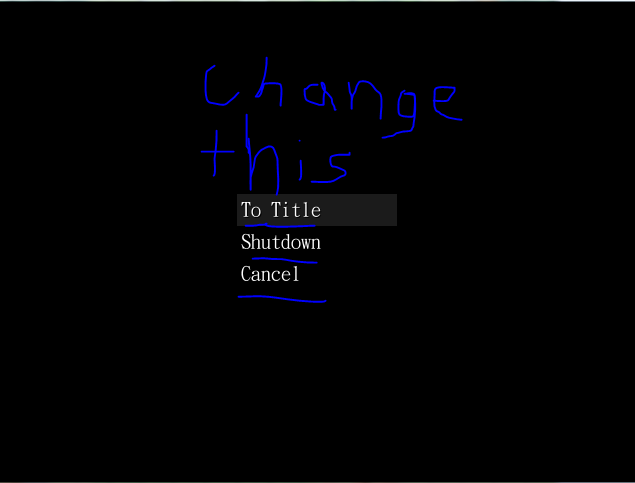
Before You Answer: This may seem a bit overwhelming to provide a step-by-step solution to this. Luckily, I would love to teach myself the coding so maybe you can give me an idea on how the main script works and I'll do the rest myself. For example, when I asked for removing some options, maybe you can show me how to remove/add one option and I can just try reviewing the code and see how it works so I can kind of self-teach myself. Thanks.
Downloads / Referenced Files
RPG Maker Web attachments are mirrored locally when available. Other external links remain hosted by their original creator or third-party service.
- Local mirror: 11460-04d57a74c607d60be46a5d192a38d31f.png
SHA-256:beb3f709e9ec1b6c5118014b979cef033364cbdd7bb0730f6ea8ff27fa0a11c3
Original attachment URL: https://forums.rpgmakerweb.com/attachments/visual_1-png.21711/ - Local mirror: 11461-a9c66308c60bc40e602efc28ed7f3cec.png
SHA-256:f47bf319a1c4c8dd74ca59f9c2547b123125cbe5a3cc98c30b0781be204cbb67
Original attachment URL: https://forums.rpgmakerweb.com/attachments/visual_2-png.21712/
Referenced Images / Attachments
Creator Claims / Removal
If you are the original creator and want this listing reassigned, edited, or removed, join BMMPlay and contact the moderators with proof that matches the original RPG Maker Web profile, linked GitHub, itch.io page, or another public creator identity.
Replies (0)
No replies yet.
Topic Summary
Loading summary...