public

Rpg Maker Developers Group

Simple enough for a child, powerful enough for a developer

2 Followers

Light's Out Puzzle

BMM Archive · July 16, 2026

Preserved forum archive. This topic stores the original first post and locally mirrored RPG Maker Web attachments when available. It is posted by the BMMPlay archive account, not by the original creator.

Original Source

  • Original title: Light's Out Puzzle
  • Original author: GoodSelf
  • Original date: July 31, 2016
  • Source thread: https://forums.rpgmakerweb.com/threads/lights-out-puzzle.66148/
  • Source forum path: Game Development Engines > RPG Maker Tutorials > RMMV Tutorials

Summary

{ "lightbox_close": "Close", "lightbox_next": "Next", "lightbox_previous": "Previous",

Archived First Post


2dbm1hd.jpg


Difficulty: Beginner Friendly (10+ hours invested into the engine)

Wavelength has noticed that you do not need Labels for this event to work - they were left in after earlier playtests. I hope you enjoy the tutorial!


STEP 1


First, place down 9 Events in a 3x3 pattern. Keep in mind you don't have to place all the event's at once - it will be easier to copy and paste Event 1.1 later.
Name the events as such:


347i1zp.jpg


Go to Event 1.1 and change it's picture to any image you like, then set it to "Below Characters" and "Action Button".


STEP 2


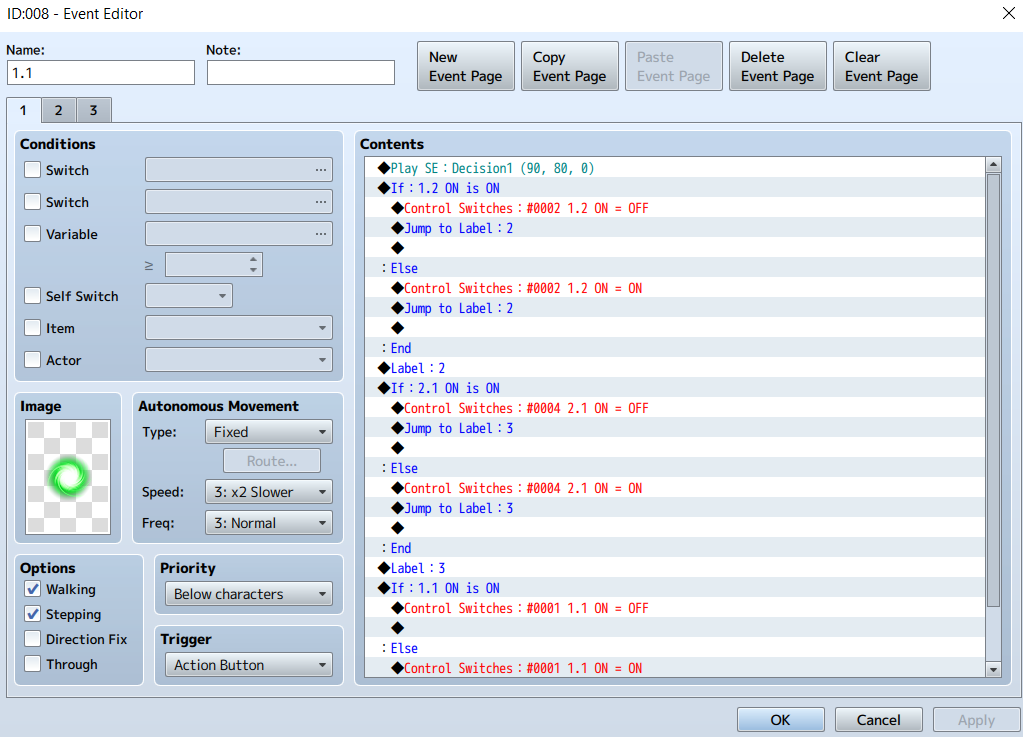
Now, we are going to get into the meat of the puzzle. The idea is, whenever we use a tile, the color of that tile and all adjacent tiles change. We'll be using Conditional Branches, Swiches, and Labels to get the job done. In the spoiler tag, you will find how you should set up the first page of your event. Refer to the picture below for more information on how the event works. Keep in mind, the spoiler tag shows how to set up Event 1.1, the Event in the top left corner.
 

Play Sound Effect


Conditional Branch


   IF Switch 1.2 = ON


        THEN Switch 1.2 = OFF


        Jump to Label: 1
   ELSE
         THEN Switch 1.2 = ON


         Jump to Label 1


Label 1


Conditional Branch


   IF Switch 2.1 = ON


         THEN Switch 1.2 = OFF


         Jump to Label: 2


   ELSE


         THEN Switch 1.2= ON


         Jump to Label: 2


Label 2


Conditional Branch


   IF Switch 1.1 = ON


          THEN Switch 1.1 = OFF


 ELSE


          THEN Switch 1.1 = ON


Protected download


What were doing here is basically asking, "What color are you?".


Then, once we figure out what color it is (if the switch is on or off), we simply change the color by changing the switch on or off.


Keep in mind that when you activate a tile, it changes itself and all adjacent tiles. The switchs we made correspond to which tile we are changing.


In the example above, when you click the top left tile, tiles 1.1, 1.2, and 2.1 all switch their colors.


STEP 3


We're still working with Event 1.1


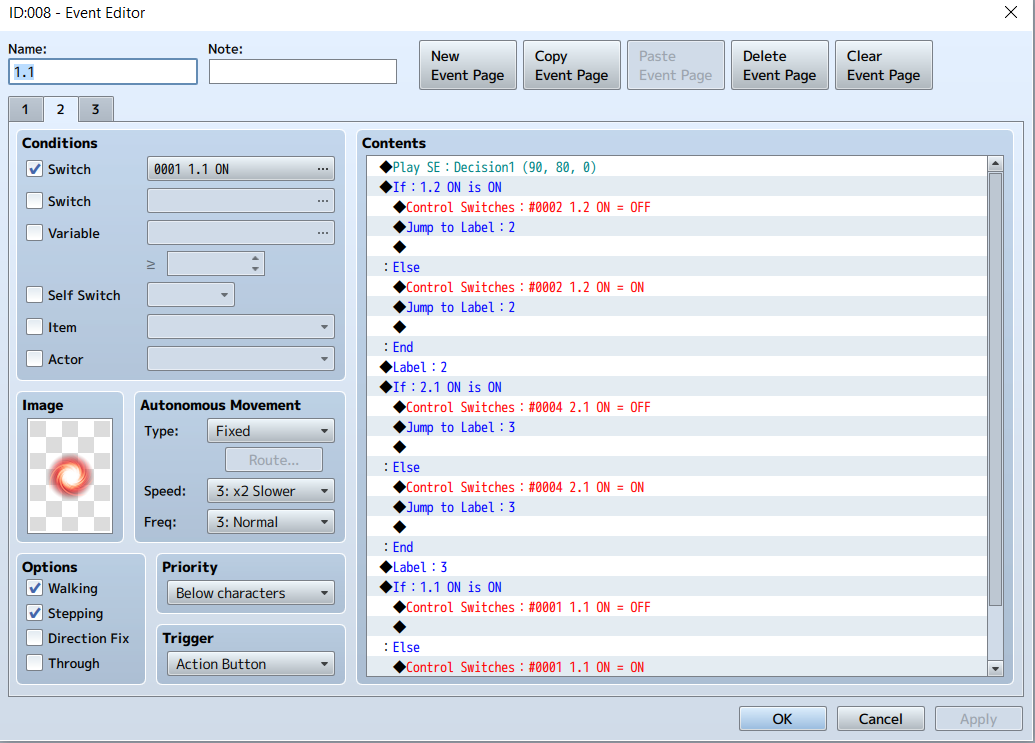
Click the "Copy Event Page" button, then click the "Paste Event Page" button.


You won't be editing any of the Event commands - make sure they are the same as your first page.


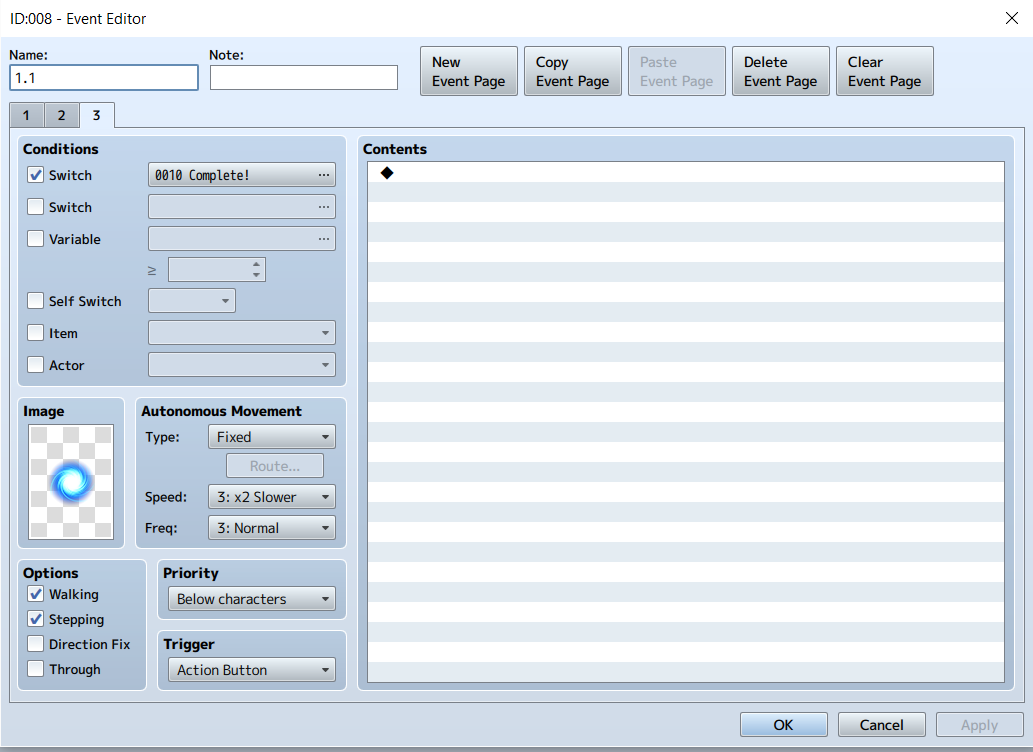
Simply change the condition of this new event page to require Switch 1.1 to be on.


Then, change the graphic to a different color of your choice.


Finally, click "Paste Event Page" one more time, this time deleting everything in the Event commands.
Simply change the conditon switch to "Complete", and change the image color to one you haven't used yet.


You just finished your first Event!


Protected download


Protected download


STEP 4


Now that you've done the legwork, the rest of this system is smooth-sailing.


Copy and paste the event to the space right next to it, and name this Event 1.2


All you have to do now is change the Switches in the Event code to reflect the new tiles that are adjacent to it.
In addition, you will need to create 1 additional label for the middle events on the outer row, and 2 additional labels for the event in the middle.


The spoiler tag below will show you how Event 2.2 (the middle tile in your 3x3) should look:

Play Sound Effect


Conditional Branch


   IF Switch 1.2 = ON


        THEN Switch 1.2 = OFF


        Jump to Label: 1
   ELSE
         THEN Switch 1.2 = ON


         Jump to Label 1


Label 1


Conditional Branch


   IF Switch 2.1 = ON


         THEN Switch 2.1 = OFF


         Jump to Label: 2


   ELSE


         THEN Switch 2.1 = ON


         Jump to Label: 2


Label 2


Conditional Branch


   IF Switch 2.3 = ON


          THEN Switch 2.3 = OFF


          Jump to Label: 3


 ELSE


          THEN Switch 2,3 = ON


          Jump to Label: 3


Label 3


Conditional Branch


   IF Switch 3.2 = ON


           THEN Switch 3.2 = OFF


           Jump to Label: 4


ELSE


           THEN Switch 3.2 = ON


           Jump to Label: 4


Label: 4


Conditional Branch


   IF Switch 2.2 = ON
            THEN Switch 2.2 = OFF


ELSE


            THEN Switch 2.2 = ON


STEP 5


Once you have finished setting up all 9 of your Events, it's time to create an Event that gets it all working!


Make a new event, and set it to Parallel.


Add the command to Control Switches, and adjust which switches will be turned on or off (this sets the starting position of the puzzle).
Once you have that set up, turn the Puzzle Start Switch on.


On the second page of this Event, set the Condition to Puzzle Start Switch = ON.


On this page, set up a chain of Coditional Branchs checking to see that every switch (1-10) has been turned off.


Place a wait here for 60 frames to ensure that all the tiles have changed before the game recognizes a win.
Play a Music Effect, throw a message on there, and your done! Refer to the pictures in the spoiler below if you need more help setting up this final Event.


If you want to reset the puzzle, just set the Puzzle Start Switch = OFF when leaving the map.


The event below will then trigger, reseting your puzzle =]

iog3es.jpg


2pqoz21.png


For those of you still having trouble, or those who would like to see this puzzle in action, the download link is below! 


Thanks again for your time, now get back to making your game! =]


Windows: http://www.mediafire.com/download/6h8r84bs044kfkm/Lights_Out_Puzzle_WINDOWS.zip


Mac: http://www.mediafire.com/download/iiar1bcb6ddn982/Lights_Out_Puzzle_MAC.zip

Downloads / Referenced Files

Log in to download

Log in, then follow the RPG Maker Developers Group to see these download links.

Log in to download
Referenced Images / Attachments

LO2.png
LO2.png
LO3.png
LO3.png
LO4.png
LO4.png
Creator Claims / Removal

If you are the original creator and want this listing reassigned, edited, or removed, join BMMPlay and contact the moderators with proof that matches the original RPG Maker Web profile, linked GitHub, itch.io page, or another public creator identity.

#039#rpg-maker-archive#mv-tutorials

Replies (0)

No replies yet.

0 replies 1 view

Log in to reply.

User Avatar