

Creating an elevator event
BMM_Archive · July 16, 2026

BMM_Archive
Preserved forum archive. This topic stores the original first post and locally mirrored RPG Maker Web attachments when available. It is posted by the BMMPlay archive account, not by the original creator.
Original Source
- Original title: Creating an elevator event
- Original author: byBibo
- Original date: April 10, 2016
- Source thread: https://forums.rpgmakerweb.com/threads/creating-an-elevator-event.60254/
- Source forum path: Game Development Engines > RPG Maker Tutorials > RMMV Tutorials
Summary
Hello everyone!! Today we will learn how to create an elevator thgough events! Once it is done, the game will be like this: - press the button to call the elevator
Archived First Post
<span style="color: #FF8C00">Hello everyone!!
Today we will learn how to create an elevator thgough events!
Once it is done, the game will be like this:
- press the button to call the elevator
- enter the elevator by yourself
- go to the panel command to press the desired floor button
- go out of the elevator once it arrived.
-------------------------------------------------------------------------------------------------------------------------
<span style="color: #008000">Before we begin
You will need some plug-ins to achieve this tutorial:
- Yanfly's Message core & Extented message
- Tsukihime's Custom Page Conditions
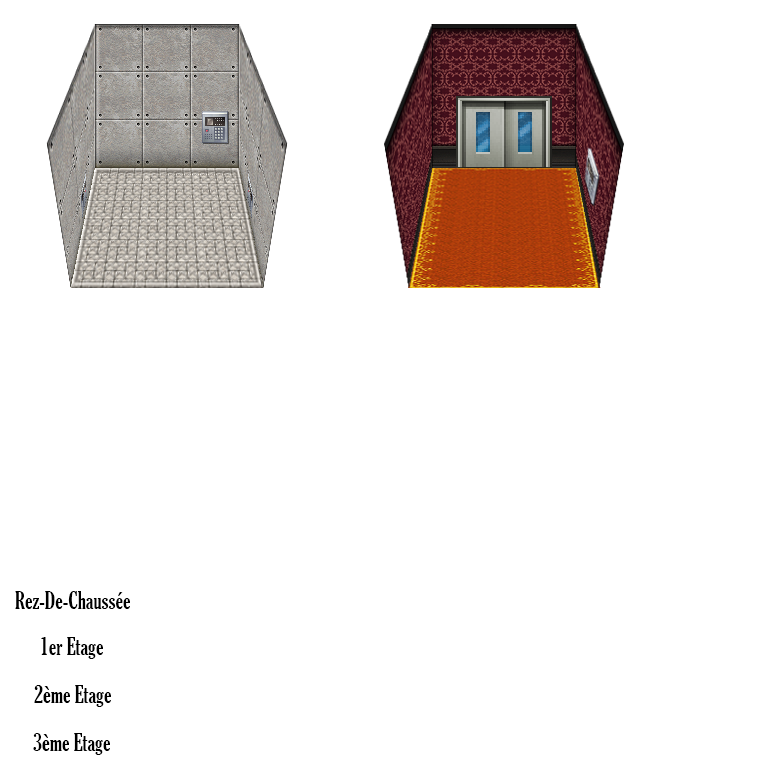
If you want an elevator with a 3D effect like in the video, here you are the tileset (includes lights):
-------------------------------------------------------------------------------------------------------------------------
<span style="color: #008000">1. Creating your maps
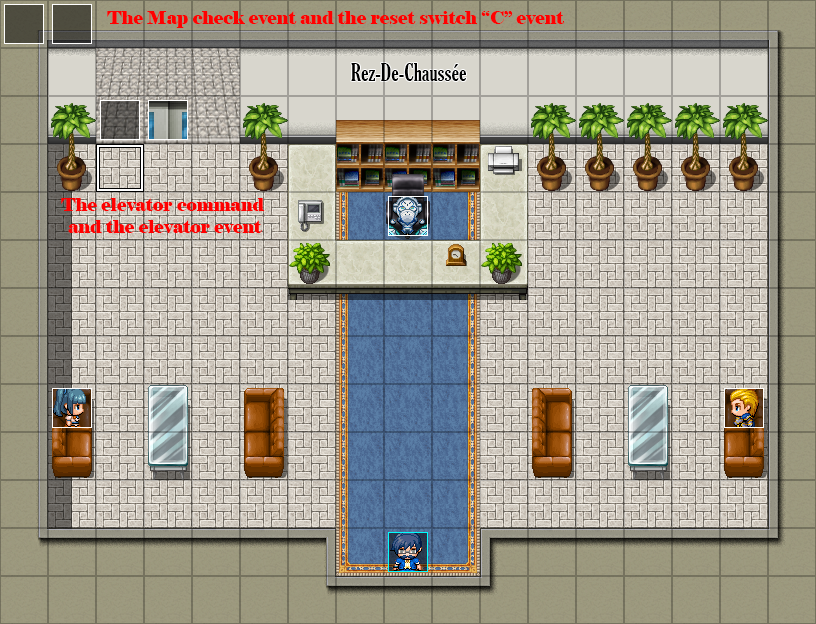
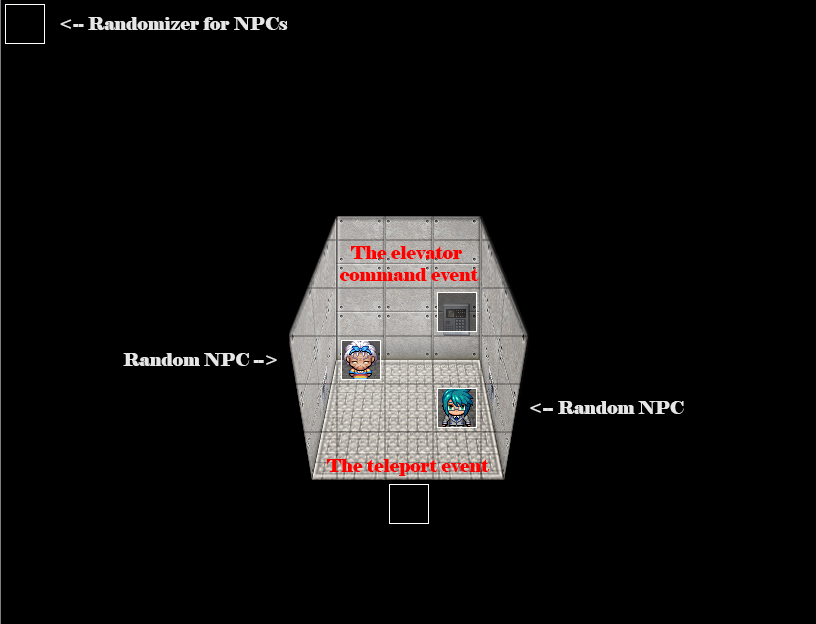
For this tutorial i decided to go with 3 floors: a ground floor (RDC), a 1st floor (1er étage) and a 2nd floor (2ème étage). You will have to create your 3 maps, and create a 'th map: the inside of the elevator. When the tutorial is done, you should end up with something similar to this:
-------------------------------------------------------------------------------------------------------------------------
<span style="color: #008000">2. Creating your elevator event
We will begin by creating an elevator event:
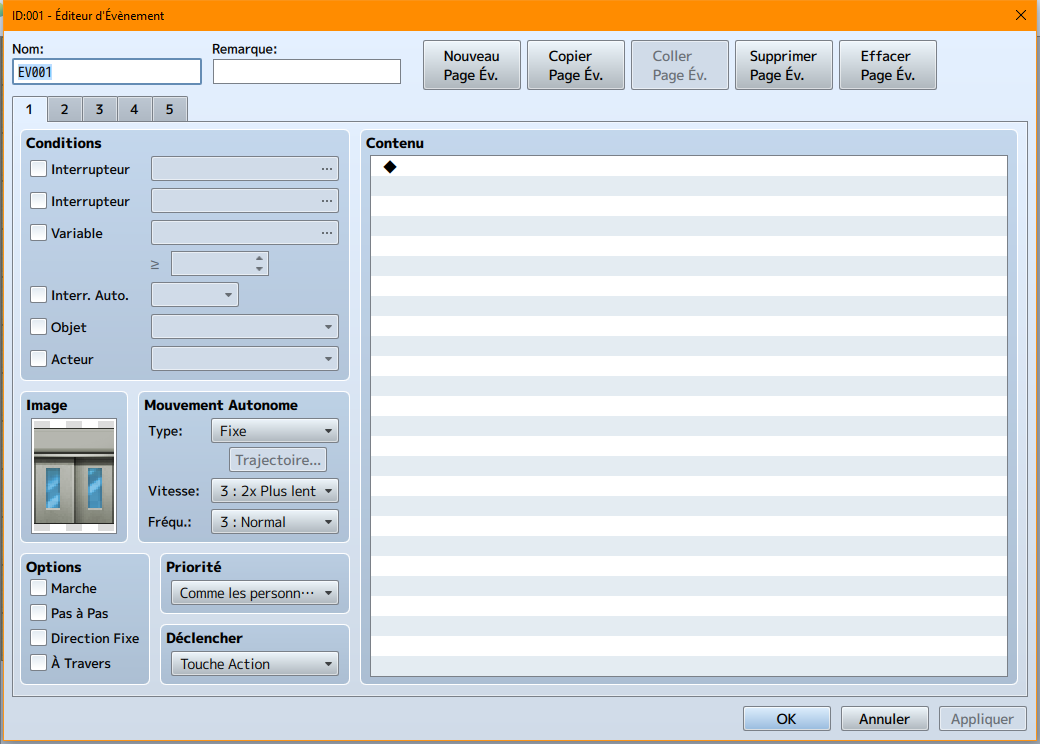
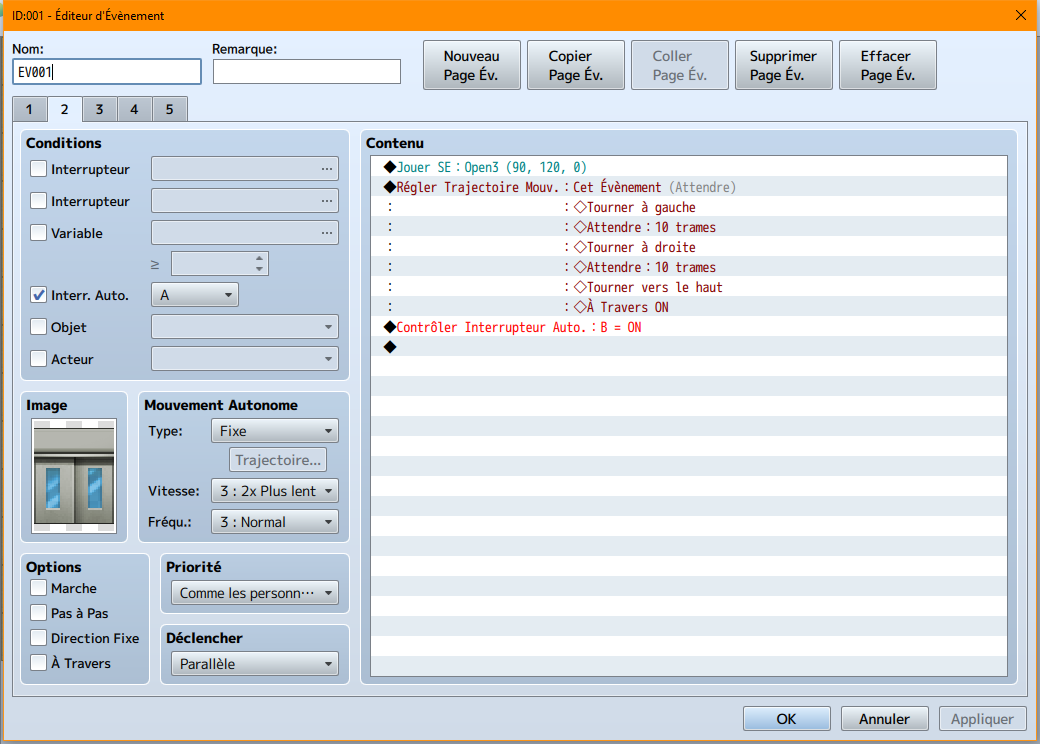
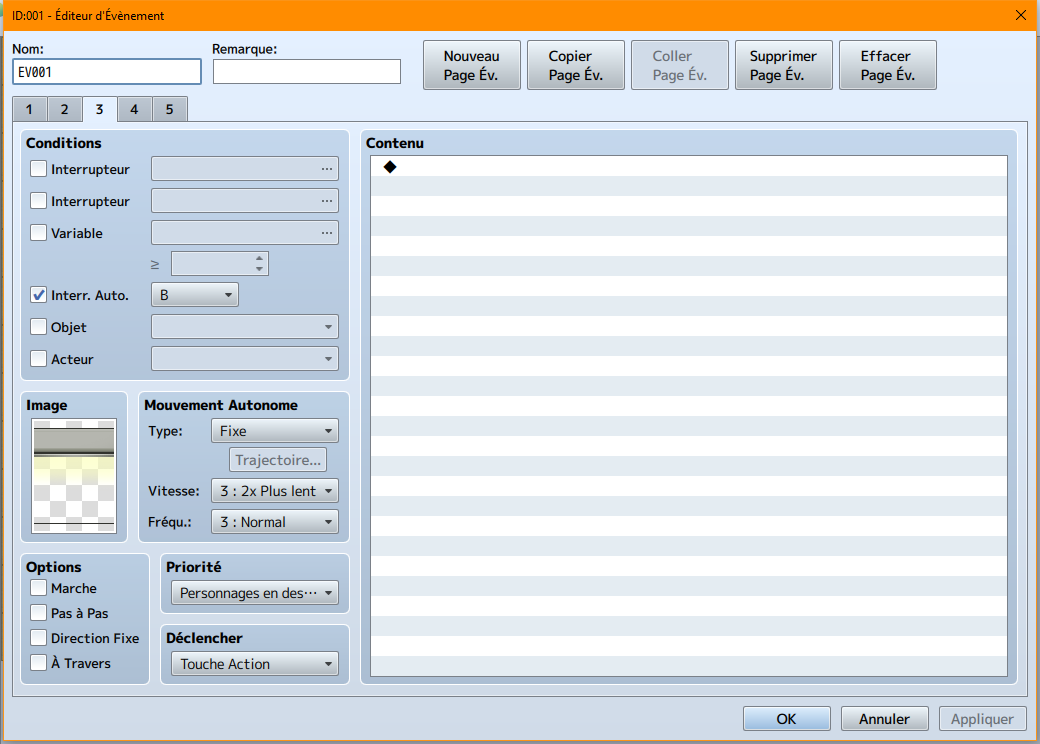
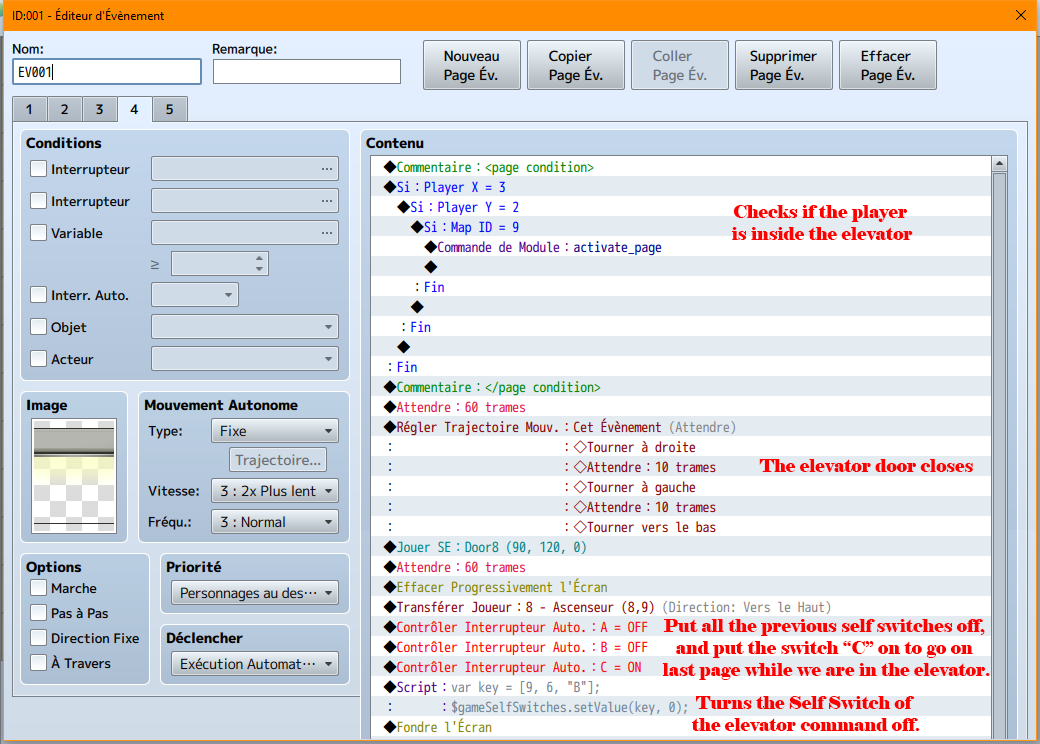
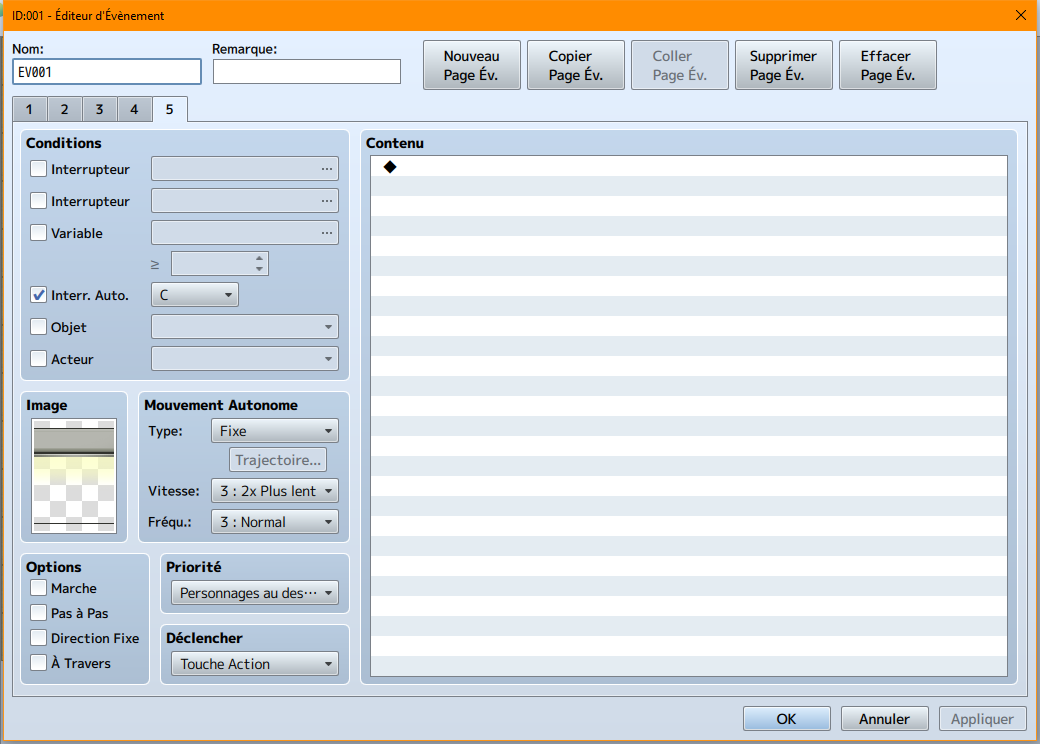
Note: this last page is to prevent a glitch later.
-------------------------------------------------------------------------------------------------------------------------
<span style="color: #008000">3. Creating your command event
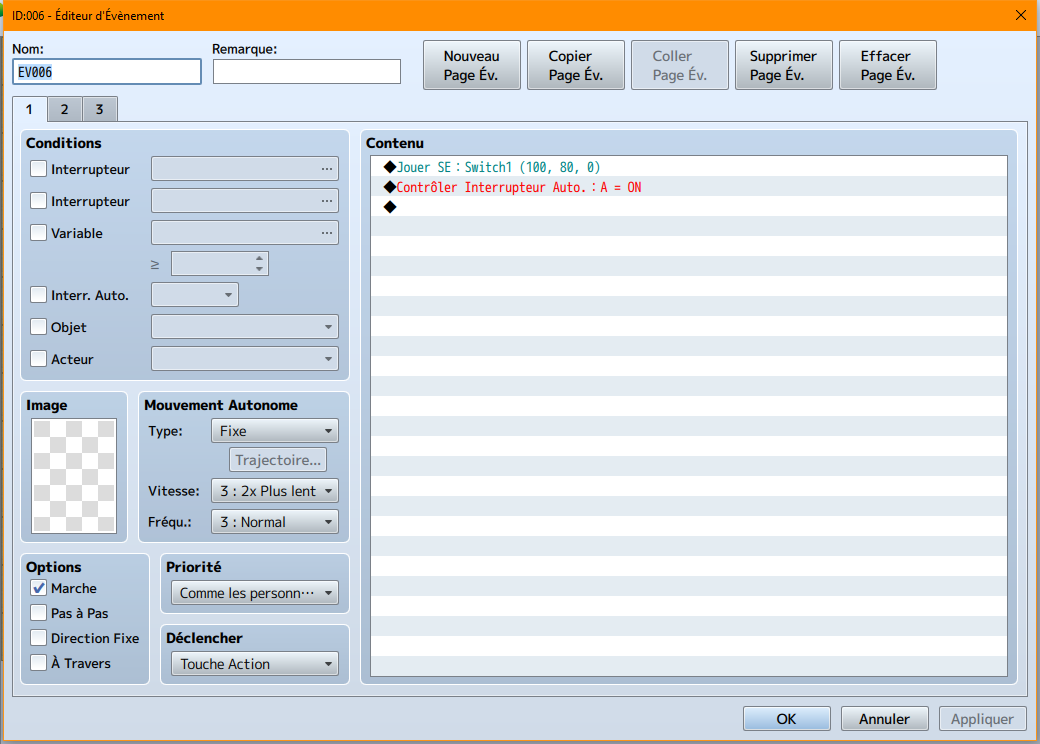
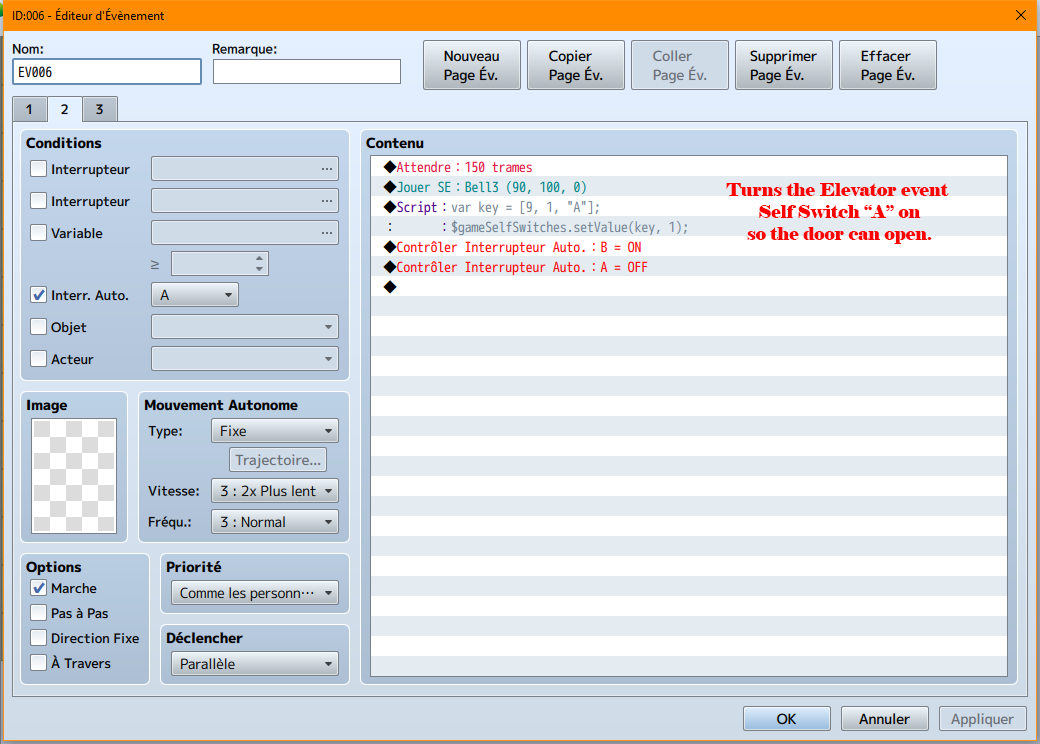
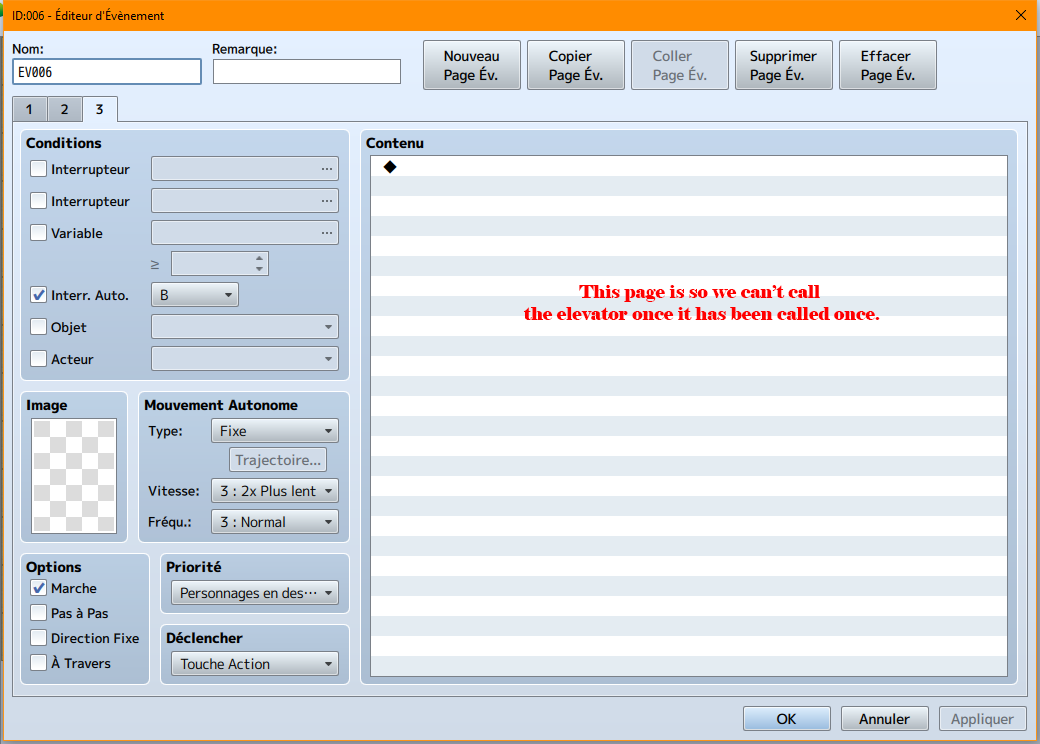
Now we will create our command event. As the pad is included in my elevator sprite, i didn't put any image, but make sure to put one in yours!
-------------------------------------------------------------------------------------------------------------------------
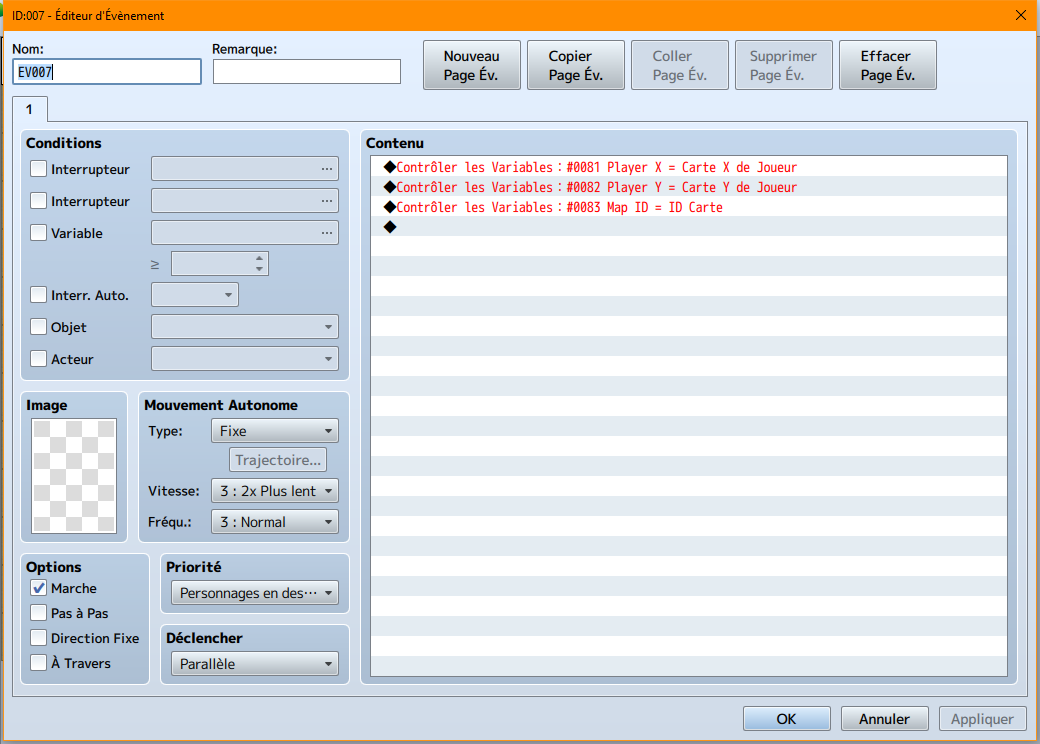
<span style="color: #008000">4. Creating your check Player's coordonates on map
Simply create a parallel event with 3 variables:
-------------------------------------------------------------------------------------------------------------------------
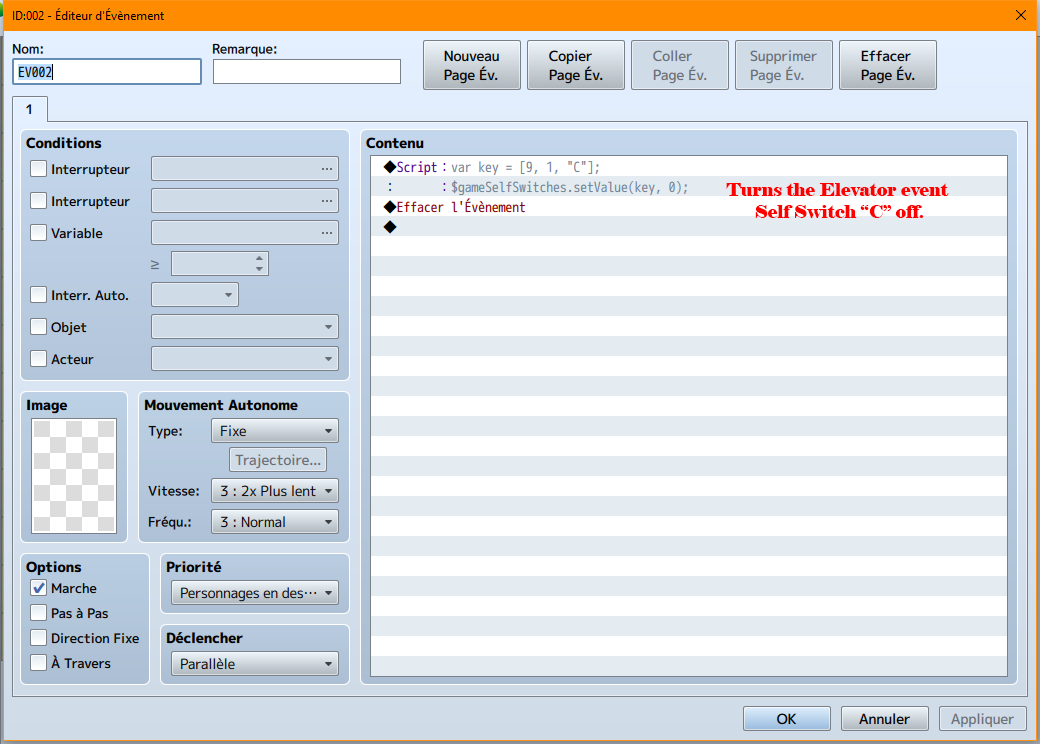
<span style="color: #008000">5. Creating the Self Switch "C" deactivation event
-------------------------------------------------------------------------------------------------------------------------
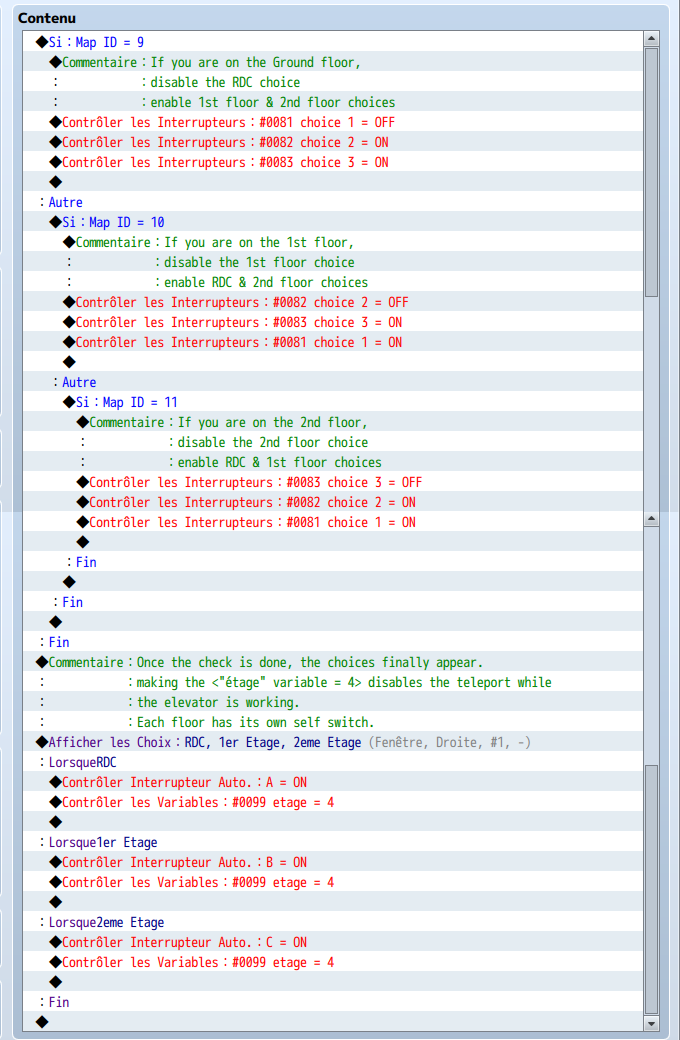
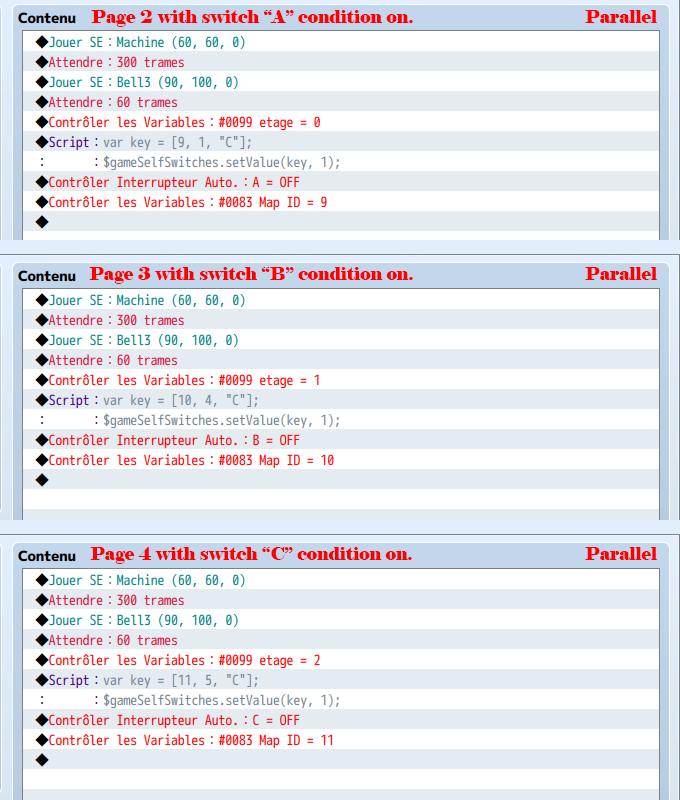
<span style="color: #008000">6. Creating your Inside-Elevator command event
-------------------------------------------------------------------------------------------------------------------------
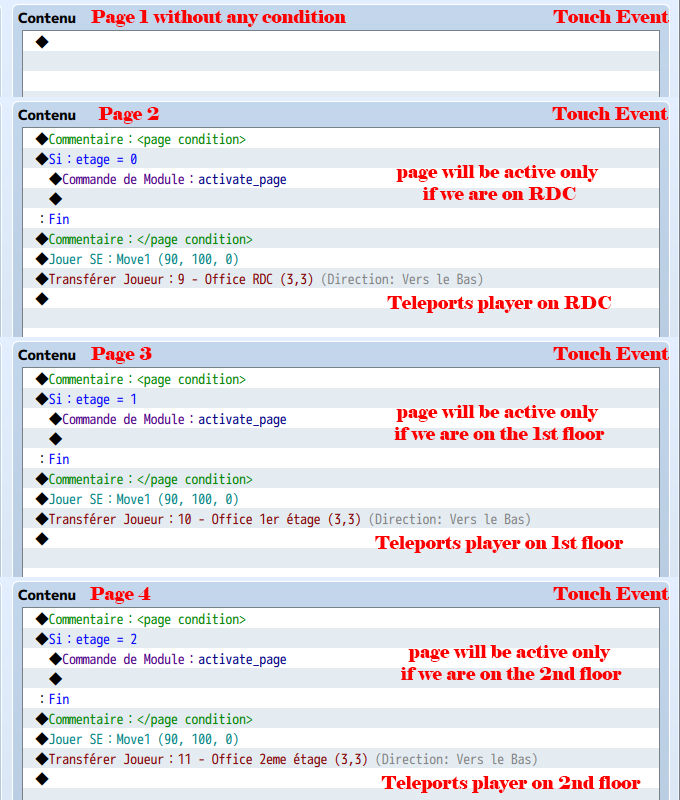
<span style="color: #008000">7. Creating the teleport event
-------------------------------------------------------------------------------------------------------------------------
<span style="color: #008000">8. Repeat the process
Now do the same thing for your floors, make sure you change the maps ID and Events ID in your self switches script calls and conditions.
And you're done!
I hope this tutorial was useful, and provided a way to improve how elevators work! So now your player can act and do actions while waiting for the elevator, and even talk to NPCs while the elevator is going upstairs/downstairs!
Today we will learn how to create an elevator thgough events!
Once it is done, the game will be like this:
- press the button to call the elevator
- enter the elevator by yourself
- go to the panel command to press the desired floor button
- go out of the elevator once it arrived.
-------------------------------------------------------------------------------------------------------------------------
<span style="color: #008000">Before we begin
You will need some plug-ins to achieve this tutorial:
- Yanfly's Message core & Extented message
- Tsukihime's Custom Page Conditions
If you want an elevator with a 3D effect like in the video, here you are the tileset (includes lights):
-------------------------------------------------------------------------------------------------------------------------
<span style="color: #008000">1. Creating your maps
For this tutorial i decided to go with 3 floors: a ground floor (RDC), a 1st floor (1er étage) and a 2nd floor (2ème étage). You will have to create your 3 maps, and create a 'th map: the inside of the elevator. When the tutorial is done, you should end up with something similar to this:
-------------------------------------------------------------------------------------------------------------------------
<span style="color: #008000">2. Creating your elevator event
We will begin by creating an elevator event:
Note: this last page is to prevent a glitch later.
-------------------------------------------------------------------------------------------------------------------------
<span style="color: #008000">3. Creating your command event
Now we will create our command event. As the pad is included in my elevator sprite, i didn't put any image, but make sure to put one in yours!
-------------------------------------------------------------------------------------------------------------------------
<span style="color: #008000">4. Creating your check Player's coordonates on map
Simply create a parallel event with 3 variables:
-------------------------------------------------------------------------------------------------------------------------
<span style="color: #008000">5. Creating the Self Switch "C" deactivation event
-------------------------------------------------------------------------------------------------------------------------
<span style="color: #008000">6. Creating your Inside-Elevator command event
-------------------------------------------------------------------------------------------------------------------------
<span style="color: #008000">7. Creating the teleport event
-------------------------------------------------------------------------------------------------------------------------
<span style="color: #008000">8. Repeat the process
Now do the same thing for your floors, make sure you change the maps ID and Events ID in your self switches script calls and conditions.
And you're done!
I hope this tutorial was useful, and provided a way to improve how elevators work! So now your player can act and do actions while waiting for the elevator, and even talk to NPCs while the elevator is going upstairs/downstairs!
Downloads / Referenced Files
RPG Maker Web attachments are mirrored locally when available. Other external links remain hosted by their original creator or third-party service.
- Local mirror: 21435-12804137a9fc26439d6b90d7845b198f.png
SHA-256:646811995aaba61ebdb449cd25ab2f386058940f8376caec1149d91411be1fe3
Original attachment URL: https://forums.rpgmakerweb.com/attachments/ascenseur-png.36189/ - Local mirror: 21433-e8ac3a0157cb2b48c7be7bc95b948deb.png
SHA-256:d31b62338df485c3973aec987697d0d948fcdfde8caab2187c33253ef44ba124
Original attachment URL: https://forums.rpgmakerweb.com/attachments/screenshot1-png.36187/ - Local mirror: 21434-95682f59f7b2e363af1b71918fa32dcd.png
SHA-256:8c57abbbf5047613dbbf4db65ed1e6a8c68301d3ccca66e75bcb0554904b181f
Original attachment URL: https://forums.rpgmakerweb.com/attachments/screenshot2-png.36188/ - Local mirror: 21427-32c81e5ddaf0672224f2da49f7fcd7a2.png
SHA-256:61a2ecd8512f94c46d7c4be790fb010986d1bfb29fb9340914f29643b7fe22e7
Original attachment URL: https://forums.rpgmakerweb.com/attachments/rdc-elevator_page1-png.36181/ - Local mirror: 21428-2ad7b6478442e36a9fba71408dc7e55e.png
SHA-256:a42c6f95d7c4bc788912ca3770eaad8a8f85eae8ab1814ec53ff4fe843d32216
Original attachment URL: https://forums.rpgmakerweb.com/attachments/rdc-elevator_page2-png.36182/ - Local mirror: 21429-bbfd6e313a7b65c9249bb9a533b8f97c.png
SHA-256:a5eac6ae69f46757ffe9cee14a6d37220d5165b8da474b1197da7049f762d710
Original attachment URL: https://forums.rpgmakerweb.com/attachments/rdc-elevator_page3-png.36183/ - Local mirror: 21430-73e5a3c6070521890f9c7f444bc4d20e.png
SHA-256:27432d21ca3cc40d1ea9083cb89f4d9b777f569bc04b39368f0dc0bc4a9dacf5
Original attachment URL: https://forums.rpgmakerweb.com/attachments/rdc-elevator_page4-png.36184/ - Local mirror: 21431-2a01bbce7e43690740cdcdfa9efe72bc.png
SHA-256:4e4dfdc6503b3f16f03103ae4b095d0362f36abf52481e7bf3f5f2d723edaac9
Original attachment URL: https://forums.rpgmakerweb.com/attachments/rdc-elevator_page5-png.36185/ - Local mirror: 21424-4a5af904cfcf60b842ccda09caffd004.png
SHA-256:ef2685194f2fd2d83b6059d1eeb8cc598f9257ef2aeebb66bd83c89602fa436c
Original attachment URL: https://forums.rpgmakerweb.com/attachments/rdc_command_page1-png.36178/ - Local mirror: 21425-f883d2c9913e53edc7a666374a764c76.png
SHA-256:153b4eeefe567a09e2a8e4b537f1a82341079e327aea6015d7ae0b4eca6ecfaf
Original attachment URL: https://forums.rpgmakerweb.com/attachments/rdc_command_page2-png.36179/ - Local mirror: 21426-101b211381b05b89e96f1fce10e2a152.png
SHA-256:1c716678af5b8c34338bdad9d07060d333fcad2f8c884a7b7eddba16133c8deb
Original attachment URL: https://forums.rpgmakerweb.com/attachments/rdc_command_page3-png.36180/ - Local mirror: 21423-9d5ff65a22d2616c7f3a1168805217d4.png
SHA-256:4811a4021e9ac74b79a4170e1254aa734a09b581108caf377c635e33ff2c2c79
Original attachment URL: https://forums.rpgmakerweb.com/attachments/map-player-check-png.36177/ - Local mirror: 21432-ec90ae31c3bdc82b6b3097cfe03fa2ad.png
SHA-256:91eaf181d77dbf8e08caefcf6a2ea2429d75af4ab87ca05984e02746b8834fe8
Original attachment URL: https://forums.rpgmakerweb.com/attachments/reset-elevator-png.36186/ - Local mirror: 21420-ea088bfcb49a7a788793ad58ad7e389e.png
SHA-256:2cac62c540cbbdbfc9664c2a2619cb284b7108466270a614031f934dc821efd7
Original attachment URL: https://forums.rpgmakerweb.com/attachments/elevator-event1_page1-png.36174/ - Local mirror: 21421-ff64137b2d04ee2dbd4a1da704ffa4e4.png
SHA-256:144feec73e1b3b07fe2dad3eb217cb5445c9d7d3ca924a86f1cfc2298d7bf10b
Original attachment URL: https://forums.rpgmakerweb.com/attachments/elevator-event1_page2-3-4-png.36175/ - Local mirror: 21422-7d7e5b9e74c297b4325be9020e486f14.png
SHA-256:f2c578d330632214c88a6dee9dbf1939b297aac302da117379c008bde9dbba0b
Original attachment URL: https://forums.rpgmakerweb.com/attachments/elevator-event2_pages-png.36176/
Referenced Images / Attachments
Creator Claims / Removal
If you are the original creator and want this listing reassigned, edited, or removed, join BMMPlay and contact the moderators with proof that matches the original RPG Maker Web profile, linked GitHub, itch.io page, or another public creator identity.
Replies (0)
No replies yet.
0
replies
20
views
Topic Summary
Loading summary...