

Dynamic Time Based Lighting System
BMM_Archive · July 16, 2026

BMM_Archive
Preserved forum archive. This topic stores the original first post and locally mirrored RPG Maker Web attachments when available. It is posted by the BMMPlay archive account, not by the original creator.
Original Source
- Original title: Dynamic Time Based Lighting System
- Original author: Skunk
- Original date: July 18, 2017
- Source thread: https://forums.rpgmakerweb.com/threads/dynamic-time-based-lighting-system.81462/
- Source forum path: Game Development Engines > RPG Maker Tutorials > RMMV Tutorials
Summary
Hey folks! I've spent the past few hours coming up with a method for having a dynamic lighting system based on the time of day. To do this we will need two plugins: MOGHUNTERS Time System
Archived First Post
Hey folks!
I've spent the past few hours coming up with a method for having a dynamic lighting system based on the time of day.
To do this we will need two plugins:
MOGHUNTERS Time System
MOGHUNTERS Time System HUD (optional)
Soulpour777 Thomas Edison Lights
The first thing we are going to do is download and install the plugins, and make sure they are under any core plugins.
For this example we are going to make it so the street lights in our happy little town will come on at 8 oclock at night, and turn off at 6 in the morning.
There are more than one way to do this, but with this method we can also have doors not open until morning, NPC's will only give you certain dialogue, and i'm sure there are plenty other nifty things you can do with it.
Prestep: Create a switch that says "sunset".
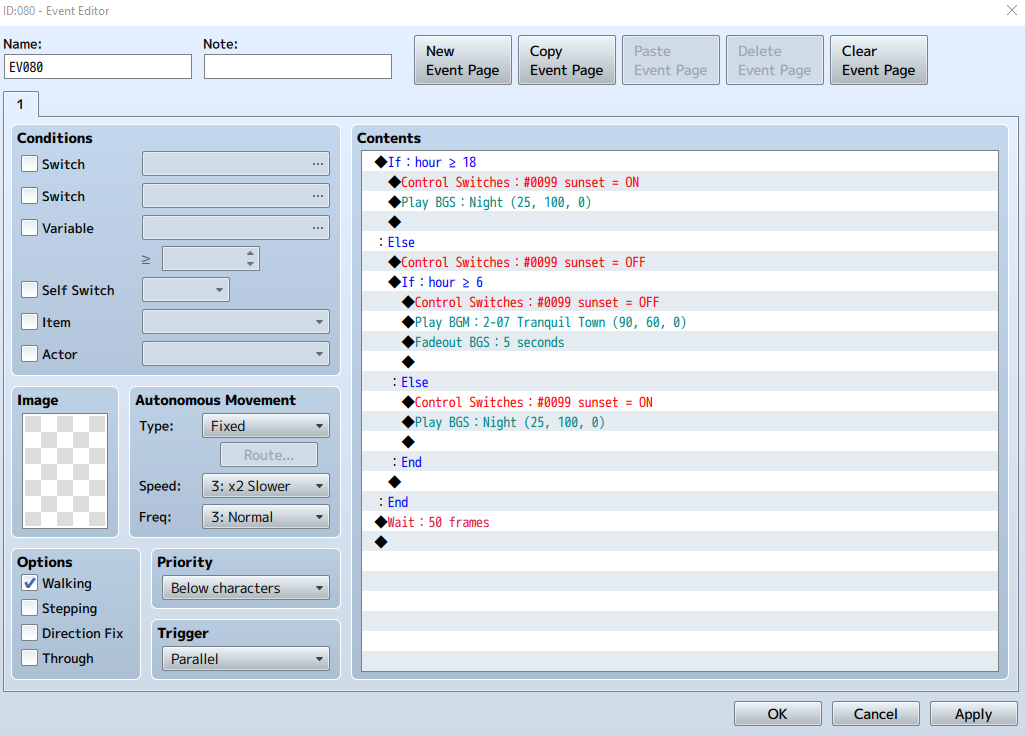
Step 1: Create an event on the map you wish to have this effect, in that event we are going to set it to parallel process.
We are going to control the variables from Mog's time system inside this event.
Plainly put, this says "if its past 8 o'clock, then turn the lights on, if its past 6 am, turn them off". (it is very important to pay attention to the identifier) ie: = > < etc.
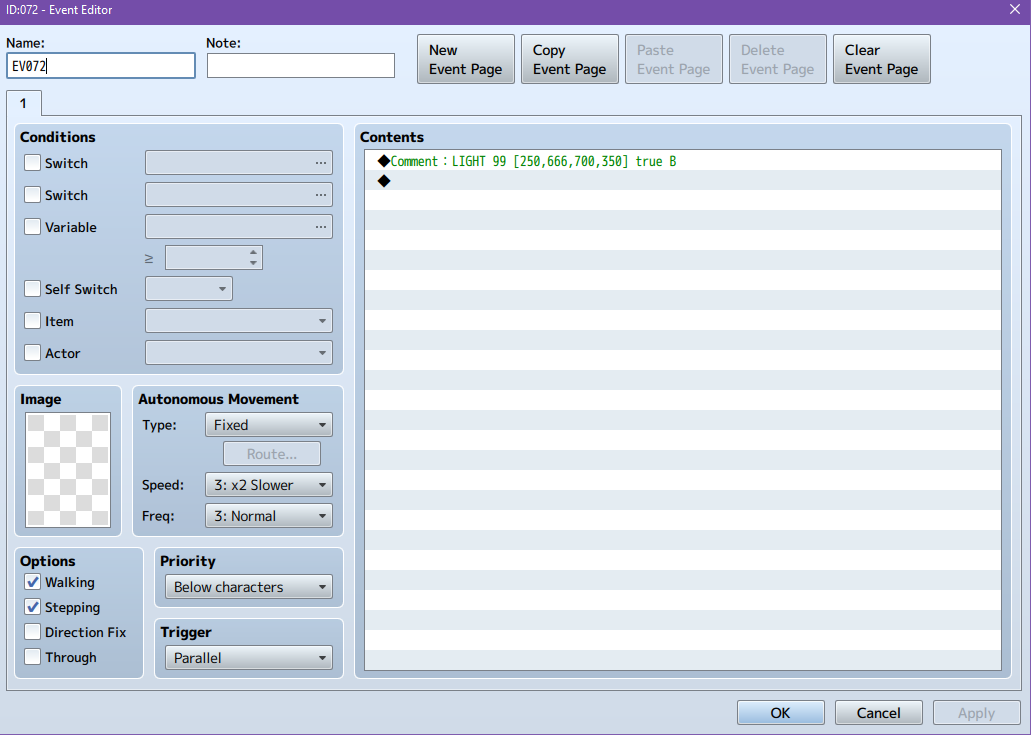
Step 2: Now we need to set up our light events to get their tasks from the event above.
Using this event comment "LIGHT 99 [250,666,700,350] true B" we are telling rpg maker to turn ON this light when switch 99 is turned to ON. (be sure it is a parallel process)
Step 3: Now you can set up your time plugin to have all the specs you'd like it to have, as well as the HUD.
LOCKED DOORS: using this exact same method, we can prevent the player from accessing different doors or npc's.
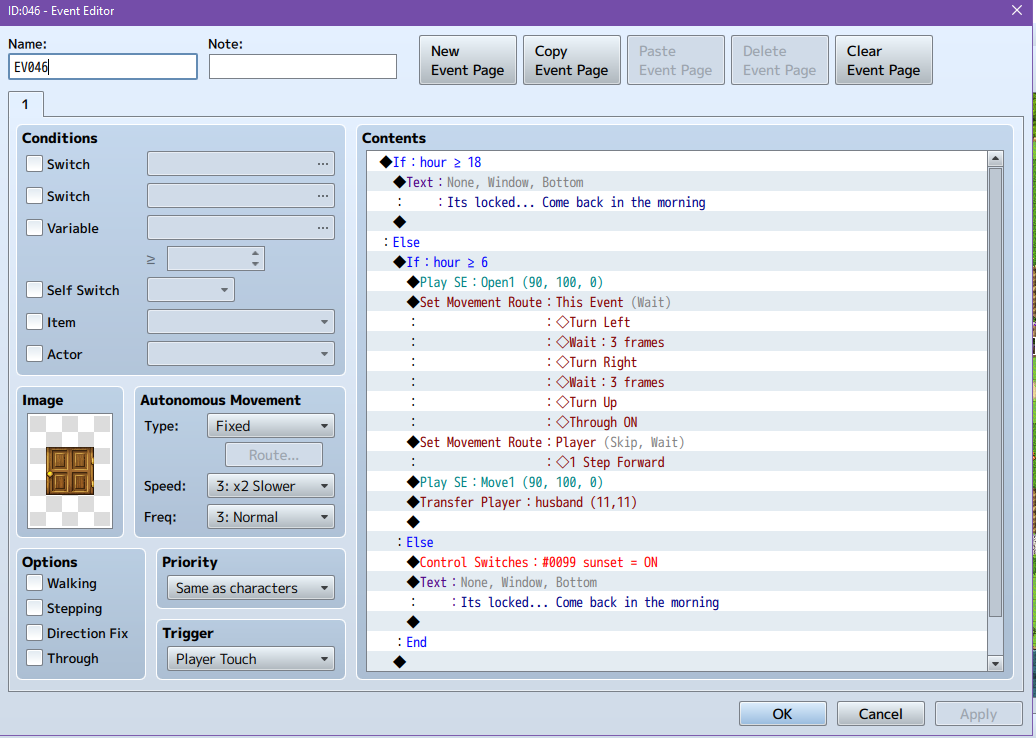
Do to this simply copy the the contents from the first event where we controled the variables.
So because there is a conditional branch within a conditional branch, we need to erase the switches from the top part, so it will look like this.
And because its only a door, change it to ACTION BUTTON.

And thats basically it.
With this you can do ... this
I hope someone will find this usefull, as it took longer to make this tutorial than to event this system lol.
I've spent the past few hours coming up with a method for having a dynamic lighting system based on the time of day.
To do this we will need two plugins:
MOGHUNTERS Time System
MOGHUNTERS Time System HUD (optional)
Soulpour777 Thomas Edison Lights
The first thing we are going to do is download and install the plugins, and make sure they are under any core plugins.
For this example we are going to make it so the street lights in our happy little town will come on at 8 oclock at night, and turn off at 6 in the morning.
There are more than one way to do this, but with this method we can also have doors not open until morning, NPC's will only give you certain dialogue, and i'm sure there are plenty other nifty things you can do with it.
Prestep: Create a switch that says "sunset".
Step 1: Create an event on the map you wish to have this effect, in that event we are going to set it to parallel process.
We are going to control the variables from Mog's time system inside this event.
Plainly put, this says "if its past 8 o'clock, then turn the lights on, if its past 6 am, turn them off". (it is very important to pay attention to the identifier) ie: = > < etc.
Step 2: Now we need to set up our light events to get their tasks from the event above.
Using this event comment "LIGHT 99 [250,666,700,350] true B" we are telling rpg maker to turn ON this light when switch 99 is turned to ON. (be sure it is a parallel process)
Step 3: Now you can set up your time plugin to have all the specs you'd like it to have, as well as the HUD.
LOCKED DOORS: using this exact same method, we can prevent the player from accessing different doors or npc's.
Do to this simply copy the the contents from the first event where we controled the variables.
So because there is a conditional branch within a conditional branch, we need to erase the switches from the top part, so it will look like this.
And because its only a door, change it to ACTION BUTTON.
And thats basically it.
With this you can do ... this
I hope someone will find this usefull, as it took longer to make this tutorial than to event this system lol.
Downloads / Referenced Files
RPG Maker Web attachments are mirrored locally when available. Other external links remain hosted by their original creator or third-party service.
- Local mirror: 47328-16160a0975bb137688c16e605e33ec14.png
SHA-256:4eebb9d7966f4b0f89a1c803540a9feab745b17b65633c7260482c5103f96d04
Original attachment URL: https://forums.rpgmakerweb.com/attachments/capture-png.68830/ - Local mirror: 47315-cb75ef603220fa5b598eb8e21929f64e.png
SHA-256:7aa4c86759c0cef2827f3e209eafe5134b3e7499b2f8b95c7623e95054dcc3cf
Original attachment URL: https://forums.rpgmakerweb.com/attachments/capture2-png.68817/ - Local mirror: 47317-6544392cfd1afc98c2bef8e6741cf126.png
SHA-256:6181b2a49346d7fb7cf19b1a7ecb807486ba3a3713aeb9822fbc4cdb956ae957
Original attachment URL: https://forums.rpgmakerweb.com/attachments/capture3-png.68819/
Referenced Images / Attachments
Creator Claims / Removal
If you are the original creator and want this listing reassigned, edited, or removed, join BMMPlay and contact the moderators with proof that matches the original RPG Maker Web profile, linked GitHub, itch.io page, or another public creator identity.
Replies (0)
No replies yet.
0
replies
22
views
Topic Summary
Loading summary...