

Custom Random Encounter/Event Spawner
BMM_Archive · July 16, 2026

Original Source
- Original title: Custom Random Encounter/Event Spawner
- Original author: matthew30903
- Original date: January 13, 2016
- Source thread: https://forums.rpgmakerweb.com/threads/custom-random-encounter-event-spawner.54849/
- Source forum path: Game Development Engines > RPG Maker Tutorials > RMMV Tutorials
Summary
Random Encounter/Event Spawner So you do not like the standard random encounter system, but evented encounters are too static. The solution is to have random evened encounters.
Archived First Post
Random Encounter/Event Spawner
So you do not like the standard random encounter system, but evented encounters are too static. The solution is to have random evened encounters.
After looking at the script request forum I found requests for procedural flora and other things, making them should follow the same principle as this.
Things you will need:
Yanfly's Region Events
Hudell's Orange Custom Events
Orange Time System
Time System Events
Two Common Events
Once Switch
Two Variables
Two Maps
First make a map that will hold all of the events you wish to have spawn randomly. We will also need a map to spawn events onto, like a world map.
Common Event Setup:
Next open your Database and go to the Common Events tab. Make a new Common Event named “Event Spawner” or something similar.
We are going to make a switch named “Event Spawn” and a Variable Named “Encounter?”.
In our common event make a Conditional Branch for if “Event Spawn” is On, check Create Else Branch. In the Else branch you want to use Control Variables and set “Encounter?” to a random number from zero to ninety-nine. Create a Conditional Branch for if Variable “Encounter?” is greater than or equal to 49, check Create Else Branch. We will be using the If branch to keep encounters from spawning at every step, thus we will leave it blank. If you want to make events spawn less often increase the number, to make them spawn more often decrease the number. At this setting events have a 50% chance of spawning each step.
In the Else section we will set “Encounter?” to a random number between zero and ninety-nine again. This will be used to determine what event is to spawn. We will come back to this part later.
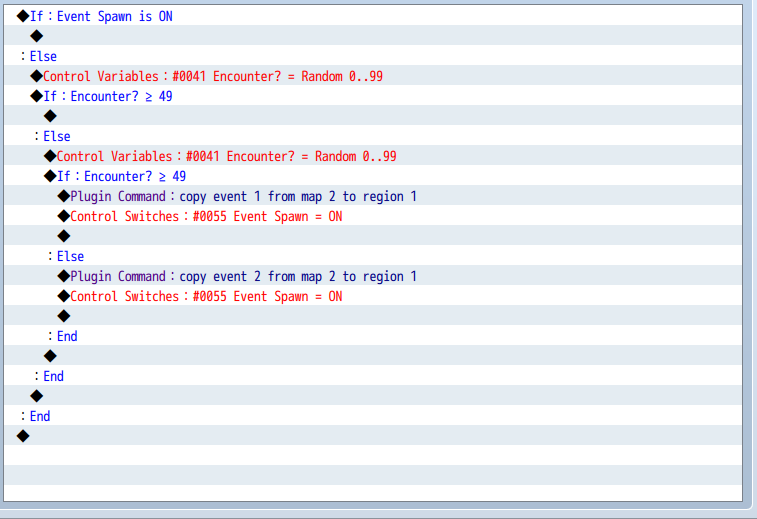
Next we will make a new Common Event named “Event Despawn”. This event will keep more than one event from spawning and despawn events that are not triggered.
First we will create a Conditional Branch for If “Event Spawn” is On. Within this we want to set a new variable named Spawn Counter to be incremented by one (add one to current value). Then another Conditional Branch for If “Spawn Counter” is less than or equal to 50, or however many seconds you want it to take to spawn a new event or an existing event to despawn.
Then you want to control switch “Event Spawn” to Off. Make the script call: $gameSystem.clearCustomEvents($gameMap._1);
Set 1 to the name of the map these events will spawn on and make multiple calls for each map that uses this system.
Then control variable “Spawn Counter” to equal zero.
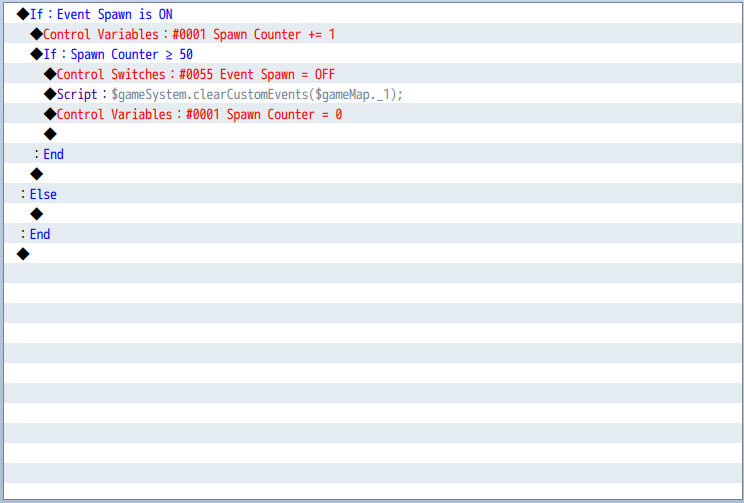
Plugin configuration:
In the YEP_RegionEvents Plugin you want to pick a region that you want to have your events spawn in. Set the region's value to the Common Event ID of our “Event Spawner”. When the player moves over this region, “Event Spawner” will run.
In OrangeTimeSystemEvents you want to set onChangeSecond to our “Event Despawn” Common Event ID. Every game second the “Spawn Counter” variable will be incremented by one.
Event Setup:
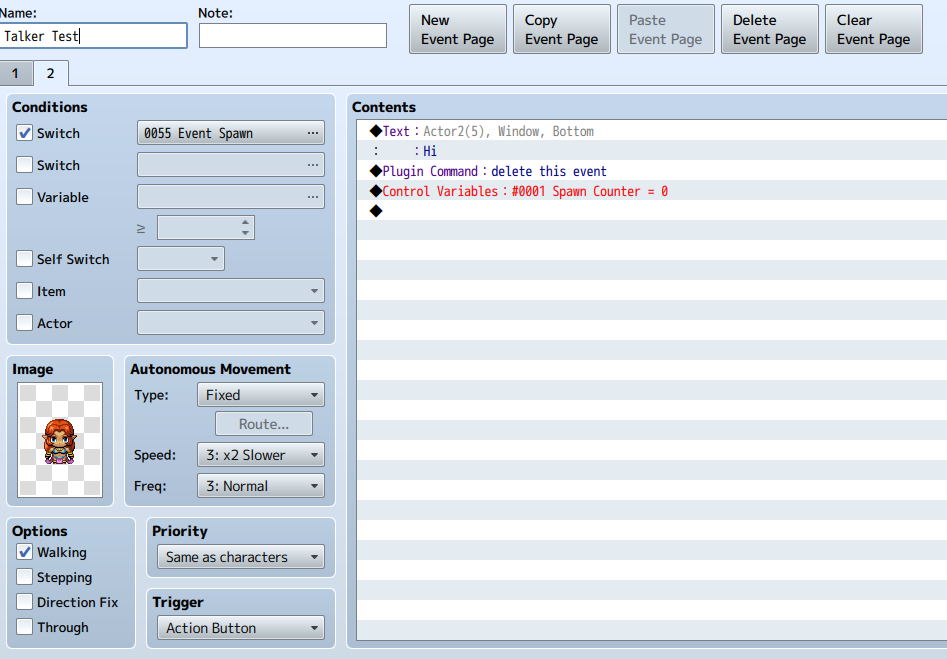
Each Event you wish to have spawn needs at least two pages to work. The First page should be blank or, as a fail-safe, use these commands: Use the plugin command “delete this event”, control switch “Event Spawn” to Off, and use Erase Event. I like fail-safes.
On page two you want the condition switch “Event Spawn” set to On. The last things you want the event to run are a “delete this event” plugin command and control variable “Spawn Counter” to equal zero.
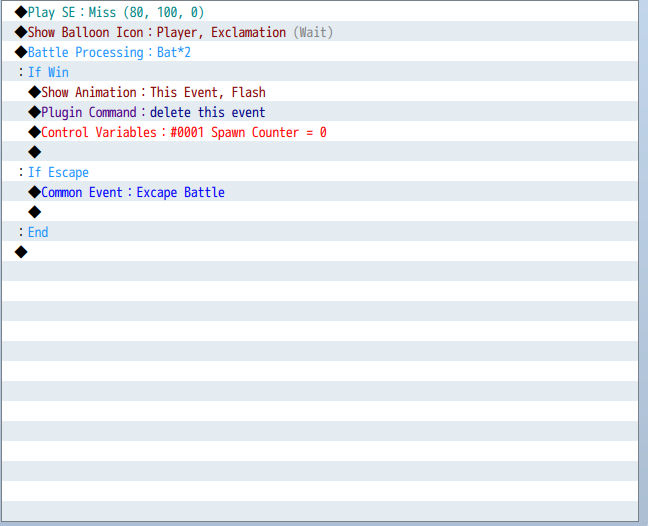
Back in our “Event Spawner” Common Event we want to setup a conditional branch for each of our events. Lets say that we have two events on our spawn map. We will say If encounter is greater than or equal to 49, check Create Else Branch.
For each event we will use the plugin command:
copy event ID from map ID to Region ID
Make sure your Region ID matches the one you set up earlier. So if we want to to copy event one from map two to region one we would use:
copy event 1 from map 2 to region 1
Then we want to control switch “Event Spawn” to On.
On Map:
On your map simply paint the places you want your events to spawn in the region you set up earlier.
That is all there is to setting up random encounters. Not only does this give you the ability to make combat encounters, but now you can have interesting non-combat/role-playing encounters.
Notes:
You do not need most of the else branches in your Conditional Branches, I have them there in case I want to do something different.
You need to make an “Event Spawner” Common Event for every region and every map you want to use this system on. It sounds redundant and it is, but it keeps things nice and simple.
Keep your regions small. Events will only spawn in the regions you set them to. If your regions are too big, the player will not see some of your wonderfully crafted encounters.
I hope this helps you, thank you for your time.
Demo:
From MEGA
Credits:
Hudell and Yanfly for their wonderful plugins.
Matthew Lamont/Lamontgames for eventing, you do not need to credit me as this is something anyone could do, but I would appreciate it. It took me 864 words to make after all.
Downloads / Referenced Files
RPG Maker Web attachments are mirrored locally when available. Other external links remain hosted by their original creator or third-party service.
- Local mirror: 16425-9c856f4c35ac9420fbcd0b7633cbced6.png
SHA-256:c94d849a890fff957eab3396481a80972277b79694ac39177e79110875899fa9
Original attachment URL: https://forums.rpgmakerweb.com/attachments/event-spawner-png.28609/ - Local mirror: 16426-71c991eac28c47ffca1f208c72224d63.png
SHA-256:34055cba1914955c1c16e8ee3277f2575c2cfa75972d84bfb52789b84c93de5d
Original attachment URL: https://forums.rpgmakerweb.com/attachments/event-despawner-png.28610/ - Local mirror: 16428-4ed94ac1e41ba25540e0b839a76d3b4d.png
SHA-256:13d76460f2b3dd2d50b97109ff6477c7f6ab70fcf66085e9111c541e2e7e5364
Original attachment URL: https://forums.rpgmakerweb.com/attachments/talker-example-png.28612/ - Local mirror: 16427-1c4af0c6704a2dc5756f4aa86d944dd9.png
SHA-256:7c625e4288a5b25e2c5489670312a719993ab218bf5c50c5a93a68d65cd47b31
Original attachment URL: https://forums.rpgmakerweb.com/attachments/example-enemy-png.28611/
License / Terms Note
Credits: Hudell and Yanfly for their wonderful plugins. Matthew Lamont/Lamontgames for eventing, you do not need to credit me as this is something anyone could do, but I would appreciate it. It took me 864 words to make after all.
Referenced Images / Attachments
Creator Claims / Removal
If you are the original creator and want this listing reassigned, edited, or removed, join BMMPlay and contact the moderators with proof that matches the original RPG Maker Web profile, linked GitHub, itch.io page, or another public creator identity.
Replies (0)
No replies yet.
Topic Summary
Loading summary...