

How to make a character punch with both hands.
BMM_Archive · July 16, 2026

Original Source
- Original title: How to make a character punch with both hands.
- Original author: AsuranFish
- Original date: June 4, 2018
- Source thread: https://forums.rpgmakerweb.com/threads/how-to-make-a-character-punch-with-both-hands.96097/
- Source forum path: Game Development Engines > RPG Maker Tutorials > RMMV Tutorials
Summary
Got tired of my "monk" type characters punching twice with their right hand, because that's an idiotic way to fight. Seriously, if you don't use a jab, you're liable to get knocked out. Unfortunately, the RPG Maker MV character generator doesn't take this into account. Which is why I came up with an easy solution! Unless someone else did it first. But if they did, it's news to me. Before you continue, know that currently this won't work properly with any form of animated weapon graphics or dual wield state....
Archived First Post
Which is why I came up with an easy solution! Unless someone else did it first. But if they did, it's news to me.
Before you continue, know that currently this won't work properly with any form of animated weapon graphics or dual wield state. You will have to think of your gloves/claws as a "set of two", rather than separate weapons that can be mixed and matched.
The animation will not display properly if you have any sort of weapon equipped, so your character will have to remain barehanded. I have come up with a workaround, which I will explain at the end of this post, following the video.
In order for this to work, you'll have to sacrifice one of your battle motions, either slash or missile - but there's always other ways to switch out SV_Battlers if you reaaaally need all the battle motions. Yanfly Class Core is one of them, if that method fits what you're doing.
You'll need a few things. Obviously, you'll need a SV_Battler image, and you'll also need an image editing program. I recommend GIMP for this, because of the grids/snap to grid function, which makes this simple process even simpler. Setup the grid to be 64x64, visible, and have "snap to grid" turned on. You'll also need the ability to use action sequences, and probably Yanfly's Weapon Unleash plugin to make this work properly.
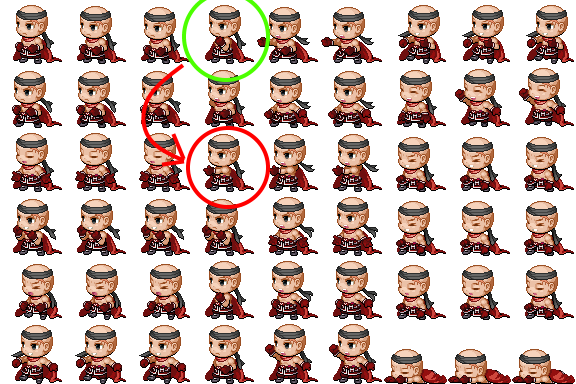
1: Open up the battler image, and cut out the first frame of the "missile" motion. This is the fourth sprite in the third row. Should look like your character giving a thumbs up, with their mouth closed.
2: Once you've erased that frame, select and copy the fourth 64x64 cell in the top row. Should look like your character flexing their arm, or doing a bit of a fist up. Paste this frame into the 64x64 cell you previously deleted. Make sure it's aligned properly. Should be easy if you're using "snap to grid", etc.
Referring to the image below, you're replacing the red circled image with the green circled image.
Once done, the only difference in your sv_actor image should be the one circled in green below:
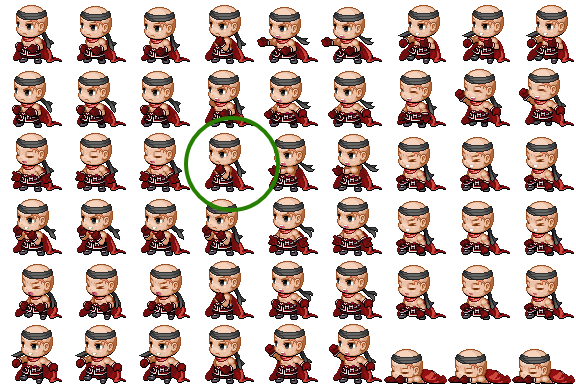
3: Save the file. I suggest saving it as something else other than the original file, so you have a backup. Don't forget to assign the new image to your character under the Actor tab in your database.
4: Create a skill for "punching with both hands". You can use this notetag with Yanfly's Weapon Unleash program to ensure your character attacks with it.
<Replace Attack: x>You can use this notetag on either the character (only if they're going to be strictly a puncher), a job class (again, if it only attacks with punches), weapons, or states.
5: Give the skill an action sequence. Here's a simple one to get you started:
<setup action>
display action
immortal: targets, true
</setup action>

<target action>
move user: targets, front, 20
wait for movement
motion missile: user
wait: 10
attack animation: target
wait for animation
action effect
motion attack: user
wait: 10
attack animation: target
wait for animation
action effect
</target action>
And it should work!
Here's a video of it in action.
"But... this doesn't work right if I equip a weapon! This puts monk classes at a huge disadvantage!"
Yeah, yeah. Chill. I told you there was a way around this. You'll need Yanfly's Equip Core for this part. You'll probably also want Yanfly's Auto Passive States for this. Not required, but it'll greatly increase functionality.
1: Under the types section of your database, create a new type of armor. Let's call it "Fists".
2: Under your job class, put the following into the notebox, making sure to adjust the entries based on your game/armor types:
<Equip Slot>
Fists
Head
Body
Accessory
</Equip Slot>
This job class will no longer have the option to equip normal weapons, or shields. The armor slot "Fists" will serve as your character's weapons for this job class.
3: Go ahead and create as many "fist" type armors as you want. Be sure to give them all a "Replace Attack" notetag to use a skill that punches twice, as shown above.
Conversely, you're going to want to give your other job classes their own Equip Core notetags, to ensure they can't equip monk fists, in addition to their normal weapons.
<Equip Slot>
Weapon
Shield
Head
Body
Accessory
</Equip Slot>
Hopefully I covered anything. I'll try my best to answer any questions and will update this post if the need arises.
Downloads / Referenced Files
RPG Maker Web attachments are mirrored locally when available. Other external links remain hosted by their original creator or third-party service.
- Local mirror: 70148-ef821c4c0e851ffb0866f3aa033ab012.png
SHA-256:498e8f3ec3d8054a0b2d8b450d3f1697a3a63e87291134f287669b12781be148
Original attachment URL: https://forums.rpgmakerweb.com/attachments/punch1-png.91649/ - Local mirror: 70149-994c235b4ebbb507a55d48b85541965b.png
SHA-256:12ce53ff5971a2693647a077cc7f8b263598776032f9a288de06c79c6163ad18
Original attachment URL: https://forums.rpgmakerweb.com/attachments/punch2-png.91650/
Referenced Images / Attachments
Creator Claims / Removal
If you are the original creator and want this listing reassigned, edited, or removed, join BMMPlay and contact the moderators with proof that matches the original RPG Maker Web profile, linked GitHub, itch.io page, or another public creator identity.
Replies (0)
No replies yet.
Topic Summary
Loading summary...