

Android/iOS - (TL:DR) Converting your project using the MANUAL METHOD
BMM_Archive · July 16, 2026

BMM_Archive
Preserved forum archive. This topic stores the original first post and locally mirrored RPG Maker Web attachments when available. It is posted by the BMMPlay archive account, not by the original creator.
Original Source
- Original title: Android/iOS - (TL:DR) Converting your project using the MANUAL METHOD
- Original author: Faytless
- Original date: October 27, 2015
- Source thread: https://forums.rpgmakerweb.com/threads/android-ios-tl-dr-converting-your-project-using-the-manual-method.47780/
- Source forum path: Game Development Engines > RPG Maker Tutorials > RMMV Tutorials
Summary
10/28/2015 A new tech demo was uploaded to the store that will give you options to see how your device will lag under certain events that take alot of resources ( i.e. animations, sprites, weather, etc) It was uploaded at 5:30am PST, will be available by 10AM PST Today
Archived First Post
10/28/2015
A new tech demo was uploaded to the store that will give you options to see how your device will lag under certain events that take alot of resources ( i.e. animations, sprites, weather, etc) It was uploaded at 5:30am PST, will be available by 10AM PST Today
<span style="color: #000000">Version 4 Toms SPM
<span style="color: #000000">BETA USERS have reported this might cause the program to crash. If it does, just relaunch. I've had good luck with it after a simple relaunch
-- Added SAVE function to save variables
-- Added Version Code (ALPHA) (this allows you to UPDATE your apk for the playstore)
<span style="color: #000000">Updated Link
https://www.dropbox.com/s/i0pd2u3s81vfd8r/Toms%20SPM%20vr4%20.exe?dl=0
CONDENSED VERSION
I have packaged Python, ANT, Crosswalk and my Environment path/Compile program in one package. You still have to register the paths, but it beats going to 3
different websites for your files.
Android Conversion Pack ( Python, ANT, Crosswalk, TomsPathomizer Version3)
https://www.dropbox.com/s/9idijlq0e4x78f8/Android%20Conversion%20Pack.zip?dl=0
1. Download the conversion pack. Unzip this to your C Drive.
2. Install Java JDK, take note of the installation path
3. Install Android SDK (Zip version, and transfer into the Android Conversation Pack Folder.
3a. Right click run SDK manager inside the folder and Install API 21 (I personally recommend getting api 23, 21, and 19)
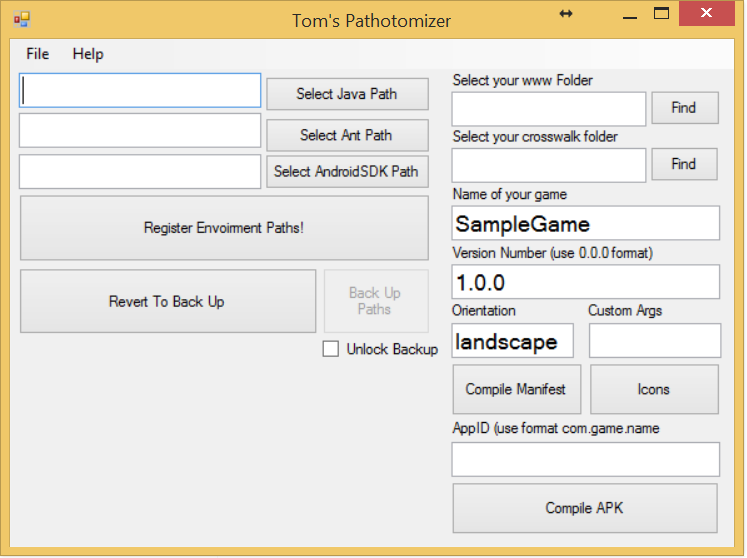
4. Open Toms Pathomizer.
5. Read my warning and select Python Path -- Navigate to Android Conversion pack folder and select the python folder
6. Click Select Java Payh -- Navigate to your Java folder and select the the JDK(SOMEVERSION NUMBER) folder (i.e. JDK.1.8.85)
7. Click Select Ant Path -- Navigate to the Android Conversion Pack, and select the Ant folder.
8. Click Select AndroidSDK Path, Navigate to your android folder and select it.
9 Click Unlock Backup, and click Back up Paths. Once you see a message, click Register Environment Paths.
10. Go to actions, click Compile APK.
11. Click Find Under www. Find your www Folder
12. Click find under crosswalk folder. go to Android Conversion Pack and find your crosswalk folder.
13. Fill out the name, version, and APPID. Pay attention to format.
14. If you don't have a manifest, click compile sample manifest.
15. Click Compile APK.
16. If this works, you can deploy your updated project again as long as you keep your www folder in the same location.
and click recompile with Last Settings. OR you can run the compile.bat file the program created as admin.
FULL INSTRUCTIONS
1. Install Python (write env. variables, custom install, system var, install to C:\)
https://www.python.org/downloads/
2. Install Java (take note of install path)
http://www.oracle.com/technetwork/java/javase/downloads/index.html
3. Download Ant and extract to C:\
http://ant.apache.org/bindownload.cgi
4. Install Android SDK, (install to root of C:\, don't run automatically)
https://dl.google.com/android/installer_r24.4.1-windows.exe
a. go to the folder now right click on SDK manager click run as admin
b. if this doesn't open, EEK. You need to find out why its not. You can ask here -- watch my troubleshoot video (not up yet) -- or google
c. Install SDK Platform Tools, SDK Build Tools, everything under API 19 and above , and google USB drivers. ( this will take a while)
5. Download a crosswalk template extract to C:\ (zip)
https://download.01.org/crosswalk/releases/crosswalk/android/stable/10.39.235.16/
6. Download Tom's Pathomitizer V4 and RUN AS ADMINISTRATOR (This is custom application I wrote)
https://www.dropbox.com/s/x78v4qgh6livewo/TomsSystemPathMaker.exe?dl=0
Read the EULA, If you agree, continue.
a. click the check box to unlock back up, click back up path
b. Click Find Java Path, then go through and find your Java Folder. It should end in a bunch of numbers
c. Click Find Ant, find your Ant folder
d. Click Find Android SDK, navigate to your android SDK folder
e. Click Register Paths, if it worked, you will get a message.
f. Open command prompt with admin privileges.
a. Type in Python --version
b. java -version
c. adb version
If you get version numbers for all, you're doing it right
7. Export your RPG Maker Game to somewhere you can find.
8. Open my custom application
a. Click find next to www. select your www folder. Make sure your path ends in www.
b. Click the box below and find your crosswalk folder that you extracted.
c. Enter the name of your game, version number, orientation
e. enter your AppID (i.e. com.example.sample) in that format.
e1. Click Compile Manifest
f. click Compile APK, give this a while
g. Move appropriate APK to device to test!
A new tech demo was uploaded to the store that will give you options to see how your device will lag under certain events that take alot of resources ( i.e. animations, sprites, weather, etc) It was uploaded at 5:30am PST, will be available by 10AM PST Today
<span style="color: #000000">Version 4 Toms SPM
<span style="color: #000000">BETA USERS have reported this might cause the program to crash. If it does, just relaunch. I've had good luck with it after a simple relaunch
-- Added SAVE function to save variables
-- Added Version Code (ALPHA) (this allows you to UPDATE your apk for the playstore)
<span style="color: #000000">Updated Link
https://www.dropbox.com/s/i0pd2u3s81vfd8r/Toms%20SPM%20vr4%20.exe?dl=0
CONDENSED VERSION
I have packaged Python, ANT, Crosswalk and my Environment path/Compile program in one package. You still have to register the paths, but it beats going to 3
different websites for your files.
Android Conversion Pack ( Python, ANT, Crosswalk, TomsPathomizer Version3)
https://www.dropbox.com/s/9idijlq0e4x78f8/Android%20Conversion%20Pack.zip?dl=0
1. Download the conversion pack. Unzip this to your C Drive.
2. Install Java JDK, take note of the installation path
3. Install Android SDK (Zip version, and transfer into the Android Conversation Pack Folder.
3a. Right click run SDK manager inside the folder and Install API 21 (I personally recommend getting api 23, 21, and 19)
4. Open Toms Pathomizer.
5. Read my warning and select Python Path -- Navigate to Android Conversion pack folder and select the python folder
6. Click Select Java Payh -- Navigate to your Java folder and select the the JDK(SOMEVERSION NUMBER) folder (i.e. JDK.1.8.85)
7. Click Select Ant Path -- Navigate to the Android Conversion Pack, and select the Ant folder.
8. Click Select AndroidSDK Path, Navigate to your android folder and select it.
9 Click Unlock Backup, and click Back up Paths. Once you see a message, click Register Environment Paths.
10. Go to actions, click Compile APK.
11. Click Find Under www. Find your www Folder
12. Click find under crosswalk folder. go to Android Conversion Pack and find your crosswalk folder.
13. Fill out the name, version, and APPID. Pay attention to format.
14. If you don't have a manifest, click compile sample manifest.
15. Click Compile APK.
16. If this works, you can deploy your updated project again as long as you keep your www folder in the same location.
and click recompile with Last Settings. OR you can run the compile.bat file the program created as admin.
FULL INSTRUCTIONS
1. Install Python (write env. variables, custom install, system var, install to C:\)
https://www.python.org/downloads/
2. Install Java (take note of install path)
http://www.oracle.com/technetwork/java/javase/downloads/index.html
3. Download Ant and extract to C:\
http://ant.apache.org/bindownload.cgi
4. Install Android SDK, (install to root of C:\, don't run automatically)
https://dl.google.com/android/installer_r24.4.1-windows.exe
a. go to the folder now right click on SDK manager click run as admin
b. if this doesn't open, EEK. You need to find out why its not. You can ask here -- watch my troubleshoot video (not up yet) -- or google
c. Install SDK Platform Tools, SDK Build Tools, everything under API 19 and above , and google USB drivers. ( this will take a while)
5. Download a crosswalk template extract to C:\ (zip)
https://download.01.org/crosswalk/releases/crosswalk/android/stable/10.39.235.16/
6. Download Tom's Pathomitizer V4 and RUN AS ADMINISTRATOR (This is custom application I wrote)
https://www.dropbox.com/s/x78v4qgh6livewo/TomsSystemPathMaker.exe?dl=0
Read the EULA, If you agree, continue.
a. click the check box to unlock back up, click back up path
b. Click Find Java Path, then go through and find your Java Folder. It should end in a bunch of numbers
c. Click Find Ant, find your Ant folder
d. Click Find Android SDK, navigate to your android SDK folder
e. Click Register Paths, if it worked, you will get a message.
f. Open command prompt with admin privileges.
a. Type in Python --version
b. java -version
c. adb version
If you get version numbers for all, you're doing it right
7. Export your RPG Maker Game to somewhere you can find.
8. Open my custom application
a. Click find next to www. select your www folder. Make sure your path ends in www.
b. Click the box below and find your crosswalk folder that you extracted.
c. Enter the name of your game, version number, orientation
e. enter your AppID (i.e. com.example.sample) in that format.
e1. Click Compile Manifest
f. click Compile APK, give this a while
g. Move appropriate APK to device to test!
Downloads / Referenced Files
RPG Maker Web attachments are mirrored locally when available. Other external links remain hosted by their original creator or third-party service.
- Download: https://www.dropbox.com/s/i0pd2u3s81vfd8r/Toms%20SPM%20vr4%20.exe?dl=0
- Download: https://www.dropbox.com/s/9idijlq0e4x78f8/Android%20Conversion%20Pack.zip?dl=0
- Download: https://www.python.org/downloads/
- Download: http://www.oracle.com/technetwork/java/javase/downloads/index.html
- Download: http://ant.apache.org/bindownload.cgi
- Download: https://download.01.org/crosswalk/releases/crosswalk/android/stable/10.39.235.16/
- Download: https://www.dropbox.com/s/x78v4qgh6livewo/TomsSystemPathMaker.exe?dl=0
- Local mirror: 13805-1f998a923380672d55d22811a11d99ad.png
SHA-256:82543f150b34b18ac0bacf3c3d568db5a26bed50158c7e4d922cc433091d2321
Original attachment URL: https://forums.rpgmakerweb.com/attachments/screenshto-png.24825/
Referenced Images / Attachments
Creator Claims / Removal
If you are the original creator and want this listing reassigned, edited, or removed, join BMMPlay and contact the moderators with proof that matches the original RPG Maker Web profile, linked GitHub, itch.io page, or another public creator identity.
Replies (0)
No replies yet.
0
replies
21
views
Topic Summary
Loading summary...