

Making RPG Maker AutoTiles in Pyxel Edit
BMM_Archive · July 16, 2026

Original Source
- Original title: Making RPG Maker AutoTiles in Pyxel Edit
- Original author: fallenlorelei
- Original date: January 7, 2017
- Source thread: https://forums.rpgmakerweb.com/threads/making-rpg-maker-autotiles-in-pyxel-edit.73309/
- Source forum path: Game Development Engines > RPG Maker Tutorials > RMMV Tutorials
Summary
A few weeks ago there was an Indie Game Dev Humble Bundle Sale where they sold a few awesome development tools for $1. I ended up buying the bundle, which included programs like Pyxel Edit and Spriter Pro. I really loved Pyxel Edit's tileset feature, and while I'm making my own game in RPG Maker, I wanted to know how to use Pyxel Edit for autotiles. There were no tutorials out there so I went and figured it out myself! After much trial and error, this is what I came up with....
Archived First Post
After much trial and error, this is what I came up with. It might not be perfect but it works for me! This is a very picture heavy tutorial. Hopefully loading these images don't break your computer. I wanted to make a YouTube video for my channel instead, but my husband is watching DragonBall Super in the background, and I wouldn't have been able to record If you'd rather me make a video for it, I'll try to find time!
So let's get started!
You will need...
- Pyxel Edit
- RPG Maker VX/Ace/MV
- but I will be focusing on MV. I don't believe the format for autotiles is the same for earlier versions of RPG Maker?
We will make...

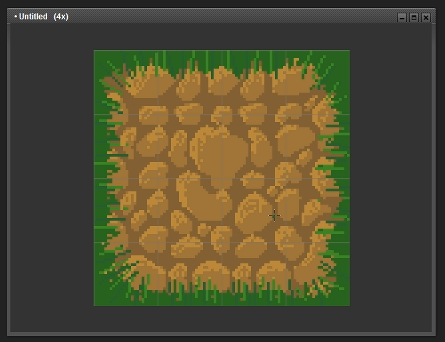
This dirt tileset! Feel free to use!
You'll be able to use this technique for almost all of the autotiles, however, such as water and walls!
How does this work?
Autotiles are kinda tricky in RPG Maker. It uses a combination of 48x48 with 24x24 to get them to work. I read the documentation on it, and it was still kinda confusing. I only understood it by actually scrutizing the default RTP. Basically, it's like this: (to my understanding)
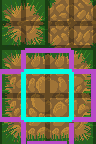
It's split up into 24x24 tiles instead of 48x48. The top tiles are made up of four 24x24 corner tiles. The 48x48 tile highlighted in blue is the "main" repeating tile. The pink 24x48 and 48x24 tiles are also repeating. And they are all seamless with one another! Crazy!
Looking online, there are lots of ways to get the seamless tiles to look nice. This tutorial is going to use Pyxel Edit specifically.
Before we begin:
I want everyone to know that I am not an artist! I mean, look at that grass up there! So bad! Hahaha. I'm just good at figuring out how programs work. I'm hoping a true artist will be able to view this post, learn something, and then make some awesome tiles!
Another important note - this is only for pixel art! Pyxel Edit won't give you the "painted look" RPG Maker uses without some immense effort on your part. If you make these autotiles, you should devote yourself to making matching pixel tiles. It might look really odd with the default resources otherwise.
Alright let's start!
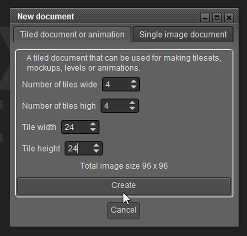
Open Pyxel Edit and make a new document. Make it 4x4 tiles wide, with 24x24 tiles.
As I mentioned, autotiles use 24x24. The only "real" 48x48 we'll be using is the middle main one (highlighted in blue above)
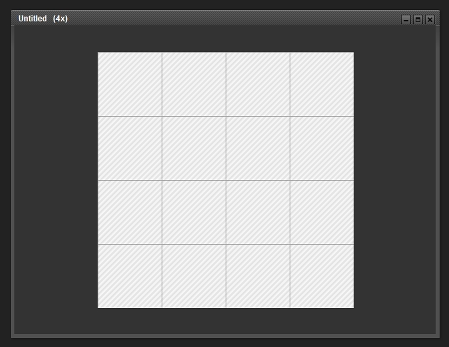
So now we have our document:
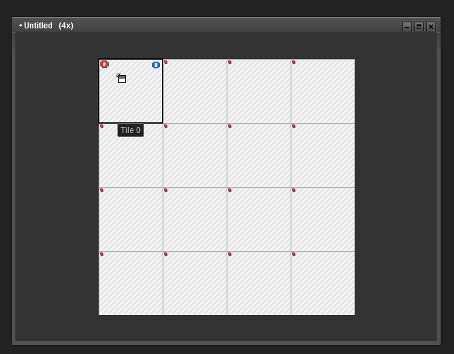
Press TAB! You'll see some dots appear in the corners of your grid.
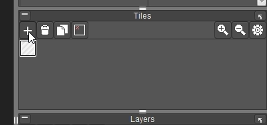
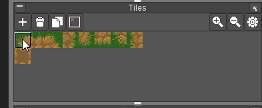
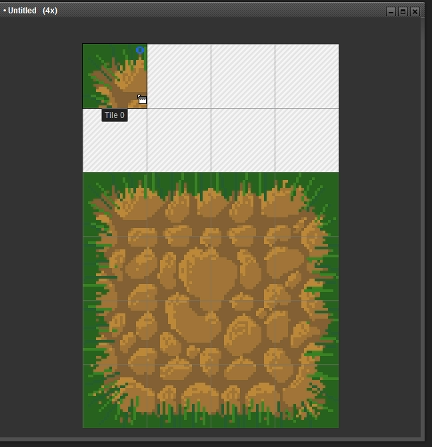
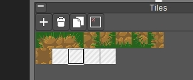
Then take a look at the "Tiles" window on the right. This is important, we'll be using this window a lot. Click on the first square. This is going to be "Tile 0." Then click on the top left-most square in the document.
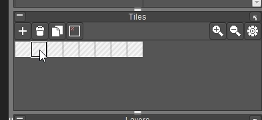
Now add a bunch more tiles by clicking the plus sign + in the Tiles window.
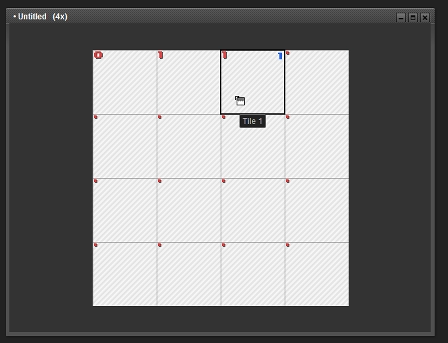
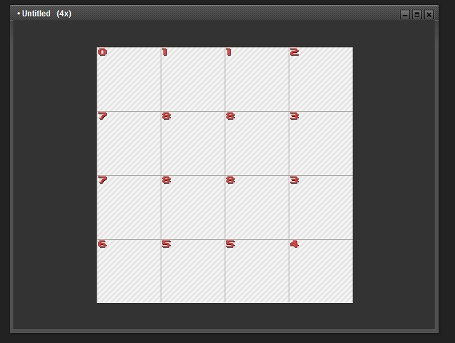
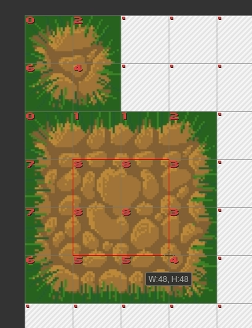
Select the 2nd one. This is "Tile 1." Put Tile 1 in the top middle two squares, like this:
Now put the tiles in the rest of the document to look like this:
0 1 1 2
7 8 8 3
7 8 8 3
6 5 5 4
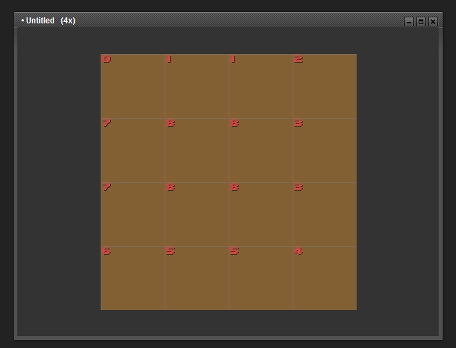
Great! Now let's art. Fill the window with a brown color!
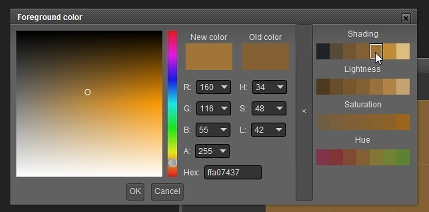
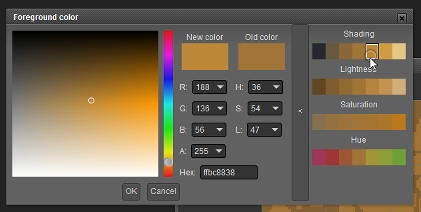
Now find a lighter brown color. I love Pyxel Art for this. Just click your color and then one "shade" lighter in the dialogue box. (You might need to click the arrow to expand the window). Upping the shade this way also warms the hue a bit, which is awesome. No more guesswork!
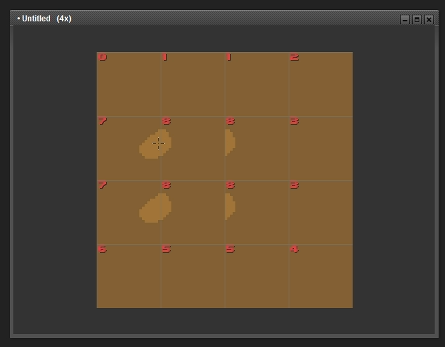
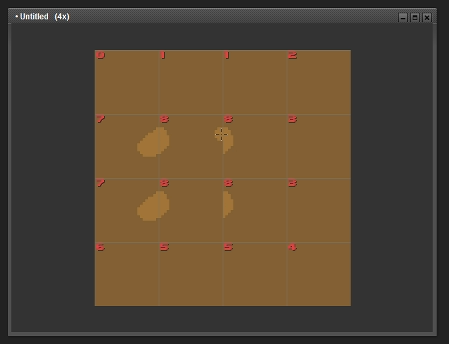
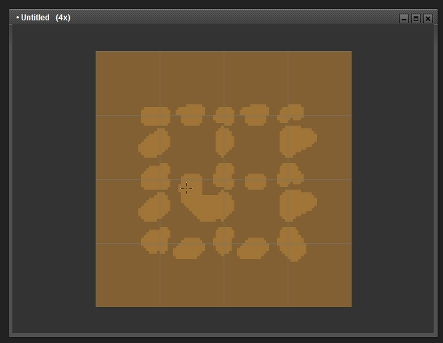
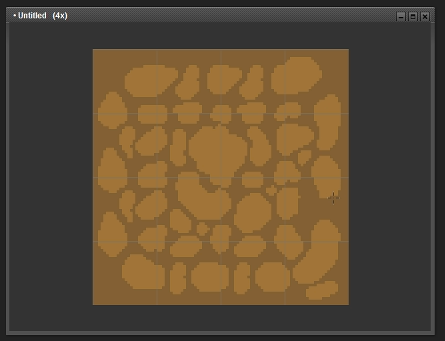
Now we're going to start adding texture/rocks to our dirt. It's important that at this stage we only add circles to the grid edges.
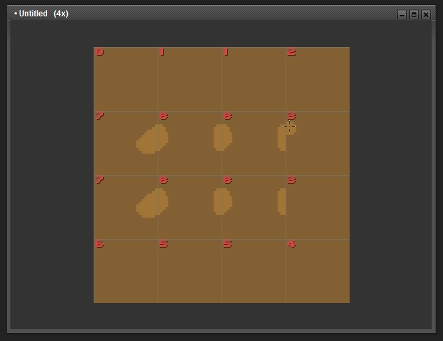
Notice that your art is being duplicated in the same tiles! I love this program. While you're putting in circles, fill in the edges you see in Tile 8. Then fill it in Tile 3. And so on.
Again, only the edges. This will ensure seamless transitions before we add stuff to the middle tile.
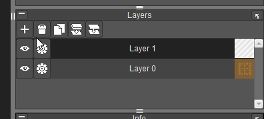
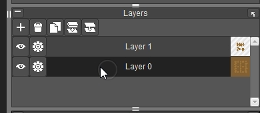
The problem here is that we're using 24x24 pixels, which kinda sucks. We want to take advantage of all the space 48x48 gives us! So when you're done with the edges, make a new layer:
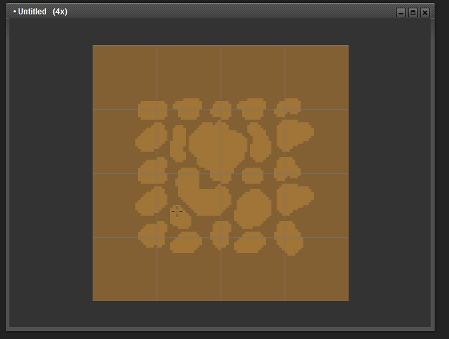
This layer does not use the tiles. This way, we can edit the middle part (blue from above) without it repeating. RPG Maker MV uses 48x48 afterall, not 24x24. So we want to take advantage of that. In this new layer, start adding some new rocks. Make sure these new rocks do not touch the edges which are already seamless. Keep them in the middle 4 squares.
Now let's go back to Layer 0 and finish up the rest.
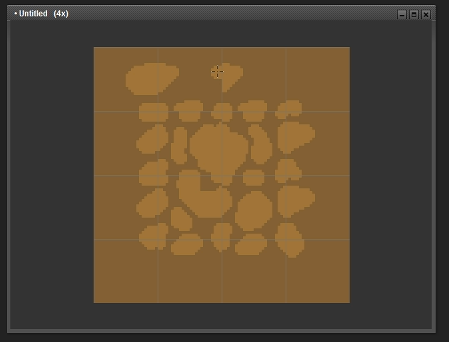
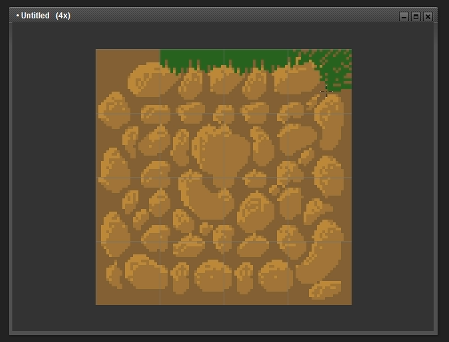
At one point, go back to Layer 1 and start making the other tiles a little different. For example, here I added some darker brown to a tile so it doesn't look the same as the tile above it. (Again to take advantage of 48x48, not 24x24). Just remember not to touch the edges in this upper layer!
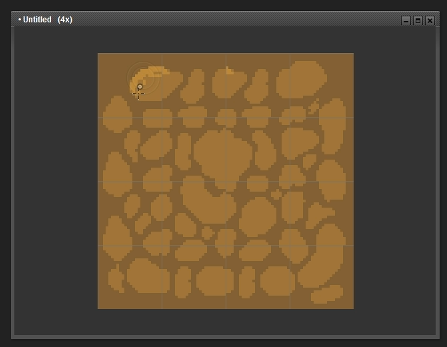
Great! Let's add some shading now! Grab a lighter color from the rock, and start coloring in the edges where the light is hitting.
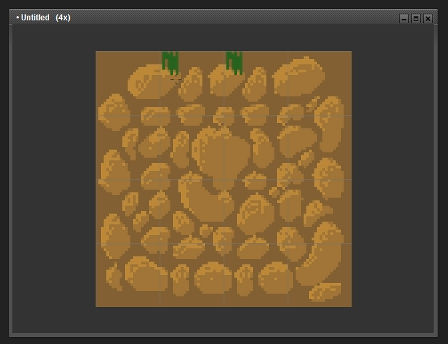
Beautiful! (Haha they look like potatoes - hopefully yours looks better!) Now we're going to add grass.
When you add grass, make sure it matches whatever grass tiles you're already using! For this tutorial, I just picked a random green.
You could also use the eraser tool to make this area transparent, instead of grass. Really, it's up to you how you want to do this!
Then pick a lighter and a dark color to make it a little more interesting.
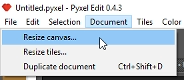
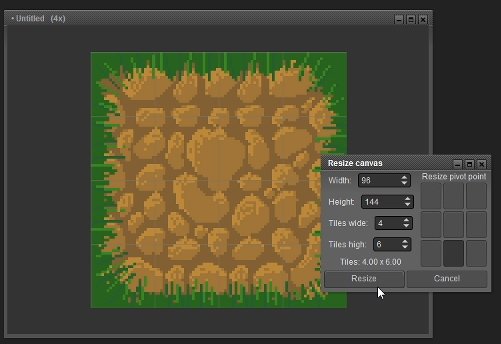
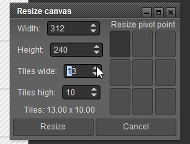
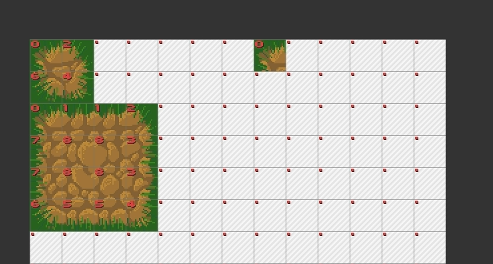
We're almost done! Now let's increase our canvas size.
Follow the settings above. We're adding 2 more to the height (to make 6), and making sure to click the bottom pivot point.
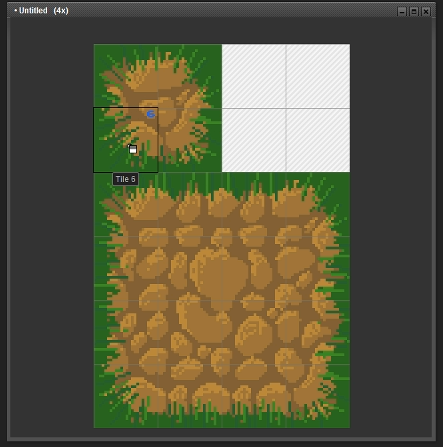
When it's been resized, go back over to your Tiles window. Click One of the corners and then put it in the top right corner. Do this for all of them until you've got a square of corners.
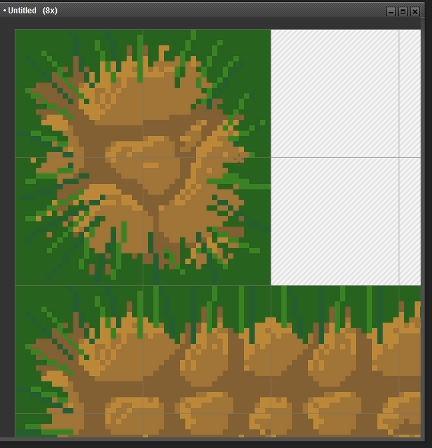
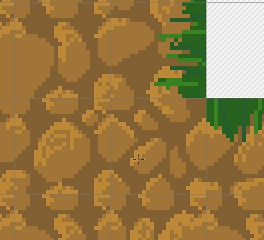
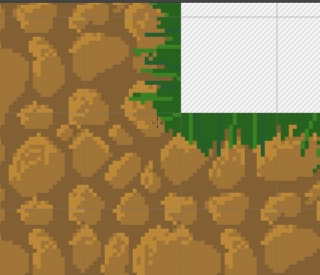
Check out your tile. Does it look funny in any way? Fix it! When you edit the tile here, it edits it for all matching tiles. Pretty cool! But make sure it still looks okay for the rest of the image. Here, I fixed part of the rock and some grass, but it was otherwise fine. Pixel art is easy that way.
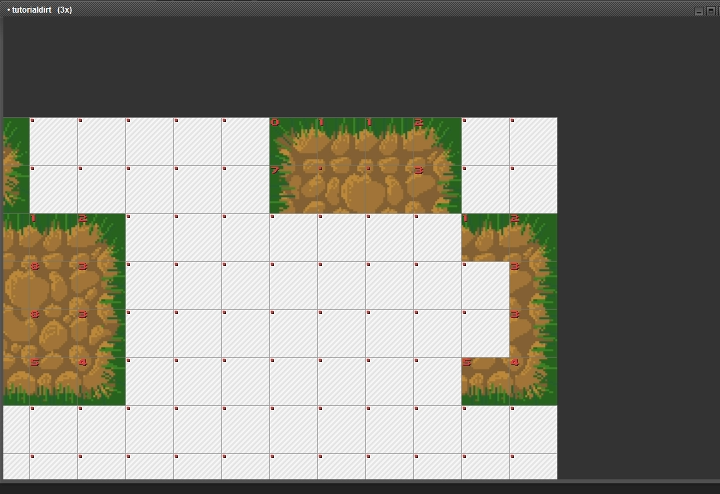
Alright now let's make our canvas big again. Here I picked some random numbers. Feel free to copy, or go bigger. It doesn't matter too much. Keep the pivot point in the top left.
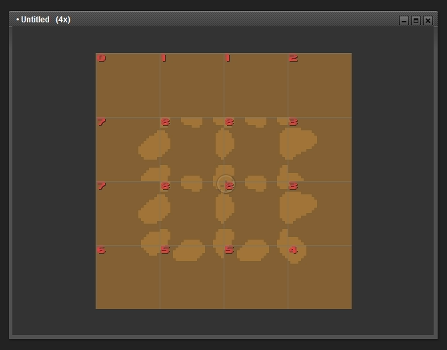
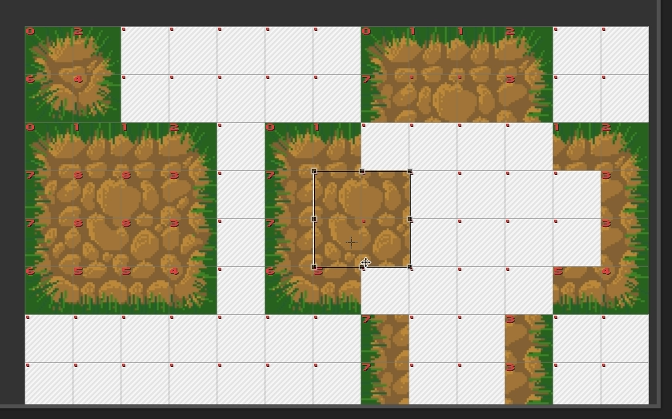
Now we're going to use the tiles to make a big cross shape in our new space, like this:
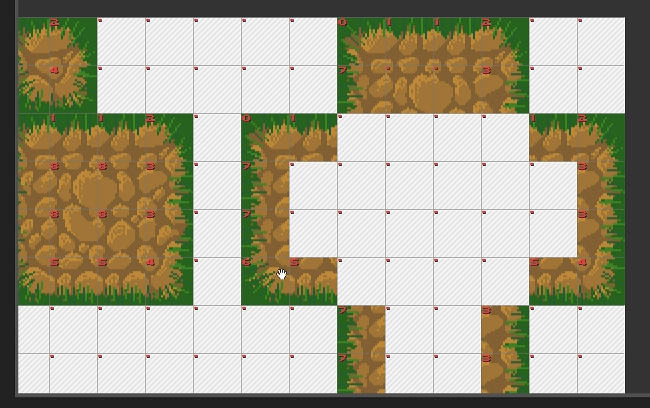
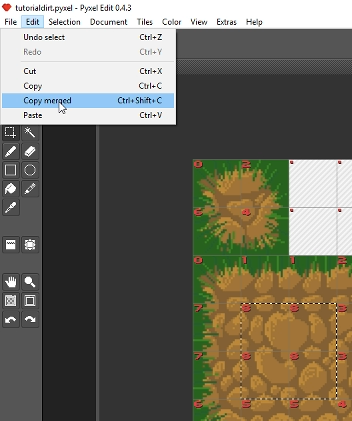
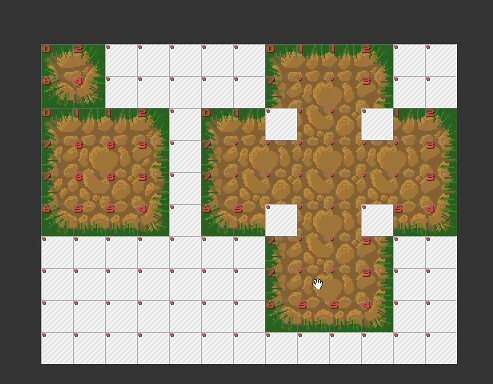
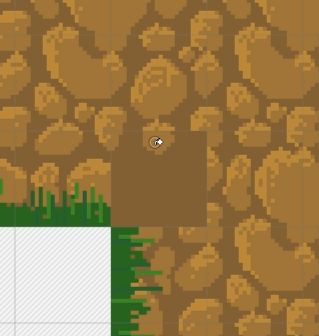
Begin to fill in the middle. You'll need to use the selection tool to copy the middle 4 squares of our original dirt on the left. Copy merged (because remember: we're using 2 layers here) and then paste. Drag it over to fit in our new cross. Keep dragging and dropping til it's all filled in.
At one point, you may need to only copy 2 squares to make sure everything matches up. Follow it by ear!
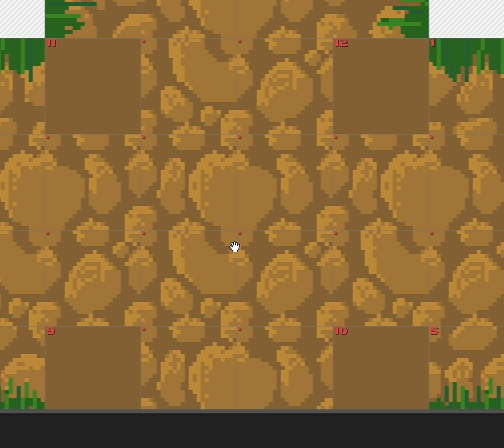
As you can see from the image above, leave the corners! We have to fill those in ourselves.
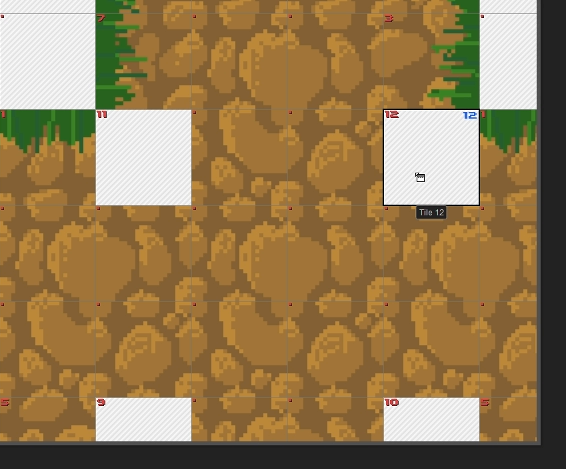
First make those 4 corners into their own tile.
Then begin drawing them in. I filled mine with the dark brown, then added in the rocks. After that, add the grass corners, and you're done! Make sure you don't edit the other tiles. We're only working with the corners here!
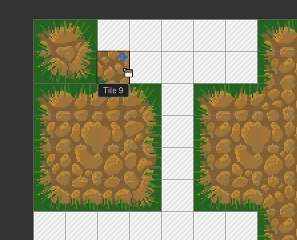
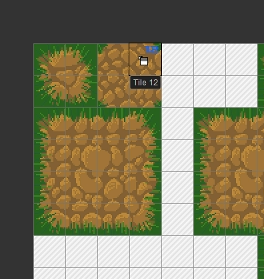
We're done! Hooray! Now let's put it into the main tileset. Simply select the right tile from the Tiles window, then put them into the right 4 squares, like this:
You can also check to see if they're aligned correctly here as well.
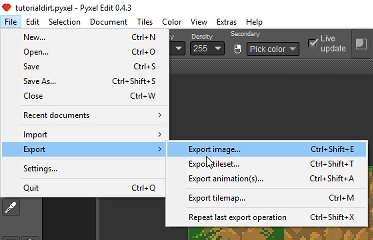
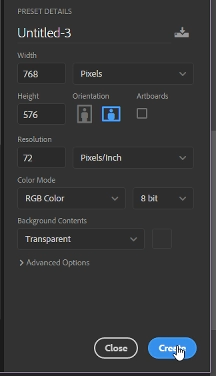
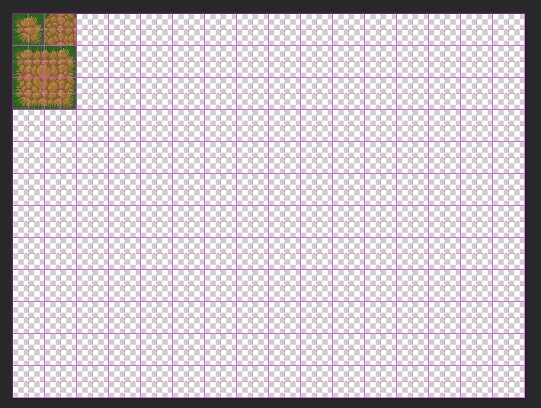
After that, export the image, and then add it to a 768x576 document. This is the typical size for an A2 tilesheet. I used Photoshop for this, but you can use any program. Even Pyxel Edit if you want.
Then save it as a PNG and bring it into RPG Maker! Put it as an A2 tile or it might mess up This is what it looks like!
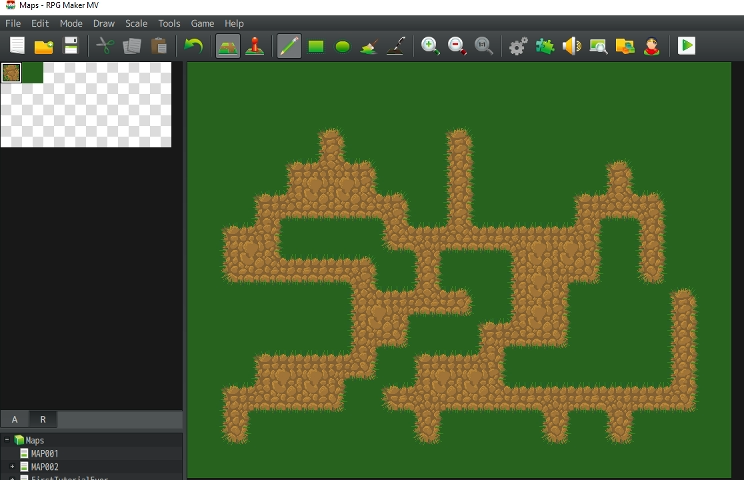
Yay we did it! Good job team
Downloads / Referenced Files
RPG Maker Web attachments are mirrored locally when available. Other external links remain hosted by their original creator or third-party service.
- Local mirror: 34835-52280fb019e97bb64af165628055ed1f.png
SHA-256:0d3b424c49b407a486d3e4e7e9b919ad48858004922d15f61129481e6126f017
Original attachment URL: https://forums.rpgmakerweb.com/attachments/a2tutorialtile-png.55910/ - Local mirror: 34841-6118cc15c85df57a160d19e1c50c65b4.png
SHA-256:f9948bbdb399c6d48e1dedf10e53f74f98c7c48b6367888984803a01024fa44d
Original attachment URL: https://forums.rpgmakerweb.com/attachments/a2tutorialtile-copy-png.55918/ - Local mirror: 34784-a83dde280091f25721f96e0c82cd955a.png
SHA-256:3caf52ecea127c9709dc7d7e59819f2382dbfac679dae3a2ff24f68a119eeab8
Original attachment URL: https://forums.rpgmakerweb.com/attachments/1-png.55852/ - Local mirror: 34785-3d991acf1020cb12e2e126e3f60a6c05.png
SHA-256:e2d8daf58ca9202683fdcfd883cb953d5f765ec93f086a8f98878e6c66eb3187
Original attachment URL: https://forums.rpgmakerweb.com/attachments/2-png.55853/ - Local mirror: 34786-02f7aae2e6e7b5b15d25198269456aca.png
SHA-256:be215b7af11ad36ea2b93f62b230a7edf4cbf7342bfabf0e8db210cba620d39a
Original attachment URL: https://forums.rpgmakerweb.com/attachments/3-png.55854/ - Local mirror: 34787-aac3cac6382676a1774f9a9ea8d19762.png
SHA-256:cc8b54d1763b8eccb00e747ecbb63c7e4e2d11c8ef4fb9be4cfe180573e67628
Original attachment URL: https://forums.rpgmakerweb.com/attachments/4-png.55855/ - Local mirror: 34788-e82b3f058611b9fe21857c25d09fff8a.png
SHA-256:5733970c1c8504ff263f2ef6ecbf7a1903bcedfa12c04b57278251cbef793e0c
Original attachment URL: https://forums.rpgmakerweb.com/attachments/5-png.55856/ - Local mirror: 34789-eefc8f490aa412229a21ee4a455b076d.png
SHA-256:428d6c0e61f857120d6fa74d48e9144d45095c3cf8701640dff1ae9ad30bc696
Original attachment URL: https://forums.rpgmakerweb.com/attachments/6-png.55857/ - Local mirror: 34790-6fa68fc1c30999fd752e4f113782cdd0.png
SHA-256:471ee7ac13d23cda92208305530fbb4bd3081673e52a3425ba39d14bebafe8b2
Original attachment URL: https://forums.rpgmakerweb.com/attachments/7-png.55858/ - Local mirror: 34791-55e1991bf409451d54009619e0666727.png
SHA-256:6493b6dd15069c2c2ed8f7c0ae9d326371f6cc90675075846094e4df8986f910
Original attachment URL: https://forums.rpgmakerweb.com/attachments/9-png.55859/ - Local mirror: 34792-f8fde15f245d3659486f10a5139dc939.png
SHA-256:ac57ca3a71f51e586e47c861378ead15ad82fa5bb1e5353d293de6bfcd591821
Original attachment URL: https://forums.rpgmakerweb.com/attachments/10-png.55860/ - Local mirror: 34793-c6b990eb48d5f7eced809c186acffe04.png
SHA-256:8bc869bb1c6c49e3add1d83bb1c9ca84213d06b55da89796bbe8941165805bc9
Original attachment URL: https://forums.rpgmakerweb.com/attachments/11-png.55861/ - Local mirror: 34794-fca070da3e3334583a5cef1a9312bc67.png
SHA-256:71c9bd18bc77a28395501d2303a9b0346dc2c128f6b25c60d35a27755e05bfb4
Original attachment URL: https://forums.rpgmakerweb.com/attachments/12-png.55862/ - Local mirror: 34795-66a7321a7252f8460188b3097c2cd83b.png
SHA-256:4d43657ea2d8bca03f25ff1a02672289962173a7783c56d3961ca758dafc34c9
Original attachment URL: https://forums.rpgmakerweb.com/attachments/13-png.55863/ - Local mirror: 34796-2aabef2892f09b2672a96b397a88235c.png
SHA-256:e26d9812718d035b9bcb7f49b3b34da79e507b92b464b1814a4a3a10a837c57e
Original attachment URL: https://forums.rpgmakerweb.com/attachments/14-png.55864/ - Local mirror: 34797-5b94c8d838970d00403cd2a6d3c61b1d.png
SHA-256:1b08913b3e26b5c07b595a4a158a161e209ed33111e315c13b3ca89f21fb71c0
Original attachment URL: https://forums.rpgmakerweb.com/attachments/16-png.55866/ - Local mirror: 34798-f7b983023ef81ad81a9625da713eee72.png
SHA-256:ebeb8ddf528b306ef8178a572c049f15b80f5b30fd2fce64ee15a0cff638c486
Original attachment URL: https://forums.rpgmakerweb.com/attachments/17-png.55867/ - Local mirror: 34799-164c66bb6aa6fa3cfc0ce2c230482adc.png
SHA-256:f018cc1a046930b42d8af693e5dc35961ab662f1ed0f292481f203d2ec763525
Original attachment URL: https://forums.rpgmakerweb.com/attachments/18-png.55868/ - Local mirror: 34800-4563f7686a60cfb2a53eac1c159c0e57.png
SHA-256:d8c010453031d7416039f50764f4238c6ddc6258f1768031c14f7d1f0bee3649
Original attachment URL: https://forums.rpgmakerweb.com/attachments/19-png.55869/ - Local mirror: 34801-5d0b6034e6e4f6f544401b306ba05507.png
SHA-256:2d161405e85546ae6960e13b809e8765fd68124322f60d1ff444301e72d9478e
Original attachment URL: https://forums.rpgmakerweb.com/attachments/20-png.55870/ - Local mirror: 34802-006fbca82d57bdaa91ccdfa19604e98f.png
SHA-256:e6bfcba07a067aac81a5873c42352e7618b9fe47245d3efb9c3c48fc20b56069
Original attachment URL: https://forums.rpgmakerweb.com/attachments/23-png.55871/ - Local mirror: 34803-9ad737c86f166a2d1780c9f738218400.png
SHA-256:a0709f4da77e631a42af0c5e3a2ff74ebcdae0f3331d300d0723c630e9b80df5
Original attachment URL: https://forums.rpgmakerweb.com/attachments/24-png.55872/ - Local mirror: 34804-206cd6663f84b339d7fe71a386978d00.png
SHA-256:773f77bb38f436e653735aa9c0feab828d0180327783dad240f59e54d4d99f1f
Original attachment URL: https://forums.rpgmakerweb.com/attachments/25-png.55873/ - Local mirror: 34805-d4b7305fc84e5d2c9cb9b64597d0b9f0.png
SHA-256:e30a3aa1110eb3b8ac50912ad49a139cb6becbd99cbd160958980b8cfd5ec9dd
Original attachment URL: https://forums.rpgmakerweb.com/attachments/26-png.55875/ - Local mirror: 34806-bb4641faea85b8a6af946cd9e215d7e9.png
SHA-256:f8c34d716dc596a6cd0180e9587b462c373b0e10cc47c952a3eb066dc2ed1447
Original attachment URL: https://forums.rpgmakerweb.com/attachments/27-png.55876/ - Local mirror: 34807-1eff17f2a94c3f1aced28e760511bfcd.png
SHA-256:e0a9f86694d10beb6ca652fafd0028348879e031cdd21d657ccf7c1e60d11c7e
Original attachment URL: https://forums.rpgmakerweb.com/attachments/29-png.55878/ - Local mirror: 34808-6c49f1a2367fabb3b8b76fa9464e95c8.png
SHA-256:a25ede88c4ae674b22507bce338f0f413c8a27aea84fceeb2e0270cd73f00095
Original attachment URL: https://forums.rpgmakerweb.com/attachments/31-png.55880/ - Local mirror: 34809-549a1192c96253e57bc55217ed30cfaa.png
SHA-256:41102bb5819660357a079222c3e00e37a2a45b5787b28483e6a2adcd99bff738
Original attachment URL: https://forums.rpgmakerweb.com/attachments/32-png.55881/ - Local mirror: 34810-d0a749e829f007fc577223a0b6eae744.png
SHA-256:1c81c30cc7905c7e71da1b98ac1c9a2c2a142b305b971132e48bec2528f853af
Original attachment URL: https://forums.rpgmakerweb.com/attachments/33-png.55882/ - Local mirror: 34811-0f04ab9e8830647929861efcc08df60d.png
SHA-256:0356eaef0d2d2eaf5aa7ff7574f779f0df377bd5cf7582044de0519acf8fe3cd
Original attachment URL: https://forums.rpgmakerweb.com/attachments/34-png.55883/ - Local mirror: 34812-0396951710b117ef2662648176e545ab.png
SHA-256:6e43a9e5e312cca71af9d7ccf1d7fe4bab672b68dabd568e7ccb6a031e538678
Original attachment URL: https://forums.rpgmakerweb.com/attachments/35-png.55884/ - Local mirror: 34813-3332be6fb88b0aa079a78311a2eb2735.png
SHA-256:1e54198249e15c966725827b6d7d76ce500408ed9b7a6f0c86c50722d8be8f1f
Original attachment URL: https://forums.rpgmakerweb.com/attachments/36-png.55885/ - Local mirror: 34814-f8496a82756d28c4fff60452a7d4fe87.png
SHA-256:a32aab29d7174dcf616f96edd4f1e5b981867b5e9732881ff6f42d085e1d3bc5
Original attachment URL: https://forums.rpgmakerweb.com/attachments/38-png.55887/ - Local mirror: 34815-35289f5557b1bea9a43dfe10cc85cae1.png
SHA-256:b4ac5931e2ce47890c562cf043293fc78677994d68ea47d0edbab0d39f3d9ec3
Original attachment URL: https://forums.rpgmakerweb.com/attachments/39-png.55888/ - Local mirror: 34816-e2c4c295b3280f6adb854ca12364751a.png
SHA-256:1b38d2b5a68342c3ae4c953bea3dbb7cbe2ffd9e62c124ff8fc403d81fd8dd1d
Original attachment URL: https://forums.rpgmakerweb.com/attachments/40-png.55889/ - Local mirror: 34817-92584d6c0f28562a424d27cc32a73101.png
SHA-256:4507641e6e9cd85ff38af30ae66c4bb9db5784a5b40db28265807456923751f0
Original attachment URL: https://forums.rpgmakerweb.com/attachments/41-png.55890/ - Local mirror: 34818-5a773df8e4960245b7a19a368cf26ec6.png
SHA-256:e7b0d2011296325b56f0aeb81a5006de468992b6a5b0c93e9a993c291bb7c02d
Original attachment URL: https://forums.rpgmakerweb.com/attachments/42-png.55891/ - Local mirror: 34819-ed75cf59cada8d27f721cde819fa379c.png
SHA-256:e59e098fa0eae39f4f05007f9d8e6a622ac1838b434a1d89fbc2cd7d0af01641
Original attachment URL: https://forums.rpgmakerweb.com/attachments/43-png.55892/ - Local mirror: 34820-552df2437ab18d76d97e4093e0d6ac55.png
SHA-256:2bfcc4d2ac6f3f578bf063bc2a29c28a35eb72268fe6c6afbcc00f4dc1d2a559
Original attachment URL: https://forums.rpgmakerweb.com/attachments/44-png.55893/ - Local mirror: 34821-c3d1c784de9f6771171efda3f8a13e03.png
SHA-256:556e00b8af1eeda892c21593b39ae497ebe0980154a6a83cabe9dd69a4d3f9f4
Original attachment URL: https://forums.rpgmakerweb.com/attachments/45-png.55894/ - Local mirror: 34822-a9724b885577036e84b6790e6b56c8d3.png
SHA-256:e03ee138e7ed29882832a29104946527d2485f2dd48eb88405235f8a18d97a58
Original attachment URL: https://forums.rpgmakerweb.com/attachments/46-png.55895/ - Local mirror: 34823-be7675334ed2618084570a72b1f69991.png
SHA-256:cac98f48cac81d5d322f5f92c3c4765d5eb39c93d5c7ccc847f41704650414ef
Original attachment URL: https://forums.rpgmakerweb.com/attachments/47-png.55896/ - Local mirror: 34824-14a324f7fb63b7a8497f440117f468c0.png
SHA-256:7e4b822e97082507aac8fdc06db99ca5ed132aca417cfc74d39a9c42eab896d3
Original attachment URL: https://forums.rpgmakerweb.com/attachments/48-png.55897/ - Local mirror: 34825-de2a83d5a837660833affe5b5a38fea1.png
SHA-256:6143f599660d51b2a89df024e2ae17795502fe9e7e6237020502d220e5fad189
Original attachment URL: https://forums.rpgmakerweb.com/attachments/49-png.55898/ - Local mirror: 34826-e2efee2b9e0fa3c99753e121258ff5a5.png
SHA-256:e7ee3b16e1287b407efdfc1d4ed51809aad59a00710b16499ba198c54949cc43
Original attachment URL: https://forums.rpgmakerweb.com/attachments/50-png.55899/ - Local mirror: 34827-0e9080cf375eaae12e64ac2e555d56ae.png
SHA-256:32db0af4fae212d034b1d4ad5c109cc7842719d223040e1bfbed487d11c9deef
Original attachment URL: https://forums.rpgmakerweb.com/attachments/53-png.55900/ - Local mirror: 34828-2971614f64e1408b6dbbf3976efa284e.png
SHA-256:7758b4a4d4b9e4ca471042e0e34028fc6717e8182375468a4ce41646ddd54fed
Original attachment URL: https://forums.rpgmakerweb.com/attachments/55-png.55901/ - Local mirror: 34829-c067bdf81a3cd317b3df0da3a8289090.png
SHA-256:2deeac34b5275e6dae812a0c68f01d514ec389184160393065d5f62351fc1536
Original attachment URL: https://forums.rpgmakerweb.com/attachments/56-png.55902/ - Local mirror: 34830-e2cf1530964349b1f85f3483d2262f37.png
SHA-256:c43161146a7909daea7626f9d8503753946cf164a623ddd1a26f64d5cd05508b
Original attachment URL: https://forums.rpgmakerweb.com/attachments/57-png.55903/ - Local mirror: 34832-6bf73aa67466b19e1af1ecace5e7116e.png
SHA-256:9c8868b2dce763999ceef431f9eb0e3d8037a802462e0d7da67d831478c5c734
Original attachment URL: https://forums.rpgmakerweb.com/attachments/60-png.55906/ - Local mirror: 34831-8320b01d0cda6186477adf48e0e61a92.png
SHA-256:22159b63ec3e524534ec8ac3f020b4a1cb19e1f6ecbcb12e6611416fe6fd921e
Original attachment URL: https://forums.rpgmakerweb.com/attachments/59-png.55905/ - Local mirror: 34833-d09935476d1fb14533a24e2096c3eb24.png
SHA-256:32b65d1c4b8ebfd7c6413aec13c77a07923b67d5b99a35c7201ba8619eea0487
Original attachment URL: https://forums.rpgmakerweb.com/attachments/61-png.55907/ - Local mirror: 34834-1d5b606b3fcdd8e66732d52545aeb674.png
SHA-256:6484959b6aa1408960b3be7655fa27044a3257aae2546c631e1489687e13cb8c
Original attachment URL: https://forums.rpgmakerweb.com/attachments/63-png.55909/
Referenced Images / Attachments

Creator Claims / Removal
If you are the original creator and want this listing reassigned, edited, or removed, join BMMPlay and contact the moderators with proof that matches the original RPG Maker Web profile, linked GitHub, itch.io page, or another public creator identity.
Replies (0)
No replies yet.
Topic Summary
Loading summary...