

Multiple Equipment changes character graphic (add and remove) Without script!
BMM_Archive · July 16, 2026

Original Source
- Original title: Multiple Equipment changes character graphic (add and remove) Without script!
- Original author: scytaic
- Original date: September 18, 2016
- Source thread: https://forums.rpgmakerweb.com/threads/multiple-equipment-changes-character-graphic-add-and-remove-without-script.68527/
- Source forum path: Game Development Engines > RPG Maker Tutorials > RMMV Tutorials
Summary
Hi! This is my first post so forgive me if I'm doing anything wrong! I've been searching for a few hours now for a way to be able to change my character by adding or removing equipment. It was pretty easy just to add and remove one. But when I tried to find how to add and remove multiple ones at a time, all I could find were scripts (some you had to pay for). I'll try and explain what exactly this does, I hope I make sense! So, BasicActor...
Archived First Post
I'll try and explain what exactly this does, I hope I make sense! So, BasicActor equips Hoodie (Changes graphic to HoodieActor), HoodieActor equips Goggles (Goggles graphic adds on to HoodieActor) Visa-versa, BothActor removes one and is left with the other. And will become BasicActor if you remove both.
First you need to make the sprites. Basic actor, Actor with separate goggles, Actor with separate hoodie, Actor with both goggles and hoodie (together).
Then set a parallel process and put this in the event box:
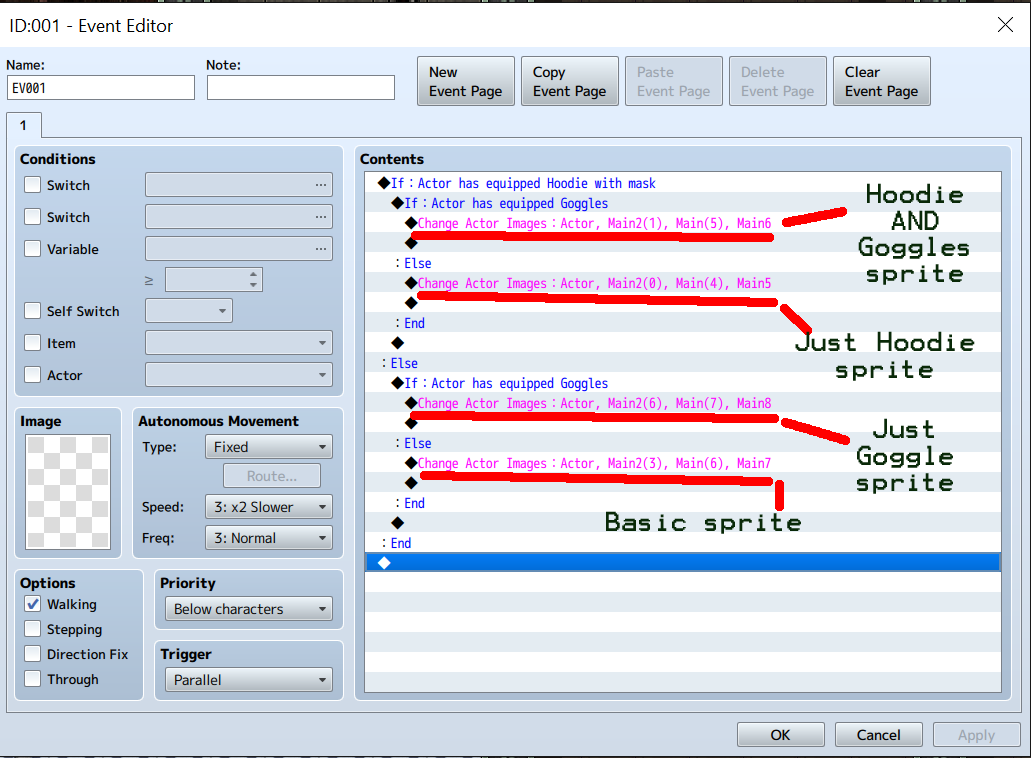
(Conditional Branch with else case) If Actor has equipped Hoodie
(Under that make another one) If Actor has equipped Goggles
Change Actor images: Hoodie and goggle actor/graphic
ELSE: Change Actor images: JUST hoodie actor/graphic
2nd ELSE: (Condintional Branch with else case) If Actor has equipped Goggles
Change Actor images: JUST goggles actor/graphics
3rd ELSE: Change Actor images: BasicActor
I can imagine this will work for more items and would be useful for a character maker or dress up game. If this hasn't made any sense (sorry I'm bad with explanations) I've added a screenshot and you can also download the demo and take a look for yourself. I've made it as small as possible (Deleted everything but the essentials) I think it's about 6MB. It's too big to attach here so I've put it on Dropbox: https://www.dropbox.com/s/bw16wvkjgrqe7pa/Test.zip?dl=0 I hope this helps someone as much as it's helped me!
Downloads / Referenced Files
RPG Maker Web attachments are mirrored locally when available. Other external links remain hosted by their original creator or third-party service.
- Download: https://www.dropbox.com/s/bw16wvkjgrqe7pa/Test.zip?dl=0
- Local mirror: 29033-df44243dd77853582c6287713d1e608b.png
SHA-256:22a52e11a8a0c3f69a3d3f9b2c351b64fae8d3413ce3719753fb648be57c0bd4
Original attachment URL: https://forums.rpgmakerweb.com/attachments/multiequipped-copy-png.47862/
Referenced Images / Attachments
Creator Claims / Removal
If you are the original creator and want this listing reassigned, edited, or removed, join BMMPlay and contact the moderators with proof that matches the original RPG Maker Web profile, linked GitHub, itch.io page, or another public creator identity.
Replies (0)
No replies yet.
Topic Summary
Loading summary...