

XPXP MMO-XP(Free)
BMM_Archive · July 16, 2026

BMM_Archive
Preserved forum archive. This topic stores the original first post and locally mirrored RPG Maker Web attachments when available. It is posted by the BMMPlay archive account, not by the original creator.
Original Source
- Original title: XP MMO-XP(Free)
- Original author: ProtoXx
- Original date: February 4, 2026
- Source thread: https://forums.rpgmakerweb.com/threads/mmo-xp-free.182282/
- Source forum path: Game Development Engines > Ruby Game System (RGSS) Scripts > RGSS Scripts (RMXP)
Summary
MMO-XP ProtoX Introduction WHAT CURRENTLY WORKS:
Archived First Post
MMO-XP
ProtoX
Introduction
WHAT CURRENTLY WORKS:
1. Client-Server Connection (TCP).
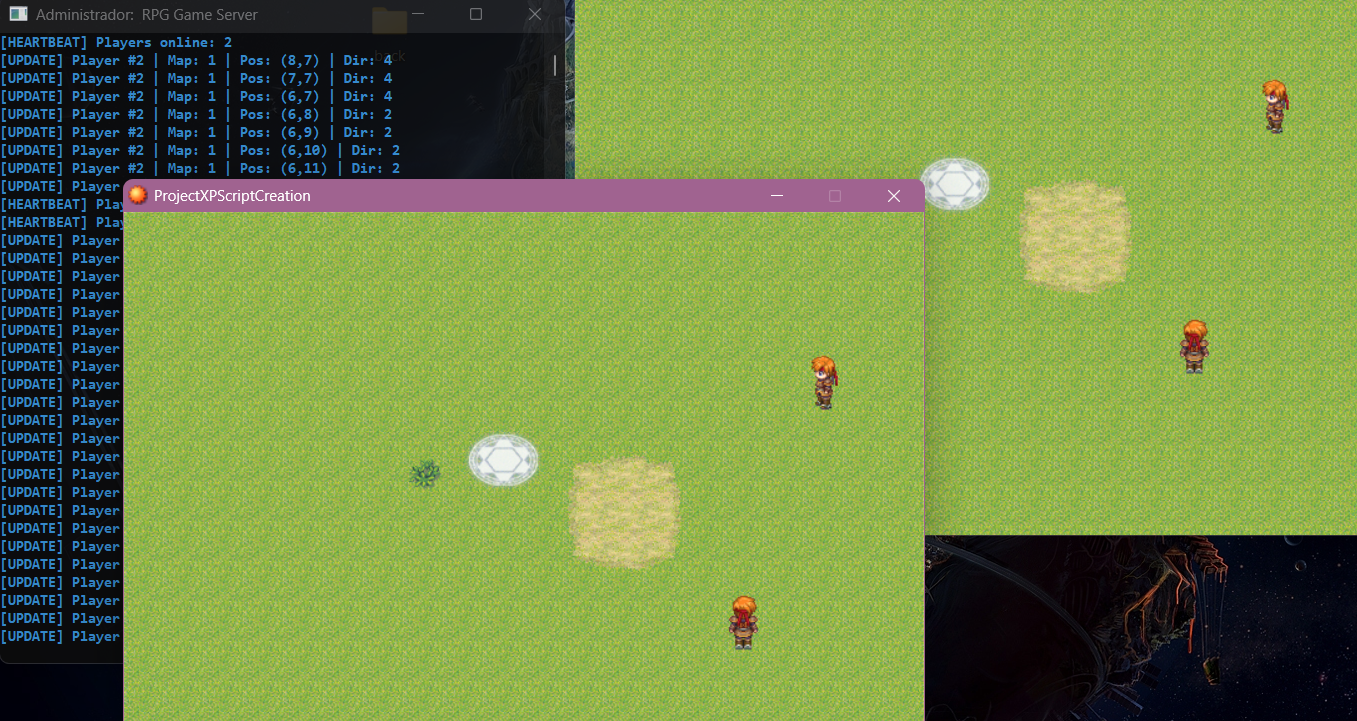
2. Visual Multiplayer: You can see other players on the map.
3. Movement Synchronization: Movement is updated in real-time.
4. Map Switching: The system manages which map each player is on.
5.Party Invitation System
6.CO-OP Battle
MANDATORY REQUIREMENTS:
To start the server, you MUST have Python installed on your computer.
1. Download Python (python.org).
2. During installation, CHECK the option "Add Python to PATH". Without this, the server will not start.
HOW TO USE:
1. Install Python (with PATH).
2. Go to the "server" folder and run the "start_server.bat" file.
3. Open the game (Game.exe).
4. The script connects automatically at the title screen.
Features of this base:
- Uses only Win32API (no heavy external DLLs).
- "Ghost" bug fixes (players from previous maps disappear correctly).
- Idle players are immediately visible upon entering the map.
Features
Party System
COOP Battle
Other players in map
Python Server
Screenshots

How to Use
Just insert the script on Script Editor, 2 scripts: Client and mmoParty.
Put server folder inside game root folder.
Download
 decinbr.itch.io
Terms and Credits
Free for non commercial and commercial games.
Include my nickname in your game credits(ProtoX)!
ProtoX
Introduction
WHAT CURRENTLY WORKS:
1. Client-Server Connection (TCP).
2. Visual Multiplayer: You can see other players on the map.
3. Movement Synchronization: Movement is updated in real-time.
4. Map Switching: The system manages which map each player is on.
5.Party Invitation System
6.CO-OP Battle
MANDATORY REQUIREMENTS:
To start the server, you MUST have Python installed on your computer.
1. Download Python (python.org).
2. During installation, CHECK the option "Add Python to PATH". Without this, the server will not start.
HOW TO USE:
1. Install Python (with PATH).
2. Go to the "server" folder and run the "start_server.bat" file.
3. Open the game (Game.exe).
4. The script connects automatically at the title screen.
Features of this base:
- Uses only Win32API (no heavy external DLLs).
- "Ghost" bug fixes (players from previous maps disappear correctly).
- Idle players are immediately visible upon entering the map.
Features
Party System
COOP Battle
Other players in map
Python Server
Screenshots
How to Use
Just insert the script on Script Editor, 2 scripts: Client and mmoParty.
Put server folder inside game root folder.
Download
MMO XP (Free) by ProtoX(JhonWick)
decinbr.itch.io
Terms and Credits
Free for non commercial and commercial games.
Include my nickname in your game credits(ProtoX)!
Features Mentioned
- Uses only Win32API (no heavy external DLLs).
- "Ghost" bug fixes (players from previous maps disappear correctly).
- Idle players are immediately visible upon entering the map.
- Party System
- COOP Battle
- Other players in map
- Python Server
Downloads / Referenced Files
RPG Maker Web attachments are mirrored locally when available. Other external links remain hosted by their original creator or third-party service.
- Download: MMO XP (Free) by ProtoX(JhonWick)
License / Terms Note
Terms and Credits Free for non commercial and commercial games. Include my nickname in your game credits(ProtoX)!
Referenced Images / Attachments
Creator Claims / Removal
If you are the original creator and want this listing reassigned, edited, or removed, join BMMPlay and contact the moderators with proof that matches the original RPG Maker Web profile, linked GitHub, itch.io page, or another public creator identity.
Replies (0)
No replies yet.
0
replies
16
views
Topic Summary
Loading summary...